Sponsored by
Designkit Free Background Remover



ChatGPT Search Bar & Send With Command Enter - Chrome 擴充功能
0
0 評價
0 收藏
工具介紹:
透過聊天搜尋、自訂發送按鍵和提示保護來提升 ChatGPT 體驗。
Updated Time
2025年3月14日
活躍用戶
120

ScholarSail
整合 AI 學習工作區,支援學習卡片、心智圖、記憶宮殿與專注規劃

Decksy AI
能根據主題、文字或上傳文件,製作具研究內容與專業設計投影片的 AI 簡報工具。

Maxworker.ai
Max 是您團隊在 Slack 中的 AI 協作者。他目前已連結 25 個以上的核心工作工具,並即將支援 3,000 多種工具,能將您團隊的背景資訊轉化為可直接審核的工作成果。固定價格,沒有意外支出。

Runable
Runable是一個通用的AI代理,可以執行任何任務,從建立網頁應用程式、簡報、報告和文件,到生成圖片、視頻和播客,應有盡有。它不僅僅是創建,它更是連結。Runable整合了數千個你最愛的應用程式,因此你可以簡單地請它為你做工作。

Velo
專為加速解說、培訓與銷售而生的 AI 影片基礎設施。

ChatGPT Search Bar & Send With Command Enter AI Chrome 擴充功能訊息
什麼是 ChatGPT Search Bar & Send With Command Enter ai chrome 擴充功能?
這是一個瀏覽器擴充功能,旨在提升 ChatGPT 使用者體驗,提供流暢的聊天標題搜尋功能和更友善的訊息操作體驗。它允許用戶使用關鍵字搜尋聊天標題,自訂發送訊息的按鍵組合,並在編輯提示時防止意外發送訊息。
如何使用 ChatGPT Search Bar & Send With Command Enter ai chrome 擴充功能?
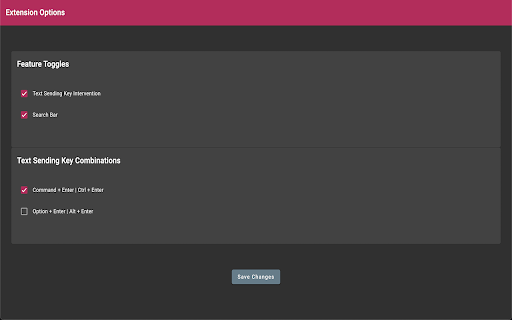
安裝擴充功能。使用搜尋列查找聊天標題。在選項頁面中配置發送按鍵組合。預設發送按鍵為 Command+Enter(Mac)或 Ctrl+Enter(Windows)。
ChatGPT Search Bar & Send With Command Enter ai chrome 擴充功能的核心功能
聊天標題搜尋(包括所有過去對話的 '快速搜尋')
自訂發送訊息的按鍵組合
防止意外發送訊息
配置和設定的選項頁面
ChatGPT Search Bar & Send With Command Enter ai chrome 擴充功能的用例
#1
快速透過聊天標題搜尋找到過去的對話。
#2
自訂訊息發送按鍵組合以防止意外發送。
#3
更有效地管理和組織 ChatGPT 對話。
來自 ChatGPT Search Bar & Send With Command Enter 的常見問題解答
安裝擴充功能後,我該如何發送訊息?
我該如何使用 '快速搜尋' 功能?
我可以停用修改過的 Enter 鍵行為嗎?
ChatHawk
從頂尖 AI 模型中找出最佳答案
立即嘗試
AD
Flowith 2.0
AI 創作工作空間,用於知識轉變及與 AI 模型合作。
立即嘗試
AD
ChatGPT Search Bar & Send With Command Enter AI Chrome擴充解析
ChatGPT Search Bar & Send With Command Enter Active Users
安裝用戶總數
120 (-11)
