



Sponsored by
AdsCreator.com
alvdansen / h3-keyframe-animation
Model's Last Updated: September 28 2026
image-to-video
Introduction of h3-keyframe-animation
Model Details of h3-keyframe-animation
H3 Keyframe Animation Adapters
Three LoRA adapters that teach MiniMax H3 to move a drawing the way a hand-drawn animator moves it — a consistent cadence held across styles, rather than the drift between vector interpolation, digital easing, and limited animation that the base model slides through unprompted.
Companion to the paper Animating on Twos (Carlson & Bielec, Alvdansen Labs, August 2026).
The three adapters
Same architecture, same training schedule. What separates them is the conditioning contract : how many reference drawings each takes, and what the distance between those drawings is asked to mean. In every clip below, the left half is the untrained baseline and the right half is the adapter at step 12,000 — same inputs, same seed.
hero — 1 reference
Draw the natural next hero key.
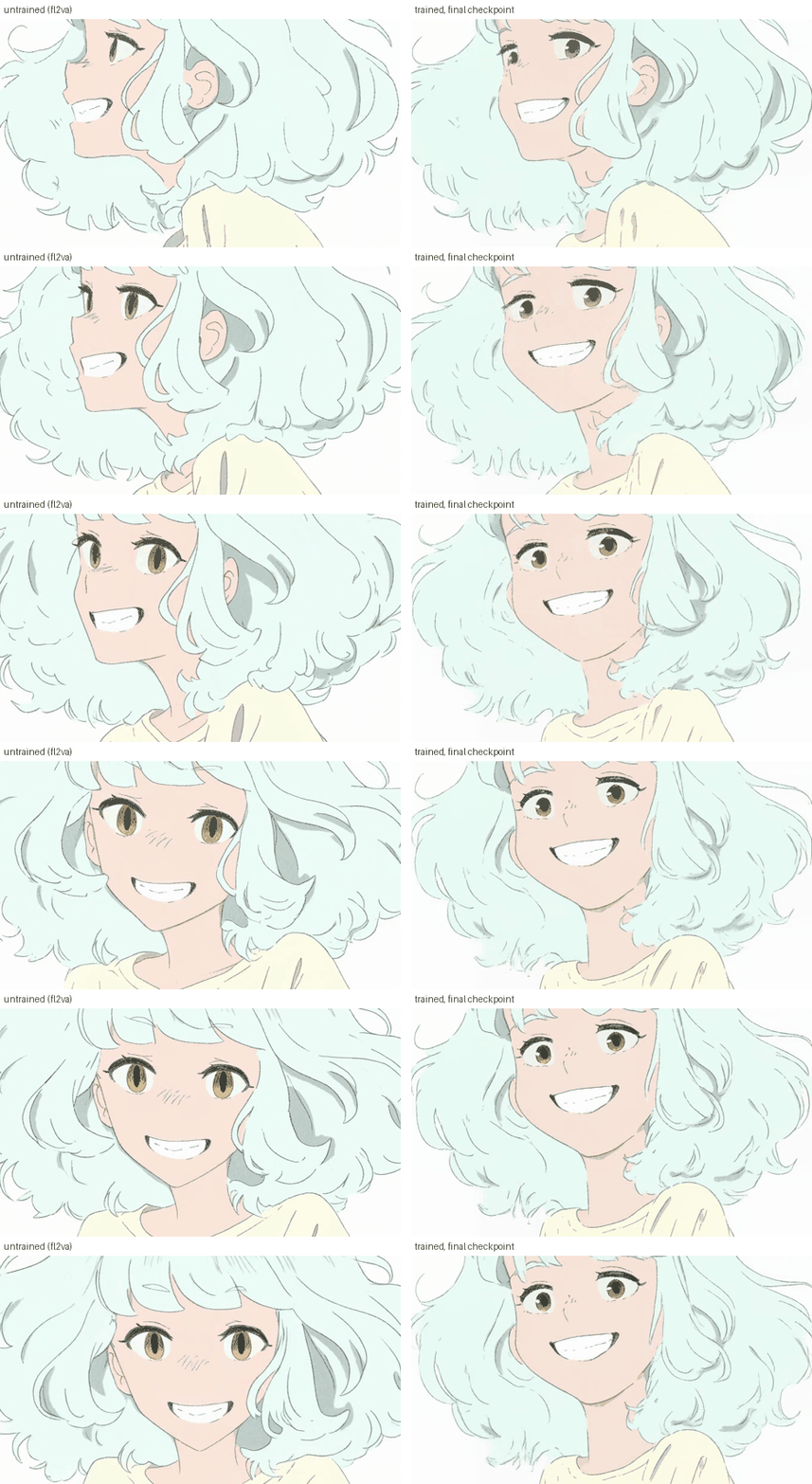
Conditioned on the current hero key , and nothing else. There is deliberately no second reference: where the action goes next is the question being asked, so showing the model a destination would be showing it the answer.
tween — 2 references
Draw the next inbetween, advancing the motion one small step.
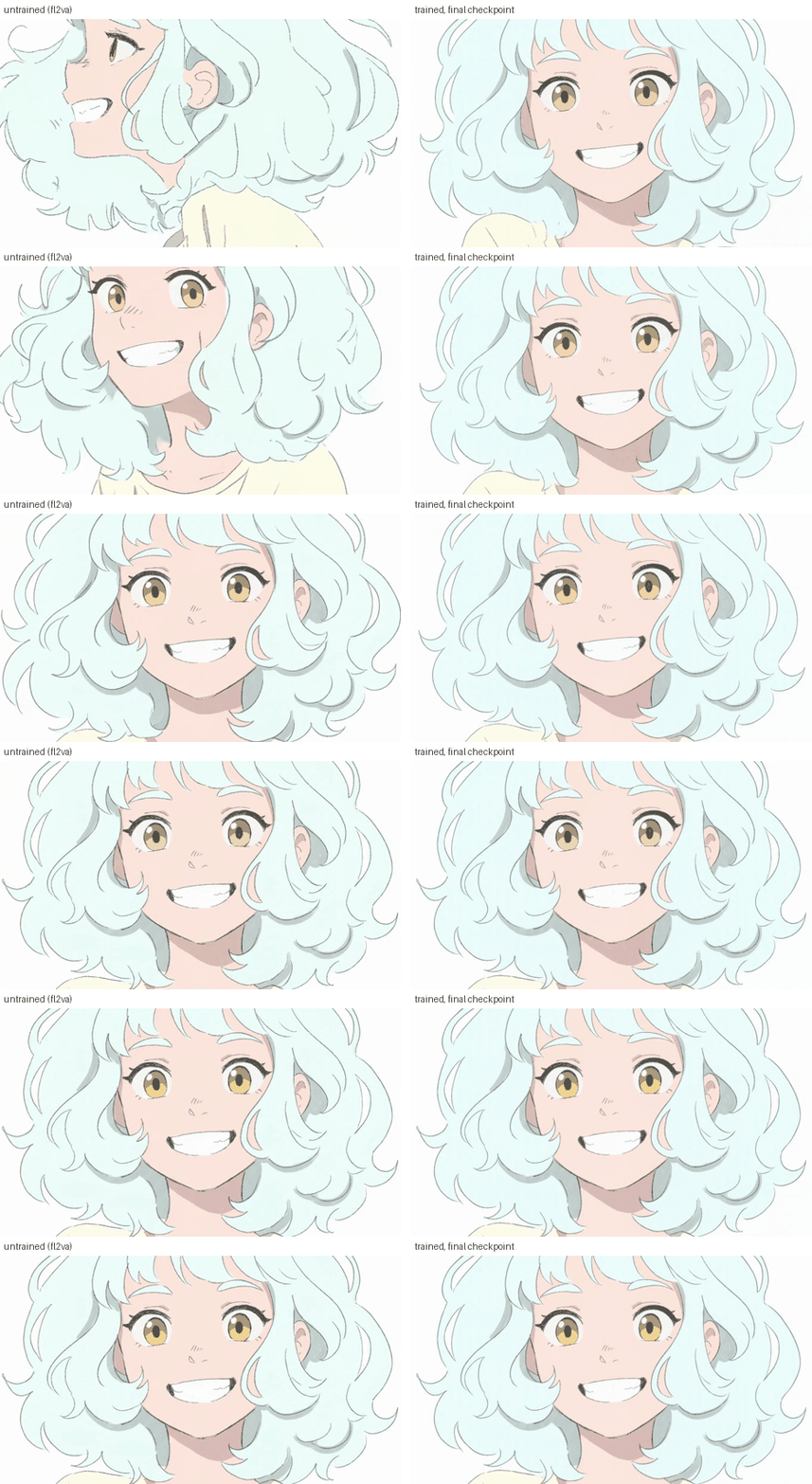
Conditioned on a rolling current frame plus the beat's distant end extreme, held fixed for the whole chain. That far reference is context , not a target — it tells the next inbetween which way to lean. Chain it by feeding each result back as the near reference while the far one never moves.
sequence — 2 references
Surface a short, self-contained held sequence.
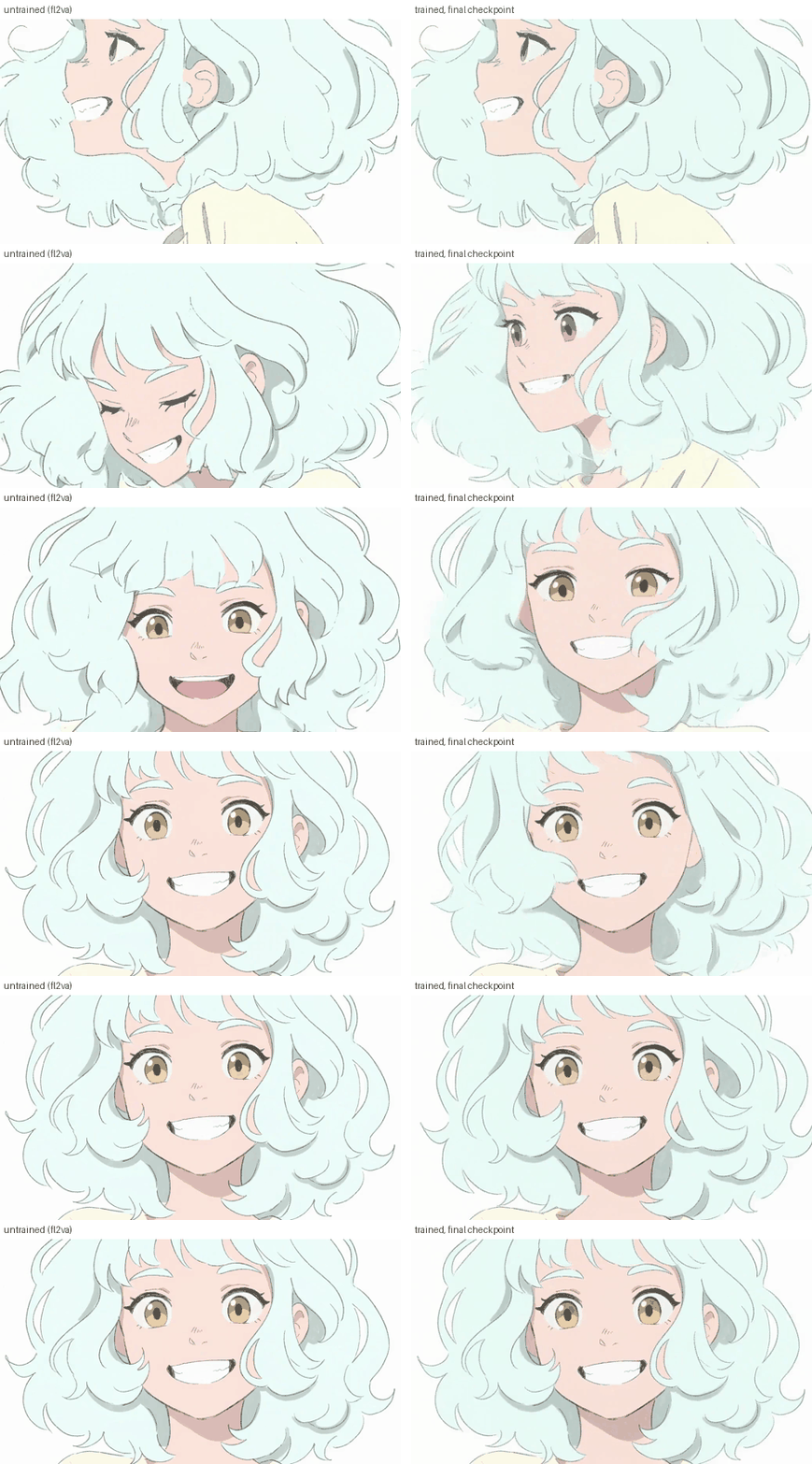
Conditioned on the window's first drawing and the window's own natural end . Unlike the other two, this adapter is not teaching the model a new mapping — hand-drawn held animation already exists somewhere in the base distribution, and its job is to surface that more consistently. It converges early and changes little across late checkpoints.
Quick start
A ready-to-load ComfyUI graph, the reference it runs on, and the prompt that drives it.
| File | |
|---|---|
workflows/h3_seq_r2v.json
|
The graph. Drag it onto the ComfyUI canvas. |
examples/quickstart/reference.png
|
The single reference drawing it conditions on. |
examples/quickstart/prompt.txt
|
The caption, in the dialect below. |
Put the reference in
ComfyUI/input/
and the adapter in
ComfyUI/models/loras/
, then load
the graph. It is laid out in labelled stages — models, references, prompt, sampling — and
carries its own notes on the settings that matter.
The graph ships configured for
one reference
(the second image slot is bypassed), which
is the
hero
contract. For
tween
or
sequence
, un-bypass the second
LoadImage
and swap
the adapter in the
LoraLoaderModelOnly
node.
⚠ Load the converted files
These adapters were trained against the diffusers module tree, which exposes separate
to_q
/
to_k
/
to_v
projections. MiniMax H3 serves a single
fused
qkv_proj
.
A raw PEFT adapter loaded against H3 matches zero keys, does nothing, and warns about nothing. You get a clean render that the adapter never touched.
The
.safetensors
files in this repo are
already converted
— 400 tensors, 100
qkv_proj
keys, no
to_q
/
to_k
/
to_v
— so load them as they are. If you convert
another checkpoint yourself, use the included
h3_lora_to_comfy.py
and check the result
by confirming its key names contain
qkv_proj
.
⚠ Not on Turbo variants
Run these on the full H3 model , not a Turbo or otherwise step-distilled repack of it.
These adapters exist to hold a hand-drawn line and a deliberate cadence, and the step-distilled variants do not preserve the linework. Whatever you gain in speed you lose in exactly the thing the adapters were trained to protect.
Thanks to @shadowworksltd for raising this.
Contents
| File | What it is |
|---|---|
adapters/h3_hero_step12000.safetensors
|
hero adapter, final checkpoint, converted |
adapters/h3_tween_step12000.safetensors
|
tween adapter, final checkpoint, converted |
adapters/h3_seq_step12000.safetensors
|
sequence adapter, final checkpoint, converted |
h3_lora_to_comfy.py
|
Raw PEFT → fused-QKV converter |
examples/
|
A small number of renders, selected by the author |
LICENSE
,
NOTICE
|
Terms, and the base-model obligations we cannot waive |
Each adapter is rank 64 / alpha 64, F32, ~1.88 GB, trained for 12,000 steps.
The conditioning contract
| Adapter | The act it supports | Conditioning | What the second reference's distance means |
|---|---|---|---|
| hero | Draw the natural next hero key | 1 reference , the current hero key | No second reference. Where the action goes next is the question being asked; showing the model a destination would be showing it the answer. |
| tween | Draw the next inbetween , advancing the motion one small step | 2 references : a rolling current frame, plus the beat's distant end extreme, held fixed for the whole chain | Far, deliberately. The end extreme provides context : it tells the next inbetween which way to lean, without being the thing to interpolate to. |
| sequence | Surface a short, self-contained held sequence already latent in the model | 2 references : the window's first drawing and the window's own natural end | One window to fill: a complete keyframed clip on twos. |
hero and tween teach the model a mapping it does not reliably have. sequence works differently — hand-drawn-looking held animation already exists somewhere in the base distribution, and that adapter's job is to surface it more consistently . Expect sequence to converge early and change little across late checkpoints, where a teaching adapter keeps moving.
All three drive the reference-conditioning path (N soft reference images), not the first/last-frame path (hard endpoints).
Inference settings
These are the settings that produced the paper's figures, read out of the render code rather than recommended in the abstract. Everything not listed here is a ComfyUI default.
| hero | tween | sequence | |
|---|---|---|---|
| Base checkpoint |
minimax_h3_ref2va_int8_convrot
(
unpruned
, not Turbo)
|
same | same |
| Conditioning node |
MiniMaxH3ReferenceToVideo
|
same | same |
| References | 1 | 2 | 2 |
| Reference keys |
ref_images.ref_image_0
|
…_0
,
…_1
|
…_0
,
…_1
|
ref_image_size
|
max
|
max
|
max
|
| LoRA loader |
LoraLoaderModelOnly
|
same | same |
| LoRA strength | 1.0 | 1.0 | 1.0 |
| Sampler / scheduler |
euler
/
simple
|
same | same |
| Steps | 30–100 | 30–100 | 30–100 |
| Guidance |
none
—
BasicGuider
, no CFG input exists
|
same | same |
| Sigma shift | video 12.0 , audio 3.0 | same | same |
| Denoise | 1.0 | 1.0 | 1.0 |
| Resolution | 1344 × 768 | same | same |
| Frames | 22 | 22 | 22 |
| Seed (paper figures) | 42 | 42 | 7 |
| Output | 24 fps | same | same |
| Text encoder |
qwen3vl_32b_minimax_h3_int8_convrot
,
CLIPLoader
type
minimax
|
same | same |
| Video / audio VAE |
..._video_vae_fp16
/
..._audio_vae_fp32
, untiled
|
same | same |
Notes that matter more than the numbers:
- Strength 1.0 is the trained strength. Rank and alpha are both 64, so the applied scale is exactly 1.0. Do not walk it back at inference.
- The adapters were trained against the unpruned reference partition , which is what the settings above record. They also run on pruned repacks.
-
The LoRA goes on the model only.
LoraLoaderModelOnly, notLoraLoader— the Qwen3-VL text encoder takes no LoRA. - There is no negative prompt, and no CFG scale to set. The checkpoints are CFG-distilled; the graph has no negative input at all.
- Steps run 30–100. The figures in the paper were sampled lower than that (25 for hero and tween, 50 for sequence) because those matched the training-time sample config — a sampling choice for the review grid, not a recommendation.
-
Legal clip lengths follow
frames = 17n + 5, so the shortest legal clip is 5. Every render above is 22 (n = 1), which for sequence is 11 drawings held two frames each. Note that hero and tween were trained on a 5-frame uniform freeze but rendered at 22 — the cache-encode length and the render length are different numbers and conflating them is a documented crash.
The caption dialect
The caption is the inference interface. These are the portable shapes; fill the angle brackets.
hero / early tween — three sections.
Create the next keyframe in the sequence. SCENE: <framing + subject-type + medium + props>. MOVEMENT: <what moves, how, where it lands>. STATIC: <what holds, ending with framing + ground>.
hero
's
MOVEMENT
carries a full
arc
— start-state, path, end-state — because the
model must bridge a whole beat.
tween — five sections.
… SCENE: … FIRST FRAME: <pose in the near reference>. TARGET END FRAME: <pose in the far reference, phrased as a destination, never comparative>. MOVEMENT: <one step only>, landing <progress>. STATIC: <what holds, ending with framing + ground>.
The trailing
landing <progress>
clause is the
step-size lever
, drawn from a fixed
vocabulary (fractional advances, plus
hold / anticipation / overshoot / arrival
).
TARGET END FRAME
must
never
use comparative language ("unchanged", "still the
same") — the rolling reference changes under it at inference while it stays fixed, so
any comparison goes stale.
sequence — alignment line first.
Picture 1 aligns with the 0.00-second mark of the target video; Picture 2 aligns with the <computed>-second mark. Subject: <medium + subject-type + ground>, animated on twos. Action: <motion path in beat order, held drawings changing on a rhythm>. Camera: <angle/move + the reason for it>. Preserve: <every axis that must not drift>, and the on-twos rhythm.
Put "on twos" in
Subject
and honour it in
Action
.
How the training captions were written
These describe the dialect the adapters were captioned in, so you can match it. They are conventions from the training data, not tested constraints.
- No negations. The checkpoints are CFG-distilled, so there is no negative branch and every token is positive. Captions state the desired condition rather than excluding an unwanted one.
- No character, show, or franchise names. Identity comes in through the reference image; captions describe subject-type, medium, motion, and framing in general terms.
-
The medium string is byte-identical
across a shot, drawn from a small fixed set —
clean line on white,flat black-and-white animatic,flat cel colour on white. -
Cameracarries a reason clause , e.g. "a low three-quarter angle, so the silhouette stays readable", rather than a bare angle. -
Preservenames each axis that should not drift. - Craft vocabulary appears where it is literally true of the clip — drag, settle, follow-through, anticipation, weight shift, leading edge , and on twos , which is used when the clip genuinely holds each drawing two frames.
License
The adapters are released under the
H3 Keyframe Animation Adapter License 1.0.0
(see
LICENSE
) — a PolyForm Small Business derivative. Source-available, not open
source.
Free, with no need to ask , for individuals at any income (personal, creative, freelance, educational), researchers and educational institutions, nonprofits and charities, and organizations that with their affiliates earned under USD 2,000,000 gross revenue last fiscal year and have raised under USD 2,000,000 in total capital. Crossing either threshold means a commercial license, with a 90-day grace period — past use is not retroactively a violation. Contact [email protected] .
The base model's license binds you directly
These adapters do nothing without MiniMax H3, which we do not own and cannot
sublicense.
You must obtain and accept your own grant from MiniMax.
Any access this
project's authors have is personal to them and does not transfer. That license carries
obligations we cannot waive, including
Excluded Territories
— which as read include
the European Union, the United Kingdom, the Republic of Korea, and the United States —
an attribution requirement on commercial products, a revenue threshold independent of
ours, and a prohibition on using outputs to train other models. Read it in full.
NOTICE
has the detail.
The paper text and figures are CC BY 4.0 and the paper repo's code is MIT — a different, more permissive scheme than the one covering these weights.
Citation
@article{carlson2026animating,
  title   = {Animating on Twos: Training Keyframe-Animation Adapters on a Pretrained Video Model},
  author  = {Carlson, Minta and Bielec, Timothy},
  year    = {2026},
  month   = {August},
  journal = {Alvdansen Labs},
  url     = {https://alvdansen.github.io/animating-on-twos/}
}
Runs of alvdansen h3-keyframe-animation on huggingface.co
0
Total runs
0
24-hour runs
0
3-day runs
0
7-day runs
0
30-day runs
More Information About h3-keyframe-animation huggingface.co Model
Url of h3-keyframe-animation
h3-keyframe-animation huggingface.co Url
Provider of h3-keyframe-animation huggingface.co
Other API from alvdansen
Total runs:
643
Run Growth:
98
Growth Rate:
15.24%
Total runs:
427
Run Growth:
-50
Growth Rate:
-11.71%
Total runs:
351
Run Growth:
-67
Growth Rate:
-19.09%
Total runs:
198
Run Growth:
-7
Growth Rate:
-3.54%
Total runs:
181
Run Growth:
156
Growth Rate:
86.19%
Total runs:
163
Run Growth:
6
Growth Rate:
3.68%
Total runs:
87
Run Growth:
12
Growth Rate:
13.79%
Total runs:
71
Run Growth:
51
Growth Rate:
71.83%
Total runs:
62
Run Growth:
19
Growth Rate:
30.65%
Total runs:
62
Run Growth:
-4
Growth Rate:
-6.45%
Total runs:
59
Run Growth:
42
Growth Rate:
71.19%
Total runs:
58
Run Growth:
34
Growth Rate:
58.62%
Total runs:
51
Run Growth:
-1
Growth Rate:
-1.96%
Total runs:
45
Run Growth:
28
Growth Rate:
62.22%
Total runs:
44
Run Growth:
-20
Growth Rate:
-45.45%
Total runs:
43
Run Growth:
18
Growth Rate:
41.86%
Total runs:
29
Run Growth:
5
Growth Rate:
17.24%
Total runs:
28
Run Growth:
-1
Growth Rate:
-3.57%
Total runs:
23
Run Growth:
15
Growth Rate:
65.22%
Total runs:
21
Run Growth:
-2
Growth Rate:
-9.52%
Total runs:
0
Run Growth:
0
Growth Rate:
0.00%
Total runs:
0
Run Growth:
0
Growth Rate:
0.00%
Total runs:
0
Run Growth:
0
Growth Rate:
0.00%
Total runs:
0
Run Growth:
0
Growth Rate:
0.00%
Total runs:
0
Run Growth:
0
Growth Rate:
0.00%
Total runs:
0
Run Growth:
0
Growth Rate:
0.00%