




Sponsored by
PostMcpAi
ATH-MaaS / Ovis2-4B
Model's Last Updated: August 15 2025
image-text-to-text
Introduction of Ovis2-4B
Model Details of Ovis2-4B
Ovis2-4B

It is recommended to use the latest version: Ovis2.5 .
Introduction
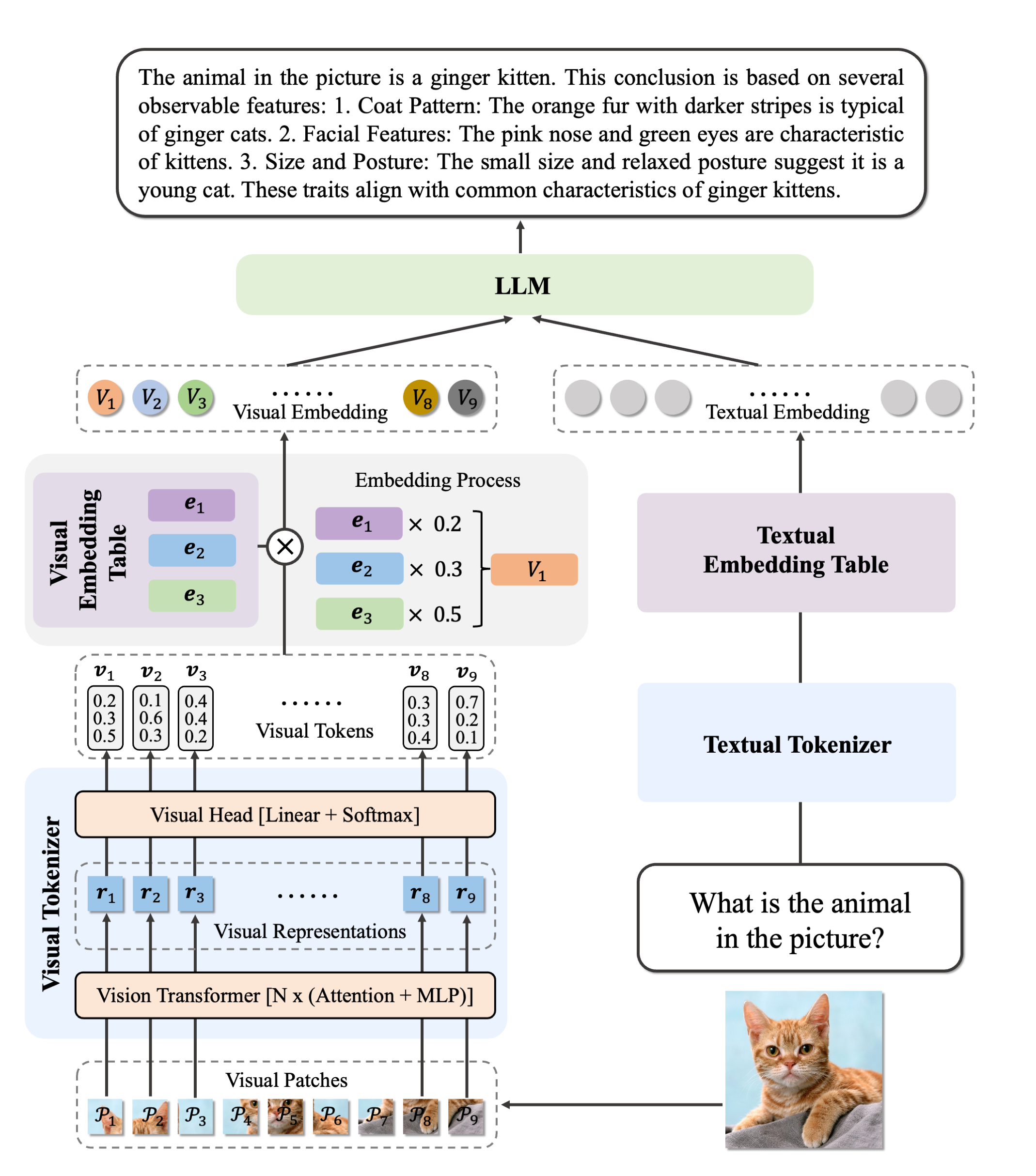
We are pleased to announce the release of Ovis2 , our latest advancement in multi-modal large language models (MLLMs). Ovis2 inherits the innovative architectural design of the Ovis series, aimed at structurally aligning visual and textual embeddings. As the successor to Ovis1.6, Ovis2 incorporates significant improvements in both dataset curation and training methodologies.
Key Features :
-
Small Model Performance : Optimized training strategies enable small-scale models to achieve higher capability density, demonstrating cross-tier leading advantages.
-
Enhanced Reasoning Capabilities : Significantly strengthens Chain-of-Thought (CoT) reasoning abilities through the combination of instruction tuning and preference learning.
-
Video and Multi-Image Processing : Video and multi-image data are incorporated into training to enhance the ability to handle complex visual information across frames and images.
-
Multilingual Support and OCR : Enhances multilingual OCR beyond English and Chinese and improves structured data extraction from complex visual elements like tables and charts.
Model Zoo
| Ovis MLLMs | ViT | LLM | Model Weights | Demo |
|---|---|---|---|---|
| Ovis2-1B | aimv2-large-patch14-448 | Qwen2.5-0.5B-Instruct | Huggingface | Space |
| Ovis2-2B | aimv2-large-patch14-448 | Qwen2.5-1.5B-Instruct | Huggingface | Space |
| Ovis2-4B | aimv2-huge-patch14-448 | Qwen2.5-3B-Instruct | Huggingface | Space |
| Ovis2-8B | aimv2-huge-patch14-448 | Qwen2.5-7B-Instruct | Huggingface | Space |
| Ovis2-16B | aimv2-huge-patch14-448 | Qwen2.5-14B-Instruct | Huggingface | Space |
| Ovis2-34B | aimv2-1B-patch14-448 | Qwen2.5-32B-Instruct | Huggingface | - |
Performance
We use VLMEvalKit , as employed in the OpenCompass multimodal and reasoning leaderboard, to evaluate Ovis2.
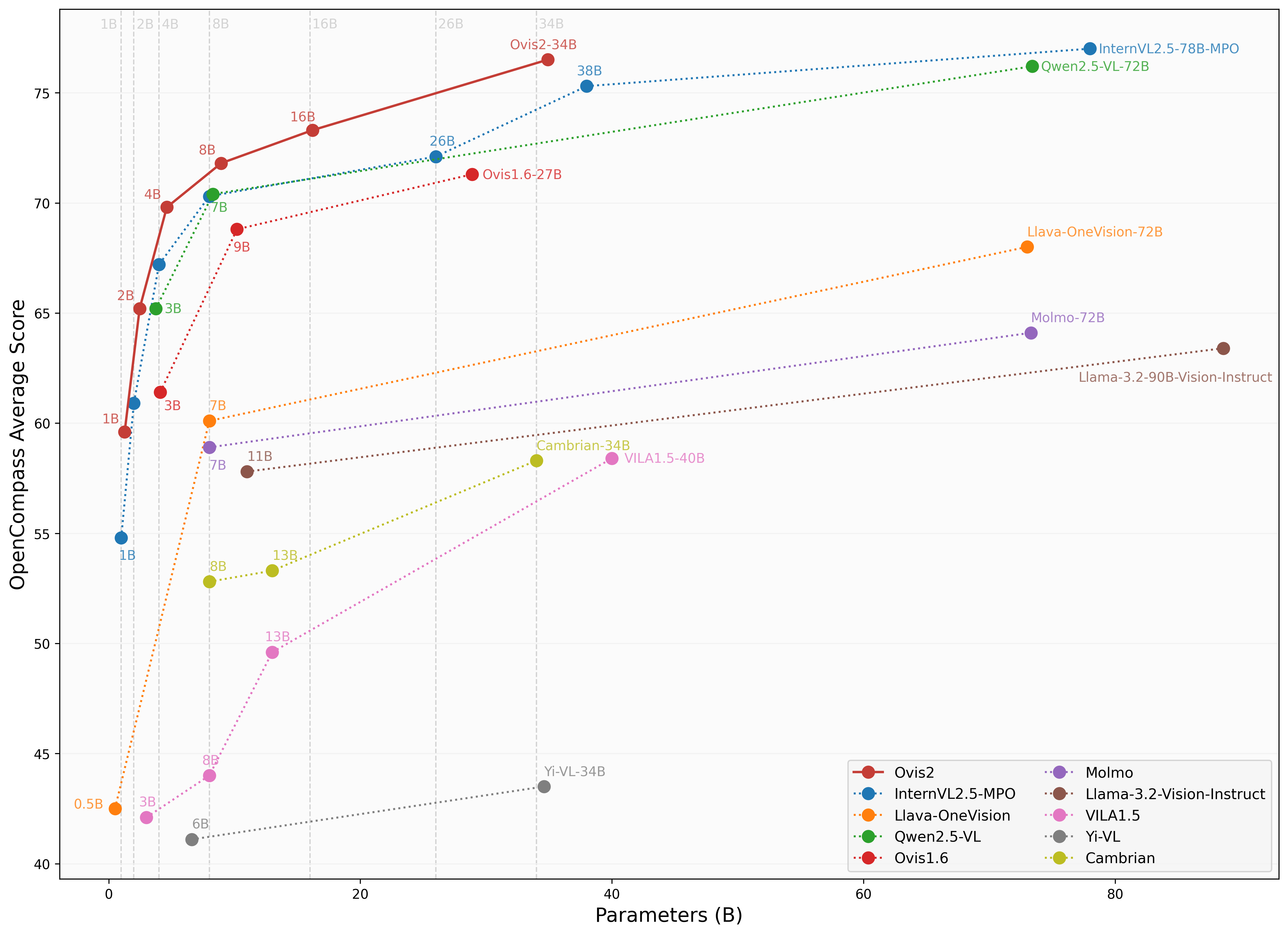
Image Benchmark
| Benchmark | Qwen2.5-VL-7B | InternVL2.5-8B-MPO | MiniCPM-o-2.6 | Ovis1.6-9B | InternVL2.5-4B-MPO | Ovis2-4B | Ovis2-8B |
|---|---|---|---|---|---|---|---|
| MMBench-V1.1 test | 82.6 | 82.0 | 80.6 | 80.5 | 77.8 | 81.4 | 83.6 |
| MMStar | 64.1 | 65.2 | 63.3 | 62.9 | 61 | 61.9 | 64.6 |
| MMMU val | 56.2 | 54.8 | 50.9 | 55 | 51.8 | 49.0 | 57.4 |
| MathVista testmini | 65.8 | 67.9 | 73.3 | 67.3 | 64.1 | 69.6 | 71.8 |
| HallusionBench | 56.3 | 51.7 | 51.1 | 52.2 | 47.5 | 53.8 | 56.3 |
| AI2D | 84.1 | 84.5 | 86.1 | 84.4 | 81.5 | 85.7 | 86.6 |
| OCRBench | 87.7 | 88.2 | 88.9 | 83 | 87.9 | 91.1 | 89.1 |
| MMVet | 66.6 | 68.1 | 67.2 | 65 | 66 | 65.5 | 65.1 |
| MMBench test | 83.4 | 83.2 | 83.2 | 82.7 | 79.6 | 83.2 | 84.9 |
| MMT-Bench val | 62.7 | 62.5 | 62.3 | 64.9 | 61.6 | 65.2 | 66.6 |
| RealWorldQA | 68.8 | 71.1 | 68.0 | 70.7 | 64.4 | 71.1 | 72.5 |
| BLINK | 56.1 | 56.6 | 53.9 | 48.5 | 50.6 | 53.0 | 54.3 |
| QBench | 77.9 | 73.8 | 78.7 | 76.7 | 71.5 | 78.1 | 78.9 |
| ABench | 75.6 | 77.0 | 77.5 | 74.4 | 75.9 | 77.5 | 76.4 |
| MTVQA | 28.5 | 27.2 | 23.1 | 19.2 | 28 | 29.4 | 29.7 |
Video Benchmark
| Benchmark | Qwen2.5-VL-7B | InternVL2.5-8B | LLaVA-OV-7B | InternVL2.5-4B | Ovis2-4B | Ovis2-8B |
|---|---|---|---|---|---|---|
| VideoMME(wo/w-subs) | 65.1/71.6 | 64.2 / 66.9 | 58.2/61.5 | 62.3 / 63.6 | 64.0/66.3 | 68.0/71.6 |
| MVBench | 69.6 | 72.0 | 56.7 | 71.6 | 68.45 | 68.15 |
| MLVU(M-Avg/G-Avg) | 70.2/- | 68.9/- | 64.7/- | 68.3/- | 70.8/4.23 | 76.4 /4.25 |
| MMBench-Video | 1.79 | 1.68 | - | 1.73 | 1.69 | 1.85 |
| TempCompass | 71.7 | - | - | - | 67.02 | 69.28 |
Usage
Below is a code snippet demonstrating how to run Ovis with various input types. For additional usage instructions, including inference wrapper and Gradio UI, please refer to Ovis GitHub .
pip install torch==2.4.0 transformers==4.46.2 numpy==1.25.0 pillow==10.3.0
pip install flash-attn==2.7.0.post2 --no-build-isolation
import torch
from PIL import Image
from transformers import AutoModelForCausalLM

# load model
model = AutoModelForCausalLM.from_pretrained("AIDC-AI/Ovis2-4B",
                                             torch_dtype=torch.bfloat16,
                                             multimodal_max_length=32768,
                                             trust_remote_code=True).cuda()
text_tokenizer = model.get_text_tokenizer()
visual_tokenizer = model.get_visual_tokenizer()

# single-image input
image_path = '/data/images/example_1.jpg'
images = [Image.open(image_path)]
max_partition = 9
text = 'Describe the image.'
query = f'<image>\n{text}'

## cot-style input
# cot_suffix = "Provide a step-by-step solution to the problem, and conclude with 'the answer is' followed by the final solution."
# image_path = '/data/images/example_1.jpg'
# images = [Image.open(image_path)]
# max_partition = 9
# text = "What's the area of the shape?"
# query = f'<image>\n{text}\n{cot_suffix}'

## multiple-images input
# image_paths = [
#     '/data/images/example_1.jpg',
#     '/data/images/example_2.jpg',
#     '/data/images/example_3.jpg'
# ]
# images = [Image.open(image_path) for image_path in image_paths]
# max_partition = 4
# text = 'Describe each image.'
# query = '\n'.join([f'Image {i+1}: <image>' for i in range(len(images))]) + '\n' + text

## video input (require `pip install moviepy==1.0.3`)
# from moviepy.editor import VideoFileClip
# video_path = '/data/videos/example_1.mp4'
# num_frames = 12
# max_partition = 1
# text = 'Describe the video.'
# with VideoFileClip(video_path) as clip:
#     total_frames = int(clip.fps * clip.duration)
#     if total_frames <= num_frames:
#         sampled_indices = range(total_frames)
#     else:
#         stride = total_frames / num_frames
#         sampled_indices = [min(total_frames - 1, int((stride * i + stride * (i + 1)) / 2)) for i in range(num_frames)]
#     frames = [clip.get_frame(index / clip.fps) for index in sampled_indices]
#     frames = [Image.fromarray(frame, mode='RGB') for frame in frames]
# images = frames
# query = '\n'.join(['<image>'] * len(images)) + '\n' + text

## text-only input
# images = []
# max_partition = None
# text = 'Hello'
# query = text

# format conversation
prompt, input_ids, pixel_values = model.preprocess_inputs(query, images, max_partition=max_partition)
attention_mask = torch.ne(input_ids, text_tokenizer.pad_token_id)
input_ids = input_ids.unsqueeze(0).to(device=model.device)
attention_mask = attention_mask.unsqueeze(0).to(device=model.device)
if pixel_values is not None:
    pixel_values = pixel_values.to(dtype=visual_tokenizer.dtype, device=visual_tokenizer.device)
pixel_values = [pixel_values]

# generate output
with torch.inference_mode():
    gen_kwargs = dict(
        max_new_tokens=1024,
        do_sample=False,
        top_p=None,
        top_k=None,
        temperature=None,
        repetition_penalty=None,
        eos_token_id=model.generation_config.eos_token_id,
        pad_token_id=text_tokenizer.pad_token_id,
        use_cache=True
    )
    output_ids = model.generate(input_ids, pixel_values=pixel_values, attention_mask=attention_mask, **gen_kwargs)[0]
    output = text_tokenizer.decode(output_ids, skip_special_tokens=True)
    print(f'Output:\n{output}')
Batch Inference
import torch
from PIL import Image
from transformers import AutoModelForCausalLM

# load model
model = AutoModelForCausalLM.from_pretrained("AIDC-AI/Ovis2-4B",
                                             torch_dtype=torch.bfloat16,
                                             multimodal_max_length=32768,
                                             trust_remote_code=True).cuda()
text_tokenizer = model.get_text_tokenizer()
visual_tokenizer = model.get_visual_tokenizer()

# preprocess inputs
batch_inputs = [
    ('/data/images/example_1.jpg', 'What colors dominate the image?'),
    ('/data/images/example_2.jpg', 'What objects are depicted in this image?'),
    ('/data/images/example_3.jpg', 'Is there any text in the image?')
]

batch_input_ids = []
batch_attention_mask = []
batch_pixel_values = []

for image_path, text in batch_inputs:
    image = Image.open(image_path)
    query = f'<image>\n{text}'
    prompt, input_ids, pixel_values = model.preprocess_inputs(query, [image], max_partition=9)
    attention_mask = torch.ne(input_ids, text_tokenizer.pad_token_id)
    batch_input_ids.append(input_ids.to(device=model.device))
    batch_attention_mask.append(attention_mask.to(device=model.device))
    batch_pixel_values.append(pixel_values.to(dtype=visual_tokenizer.dtype, device=visual_tokenizer.device))

batch_input_ids = torch.nn.utils.rnn.pad_sequence([i.flip(dims=[0]) for i in batch_input_ids], batch_first=True,
                                                  padding_value=0.0).flip(dims=[1])
batch_input_ids = batch_input_ids[:, -model.config.multimodal_max_length:]
batch_attention_mask = torch.nn.utils.rnn.pad_sequence([i.flip(dims=[0]) for i in batch_attention_mask],
                                                       batch_first=True, padding_value=False).flip(dims=[1])
batch_attention_mask = batch_attention_mask[:, -model.config.multimodal_max_length:]

# generate outputs
with torch.inference_mode():
    gen_kwargs = dict(
        max_new_tokens=1024,
        do_sample=False,
        top_p=None,
        top_k=None,
        temperature=None,
        repetition_penalty=None,
        eos_token_id=model.generation_config.eos_token_id,
        pad_token_id=text_tokenizer.pad_token_id,
        use_cache=True
    )
    output_ids = model.generate(batch_input_ids, pixel_values=batch_pixel_values, attention_mask=batch_attention_mask,
                                **gen_kwargs)

for i in range(len(batch_inputs)):
    output = text_tokenizer.decode(output_ids[i], skip_special_tokens=True)
    print(f'Output {i + 1}:\n{output}\n')
Citation
If you find Ovis useful, please consider citing the paper
@article{lu2024ovis,
  title={Ovis: Structural Embedding Alignment for Multimodal Large Language Model},
  author={Shiyin Lu and Yang Li and Qing-Guo Chen and Zhao Xu and Weihua Luo and Kaifu Zhang and Han-Jia Ye},
  year={2024},
  journal={arXiv:2405.20797}
}
License
This project is licensed under the Apache License, Version 2.0 (SPDX-License-Identifier: Apache-2.0).
Disclaimer
We used compliance-checking algorithms during the training process, to ensure the compliance of the trained model to the best of our ability. Due to the complexity of the data and the diversity of language model usage scenarios, we cannot guarantee that the model is completely free of copyright issues or improper content. If you believe anything infringes on your rights or generates improper content, please contact us, and we will promptly address the matter.
Runs of ATH-MaaS Ovis2-4B on huggingface.co
10.3K
Total runs
44
24-hour runs
-1.8K
3-day runs
-1.9K
7-day runs
-2.0K
30-day runs
More Information About Ovis2-4B huggingface.co Model
Url of Ovis2-4B
Ovis2-4B huggingface.co Url
Provider of Ovis2-4B huggingface.co
Other API from ATH-MaaS
Total runs:
7.9K
Run Growth:
-72.0K
Growth Rate:
-891.73%
Total runs:
4.6K
Run Growth:
-59.5K
Growth Rate:
-1267.28%
Total runs:
4.1K
Run Growth:
-12.2K
Growth Rate:
-292.76%
Total runs:
3.8K
Run Growth:
-3.4K
Growth Rate:
-86.79%
Total runs:
1.6K
Run Growth:
926
Growth Rate:
58.20%
Total runs:
1.2K
Run Growth:
-12.2K
Growth Rate:
-1013.25%
Total runs:
933
Run Growth:
-19.2K
Growth Rate:
-2390.89%
Total runs:
632
Run Growth:
187
Growth Rate:
40.22%
Total runs:
515
Run Growth:
-9.5K
Growth Rate:
-2033.55%
Total runs:
324
Run Growth:
-268
Growth Rate:
-80.72%
Total runs:
284
Run Growth:
-417
Growth Rate:
-139.46%
Total runs:
220
Run Growth:
52
Growth Rate:
21.94%
Total runs:
97
Run Growth:
-139
Growth Rate:
-146.32%
Total runs:
51
Run Growth:
10
Growth Rate:
20.00%
Total runs:
47
Run Growth:
-109
Growth Rate:
-242.22%
Total runs:
46
Run Growth:
9
Growth Rate:
19.15%
Total runs:
42
Run Growth:
-78
Growth Rate:
-185.71%
Total runs:
31
Run Growth:
7
Growth Rate:
23.33%
Total runs:
28
Run Growth:
-48
Growth Rate:
-171.43%
Total runs:
19
Run Growth:
-5
Growth Rate:
-26.32%
Total runs:
11
Run Growth:
-3
Growth Rate:
-27.27%
Total runs:
9
Run Growth:
-6
Growth Rate:
-75.00%
Total runs:
7
Run Growth:
-4
Growth Rate:
-50.00%