

foduucom / Headshot_Generator-FaceSwap

huggingface.co
Total runs: 0
24-hour runs: 0
7-day runs: 0
30-day runs: 0
Model's Last Updated: January 18 2025

Introduction of Headshot_Generator-FaceSwap

Model Details of Headshot_Generator-FaceSwap

FaceSwap - AI-Powered Headshot Generator

FaceSwap is a flow designed to seamlessly swap faces between two images. This project is built on top of ComfyUI, a modular and flexible interface that enables easy integration and customization of AI workflows. By leveraging advanced facial recognition and manipulation technologies, FaceSwap allows users to replace one face with another in images.

FaceSwap utilizes models to detect key facial landmarks, map them to the target face, and generate a realistic face swap by considering aspects like lighting, expression, and pose. This flow is designed to provide an easy-to-use interface through ComfyUI, allowing users to swap faces effortlessly with minimal setup.

foduucom/FaceSwap
Requirements

To run FaceSwap , you'll need to install ComfyUI and set up a few dependencies. Follow the steps below for installation and setup.

Prerequisites
  • Python 3.9 or higher (Ensure Python 3.9+ is installed on your machine)
  • NVIDIA GPU (Recommended for faster processing, though CPU can also be used)

Step-by-Step Installation
  1. Clone the ComfyUI Repository Start by cloning the main ComfyUI repository:
git clone https://github.com/comfyanonymous/ComfyUI.git
cd ComfyUI
  1. Install Dependencies Install all the required dependencies for ComfyUI:
pip install -r requirements.txt
  1. Install ComfyUI-Manager To manage custom nodes, you'll need to install ComfyUI-Manager. Run the following commands inside the ComfyUI/custom_nodes directory:
cd ComfyUI/custom_nodes
git clone https://github.com/ltdrdata/ComfyUI-Manager.git

After cloning the ComfyUI-Manager, restart ComfyUI .
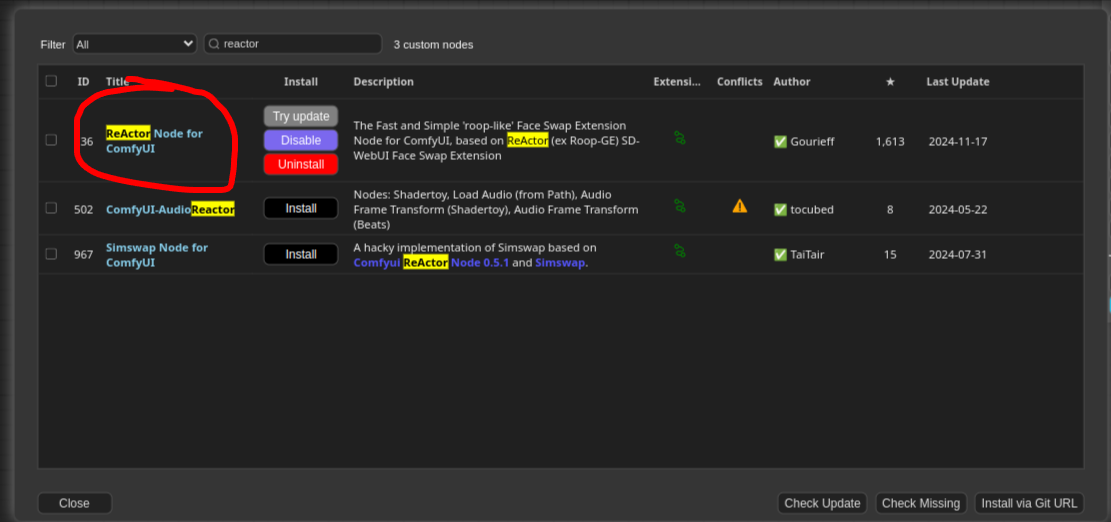
  1. Install Reactor Node for ComfyUI by clicking on Manager -> Custom Nodes Manage
    foduucom/FaceSwap

or you can clone the repository in the directory ComfyUI/custom_nodes

git clone https://github.com/Gourieff/comfyui-reactor-node.git
  1. Download Pre-trained Models Download inswapper_128.onnx and place the downloaded model in the ComfyUI/models/insightface/ directory

Note: If directory don't exist, create them manually.

  1. Start ComfyUI Run ComfyUI by executing the following command:
python3 FaceSwap.py

This will start ComfyUI, and you can access the interface by navigating to http://127.0.0.1:8188 in your browser.

Setting Up and Using the FaceSwap Workflow
  1. Clone the Headshot_Generator-FaceSwap Repository Clone this repository that contains the FaceSwap workflow and assets:
git clone https://huggingface.co/foduucom/Headshot_Generator-FaceSwap
cd Headshot_Generator-FaceSwap
  1. How to use Once ComfyUI is running, open the browser window (default: http://127.0.0.1:8188 ), and follow these steps:
  • Click on the Load button in the menu bar and select the workflow.json file from this repo you just cloned.
  • Upload the Workflow.json to start the face-swapping process.
  • Provide Input Images
    • Source Image: The image containing the face you want to swap.
    • Target Image: The image where the face will be swapped into.
  • Click Queue Prompt to initiate the face-swapping process. The AI model will process the images and generate the output.

or you can use by python script provided in this repository:

python3 FaceSwap.py

#Remember change the input paths in script here :
#prompt["1"]["inputs"]["image"] = "//put your input image"
#prompt["2"]["inputs"]["image"] = "//put your source face image"
Troubleshooting
  • ComfyUI Not Running: Ensure that all dependencies are installed correctly and that you’re using Python 3.9 or higher. If issues persist, check the ComfyUI GitHub repository for troubleshooting guides.

  • Missing Models: Ensure you’ve downloaded the required models (sam_vit_h_4b8939.pth and groundingdino_swint_ogc.pth) and placed them in the correct directories (ComfyUI/models/sams/ and ComfyUI/models/grounding-dino/).

Slow Performance:

Using a GPU is highly recommended for better performance. If you’re using a CPU, the processing time may be longer.

Compute Infrastructure
Hardware

NVIDIA GeForce RTX 3060 card

Model Card Contact

For inquiries and contributions, please contact us at [email protected] .

@ModelCard{
  author    = {Nehul Agrawal and
               Priyal Mehta},
  title     = {FaceSwap - AI-Powered Face Swap / Headshot Generator},
  year      = {2024}
}

Runs of foduucom Headshot_Generator-FaceSwap on huggingface.co

0
Total runs
0
24-hour runs
0
3-day runs
0
7-day runs
0
30-day runs

More Information About Headshot_Generator-FaceSwap huggingface.co Model

More Headshot_Generator-FaceSwap license Visit here:

https://choosealicense.com/licenses/apache-2.0

Headshot_Generator-FaceSwap huggingface.co

Headshot_Generator-FaceSwap huggingface.co is an AI model on huggingface.co that provides Headshot_Generator-FaceSwap's model effect (), which can be used instantly with this foduucom Headshot_Generator-FaceSwap model. huggingface.co supports a free trial of the Headshot_Generator-FaceSwap model, and also provides paid use of the Headshot_Generator-FaceSwap. Support call Headshot_Generator-FaceSwap model through api, including Node.js, Python, http.

Headshot_Generator-FaceSwap huggingface.co Url

https://huggingface.co/foduucom/Headshot_Generator-FaceSwap

foduucom Headshot_Generator-FaceSwap online free

Headshot_Generator-FaceSwap huggingface.co is an online trial and call api platform, which integrates Headshot_Generator-FaceSwap's modeling effects, including api services, and provides a free online trial of Headshot_Generator-FaceSwap, you can try Headshot_Generator-FaceSwap online for free by clicking the link below.

foduucom Headshot_Generator-FaceSwap online free url in huggingface.co:

https://huggingface.co/foduucom/Headshot_Generator-FaceSwap

Headshot_Generator-FaceSwap install

Headshot_Generator-FaceSwap is an open source model from GitHub that offers a free installation service, and any user can find Headshot_Generator-FaceSwap on GitHub to install. At the same time, huggingface.co provides the effect of Headshot_Generator-FaceSwap install, users can directly use Headshot_Generator-FaceSwap installed effect in huggingface.co for debugging and trial. It also supports api for free installation.

Headshot_Generator-FaceSwap install url in huggingface.co:

https://huggingface.co/foduucom/Headshot_Generator-FaceSwap

Url of Headshot_Generator-FaceSwap

Headshot_Generator-FaceSwap huggingface.co Url

Provider of Headshot_Generator-FaceSwap huggingface.co

foduucom
ORGANIZATIONS

Other API from foduucom