

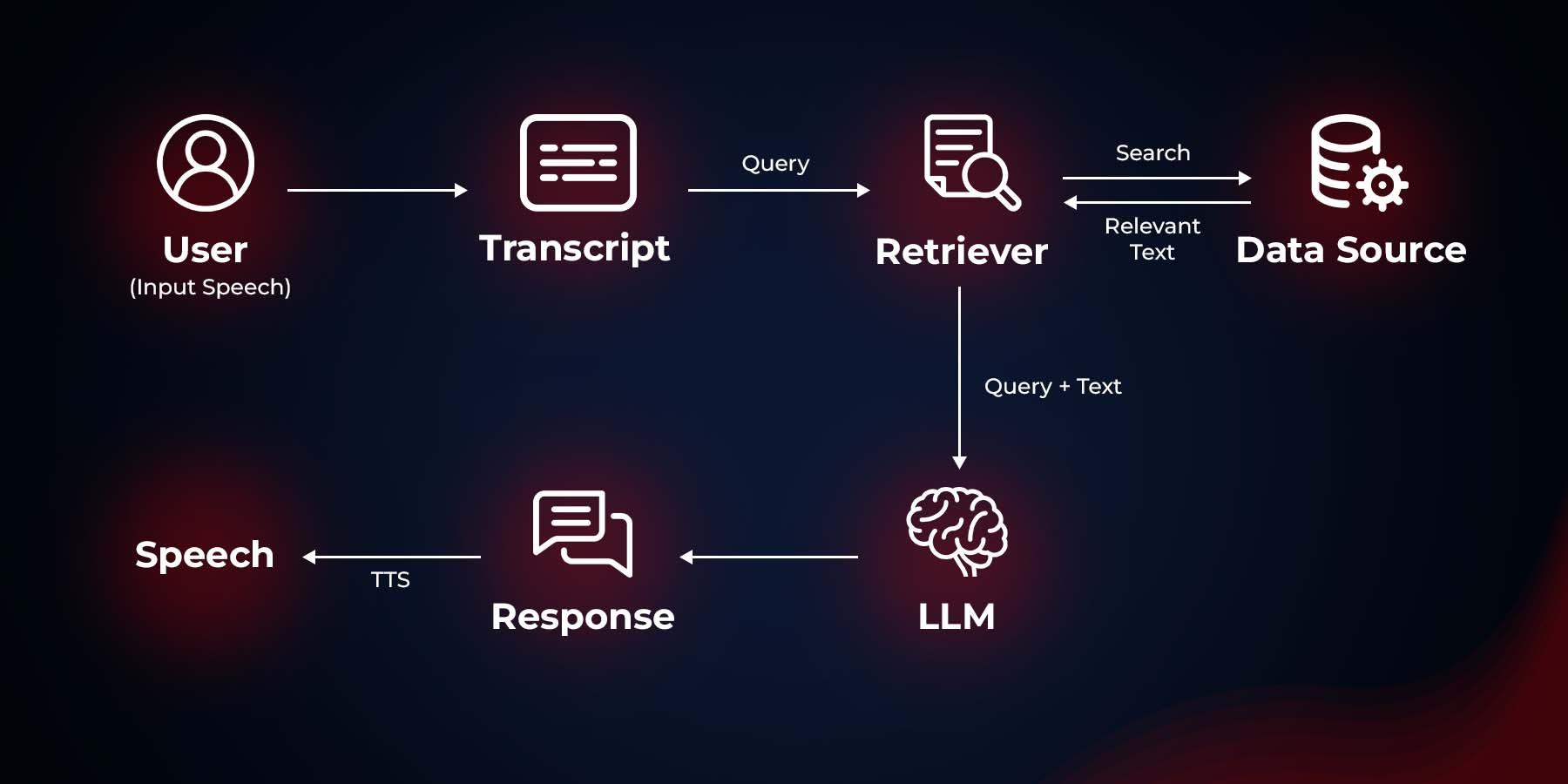
This project implements a voice assistant that uses Retrieval-Augmented Generation (RAG) and speech recognition to provide responses to user queries. The assistant can listen to voice input, process it, and respond with synthesized speech based on the knowledge base you passed.
Features
Speech recognition using Google Speech Recognition
Text-to-Speech (TTS) using Mozilla TTS
RAG-based question answering using Langchain and FAISS
Integration with Ollama for language model processing
Prerequisites
Before running this project, make sure you have the following dependencies installed:
Install the required dependencies as mentioned above.
Make sure you have the
KnowledgeBase.pdf
file in the same directory as the script. This file will be used to create the knowledge base for the RAG system.
Ensure that Ollama is running on
http://localhost:11434
with the
llama3
model loaded.
Usage
To run the voice assistant, execute the following command in your terminal:
python Voice_Assistant.py
The assistant will start listening for your voice input. Speak clearly into your microphone to ask questions or give commands. The assistant will process your input and respond with synthesized speech.
How It Works
The script loads the knowledge base from
KnowledgeBase.pdf
and creates a FAISS vector store using sentence embeddings.
It sets up a Retrieval QA chain using Ollama as the language model and the FAISS vector store as the retriever.
The main loop continuously listens for voice input using the computer's microphone.
When speech is detected, it's converted to text using Google's Speech Recognition service.
The text query is then processed by the RAG system to generate a response.
The response is converted to speech using Mozilla TTS and played back to the user.
Customization
To use a different knowledge base, replace
KnowledgeBase.pdf
with your own PDF file and update the filename in the script.
You can experiment with different embedding models by changing the
model_name
in the
HuggingFaceEmbeddings
initialization.
To use a different Ollama model, update the
model
parameter in the
Ollama
initialization.
Try to use other TTS frameworks - Melo TTS, coqui TTS, Mars5 TTS.
Further Improvements
Works on achieving lower latency for responses.
Understand speech better, even with background noise or accents.
Learn to speak and understand more languages.
Have better conversations by remembering what we talked about before.
Sound more natural when I speak, maybe even express emotions.
Troubleshooting
If you encounter issues with speech recognition, ensure your microphone is properly connected and configured.
For TTS issues, make sure you have the necessary audio drivers installed on your system.
If the RAG system is not working as expected, check that your knowledge base PDF is properly formatted and contains relevant information.
Model Card Contact
For inquiries and contributions, please contact us at
[email protected]
.
@ModelCard{
author = {Nehul Agrawal and Roshan Kshirsagar}
title = {Voice Assistant},
year = {2024}
}
Runs of foduucom VoiceAssistant on huggingface.co
0
Total runs
0
24-hour runs
0
3-day runs
0
7-day runs
0
30-day runs
More Information About VoiceAssistant huggingface.co Model
VoiceAssistant huggingface.co is an AI model on huggingface.co that provides VoiceAssistant's model effect (), which can be used instantly with this foduucom VoiceAssistant model. huggingface.co supports a free trial of the VoiceAssistant model, and also provides paid use of the VoiceAssistant. Support call VoiceAssistant model through api, including Node.js, Python, http.
VoiceAssistant huggingface.co is an online trial and call api platform, which integrates VoiceAssistant's modeling effects, including api services, and provides a free online trial of VoiceAssistant, you can try VoiceAssistant online for free by clicking the link below.
foduucom VoiceAssistant online free url in huggingface.co:
VoiceAssistant is an open source model from GitHub that offers a free installation service, and any user can find VoiceAssistant on GitHub to install. At the same time, huggingface.co provides the effect of VoiceAssistant install, users can directly use VoiceAssistant installed effect in huggingface.co for debugging and trial. It also supports api for free installation.