































Table of Contents
- Key Points
- Understanding Playwright MCP Server and Agent Mode
- Real-World Scenario: Testing a Movie Website with Agent Mode
- How to use agent mode on Playwright MCP
- Playwright MCP Server: Pros and Cons
- FAQ
- Related Questions



Understanding Playwright MCP Server and Agent Mode
What is Playwright MCP Server?
The Playwright MCP Server is designed to work seamlessly with the Playwright testing framework, providing a local server environment for running tests. This setup allows developers to test their websites in a controlled and predictable environment, minimizing the impact of external factors. The server is integrated directly into the .vscode folder within the project, making it easily accessible and manageable. This integration enhances the development workflow by enabling quick and reliable testing.
Playwright is a Node library to automate Chromium, Firefox and WebKit with a single API. Playwright is built to enable cross-browser web automation that is ever green, capable, reliable and fast.
As a website and app developer it is essential to have strong test coverage to improve both product and user experience as well as reduce costs associated with fixing bugs in production. Playwright shines in this regard and can be used for not just end-to-end testing but also component testing. It’s ability to interact with multiple browsers makes it an excellent tool for cross browser end to end testing.
The Power of Agent Mode in Playwright
Agent mode takes automation to the next level by enabling the Playwright MCP Server to actively explore and interact with a website. This mode allows the testing framework to navigate through the site as a user would, identifying key functionalities and generating test scenarios based on these interactions. Unlike traditional testing methods that rely on predefined test cases, agent mode dynamically creates tests based on the actual behavior and structure of the website. This approach is particularly useful for uncovering edge cases and unexpected behaviors that might be missed in manually crafted tests.
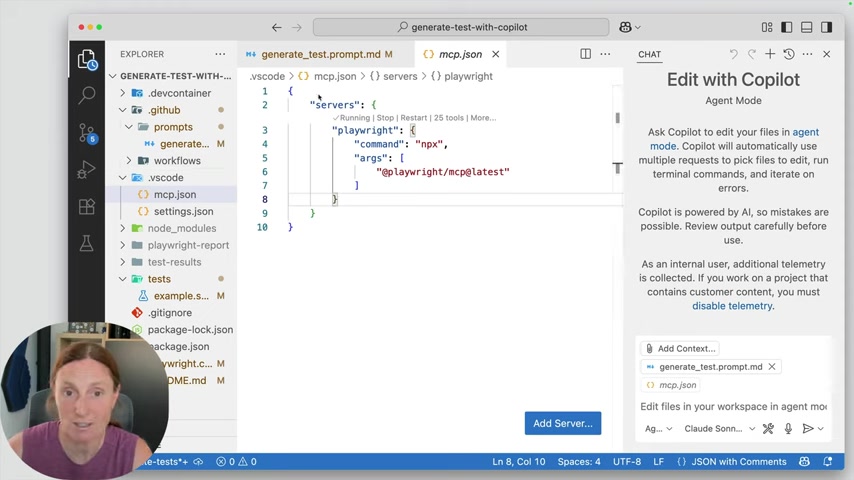
In agent mode, Playwright automatically picks files to edit, run terminal commands, and iterate on errors. This hands-off approach requires users to carefully review output, especially before the code is deployed. Agent mode allows developers to focus on higher level problems.
Agent mode enhances the testing framework to explore, discover, and build tests around websites and applications. It allows developers to define prompts that outline goals (such as identifying key website functions and building tests around them), then gives the Playwright system the control required to accomplish the stated goals. Agent mode can significantly reduce the amount of time and effort required to build a high level of test coverage.
Agent mode allows developers to create prompts that outline specific goals, such as identifying key website functions and building tests around them, while letting the Playwright system take control and accomplish the stated goals. This hands off approach requires constant monitoring, but has demonstrated the potential to significantly reduce the amount of time and effort to build a high level of test coverage.
Real-World Scenario: Testing a Movie Website with Agent Mode
Setting Up the Test Environment
To illustrate the capabilities of Playwright MCP Server and agent mode, consider a scenario involving the testing of a movie website. The first step is to ensure that the Playwright MCP Server is running locally within the project's .vscode folder. This server acts as the foundation for all subsequent testing activities. With the server up and running, a 'generate test prompt' file is created to define the scope and objectives of the test. This file specifies that Playwright should use agent mode to create tests based on exploring the website's features. This prompt file might include a high level list of instructions that include:
- NAVIGATE to the specified URL
- Explore 1 key functionalities of the site and when finishing document your exploration including elements found, interactions recorded and results observed.
- Formulate 1 meaningful test scenarios based on your exploration.
- Implement a Playwright Typescript test that uses @playwright/test assertions to verify the expected behavior.
- Save generated test file in the tests directory
- Execute the test file and iterate until the test passes.
- Include appropriate assertions to verify the expected behavior.
- Structure tests properly with descriptive test titles and descriptions.
The prompt file in the case of this example also tells Playwright to use the local MCP server to navigate the website and begin its exploration. The framework is set to explore the functionality of the website as a user would, navigating, searching, and interacting with various elements.
This sets the stage for Playwright to explore the site and begin its exploration, to create test cases.
Navigating and Exploring the Website
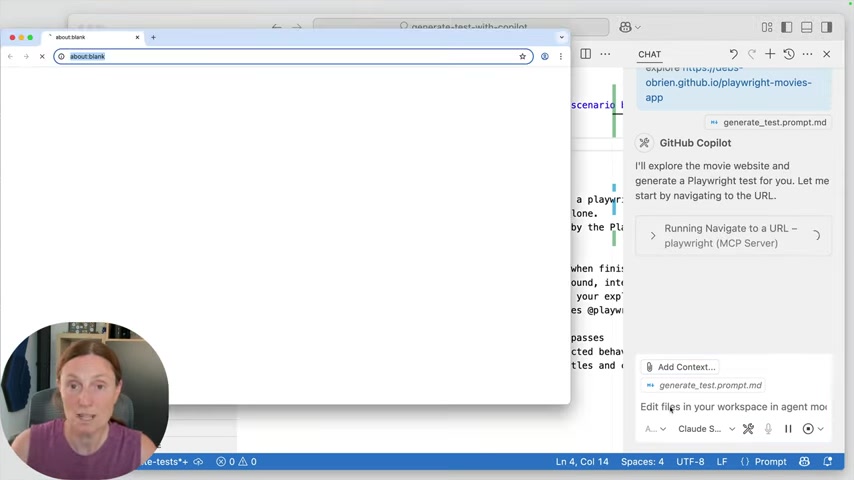
Once the test environment is set up, the Playwright MCP Server, operating in agent mode, takes control and begins navigating the movie website. It uses the defined test prompt to guide its exploration, focusing on key functionalities. For example, it might start by exploring the search functionality, simulating a user searching for a specific movie.
The process involves the agent to browse the website and identify a few key functions. After identifying the key functions, it begins writing the test cases and tying them into the actions that it has performed.
The first test it performs is based on the search functionality. In this case, the agent is performing a search on 'Star Wars'. As a result, the agent sees that search term and movie card titles do not match, and makes an observation of it.
Identifying Edge Cases and Bugs
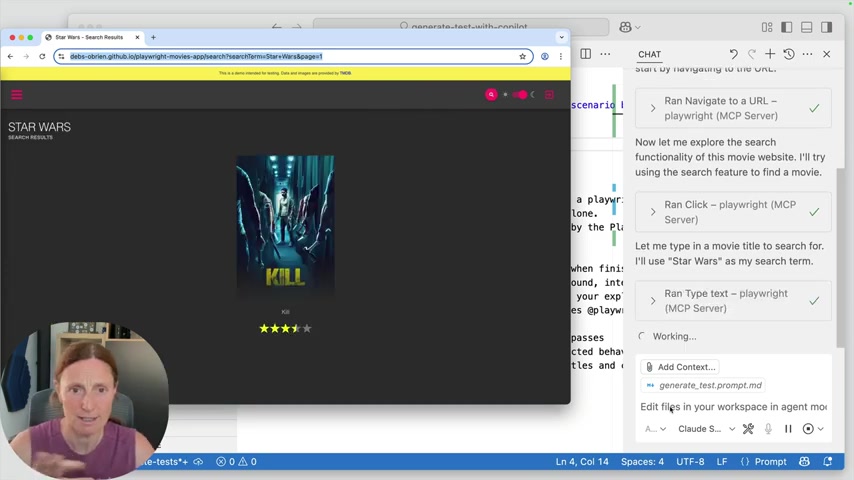
As Playwright, in agent mode, explores the movie website, it actively seeks out potential edge cases and bugs. For instance, during the search functionality test, it might discover a discrepancy between the search term and the movie titles displayed. In the video, a search for "Star Wars" returns a movie titled "Kill." This unexpected result highlights a potential issue in the website's search algorithm or data mapping. By identifying such edge cases, Playwright enables developers to address these issues proactively and ensure a more robust and reliable user experience.
After performing a search for Star Wars on the movie database, Playwright in agent mode determines that while the search results indicate “Star Wars”, the movie title presented is actually “Kill”. This is an edge case the Playwright agent has observed. Because the tester has previously only tested valid movies such as “Deadpool” the search feature appeared to be operating correctly.
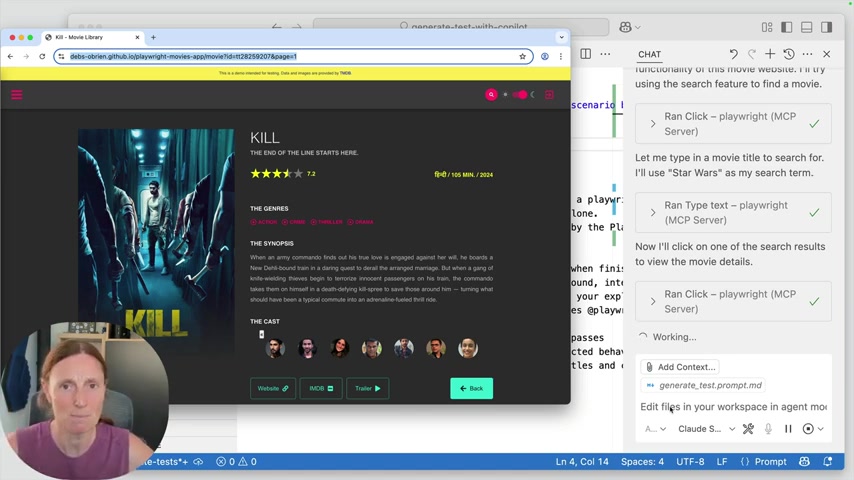
Because the search for “Star Wars” returned inconsistent results, it demonstrated that using Playwright MCP Server in agent mode can successfully locate unexpected behavior and edge cases that may otherwise be missed.
Generating and Executing Tests
After exploring the website and identifying key functionalities and potential issues, Playwright, in agent mode, automatically generates test scripts. These tests are designed to verify the expected behavior of the website and ensure that it functions correctly under various scenarios. Once the tests are generated, Playwright executes them and provides detailed reports on the test results. These reports offer valuable insights into the website's functionality and highlight any areas that require attention.
It’s important to note that the testing process itself is recorded. The record can be used to trace back through actions performed by the agent and see screen shots of any actions that may have resulted in unexpected results. In the testing process, we see that when “Star Wars” is typed into the search, the results return a movie named “KILL” .
Playwright’s use of agent mode makes this testing process easy to iterate and build test scenarios around website function. It documents the observations made during the exploration, like what it saw, and the ability to then turn those observations into testable assertions. This is an important ability as assertions help validate the intended behavior of the site during the testing process.
Reviewing Test Reports and Summaries
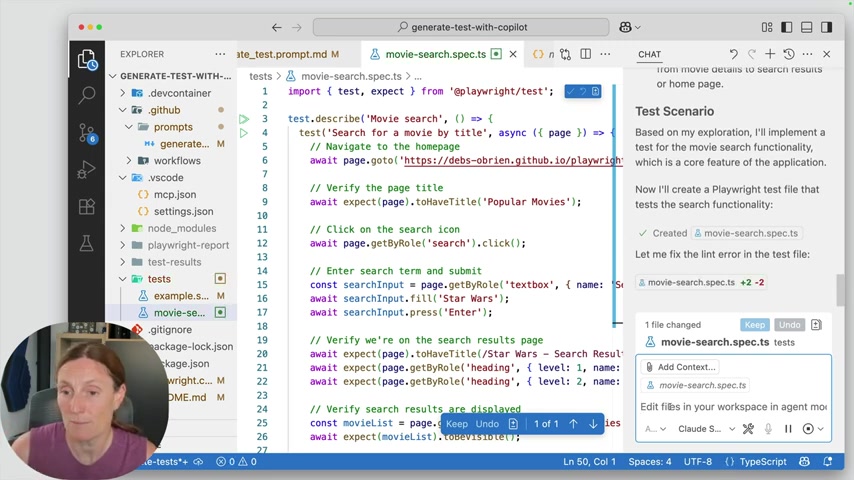
The Playwright MCP Server generates comprehensive test reports and summaries, providing developers with a clear overview of the testing process and its outcomes. These reports typically include details on the tests performed, their results, and any errors or failures encountered. By reviewing these reports, developers can gain a better understanding of their website's functionality and identify areas that need improvement. The summaries can also be used to track progress over time and ensure that new code changes do not introduce regressions.
After the exploratory testing is completed, a summary is provided to document key features:
- Homepage
- Search Functionality
- Movie Details Page
- Theme Toggle
- Navigation
The summary is a reflection of all that happened during the test. From the details of that activity, a test scenario can be proposed. Agent mode uses the information in the summary to automatically implement a test for the movie search functionality, creating a test file in the /tests directory.
Because the functionality is so well understood, Playwright can also fix any linting errors it may find automatically .







Most people like































Report
Please select a reason for reporting
- 13 Reasons to Switch from Snapchat to Text Messaging
- 7 Powerful Speech to Text Apps to Boost Productivity
- 10 Best Speech to Text Tools for Effortless Transcription
- 13 Free Tools to Easily Transcribe Audio to Text
- 15 Surprising Ways Google's Speech-to-Text Boosts Productivity
- 7 Best Free Online Audio to Text Transcription Tools
- 9 Tips to Transcribe Speech to Text Faster and Better
- 13 Best Speech to Text Software for Windows 10 in 2023
- 7 Tips for Choosing the Best Transcriber for Audio to Text
- 11 Reasons Why Dragon Speech-to-Text Apps are Game-Changers
- 6 Secrets to Enhance Your Speech to Text Transcription
- 6 Brilliant Ways to Boost Productivity with Talk-to-Text on Your MacBook
- 6 Ways Transcription Software Converts Audio to Text
- 8 Tips to Transcribe Speech to Text Like a Pro
- 6 Reasons IBM Watson Speech to Text is a Game-Changer
- 14 Powerful Ways Talk-to-Text Improves Your Workflow
- 12 Top Windows Speech-to-Text Software for Efficient Transcription
- 12 Game-Changing Benefits of Apple's Speech to Text Technology
- 9 Powerful Use Cases for AWS Speech to Text Technology
- 10 Easy Steps to Transcribe YouTube Videos to Text
- transcription audio en texte
- online audio transcription
- free audio file transcription
- free ai audio transcription
- audio transcription service
- audio transcription online free
- audio transcription free online
- audio to transcription software
- audio and transcript
- ai audio transcription free
- voice recording to text converter
- translate voice recording to text
- record voice to text
- audio recording to text converter
- voice recording and transcription
- chatgpt voice to text
- gmail voice to text
- speech to text reader
- speech to text ai free
- speech to talk
- How SEO and Marketing Dashboards Empower Agencies to Drive Results
- How to Use AI Tools to Find Internal Linking Opportunities Across a Business Website
- Discover Your Perfect Haircut with AI Hairstyle Apps
- Free Reputation Calculator Tools: How They're Adapting to Score AI Visibility, Not Just Rankings
- Design Professional Flyers for Free on Your Phone
- Best Free Flyer Maker Apps for Android: Design Like a Pro
- How to Know If Your Business Is Ready for an AI Customer Service Agent
- Revolutionizing Storytelling: From Novels to Screenplays with AI
- Create Engaging Animated Explainer Videos with a Free AI Tool
- Stop Multi-Subscribing: Benchmark Top AI Visual Models in One Canvas
- ASOMobile Helps Teams Benchmark App Store Screenshots Against Competitors
- How to Match LMS Software With Your Organization's Training Plan
- Revolutionizing Email Marketing Agency with AI
- How to Convert BTC to HNT
- Unleashing the Power of AI: Cognizant's Roadmap for Transformation
- Frame to Video Review: A Practical Look at Turning Two Still Frames Into Motion
- NVIDIA NIM: Revolutionizing Supply Chain Data Analysis with AI
- Top AI Tools That Help Brands Stand Out Offline (Not Just Online)
- Top 5 Cold Email Software: Maximize Your Outreach in 2025
- Magic School AI: Revolutionizing Quiz & Assessment Generation

Copyright ©2026 toolify