




Total runs:
1.7M
Run Growth:
-409.3K
Growth Rate:
-24.14%

SmolVLM is a compact open multimodal model that accepts arbitrary sequences of image and text inputs to produce text outputs. Designed for efficiency, SmolVLM can answer questions about images, describe visual content, create stories grounded on multiple images, or function as a pure language model without visual inputs. Its lightweight architecture makes it suitable for on-device applications while maintaining strong performance on multimodal tasks.
SmolVLM can be used for inference on multimodal (image + text) tasks where the input comprises text queries along with one or more images. Text and images can be interleaved arbitrarily, enabling tasks like image captioning, visual question answering, and storytelling based on visual content. The model does not support image generation.
To fine-tune SmolVLM on a specific task, you can follow the fine-tuning tutorial.
SmolVLM leverages the lightweight SmolLM2 language model to provide a compact yet powerful multimodal experience. It introduces several changes compared to previous Idefics models:
More details about the training and architecture are available in our technical report.
You can use transformers to load, infer and fine-tune SmolVLM.
import torch
from PIL import Image
from transformers import AutoProcessor, AutoModelForVision2Seq
from transformers.image_utils import load_image
DEVICE = "cuda" if torch.cuda.is_available() else "cpu"
# Load images
image1 = load_image("https://cdn.britannica.com/61/93061-050-99147DCE/Statue-of-Liberty-Island-New-York-Bay.jpg")
image2 = load_image("https://huggingface.co/spaces/merve/chameleon-7b/resolve/main/bee.jpg")
# Initialize processor and model
processor = AutoProcessor.from_pretrained("HuggingFaceTB/SmolVLM-Synthetic")
model = AutoModelForVision2Seq.from_pretrained(
    "HuggingFaceTB/SmolVLM-Synthetic",
    torch_dtype=torch.bfloat16,
    _attn_implementation="flash_attention_2" if DEVICE == "cuda" else "eager",
).to(DEVICE)
# Create input messages
messages = [
    {
        "role": "user",
        "content": [
            {"type": "image"},
            {"type": "image"},
            {"type": "text", "text": "Can you describe the two images?"}
        ]
    },
]
# Prepare inputs
prompt = processor.apply_chat_template(messages, add_generation_prompt=True)
inputs = processor(text=prompt, images=[image1, image2], return_tensors="pt")
inputs = inputs.to(DEVICE)
# Generate outputs
generated_ids = model.generate(**inputs, max_new_tokens=500)
generated_texts = processor.batch_decode(
    generated_ids,
    skip_special_tokens=True,
)
print(generated_texts[0])
"""
User:<image>Can you describe the two images?
Assistant: The two images are not described in the provided facts, so we cannot provide any information about them.
"""
Precision
: For better performance, load and run the model in half-precision (
torch.float16
or
torch.bfloat16
) if your hardware supports it.
from transformers import AutoModelForVision2Seq
import torch
model = AutoModelForVision2Seq.from_pretrained(
    "HuggingFaceTB/SmolVLM-Synthetic",
    torch_dtype=torch.bfloat16
).to("cuda")
You can also load SmolVLM with 4/8-bit quantization using bitsandbytes, torchao or Quanto. Refer to this page for other options.
from transformers import AutoModelForVision2Seq, BitsAndBytesConfig
import torch
quantization_config = BitsAndBytesConfig(load_in_8bit=True)
model = AutoModelForVision2Seq.from_pretrained(
    "HuggingFaceTB/SmolVLM-Synthetic",
    quantization_config=quantization_config,
)
Vision Encoder Efficiency
: Adjust the image resolution by setting
size={"longest_edge": N*384}
when initializing the processor, where N is your desired value. The default
N=4
works well, which results in input images of
size 1536×1536. For documents,
N=5
might be beneficial. Decreasing N can save GPU memory and is appropriate for lower-resolution images. This is also useful if you want to fine-tune on videos.
SmolVLM is not intended for high-stakes scenarios or critical decision-making processes that affect an individual's well-being or livelihood. The model may produce content that appears factual but may not be accurate. Misuse includes, but is not limited to:
SmolVLM is built upon the shape-optimized SigLIP as image encoder and SmolLM2 for text decoder part.
We release the SmolVLM checkpoints under the Apache 2.0 license.
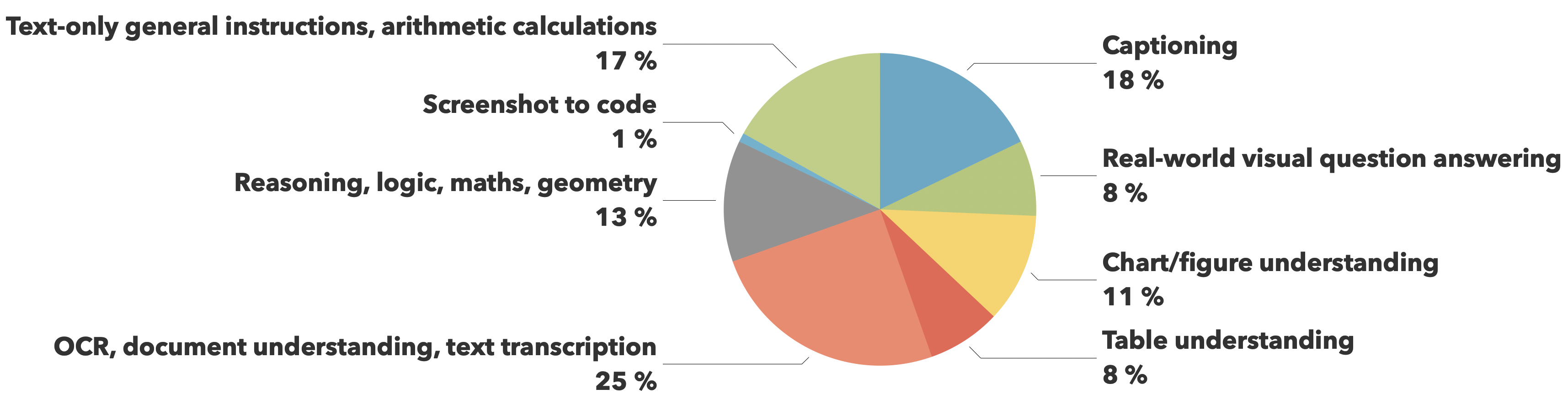
The training data comes from
The Cauldron
and
Docmatix
datasets, with emphasis on document understanding (25%) and image captioning (18%), while maintaining balanced coverage across other crucial capabilities like visual reasoning, chart comprehension, and general instruction following.
| Model | MMMU (val) | MathVista (testmini) | MMStar (val) | DocVQA (test) | TextVQA (val) | Min GPU RAM required (GB) |
|---|---|---|---|---|---|---|
| SmolVLM | 38.8 | 44.6 | 42.1 | 81.6 | 72.7 | 5.02 |
| Qwen-VL 2B | 41.1 | 47.8 | 47.5 | 90.1 | 79.7 | 13.70 |
| InternVL2 2B | 34.3 | 46.3 | 49.8 | 86.9 | 73.4 | 10.52 |
| PaliGemma 3B 448px | 34.9 | 28.7 | 48.3 | 32.2 | 56.0 | 6.72 |
| moondream2 | 32.4 | 24.3 | 40.3 | 70.5 | 65.2 | 3.87 |
| MiniCPM-V-2 | 38.2 | 39.8 | 39.1 | 71.9 | 74.1 | 7.88 |
| MM1.5 1B | 35.8 | 37.2 | 0.0 | 81.0 | 72.5 | NaN |