



Total runs:
1.3M
Run Growth:
436.9K
Growth Rate:
34.18%
This repository contains model weights and configuration files for the post-trained model in the Hugging Face Transformers format.
These artifacts are compatible with Hugging Face Transformers, vLLM, SGLang, TokenSpeed, etc.
For users seeking managed, scalable inference without infrastructure maintenance, the official Qwen API service is provided by Qwen Cloud .
In particular, Qwen3.8-Flash is the official version based on Qwen3.8-Flash-Next with more production features, e.g., 1M context length by default, official built-in tools. For more information, please refer to the Qwen3.8-Flash Overview .
As the frontier of foundation models pushes toward ever-larger parameter counts and ever-longer context windows, the question is no longer just how much we can scale, but how efficiently we can do so. Sustainable progress toward artificial general intelligence (AGI) that benefits everyone demands architectural innovation. Today, we are sharing a concrete step in that direction: Qwen3.8-Flash-Next.
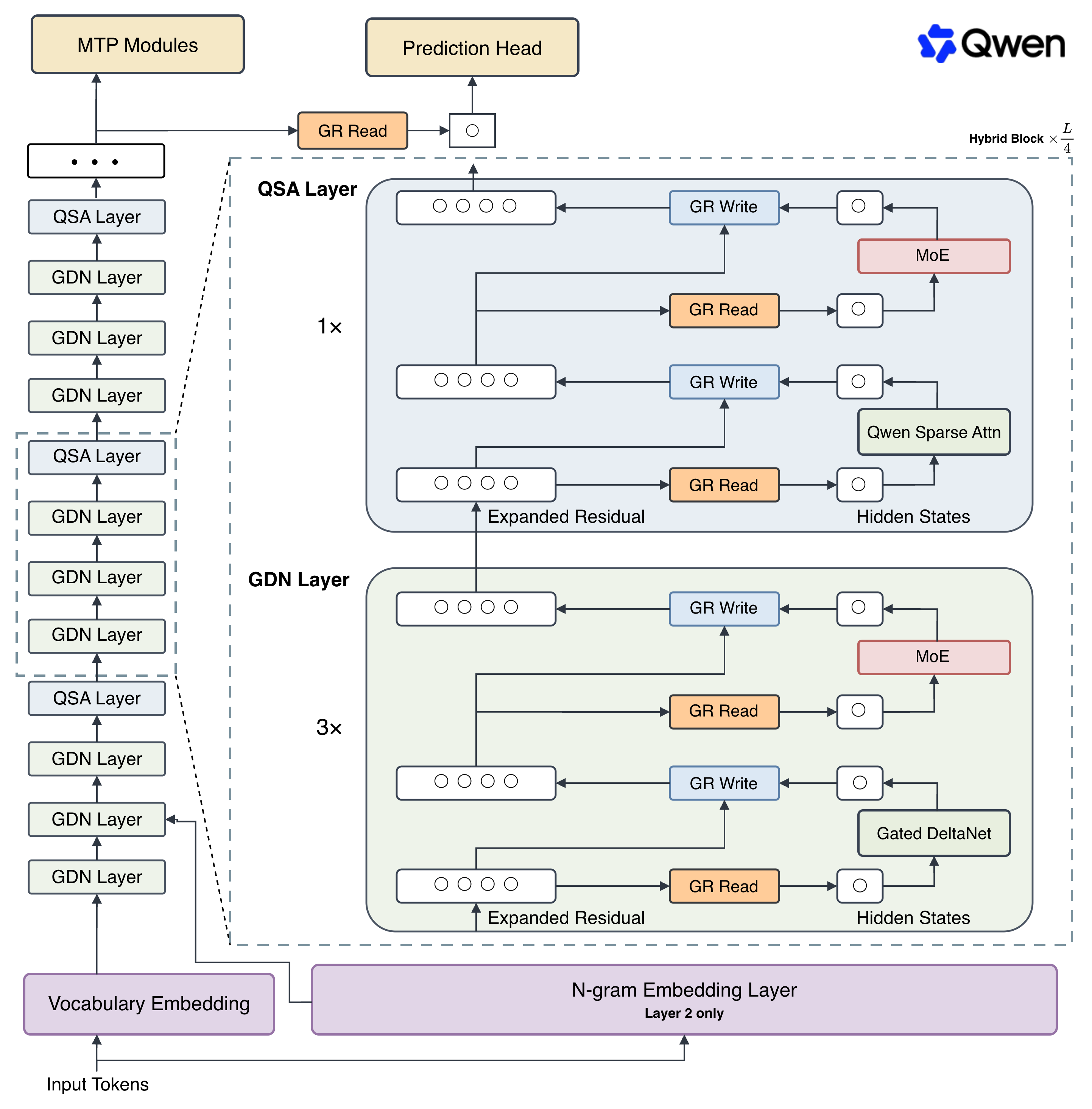
This experimental preview of the architecture that will underpin Qwen4 is built around a fundamental rethinking of how the core components of modern large language models (LLMs) interact at scale.
The first open-weight release under this architecture is Qwen3.8-Flash-Next, which introduces:
For more details, please refer to our blog post Qwen3.8-Flash-Next and the technical report .
We are excited to embark on this next chapter with you and welcome your feedback as we build what comes next.
| Qwen3.8-Flash-Next | Qwen3.8-27B | Qwen3.7-Plus | DeepSeek-V4-Flash-0731 | Claude-Opus-4.6 (Max) | |
|---|---|---|---|---|---|
|
# Params
|
125B | 27B | 397B | 284B | -- |
|
# Activated params
|
6B | 27B | 17B | 13B | -- |
|
# N-gram embedding params
|
51B | -- | -- | -- | -- |
| Coding | |||||
|
Agentic coding
DeepSWE 1.1
|
58.7 | 42.2 | 16.5 | 54.4 | -- |
|
Agentic coding
SWE-bench Pro
|
62.5 | 61.7 | 55.8 | 56.0 | 53.4 |
|
Multilingual software engineering
SWE-bench Multilingual
|
81.0 | 73.8 | 75.8 | -- | 77.5 |
|
Repo-level code generation
NL2Repo-Bench
|
48.1 | 42.3 | 41.1 | 54.2 | 47.6 |
| Agent | |||||
|
Long-horizon office work
CoWorkBench
|
73.9 | 70.7 | 65.1 | 45.1 | 68.2 |
|
Professional job tasks
JobBench
|
55.7 | 33.4 | 27.6 | 41.3 | 36.6 |
|
Frontier agentic tasks
Agents' Last Exam
|
Pass@1
24.3
Score
51.2
|
Pass@1
20.4
Score
42.9
|
Pass@1
13.2
Score
33.6
|
Pass@1
25.2
Score
--
|
-- |
|
Real-world tool use
Toolathlon Verified (Pass@1)
|
73.5 | 67.1 | 50.6 | 70.3 | -- |
| General | |||||
|
Instruction following
IFBench
|
81.3 | 79.5 | 79.1 | 79.2 | 62.5 |
|
Scientific reasoning
GPQA Diamond
|
91.7 | 89.2 | 90.3 | 90.8 | 91.3 |
|
Multidisciplinary reasoning
HLE
|
35.9 | 30.8 | 34.7 | 33.8 | 40.0 |
|
Competitive coding
LiveCodeBench v6
|
91.9 | 90.3 | 89.6 | 90.6 | 88.8 |
1. DeepSWE 1.1: evaluated with the Claude Code and mini-SWE-agent harnesses, temp=1.0, top_p=0.95, 256K context window. We report the highest score across the two harnesses; notably, Qwen3.8-Flash-Next performs best on mini-SWE-agent.
2. SWE-bench Pro: except for Claude-Opus-4.6 (Max), for which we report the officially published score, all models are evaluated with the Claude Code harness, temp=1.0, top_p=0.95, 256K context window. Problematic tasks were corrected and all baseline models were re-evaluated on the refined benchmark.
3. SWE-bench Multilingual: evaluated with the mini-SWE-agent harness, temp=1.0, top_p=0.95, 256K context window.
4. NL2Repo-Bench: evaluated with the Claude Code harness. To prevent reward hacking, we disable Bash commands that attempt to access the specific repository, such as pip download, pip install and git clone.
5. CoWorkBench: an in-house cowork benchmark for evaluating long-horizon office and productivity agent tasks across computer science, finance, law, medical and other productivity domains.
6. HLE: judged by GPT-4o.
7. The best result in each row is shown in bold.
8. Empty cells (--): scores are not yet available or are not applicable.
| Qwen3.8-Flash-Next | Qwen3.8-27B | Qwen3.7-Plus | Claude-Opus-4.6 (Max) | |
|---|---|---|---|---|
| Agentic Multimodal Intelligence | ||||
|
Multimodal tool use
ClawEval-MM
|
Pass@3
64.4
Average
60.4
|
Pass@3
57.4
Average
56.9
|
Pass@3
57.4
Average
60.1
|
Pass@3
52.5
Average
54.7
|
|
Application recreation
RecreationBench
|
49.9 | 47.1 | 30.2 | -- |
|
Mobile use
AndroidWorld
|
84.5 | 81.9 | 81.0 | 62.0 |
|
Computer use
OSWorld 2.0
|
Binary
19.4
Partial
52.3
|
Binary
19.4
Partial
48.0
|
Binary
2.8
Partial
21.5
|
-- |
|
Visual web development
Vision2Web
|
64.0 | 62.9 | 42.1 | -- |
| General Multimodal Intelligence | ||||
|
Embodied intelligence
ERQA
|
72.3 | 65.5 | 69.8 | 40.8 |
|
Long video understanding
LVBench
|
76.6 | 72.4 | 76.2 | 63.0 |
|
Real-world perception
RealWorldQA
|
88.5 | 85.9 | 86.9 | 73.9 |
|
Visual math problem solving
MathVision
|
Without CI
90.6
With CI
95.7
|
Without CI
90.0
With CI
94.6
|
Without CI
90.3
With CI
88.7
|
Without CI
65.5
|
|
Scientific chart analysis
CharXiv (RQ)
|
Without CI
84.6
With CI
90.6
|
Without CI
83.7
With CI
90.2
|
Without CI
85.8
With CI
85.9
|
Without CI
66.0
|
1. ClawEval-MM: scores are reported as "pass@3 / average score". Pass@3 measures the percentage passed in at least one of three trials, and the average score is the mean score across the three trials.
2. RecreationBench: an in-house long-horizon application-recreation benchmark for evaluating hybrid-agent abilities spanning five platforms — desktop (Ubuntu, macOS, Windows), mobile (Android) and web.
3. OSWorld 2.0: scores are reported as "binary / partial". The binary score is the percentage of tasks that receive the full task reward, while the partial score aggregates the partial rewards obtained across all tasks.
4. Vision2Web: scores are reported as the average over the frontend, webpage and website categories, using the Claude Code harness and judged by gpt-5.4-2026-03-05.
5. MathVision, CharXiv (RQ): scores are reported as "without CI / with CI". A small number of incorrect ground-truth annotations in MathVision were corrected after manual verification. Our model's score is evaluated using a fixed prompt, e.g. "Please reason step by step, and put your final answer within \boxed{}." For other models, we report the higher score between runs with and without the \boxed{} formatting.
6. The best result in each row is shown in bold.
7. Empty cells (--) indicate scores not yet available or not applicable.
For streamlined integration, we recommend using Qwen3.8-Flash-Next via APIs.
Inference efficiency and throughput vary significantly across frameworks. We recommend using the latest framework versions to ensure optimal performance and compatibility. For production workloads or high-throughput scenarios, dedicated serving engines such as SGLang, KTransformers or vLLM are strongly recommended.
Qwen3.8-Flash-Next can be deployed with popular inference frameworks, e.g.:
Qwen3.8-Flash-Next models operate in thinking mode by default, generating thinking content signified by
<think>\n...</think>\n\nbefore producing the final responses. To disable thinking content and obtain direct response, refer to the examples here .
We recommend using the following sets of sampling parameters for generation:
- Thinking Mode:
temperature=1.0,top_p=0.95,top_k=20,min_p=0.0,presence_penalty=0.0,repetition_penalty=1.0- Instruct (or non-thinking) mode:
temperature=0.7,top_p=0.80,top_k=20,min_p=0.0,presence_penalty=1.5,repetition_penalty=1.0Please note that the support for sampling parameters varies according to inference frameworks.
In multi-turn agentic tasks, lower reasoning effort does not always reduce overall task completion time. Although it may produce faster per-turn responses, it can also lead to insufficient analysis, more failures, and repeated retries, which may increase total latency and token consumption.
Qwen3.8-Flash-Next supports controlling thinking behavior via
enable_thinking
,
preserve_thinking
, and
reasoning_effort
.
The Chat Completions API can be used with most inference frameworks, as well as Qwen Cloud . Before starting, make sure it is installed and the API key and the API base URL is configured, e.g.:
pip install -U openai

# Set the following accordingly
export OPENAI_BASE_URL="http://localhost:8000/v1"
export OPENAI_API_KEY="EMPTY"
from openai import OpenAI
# Configured by environment variables
client = OpenAI()

messages = [
    {"role": "user", "content": "Write a Python function to merge two sorted linked lists."},
]

completion = client.chat.completions.create(
    model="Qwen/Qwen3.8-Flash-Next",
    messages=messages,
    extra_body={
        "chat_template_kwargs": {
            "enable_thinking": True,  # on by default
            "preserve_thinking": True, # on by default
        },
    },
    reasoning_effort="xhigh",  # xhigh by default; supported levels are xhigh, medium, and low
    stream=True,
    stream_options={"include_usage": True},
)

reasoning_content = ""
answer_content = ""
is_answering = False
print("\n" + "=" * 20 + "Reasoning" + "=" * 20 + "\n")

for chunk in completion:
    if not chunk.choices:
        print("\nUsage:")
        print(chunk.usage)
        continue

    delta = chunk.choices[0].delta

    if hasattr(delta, "reasoning_content") and delta.reasoning_content is not None:
        if not is_answering:
            print(delta.reasoning_content, end="", flush=True)
        reasoning_content += delta.reasoning_content
    elif hasattr(delta, "reasoning") and delta.reasoning is not None:
        if not is_answering:
            print(delta.reasoning, end="", flush=True)
        reasoning_content += delta.reasoning

    if hasattr(delta, "content") and delta.content:
        if not is_answering:
            print("\n" + "=" * 20 + "Answer" + "=" * 20 + "\n")
            is_answering = True
        print(delta.content, end="", flush=True)
        answer_content += delta.content

messages.append({
    "role": "assistant",
    "content": answer_content,
    "reasoning_content": reasoning_content,
    "reasoning": reasoning_content,
})
from openai import OpenAI
# Configured by environment variables
client = OpenAI()

messages = [
    {
        "role": "user",
        "content": [
            {
                "type": "image_url",
                "image_url": {
                    "url": "https://qianwen-res.oss-accelerate.aliyuncs.com/Qwen3.5/demo/CI_Demo/mathv-1327.jpg"
                }
            },
            {
                "type": "text",
                "text": "The centres of the four illustrated circles are in the corners of the square. The two big circles touch each other and also the two little circles. With which factor do you have to multiply the radii of the little circles to obtain the radius of the big circles?\nChoices:\n(A) $\\frac{2}{9}$\n(B) $\\sqrt{5}$\n(C) $0.8 \\cdot \\pi$\n(D) 2.5\n(E) $1+\\sqrt{2}$"
            }
        ]
    }
]

chat_response = client.chat.completions.create(
    model="Qwen/Qwen3.8-Flash-Next",
    messages=messages,
)
print("Chat response:", chat_response)
from openai import OpenAI
# Configured by environment variables
client = OpenAI()

messages = [
    {
        "role": "user",
        "content": [
            {
                "type": "video_url",
                "video_url": {
                    "url": "https://qianwen-res.oss-accelerate.aliyuncs.com/Qwen3.5/demo/video/N1cdUjctpG8.mp4"
                }
            },
            {
                "type": "text",
                "text": "How many porcelain jars were discovered in the niches located in the primary chamber of the tomb?"
            }
        ]
    }
]

chat_response = client.chat.completions.create(
    model="Qwen/Qwen3.8-Flash-Next",
    messages=messages,
)

# When vLLM is launched with `--media-io-kwargs '{"video": {"num_frames": -1}}'`,
# video frame sampling can be configured via `extra_body` (e.g., by setting `fps`).
# This feature is currently supported only in vLLM.
#
# By default, `fps=2` and `do_sample_frames=True`.
# With `do_sample_frames=True`, you can customize the `fps` value to set your desired video sampling rate.
# chat_response = client.chat.completions.create(
#     model="Qwen/Qwen3.8-Flash-Next",
#     messages=messages,
#     extra_body={
#         "mm_processor_kwargs": {"fps": 2, "do_sample_frames": True},
#     },
# )

print("Chat response:", chat_response)
Qwen3.8-Flash-Next will think by default before responding. You can obtain a direct response from the model without thinking by configuring the API parameters. For example,
from openai import OpenAI
# Configured by environment variables
client = OpenAI()

messages = [
    {
        "role": "user",
        "content": [
            {
                "type": "image_url",
                "image_url": {
                    "url": "https://qianwen-res.oss-accelerate.aliyuncs.com/Qwen3.5/demo/RealWorld/RealWorld-04.png"
                }
            },
            {
                "type": "text",
                "text": "Where is this?"
            }
        ]
    }
]

chat_response = client.chat.completions.create(
    model="Qwen/Qwen3.8-Flash-Next",
    messages=messages,
    temperature=0.7,
    top_p=0.8,
    presence_penalty=1.5,
    extra_body={
        "top_k": 20,
        "chat_template_kwargs": {"enable_thinking": False},
    },
)
print("Chat response:", chat_response)
If you are using APIs from Qwen Cloud, in addition to changing
model, please use"enable_thinking": Falseinstead of"chat_template_kwargs": {"enable_thinking": False}.
By default, Qwen3.8-Flash-Next retains thinking blocks from all historical messages, maintaining a complete reasoning trace across the conversation. This behavior, known as preserved thinking, ensures full context continuity and is especially beneficial for agent scenarios where decision consistency and reduced redundant reasoning are critical. It also improves KV cache utilization, optimizing inference efficiency in both thinking and non-thinking modes.
If you prefer to retain only the thinking blocks from the latest user message, you can disable this behavior by setting
preserve_thinking
to
False
:
from openai import OpenAI

# Configured by environment variables
client = OpenAI()
messages = [...]
chat_response = client.chat.completions.create(
    model="Qwen/Qwen3.8-Flash-Next",
    messages=messages,
    extra_body={
        "chat_template_kwargs": {"preserve_thinking": False},
    },
)
print("Chat response:", chat_response)
If you are using APIs from Qwen Cloud, in addition to changing
model, please use"preserve_thinking": Falsedirectly instead of wrapping it inchat_template_kwargs.
To achieve optimal performance, we recommend the following settings:
Sampling Parameters : We suggest using the following sets of sampling parameters:
temperature=1.0
,
top_p=0.95
,
top_k=20
,
min_p=0.0
,
presence_penalty=0.0
,
repetition_penalty=1.0
temperature=0.7
,
top_p=0.80
,
top_k=20
,
min_p=0.0
,
presence_penalty=1.5
,
repetition_penalty=1.0
For supported frameworks, you can adjust the
presence_penalty
parameter between 0 and 2 to reduce endless repetition. However, using a higher value may occasionally result in language mixing and a slight decrease in model performance.
Adequate Output Length : To optimize performance on agentic tasks, we recommend allocating sufficient output length to allow the model to generate detailed and comprehensive responses. For frameworks that support separate token limits for internal reasoning and final outputs, we suggest the following configuration within the 1M context length:
These settings provide the necessary capacity for complex reasoning while ensuring ample space for high-quality final deliverables.
Processing Ultra-Long Texts : Qwen3.8-Flash-Next natively supports context lengths of up to 262,144 tokens. For long-horizon tasks where the total length (including both input and output) exceeds this limit, we recommend using RoPE scaling techniques to handle long texts effectively, e.g., YaRN.
YaRN is currently supported by several inference frameworks, e.g., vLLM, SGLang, and TokenSpeed. In general, there are two approaches to enabling YaRN for supported frameworks:
Modifying the model configuration file:
In the
config.json
file, change the
rope_parameters
fields in
text_config
to:
{
    "mrope_interleaved": true,
    "mrope_section": [
        11,
        11,
        10
    ],
    "rope_type": "yarn",
    "rope_theta": 10000000,
    "partial_rotary_factor": 0.25,
    "factor": 4.0,
    "original_max_position_embeddings": 262144
}
Passing command line arguments:
For vLLM, you can use
VLLM_ALLOW_LONG_MAX_MODEL_LEN=1 vllm serve ... --hf-overrides '{"text_config": {"rope_parameters": {"mrope_interleaved": true, "mrope_section": [11, 11, 10], "rope_type": "yarn", "rope_theta": 10000000, "partial_rotary_factor": 0.25, "factor": 4.0, "original_max_position_embeddings": 262144}}}' --max-model-len 1000000
For SGLang, you can use
SGLANG_ALLOW_OVERWRITE_LONGER_CONTEXT_LEN=1 python -m sglang.launch_server ... --json-model-override-args '{"text_config": {"rope_parameters": {"mrope_interleaved": true, "mrope_section": [11, 11, 10], "rope_type": "yarn", "rope_theta": 10000000, "partial_rotary_factor": 0.25, "factor": 4.0, "original_max_position_embeddings": 262144}}}' --context-length 1000000
For TokenSpeed, you can use
TOKENSPEED_ALLOW_OVERWRITE_LONGER_CONTEXT_LEN=1 tokenspeed serve ... --hf-overrides '{"text_config": {"rope_parameters": {"mrope_interleaved": true, "mrope_section": [11, 11, 10], "rope_type": "yarn", "rope_theta": 10000000, "partial_rotary_factor": 0.25, "factor": 4.0, "original_max_position_embeddings": 262144}}}' --max-model-len 1000000
All the notable open-source frameworks implement static YaRN, which means the scaling factor remains constant regardless of input length, potentially impacting performance on shorter texts. We advise modifying the
rope_parametersconfiguration only when processing long contexts is required. It is also recommended to modify thefactoras needed. For example, if the typical context length for your application is 524,288 tokens, it would be better to setfactoras 2.0.
Long Video Understanding
: To optimize inference efficiency for plain text and images, the
size
parameter in the released
video_preprocessor_config.json
is conservatively configured. It is recommended to set the
longest_edge
parameter in the video_preprocessor_config file to 469,762,048 (corresponding to 224k video tokens) to enable higher frame-rate sampling for hour-scale videos and thereby achieve superior performance. For example,
{"longest_edge": 469762048, "shortest_edge": 4096}
Alternatively, override the default values via engine startup parameters. For implementation details, refer to: vLLM / SGLang .
If you find our work helpful, feel free to give us a cite.
@techreport{qwen2026design,
    title       = {On the Design of {Qwen3.8-Next} Architecture: Evaluation, Efficiency, and Training Stability},
    author      = {{Qwen Team}},
    institution = {Alibaba Group},
    month       = {August},
    year        = {2026}
}

@misc{qwen3.8flashnext,
    title  = {{Qwen3.8-Flash-Next}: A New Architecture, Towards Ultimate Cost-Efficiency},
    author = {{Qwen Team}},
    month  = {August},
    year   = {2026},
    url    = {https://qwen.ai/blog?id=qwen3.8-flash-next}
}