




Total runs:
5.5M
Run Growth:
885.2K
Growth Rate:
16.22%
This Hub repository contains a HuggingFace's
transformers
implementation of
the original Kosmos-2 model
from Microsoft.
Use the code below to get started with the model.
import requests

from PIL import Image
from transformers import AutoProcessor, AutoModelForVision2Seq


model = AutoModelForVision2Seq.from_pretrained("microsoft/kosmos-2-patch14-224")
processor = AutoProcessor.from_pretrained("microsoft/kosmos-2-patch14-224")

prompt = "<grounding>An image of"

url = "https://huggingface.co/microsoft/kosmos-2-patch14-224/resolve/main/snowman.png"
image = Image.open(requests.get(url, stream=True).raw)

# The original Kosmos-2 demo saves the image first then reload it. For some images, this will give slightly different image input and change the generation outputs.
image.save("new_image.jpg")
image = Image.open("new_image.jpg")

inputs = processor(text=prompt, images=image, return_tensors="pt")

generated_ids = model.generate(
    pixel_values=inputs["pixel_values"],
    input_ids=inputs["input_ids"],
    attention_mask=inputs["attention_mask"],
    image_embeds=None,
    image_embeds_position_mask=inputs["image_embeds_position_mask"],
    use_cache=True,
    max_new_tokens=128,
)
generated_text = processor.batch_decode(generated_ids, skip_special_tokens=True)[0]

# Specify `cleanup_and_extract=False` in order to see the raw model generation.
processed_text = processor.post_process_generation(generated_text, cleanup_and_extract=False)

print(processed_text)
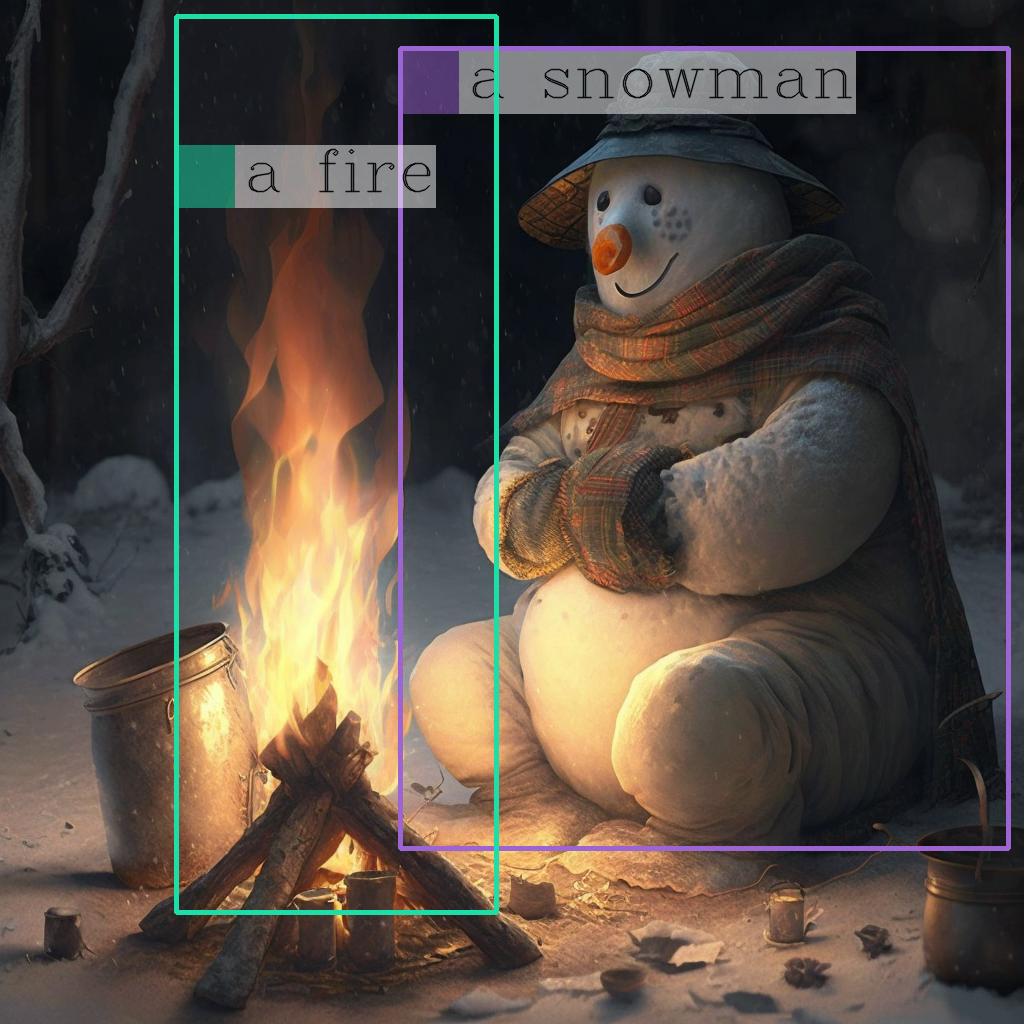
# `<grounding> An image of<phrase> a snowman</phrase><object><patch_index_0044><patch_index_0863></object> warming himself by<phrase> a fire</phrase><object><patch_index_0005><patch_index_0911></object>.`

# By default, the generated  text is cleanup and the entities are extracted.
processed_text, entities = processor.post_process_generation(generated_text)

print(processed_text)
# `An image of a snowman warming himself by a fire.`

print(entities)
# `[('a snowman', (12, 21), [(0.390625, 0.046875, 0.984375, 0.828125)]), ('a fire', (41, 47), [(0.171875, 0.015625, 0.484375, 0.890625)])]`
This model is capable of performing different tasks through changing the prompts.
First, let's define a function to run a prompt.
import requests

from PIL import Image
from transformers import AutoProcessor, AutoModelForVision2Seq


model = AutoModelForVision2Seq.from_pretrained("microsoft/kosmos-2-patch14-224")
processor = AutoProcessor.from_pretrained("microsoft/kosmos-2-patch14-224")

url = "https://huggingface.co/microsoft/kosmos-2-patch14-224/resolve/main/snowman.png"
image = Image.open(requests.get(url, stream=True).raw)

def run_example(prompt):

    inputs = processor(text=prompt, images=image, return_tensors="pt")
    generated_ids = model.generate(
      pixel_values=inputs["pixel_values"],
      input_ids=inputs["input_ids"],
      attention_mask=inputs["attention_mask"],
      image_embeds=None,
      image_embeds_position_mask=inputs["image_embeds_position_mask"],
      use_cache=True,
      max_new_tokens=128,
    )
    generated_text = processor.batch_decode(generated_ids, skip_special_tokens=True)[0]
    _processed_text = processor.post_process_generation(generated_text, cleanup_and_extract=False)
    processed_text, entities = processor.post_process_generation(generated_text)

    print(processed_text)
    print(entities)
    print(_processed_text)
Here are the tasks
Kosmos-2
could perform:
prompt = "<grounding><phrase> a snowman</phrase>"
run_example(prompt)

# a snowman is warming himself by the fire
# [('a snowman', (0, 9), [(0.390625, 0.046875, 0.984375, 0.828125)]), ('the fire', (32, 40), [(0.203125, 0.015625, 0.453125, 0.859375)])]

# <grounding><phrase> a snowman</phrase><object><patch_index_0044><patch_index_0863></object> is warming himself by<phrase> the fire</phrase><object><patch_index_0006><patch_index_0878></object>
prompt = "<grounding><phrase> a snowman next to a fire</phrase>"
run_example(prompt)

# a snowman next to a fire
# [('a snowman next to a fire', (0, 24), [(0.390625, 0.046875, 0.984375, 0.828125)])]

# <grounding><phrase> a snowman next to a fire</phrase><object><patch_index_0044><patch_index_0863></object>
prompt = "<grounding><phrase> It</phrase><object><patch_index_0044><patch_index_0863></object> is"
run_example(prompt)

# It is snowman in a hat and scarf
# [('It', (0, 2), [(0.390625, 0.046875, 0.984375, 0.828125)])]

# <grounding><phrase> It</phrase><object><patch_index_0044><patch_index_0863></object> is snowman in a hat and scarf
prompt = "<grounding> Question: What is special about this image? Answer:"
run_example(prompt)

# Question: What is special about this image? Answer: The image features a snowman sitting by a campfire in the snow.
# [('a snowman', (71, 80), [(0.390625, 0.046875, 0.984375, 0.828125)]), ('a campfire', (92, 102), [(0.109375, 0.640625, 0.546875, 0.984375)])]

# <grounding> Question: What is special about this image? Answer: The image features<phrase> a snowman</phrase><object><patch_index_0044><patch_index_0863></object> sitting by<phrase> a campfire</phrase><object><patch_index_0643><patch_index_1009></object> in the snow.
prompt = "<grounding> Question: Where is<phrase> the fire</phrase><object><patch_index_0005><patch_index_0911></object> next to? Answer:"
run_example(prompt)

# Question: Where is the fire next to? Answer: Near the snowman.
# [('the fire', (19, 27), [(0.171875, 0.015625, 0.484375, 0.890625)]), ('the snowman', (50, 61), [(0.390625, 0.046875, 0.984375, 0.828125)])]

# <grounding> Question: Where is<phrase> the fire</phrase><object><patch_index_0005><patch_index_0911></object> next to? Answer: Near<phrase> the snowman</phrase><object><patch_index_0044><patch_index_0863></object>.
prompt = "<grounding> An image of"
run_example(prompt)

# An image of a snowman warming himself by a campfire.
# [('a snowman', (12, 21), [(0.390625, 0.046875, 0.984375, 0.828125)]), ('a campfire', (41, 51), [(0.109375, 0.640625, 0.546875, 0.984375)])]

# <grounding> An image of<phrase> a snowman</phrase><object><patch_index_0044><patch_index_0863></object> warming himself by<phrase> a campfire</phrase><object><patch_index_0643><patch_index_1009></object>.
prompt = "<grounding> Describe this image in detail:"
run_example(prompt)

# Describe this image in detail: The image features a snowman sitting by a campfire in the snow. He is wearing a hat, scarf, and gloves, with a pot nearby and a cup nearby. The snowman appears to be enjoying the warmth of the fire, and it appears to have a warm and cozy atmosphere.
# [('a campfire', (71, 81), [(0.171875, 0.015625, 0.484375, 0.984375)]), ('a hat', (109, 114), [(0.515625, 0.046875, 0.828125, 0.234375)]), ('scarf', (116, 121), [(0.515625, 0.234375, 0.890625, 0.578125)]), ('gloves', (127, 133), [(0.515625, 0.390625, 0.640625, 0.515625)]), ('a pot', (140, 145), [(0.078125, 0.609375, 0.265625, 0.859375)]), ('a cup', (157, 162), [(0.890625, 0.765625, 0.984375, 0.984375)])]

# <grounding> Describe this image in detail: The image features a snowman sitting by<phrase> a campfire</phrase><object><patch_index_0005><patch_index_1007></object> in the snow. He is wearing<phrase> a hat</phrase><object><patch_index_0048><patch_index_0250></object>,<phrase> scarf</phrase><object><patch_index_0240><patch_index_0604></object>, and<phrase> gloves</phrase><object><patch_index_0400><patch_index_0532></object>, with<phrase> a pot</phrase><object><patch_index_0610><patch_index_0872></object> nearby and<phrase> a cup</phrase><object><patch_index_0796><patch_index_1023></object> nearby. The snowman appears to be enjoying the warmth of the fire, and it appears to have a warm and cozy atmosphere.
Once you have the
entities
, you can use the following helper function to draw their bounding bboxes on the image:
import cv2
import numpy as np
import os
import requests
import torch
import torchvision.transforms as T

from PIL import Image


def is_overlapping(rect1, rect2):
    x1, y1, x2, y2 = rect1
    x3, y3, x4, y4 = rect2
    return not (x2 < x3 or x1 > x4 or y2 < y3 or y1 > y4)


def draw_entity_boxes_on_image(image, entities, show=False, save_path=None):
    """_summary_
    Args:
        image (_type_): image or image path
        collect_entity_location (_type_): _description_
    """
    if isinstance(image, Image.Image):
        image_h = image.height
        image_w = image.width
        image = np.array(image)[:, :, [2, 1, 0]]
    elif isinstance(image, str):
        if os.path.exists(image):
            pil_img = Image.open(image).convert("RGB")
            image = np.array(pil_img)[:, :, [2, 1, 0]]
            image_h = pil_img.height
            image_w = pil_img.width
        else:
            raise ValueError(f"invaild image path, {image}")
    elif isinstance(image, torch.Tensor):
        image_tensor = image.cpu()
        reverse_norm_mean = torch.tensor([0.48145466, 0.4578275, 0.40821073])[:, None, None]
        reverse_norm_std = torch.tensor([0.26862954, 0.26130258, 0.27577711])[:, None, None]
        image_tensor = image_tensor * reverse_norm_std + reverse_norm_mean
        pil_img = T.ToPILImage()(image_tensor)
        image_h = pil_img.height
        image_w = pil_img.width
        image = np.array(pil_img)[:, :, [2, 1, 0]]
    else:
        raise ValueError(f"invaild image format, {type(image)} for {image}")

    if len(entities) == 0:
        return image

    new_image = image.copy()
    previous_bboxes = []
    # size of text
    text_size = 1
    # thickness of text
    text_line = 1  # int(max(1 * min(image_h, image_w) / 512, 1))
    box_line = 3
    (c_width, text_height), _ = cv2.getTextSize("F", cv2.FONT_HERSHEY_COMPLEX, text_size, text_line)
    base_height = int(text_height * 0.675)
    text_offset_original = text_height - base_height
    text_spaces = 3

    for entity_name, (start, end), bboxes in entities:
        for (x1_norm, y1_norm, x2_norm, y2_norm) in bboxes:
            orig_x1, orig_y1, orig_x2, orig_y2 = int(x1_norm * image_w), int(y1_norm * image_h), int(x2_norm * image_w), int(y2_norm * image_h)
            # draw bbox
            # random color
            color = tuple(np.random.randint(0, 255, size=3).tolist())
            new_image = cv2.rectangle(new_image, (orig_x1, orig_y1), (orig_x2, orig_y2), color, box_line)

            l_o, r_o = box_line // 2 + box_line % 2, box_line // 2 + box_line % 2 + 1

            x1 = orig_x1 - l_o
            y1 = orig_y1 - l_o

            if y1 < text_height + text_offset_original + 2 * text_spaces:
                y1 = orig_y1 + r_o + text_height + text_offset_original + 2 * text_spaces
                x1 = orig_x1 + r_o

            # add text background
            (text_width, text_height), _ = cv2.getTextSize(f"  {entity_name}", cv2.FONT_HERSHEY_COMPLEX, text_size, text_line)
            text_bg_x1, text_bg_y1, text_bg_x2, text_bg_y2 = x1, y1 - (text_height + text_offset_original + 2 * text_spaces), x1 + text_width, y1

            for prev_bbox in previous_bboxes:
                while is_overlapping((text_bg_x1, text_bg_y1, text_bg_x2, text_bg_y2), prev_bbox):
                    text_bg_y1 += (text_height + text_offset_original + 2 * text_spaces)
                    text_bg_y2 += (text_height + text_offset_original + 2 * text_spaces)
                    y1 += (text_height + text_offset_original + 2 * text_spaces)

                    if text_bg_y2 >= image_h:
                        text_bg_y1 = max(0, image_h - (text_height + text_offset_original + 2 * text_spaces))
                        text_bg_y2 = image_h
                        y1 = image_h
                        break

            alpha = 0.5
            for i in range(text_bg_y1, text_bg_y2):
                for j in range(text_bg_x1, text_bg_x2):
                    if i < image_h and j < image_w:
                        if j < text_bg_x1 + 1.35 * c_width:
                            # original color
                            bg_color = color
                        else:
                            # white
                            bg_color = [255, 255, 255]
                        new_image[i, j] = (alpha * new_image[i, j] + (1 - alpha) * np.array(bg_color)).astype(np.uint8)

            cv2.putText(
                new_image, f"  {entity_name}", (x1, y1 - text_offset_original - 1 * text_spaces), cv2.FONT_HERSHEY_COMPLEX, text_size, (0, 0, 0), text_line, cv2.LINE_AA
            )
            # previous_locations.append((x1, y1))
            previous_bboxes.append((text_bg_x1, text_bg_y1, text_bg_x2, text_bg_y2))

    pil_image = Image.fromarray(new_image[:, :, [2, 1, 0]])
    if save_path:
        pil_image.save(save_path)
    if show:
        pil_image.show()

    return new_image


# (The same image from the previous code example)
url = "https://huggingface.co/microsoft/kosmos-2-patch14-224/resolve/main/snowman.png"
image = Image.open(requests.get(url, stream=True).raw)

# From the previous code example
entities = [('a snowman', (12, 21), [(0.390625, 0.046875, 0.984375, 0.828125)]), ('a fire', (41, 47), [(0.171875, 0.015625, 0.484375, 0.890625)])]

# Draw the bounding bboxes
draw_entity_boxes_on_image(image, entities, show=True)
Here is the annotated image:
@article{kosmos-2,
  title={Kosmos-2: Grounding Multimodal Large Language Models to the World},
  author={Zhiliang Peng and Wenhui Wang and Li Dong and Yaru Hao and Shaohan Huang and Shuming Ma and Furu Wei},
  journal={ArXiv},
  year={2023},
  volume={abs/2306}
}

@article{kosmos-1,
  title={Language Is Not All You Need: Aligning Perception with Language Models},
  author={Shaohan Huang and Li Dong and Wenhui Wang and Yaru Hao and Saksham Singhal and Shuming Ma and Tengchao Lv and Lei Cui and Owais Khan Mohammed and Qiang Liu and Kriti Aggarwal and Zewen Chi and Johan Bjorck and Vishrav Chaudhary and Subhojit Som and Xia Song and Furu Wei},
  journal={ArXiv},
  year={2023},
  volume={abs/2302.14045}
}

@article{metalm,
  title={Language Models are General-Purpose Interfaces},
  author={Yaru Hao and Haoyu Song and Li Dong and Shaohan Huang and Zewen Chi and Wenhui Wang and Shuming Ma and Furu Wei},
  journal={ArXiv},
  year={2022},
  volume={abs/2206.06336}
}