
photo of a woman in a movie theatre, curled up in her chair, in a cashmere sweater, black rim glasses, eating popcorn and a soda, laughing, award winning photo, projector light above her , light brown hair
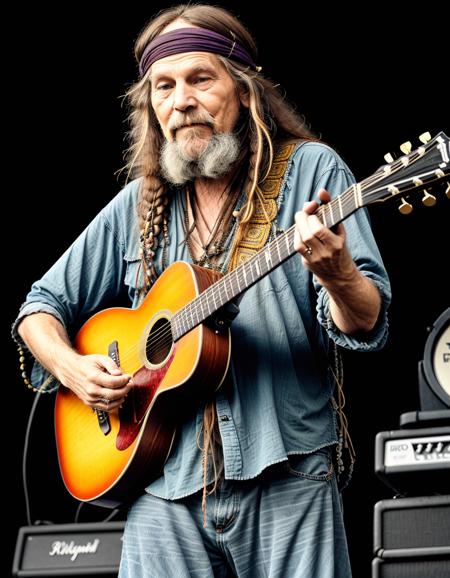
photo of a hippie man playing guitar, award winning photo
Negative Prompt
blurry, low quality, nude, too many hands, cartoon, cgi, render, illustration, painting, drawing, bad quality, grainy, low resolution
Prompt
photo of a hippie man playing guitar, award winning photo
Negative Prompt
blurry, low quality, nude, too many hands, cartoon, cgi, render, illustration, painting, drawing, bad quality, grainy, low resolution
Model description
weight:
-5.0 to 5.0
positive:
warmer colors
(orange)
negative:
cooler colors
(blue)
Yeah, you could just do some post processing. Sure. But why solve the problem with a tiny mallet when you can hit it with a giant sledgehammer?
I find some models have to many warm tones. Sometimes when I am inpainting or outpainting, the model struggles with color temperatures beyond its median. Some loras have side effects of making colors warmer and cooler. This is made to combat that without having to do post processing. It is also a new method I am working on for training these, so this was more of an experiment than anything else.
If you like my work, a kind review is always appreciated.
Download model
Weights for this model are available in Safetensors format.
from diffusers import AutoPipelineForText2Image
import torch
pipeline = AutoPipelineForText2Image.from_pretrained('runwayml/stable-diffusion-v1-5', torch_dtype=torch.float16).to('cuda')
pipeline.load_lora_weights('ostris/color-temperature-slider-lora', weight_name='color_temperature_slider_v1.safetensors')
image = pipeline('photo of a hippie man playing guitar, award winning photo ').images[0]
color-temperature-slider-lora huggingface.co is an AI model on huggingface.co that provides color-temperature-slider-lora's model effect (), which can be used instantly with this ostris color-temperature-slider-lora model. huggingface.co supports a free trial of the color-temperature-slider-lora model, and also provides paid use of the color-temperature-slider-lora. Support call color-temperature-slider-lora model through api, including Node.js, Python, http.
color-temperature-slider-lora huggingface.co is an online trial and call api platform, which integrates color-temperature-slider-lora's modeling effects, including api services, and provides a free online trial of color-temperature-slider-lora, you can try color-temperature-slider-lora online for free by clicking the link below.
ostris color-temperature-slider-lora online free url in huggingface.co:
color-temperature-slider-lora is an open source model from GitHub that offers a free installation service, and any user can find color-temperature-slider-lora on GitHub to install. At the same time, huggingface.co provides the effect of color-temperature-slider-lora install, users can directly use color-temperature-slider-lora installed effect in huggingface.co for debugging and trial. It also supports api for free installation.
color-temperature-slider-lora install url in huggingface.co: