




Sponsored by
ThumbnailCreator.com
osunlp / InstructPix2Pix-MagicBrush
Model's Last Updated: November 08 2023
Introduction of InstructPix2Pix-MagicBrush
Model Details of InstructPix2Pix-MagicBrush
InstructPix2Pix checkpoint fine-tuned on MagicBrush .
1. Env Setup
To use the InstructPix2Pix checkpoint fine-tuned on MagicBrush, set up env with following command:
git clone https://github.com/timothybrooks/instruct-pix2pix.git
cd instruct-pix2pix
mkdir checkpoints
Download this checkpoint into
checkpoints
folder via
cd checkpoints
# recent best checkpoint:
wget https://huggingface.co/osunlp/InstructPix2Pix-MagicBrush/resolve/main/MagicBrush-epoch-52-step-4999.ckpt
# checkpoint in the paper
# wget https://huggingface.co/osunlp/InstructPix2Pix-MagicBrush/resolve/main/MagicBrush-epoch-000168.ckpt
Then go back to the root folder and set up the running env following the InstructPix2Pix guidelines.
2. Launch
Edit a single image:
python edit_cli.py --input [YOUR_IMG_PATH] --output imgs/output.jpg --edit "EDIT INSTRUCTION" --ckpt checkpoints/MagicBrush-epoch-52-step-4999.ckpt

# Our model is fine-tuned for fine-grained real image editing. Therefore, it may not perform well on style transfer or other editings on large region.
# e.g. python edit_cli.py --input imgs/example.jpg --output imgs/output.jpg --edit "let him wear a pair of sun glasses" --ckpt checkpoints/MagicBrush-epoch-52-step-4999.ckpt
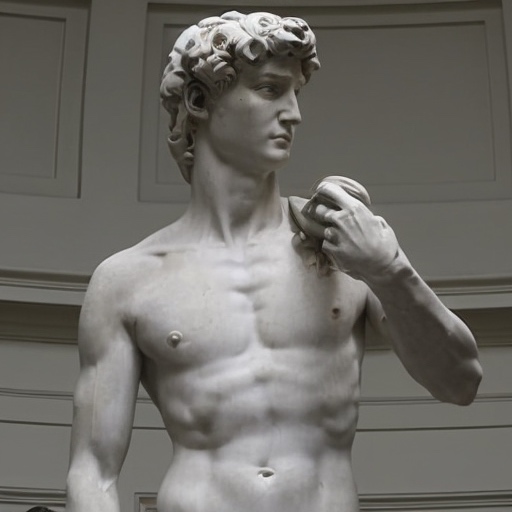
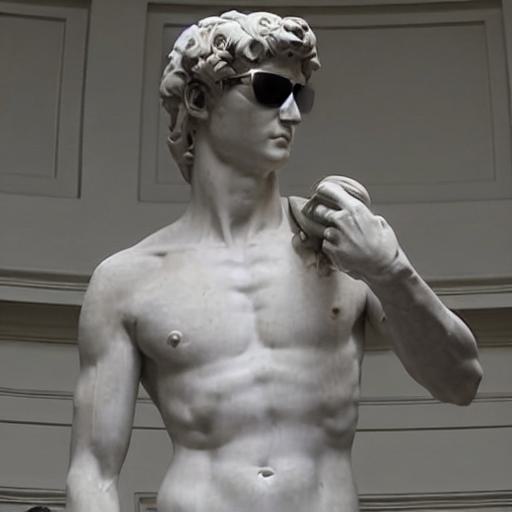
Run the interactive editing Gradio app:
python edit_app.py --ckpt checkpoints/MagicBrush-epoch-52-step-4999.ckpt
Citation
If you find this checkpoint useful, please consider citing our paper:
@inproceedings{Zhang2023MagicBrush,
        title={MagicBrush: A Manually Annotated Dataset for Instruction-Guided Image Editing},
        author={Kai Zhang and Lingbo Mo and Wenhu Chen and Huan Sun and Yu Su},
        booktitle={Advances in Neural Information Processing Systems},
        year={2023}
}
And prior work:
@InProceedings{brooks2022instructpix2pix,
    author     = {Brooks, Tim and Holynski, Aleksander and Efros, Alexei A.},
    title      = {InstructPix2Pix: Learning to Follow Image Editing Instructions},
    booktitle  = {CVPR},
    year       = {2023},
}
Runs of osunlp InstructPix2Pix-MagicBrush on huggingface.co
0
Total runs
0
24-hour runs
0
3-day runs
0
7-day runs
0
30-day runs
More Information About InstructPix2Pix-MagicBrush huggingface.co Model
Url of InstructPix2Pix-MagicBrush
InstructPix2Pix-MagicBrush huggingface.co Url
Provider of InstructPix2Pix-MagicBrush huggingface.co
Other API from osunlp
Total runs:
374
Run Growth:
204
Growth Rate:
54.55%
Total runs:
347
Run Growth:
-382
Growth Rate:
-112.35%
Total runs:
275
Run Growth:
220
Growth Rate:
82.40%
Total runs:
108
Run Growth:
87
Growth Rate:
80.56%
Total runs:
33
Run Growth:
3
Growth Rate:
9.09%
Total runs:
28
Run Growth:
9
Growth Rate:
32.14%
Total runs:
17
Run Growth:
14
Growth Rate:
82.35%
Total runs:
16
Run Growth:
-59
Growth Rate:
-368.75%
Total runs:
16
Run Growth:
3
Growth Rate:
18.75%
Total runs:
15
Run Growth:
11
Growth Rate:
73.33%
Total runs:
13
Run Growth:
8
Growth Rate:
61.54%
Total runs:
12
Run Growth:
2
Growth Rate:
16.67%
Total runs:
12
Run Growth:
-35
Growth Rate:
-291.67%
Total runs:
12
Run Growth:
-2
Growth Rate:
-16.67%
Total runs:
10
Run Growth:
-2
Growth Rate:
-20.00%
Total runs:
10
Run Growth:
6
Growth Rate:
60.00%
Total runs:
10
Run Growth:
3
Growth Rate:
30.00%
Total runs:
10
Run Growth:
5
Growth Rate:
50.00%
Total runs:
9
Run Growth:
6
Growth Rate:
66.67%
Total runs:
8
Run Growth:
5
Growth Rate:
62.50%
Total runs:
8
Run Growth:
5
Growth Rate:
62.50%
Total runs:
7
Run Growth:
4
Growth Rate:
57.14%
Total runs:
7
Run Growth:
4
Growth Rate:
57.14%
Total runs:
6
Run Growth:
5
Growth Rate:
83.33%
Total runs:
6
Run Growth:
2
Growth Rate:
33.33%
Total runs:
6
Run Growth:
3
Growth Rate:
50.00%
Total runs:
3
Run Growth:
0
Growth Rate:
0.00%
Total runs:
3
Run Growth:
-11
Growth Rate:
-366.67%
Total runs:
1
Run Growth:
-5
Growth Rate:
-500.00%
Total runs:
0
Run Growth:
0
Growth Rate:
0.00%
Total runs:
0
Run Growth:
0
Growth Rate:
0.00%
Total runs:
0
Run Growth:
0
Growth Rate:
0.00%
Total runs:
0
Run Growth:
0
Growth Rate:
0.00%
Total runs:
0
Run Growth:
0
Growth Rate:
0.00%
Total runs:
0
Run Growth:
0
Growth Rate:
0.00%
Total runs:
0
Run Growth:
0
Growth Rate:
0.00%
Total runs:
0
Run Growth:
0
Growth Rate:
0.00%
Total runs:
0
Run Growth:
0
Growth Rate:
0.00%
Total runs:
0
Run Growth:
0
Growth Rate:
0.00%
Total runs:
0
Run Growth:
-23
Growth Rate:
0.00%
Total runs:
0
Run Growth:
0
Growth Rate:
0.00%