



Total runs:
736
Run Growth:
516
Growth Rate:
70.11%

Official release of SeedVR2 for ComfyUI that enables Upscale Video/Images generation.
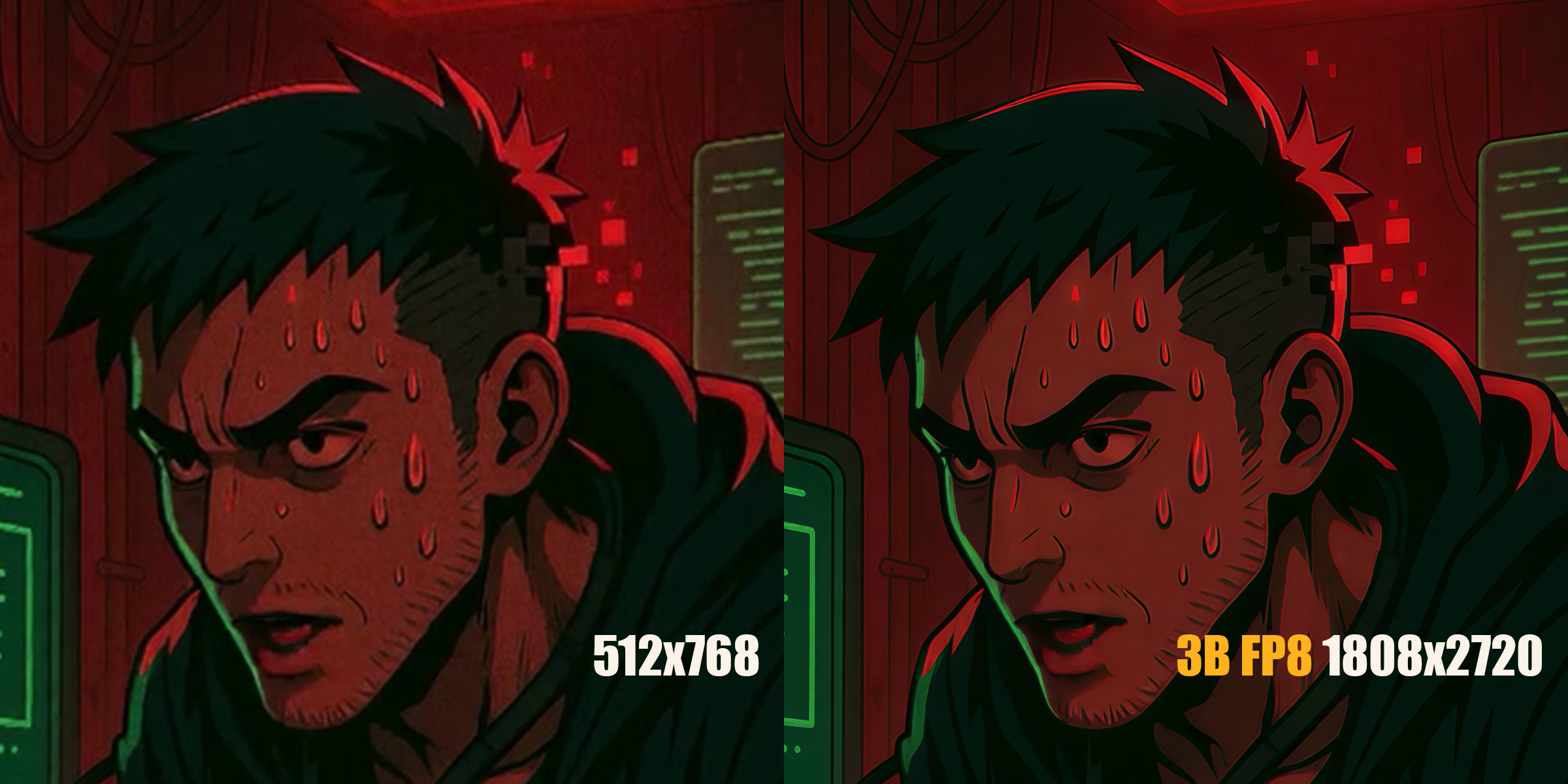


2025.06.30
2025.06.24
2025.06.22
2025.06.20
cd ComfyUI/custom_nodes
git clone https://github.com/numz/ComfyUI-SeedVR2_VideoUpscaler.git
load venv and :
pip install -r ComfyUI-SeedVR2_VideoUpscaler/requirements.txt
install flash_attn/triton, 6% faster on process, not a mandatory.
pip install flash_attn
pip install triton
or
python_embeded\python.exe -m pip install -r flash_attn
check here from https://github.com/loscrossos/lib_flashattention/releases and https://github.com/woct0rdho/triton-windows
Models
Will be automtically download into :
models/SEEDVR2
or can be found here ( MODELS )

temporal consistency : at least a batch_size of 5 is required to activate temporal consistency. SEEDVR2 need at least 5 frames to calculate it. A higher batch_size give better performances/results but need more than 24GB VRAM.
VRAM usage : The input video resolution impacts VRAM consumption during the process. The larger the input video, the more VRAM will consume during the process. So, if you experience OOMs with a batch_size of at least 5, try reducing the input video resolution until it resolves.
Of course, the output resolution also has an impact, so if your hardware doesn't allow it, reduce the output resolution.
Configure the node parameters:
model
: Select your 3B or 7B model
seed
: a seed but it generate another seed from this one
new_resolution
: New desired short edge in px, will keep ratio on other edge
batch_size
: VERY IMPORTANT!, this model consume a lot of VRAM, All your VRAM, even for the 3B model, so for GPU under 24GB VRAM keep this value Low, good value is "1" without temporal consistency, "5" for temporal consistency, but higher is this value better is the result.
preserve_vram
: for VRAM < 24GB, If true, It will unload unused models during process, longer but works, otherwise probably OOM with
7B models on NVIDIA H100 93GB VRAM (values in parentheses are from the previous benchmark):
| nb frames | Resolution | Batch Size | execution time fp8 (s) | FPS fp8 | execution time fp16 (s) | FPS fp16 | perf progress since start |
|---|---|---|---|---|---|---|---|
| 15 | 512×768 → 1080×1620 | 5 | 23.75 (26.71) | 0.63 (0.56) | 24.23 (27.75) | 0.61 (0.54) (0.10) | x6.1 |
| 27 | 512×768 → 1080×1620 | 9 | 27.75 (33.97) | 0.97 (0.79) | 28.48 (35.08) | 0.94 (0.77) (0.15) | x6.2 |
| 39 | 512×768 → 1080×1620 | 13 | 32.02 (41.01) | 1.21 (0.95) | 32.62 (42.08) | 1.19 (0.93) (0.19) | x6.2 |
| 51 | 512×768 → 1080×1620 | 17 | 36.39 (48.12) | 1.40 (1.06) | 37.30 (49.44) | 1.36 (1.03) (0.21) | x6.4 |
| 63 | 512×768 → 1080×1620 | 21 | 40.80 (55.40) | 1.54 (1.14) | 41.32 (56.70) | 1.52 (1.11) (0.23) | x6.6 |
| 75 | 512×768 → 1080×1620 | 25 | 45.37 (62.60) | 1.65 (1.20) | 45.79 (63.80) | 1.63 (1.18) (0.24) | x6.8 |
| 123 | 512×768 → 1080×1620 | 41 | 62.44 (91.38) | 1.96 (1.35) | 62.28 (92.90) | 1.97 (1.32) (0.28) | x7.0 |
| 243 | 512×768 → 1080×1620 | 81 | 106.13 (164.25) | 2.28 (1.48) | 104.68 (166.09) | 2.32 (1.46) (0.31) | x7.4 |
| 363 | 512×768 → 1080×1620 | 121 | 151.01 (238.18) | 2.40 (1.52) | 148.67 (239.80) | 2.44 (1.51) (0.33) | x7.4 |
| 453 | 512×768 → 1080×1620 | 151 | 186.98 (296.52) | 2.42 (1.53) | 184.11 (298.65) | 2.46 (1.52) (0.33) | x7.4 |
| 633 | 512×768 → 1080×1620 | 211 | 253.77 (406.65) | 2.49 (1.56) | 249.43 (409.44) | 2.53 (1.55) (0.34) | x7.4 |
| 903 | 512×768 → 1080×1620 | 301 | OOM (OOM) | (OOM) | OOM (OOM) | (OOM) (OOM) | |
| 149 | 854x480 → 1920x1080 | 149 | 450.22 | 0.41 |
3B FP8 models on NVIDIA H100 93GB VRAM (values in parentheses are from the previous benchmark):
| nb frames | Resolution | Batch Size | execution time fp8 (s) | FPS fp8 | execution time fp16 (s) | FPS fp16 |
|---|---|---|---|---|---|---|
| 149 | 854x480 → 1920x1080 | 149 | 361.22 | 0.41 |
NVIDIA RTX4090 24GB VRAM
| Model | nb frames | Resolution | Batch Size | execution time (seconds) | FPS | Note |
|---|---|---|---|---|---|---|
| 3B fp8 | 5 | 512x768 → 1080x1620 | 1 | 14.66 (22.52) | 0.34 (0.22) | |
| 3B fp16 | 5 | 512x768 → 1080x1620 | 1 | 17.02 (27.84) | 0.29 (0.18) | |
| 7B fp8 | 5 | 512x768 → 1080x1620 | 1 | 46.23 (75.51) | 0.11 (0.07) | preserve_memory=on |
| 7B fp16 | 5 | 512x768 → 1080x1620 | 1 | 43.58 (78.93) | 0.11 (0.06) | preserve_memory=on |
| 3B fp8 | 10 | 512x768 → 1080x1620 | 5 | 39.75 | 0.25 | preserve_memory=on |
| 3B fp8 | 100 | 512x768 → 1080x1620 | 5 | 322.77 | 0.31 | preserve_memory=on |
| 3B fp8 | 1000 | 512x768 → 1080x1620 | 5 | 3624.08 | 0.28 | preserve_memory=on |
| 3B fp8 | 20 | 512x768 → 1080x1620 | 1 | 40.71 (65.40) | 0.49 (0.31) | |
| 3B fp16 | 20 | 512x768 → 1080x1620 | 1 | 44.76 (91.12) | 0.45 (0.22) | |
| 3B fp8 | 20 | 512x768 → 1280x1920 | 1 | 61.14 (89.10) | 0.33 (0.22) | |
| 3B fp8 | 20 | 512x768 → 1480x2220 | 1 | 79.66 (136.08) | 0.25 (0.15) | |
| 3B fp8 | 20 | 512x768 → 1620x2430 | 1 | 125.79 (191.28) | 0.16 (0.10) | preserve_memory=off (preserve_memory=on) |
| 3B fp8 | 149 | 854x480 → 1920x1080 | 5 | 782.76 | 0.19 | preserve_memory=on |
Contributions are welcome! Please feel free to submit a Pull Request. For major changes, please open an issue first to discuss what you would like to change.
Please make sure to update tests as appropriate.
git checkout -b feature/AmazingFeature
)
git commit -m 'Add some AmazingFeature'
)
git push origin feature/AmazingFeature
)
When reporting issues, please include: