




Sponsored by
Vmake Labs Video Enhancer
sayakpaul / flux-lora-resizing
Model's Last Updated: September 28 2024
Introduction of flux-lora-resizing
Model Details of flux-lora-resizing
LoRA is the de-facto technique for quickly adapting a pre-trained large model on custom use cases. Typically, LoRA matrices are low-rank in nature. Now, the word “low” can vary depending on the context, but usually, for a large diffusion model like Flux , a rank of 128 can be considered high. This is because users may often need to keep multiple LoRAs unfused in memory to be able to quickly switch between them. So, the higher the rank, the higher the memory on top of the volume of the base model.
So, what if we could take an existing LoRA checkpoint with a high rank and reduce its rank even further to:
- Reduce the memory requirements
-
Enable use cases like
torch.compile()(which require all the LoRAs to be of the same rank to avoid re-compilation)
This project explores two options to reduce the original LoRA checkpoint into an even smaller one:
- Random projections
- SVD
We have also explored the opposite direction of the above i.e., take a low-rank LoRA and increase its rank with orthoginal completion. Check out this section for more details (code, results, etc.).
Random projections
Basic idea:
-
Generate a random projection matrix:
R = torch.randn(new_rank, original_rank, dtype=torch.float32) / torch.sqrt(torch.tensor(new_rank, dtype=torch.float32)). -
Then compute the new LoRA up and down matrices:
# We keep R in torch.float32 for numerical stability.
lora_A_new = (R @ lora_A.to(R.dtype)).to(lora_A.dtype)
lora_B_new = (lora_B.to(R.dtype) @ R.T).to(lora_B.dtype)
If
lora_Aandlora_Bhad shapes of (42, 3072) and (3072, 42) respectively,lora_A_newandlora_B_newwill have (4, 3072) and (3072, 4), respectively.
Results
Tried on this LoRA: https://huggingface.co/glif/how2draw . Unless explicitly specified, a rank of 4 was used for all experiments. Here’s a side-by-side comparison of the original and the reduced LoRAs (on the same seed).
Inference code
from diffusers import DiffusionPipeline
import torch

pipe = DiffusionPipeline.from_pretrained("black-forest-labs/FLUX.1-dev", torch_dtype=torch.bfloat16).to("cuda")
# Change accordingly.
lora_id = "How2Draw-V2_000002800_svd.safetensors"
pipe.load_lora_weights(lora_id)

prompts = [
    "Yorkshire Terrier with smile, How2Draw",
    "a dolphin, How2Draw",
    "an owl, How3Draw",
    "A silhouette of a girl performing a ballet pose, with elegant lines to suggest grace and movement. The background can include simple outlines of ballet shoes and a music note. The image should convey elegance and poise in a minimalistic style, How2Draw"
]
images = pipe(
    prompts, num_inference_steps=50, max_sequence_length=512, guidance_scale=3.5, generator=torch.manual_seed(0)
).images

|
Yorkshire Terrier with smile, How2Draw |

|
a dolphin, How2Draw |

|
an owl, How3Draw |

|
A silhouette of a girl performing a ballet pose, with elegant lines to suggest grace and movement. The background can include simple outlines of ballet shoes and a music note. The image should convey elegance and poise in a minimalistic style, How2Draw |
Code:
low_rank_lora.py
Notes
-
One should experiment with the
new_rankparameter to obtain the desired trade-off between performance and memory. With anew_rankof 4, we reduce the size of the LoRA from 451MB to 42MB. -
There is a
use_sparseoption in the script above for using sparse random projection matrices.
SVD
Results


Randomized SVD
Full SVD can be time-consuming. Truncated SVD is useful very large sparse matrices. We can use randomized SVD for none-to-negligible loss in quality but significantly faster speed.
Results


Code:
svd_low_rank_lora.py
Tune the knobs in SVD
-
new_rankas always -
niterwhen using randomized SVD
Reduced checkpoints
- Randomized SVD: How2Draw-V2_000002800_rand_svd.safetensors
- Full SVD: How2Draw-V2_000002800_svd.safetensors
- Random projections: How2Draw-V2_000002800_reduced.safetensors
LoRA rank upsampling
We also explored the opposite direction of what we presented above. We do this by using "orthogonal extension" across the rank dimensions. Since we are increasing the ranks, we thought "rank upsampling" was a cool name! Check out upsample_lora_rank.py script for the implementation.
We applied this technique to
cocktailpeanut/optimus
to increase the rank from 4 to 16. You can find the
checkpoint [here](
https://huggingface.co/sayakpaul/flux-lora-resizing/blob/main/optimus_16.safetensors
.
Results
Right: original Left: upsampled
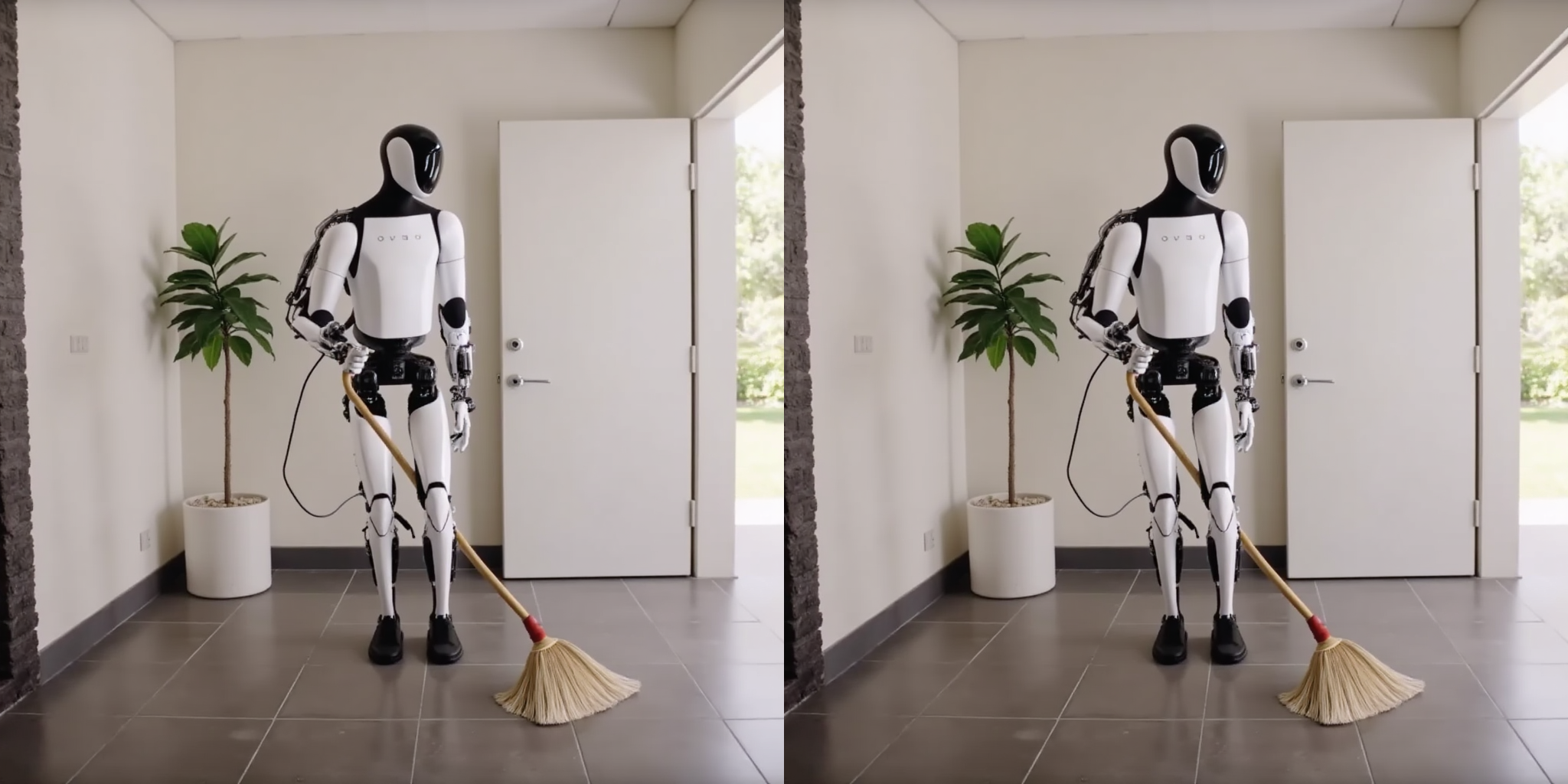
|
optimus is cleaning the house with broomstick |
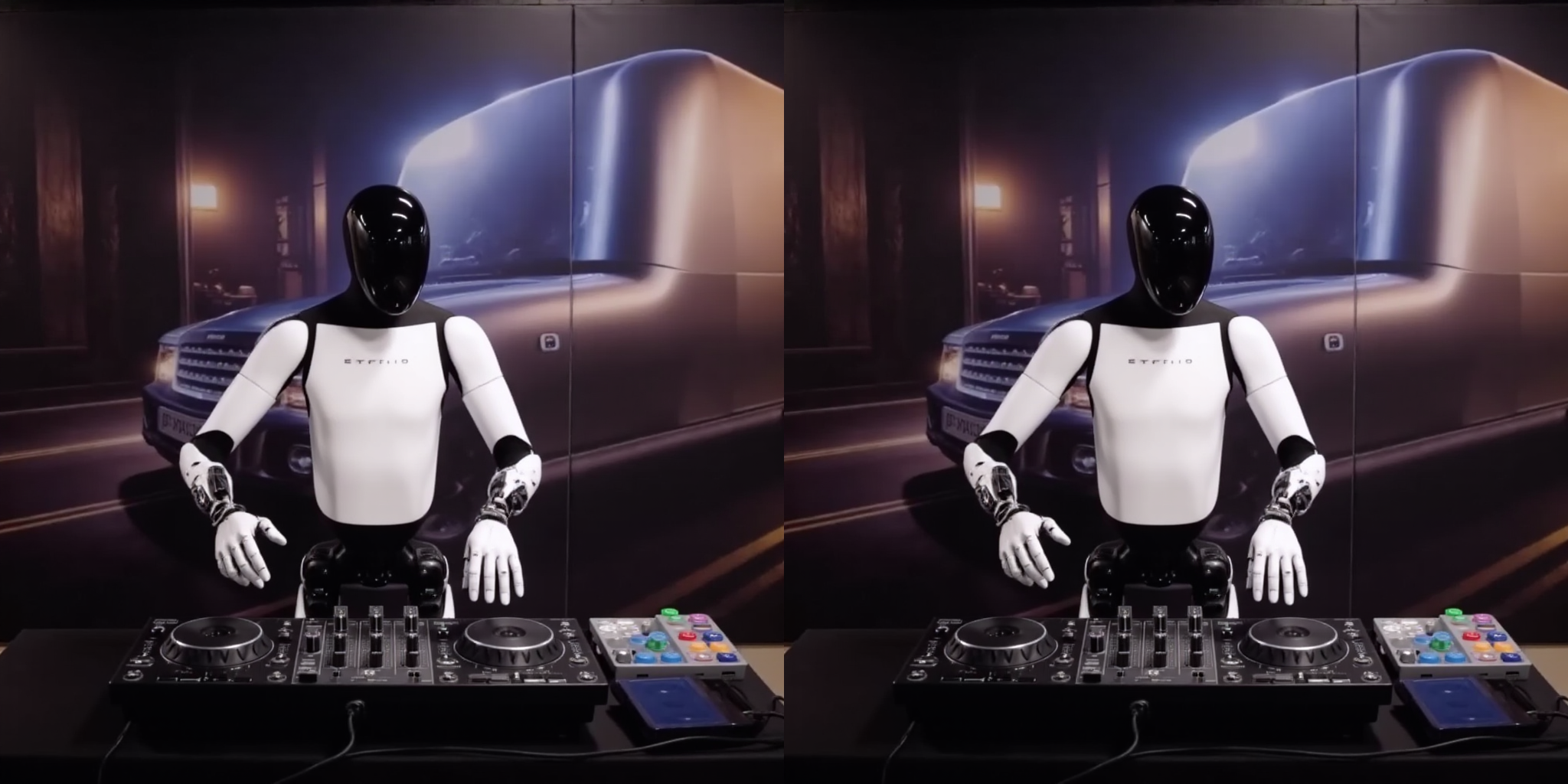
|
optimus is a DJ performing at a hip nightclub |
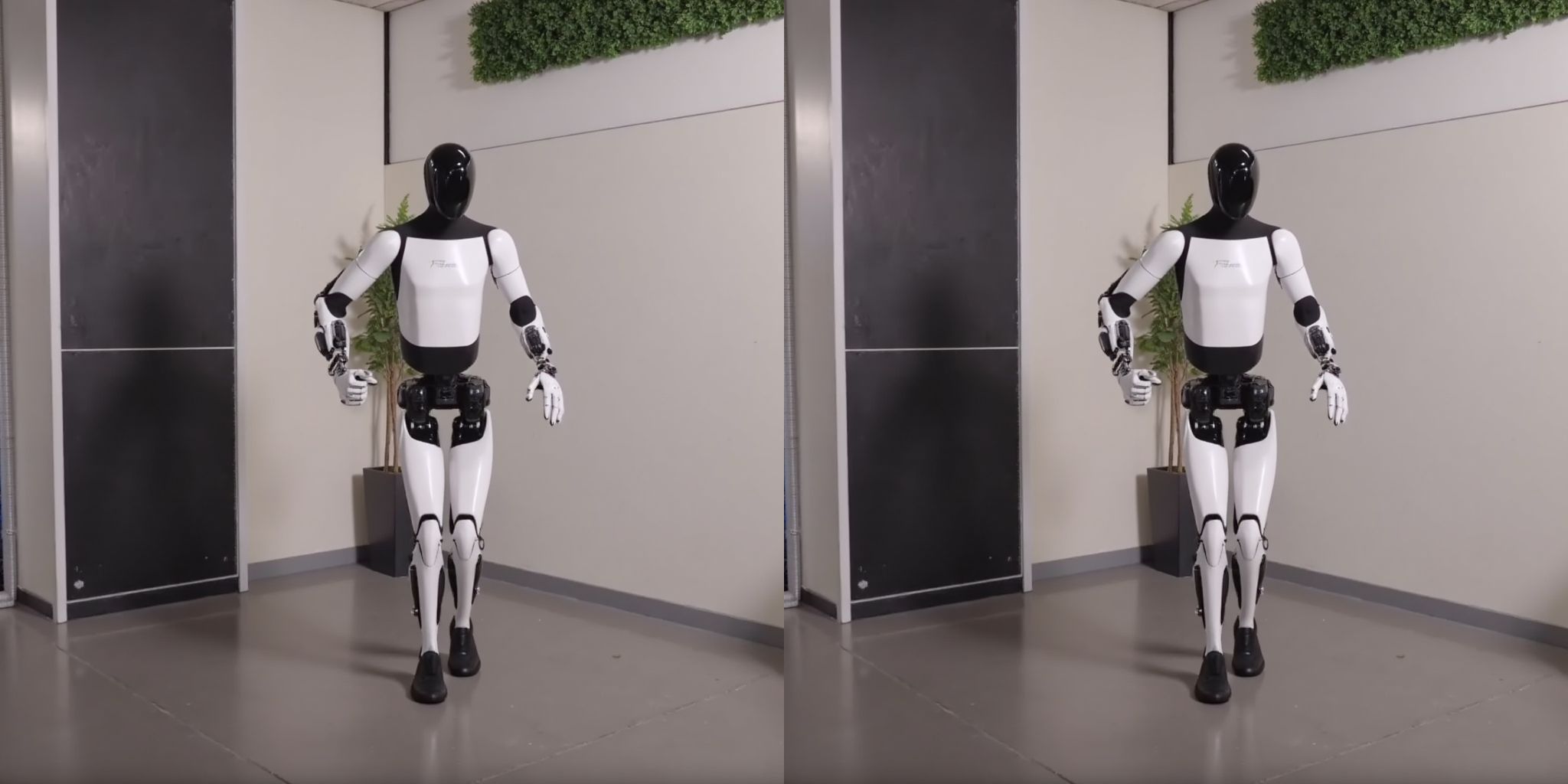
|
optimus is competing in a bboy break dancing competition |

|
optimus is playing tennis in a tennis court |
Code
from diffusers import FluxPipeline
import torch

pipeline = FluxPipeline.from_pretrained(
    "black-forest-labs/FLUX.1-dev", torch_dtype=torch.bfloat16
).to("cuda")
# Change this accordingly.
pipeline.load_lora_weights("optimus_16.safetensors")

prompts = [
    "optimus is cleaning the house with broomstick",
    "optimus is a DJ performing at a hip nightclub",
    "optimus is competing in a bboy break dancing competition",
    "optimus is playing tennis in a tennis court"
]
images = pipeline(
    prompts,
    num_inference_steps=50,
    guidance_scale=3.5,
    max_sequence_length=512,
    generator=torch.manual_seed(0)
).images
for i, image in enumerate(images):
    image.save(f"{i}.png")
Runs of sayakpaul flux-lora-resizing on huggingface.co
126
Total runs
0
24-hour runs
0
3-day runs
13
7-day runs
49
30-day runs
More Information About flux-lora-resizing huggingface.co Model
Url of flux-lora-resizing
flux-lora-resizing huggingface.co Url
Provider of flux-lora-resizing huggingface.co
Other API from sayakpaul
Total runs:
70
Run Growth:
-11
Growth Rate:
-21.15%
Total runs:
57
Run Growth:
24
Growth Rate:
42.11%
Total runs:
41
Run Growth:
12
Growth Rate:
26.09%
Total runs:
37
Run Growth:
6
Growth Rate:
16.22%
Total runs:
37
Run Growth:
-9
Growth Rate:
-24.32%
Total runs:
33
Run Growth:
-4
Growth Rate:
-12.12%
Total runs:
32
Run Growth:
8
Growth Rate:
25.00%
Total runs:
32
Run Growth:
6
Growth Rate:
18.75%
Total runs:
30
Run Growth:
0
Growth Rate:
0.00%
Total runs:
30
Run Growth:
0
Growth Rate:
0.00%
Total runs:
24
Run Growth:
-30
Growth Rate:
-125.00%
Total runs:
23
Run Growth:
9
Growth Rate:
39.13%
Total runs:
20
Run Growth:
18
Growth Rate:
90.00%
Total runs:
20
Run Growth:
8
Growth Rate:
40.00%
Total runs:
15
Run Growth:
-9
Growth Rate:
-60.00%
Total runs:
13
Run Growth:
0
Growth Rate:
0.00%
Total runs:
13
Run Growth:
0
Growth Rate:
0.00%
Total runs:
12
Run Growth:
0
Growth Rate:
0.00%
Total runs:
12
Run Growth:
0
Growth Rate:
0.00%
Total runs:
11
Run Growth:
0
Growth Rate:
0.00%
Total runs:
11
Run Growth:
-17
Growth Rate:
-154.55%
Total runs:
10
Run Growth:
0
Growth Rate:
0.00%
Total runs:
10
Run Growth:
-9
Growth Rate:
-90.00%
Total runs:
10
Run Growth:
8
Growth Rate:
80.00%
Total runs:
10
Run Growth:
0
Growth Rate:
0.00%
Total runs:
10
Run Growth:
0
Growth Rate:
0.00%
Total runs:
10
Run Growth:
0
Growth Rate:
0.00%
Total runs:
10
Run Growth:
-2
Growth Rate:
-20.00%
Total runs:
9
Run Growth:
0
Growth Rate:
0.00%
Total runs:
9
Run Growth:
0
Growth Rate:
0.00%
Total runs:
9
Run Growth:
3
Growth Rate:
33.33%
Total runs:
9
Run Growth:
0
Growth Rate:
0.00%
Total runs:
9
Run Growth:
0
Growth Rate:
0.00%
Total runs:
9
Run Growth:
8
Growth Rate:
88.89%
Total runs:
8
Run Growth:
4
Growth Rate:
50.00%
Total runs:
8
Run Growth:
1
Growth Rate:
12.50%
Total runs:
8
Run Growth:
0
Growth Rate:
0.00%
Total runs:
7
Run Growth:
0
Growth Rate:
0.00%
Total runs:
6
Run Growth:
-1
Growth Rate:
-16.67%
Total runs:
6
Run Growth:
0
Growth Rate:
0.00%
Total runs:
6
Run Growth:
1
Growth Rate:
16.67%
Total runs:
6
Run Growth:
0
Growth Rate:
0.00%
Total runs:
5
Run Growth:
-2
Growth Rate:
-40.00%
Total runs:
5
Run Growth:
0
Growth Rate:
0.00%
Total runs:
5
Run Growth:
3
Growth Rate:
60.00%
Total runs:
5
Run Growth:
0
Growth Rate:
0.00%
Total runs:
4
Run Growth:
-1
Growth Rate:
-25.00%
Total runs:
4
Run Growth:
3
Growth Rate:
75.00%
Total runs:
4
Run Growth:
0
Growth Rate:
0.00%
Total runs:
4
Run Growth:
-3
Growth Rate:
-75.00%
Total runs:
3
Run Growth:
1
Growth Rate:
33.33%
Total runs:
3
Run Growth:
-3
Growth Rate:
-100.00%
Total runs:
2
Run Growth:
-6
Growth Rate:
-300.00%
Total runs:
2
Run Growth:
1
Growth Rate:
50.00%
Total runs:
2
Run Growth:
0
Growth Rate:
0.00%
Total runs:
1
Run Growth:
0
Growth Rate:
0.00%
Total runs:
1
Run Growth:
0
Growth Rate:
0.00%
Total runs:
0
Run Growth:
0
Growth Rate:
0.00%
Total runs:
0
Run Growth:
0
Growth Rate:
0.00%
Total runs:
0
Run Growth:
0
Growth Rate:
0.00%
Total runs:
0
Run Growth:
0
Growth Rate:
0.00%
Total runs:
0
Run Growth:
0
Growth Rate:
0.00%
Total runs:
0
Run Growth:
0
Growth Rate:
0.00%
Total runs:
0
Run Growth:
0
Growth Rate:
0.00%
Total runs:
0
Run Growth:
0
Growth Rate:
0.00%
Total runs:
0
Run Growth:
0
Growth Rate:
0.00%
Total runs:
0
Run Growth:
0
Growth Rate:
0.00%
Total runs:
0
Run Growth:
0
Growth Rate:
0.00%
Total runs:
0
Run Growth:
0
Growth Rate:
0.00%
Total runs:
0
Run Growth:
0
Growth Rate:
0.00%
Total runs:
0
Run Growth:
0
Growth Rate:
0.00%
Total runs:
0
Run Growth:
0
Growth Rate:
0.00%
Total runs:
0
Run Growth:
0
Growth Rate:
0.00%
Total runs:
0
Run Growth:
0
Growth Rate:
0.00%
Total runs:
0
Run Growth:
0
Growth Rate:
0.00%
Total runs:
0
Run Growth:
0
Growth Rate:
0.00%
Total runs:
0
Run Growth:
0
Growth Rate:
0.00%