



Total runs:
6.2K
Run Growth:
-15.7K
Growth Rate:
-252.72%
[📄arXiv] | [🤗HF Paper] | [🤖Models] | [🛠️Code] | [Web] | [Discord]
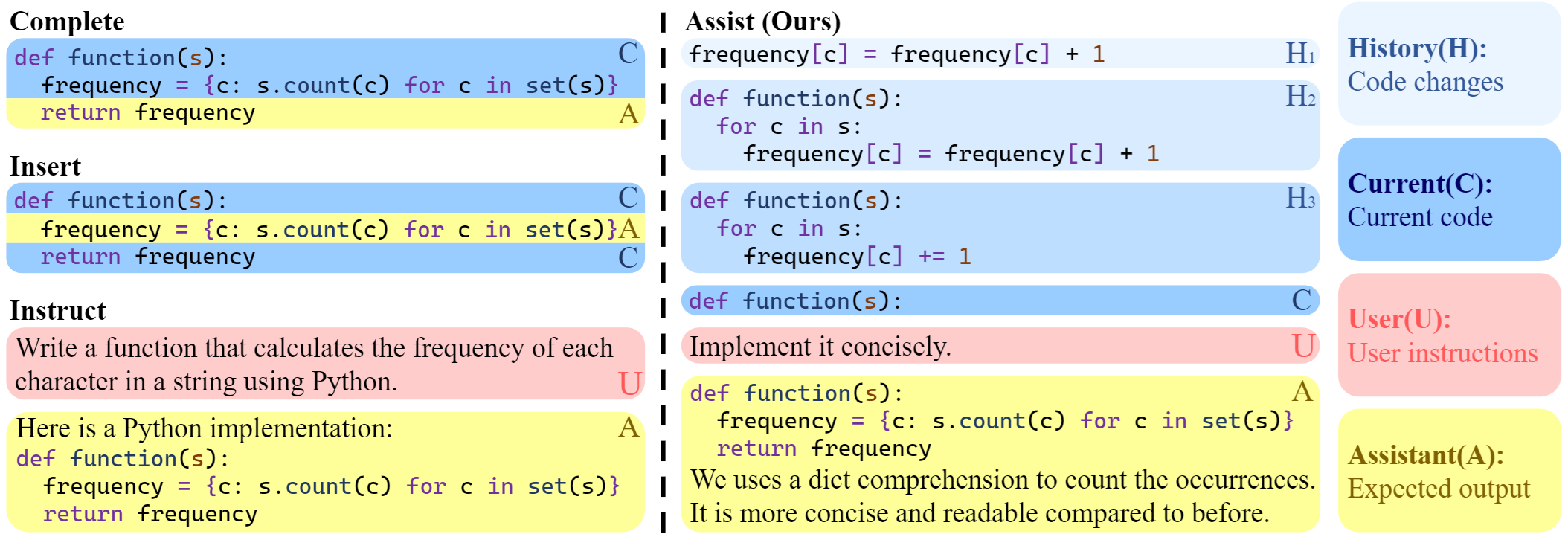
CursorCore is a series of open-source models designed for AI-assisted programming. It aims to support features such as automated editing and inline chat, replicating the core abilities of closed-source AI-assisted programming tools like Cursor. This is achieved by aligning data generated through Programming-Instruct. Please read our paper to learn more.
Our models have been open-sourced on Hugging Face. You can access our models here: CursorCore-Series . We also provide pre-quantized weights for GPTQ and AWQ here: CursorCore-Quantization
Here are some examples of how to use our model:
Script:
import torch
from transformers import AutoTokenizer, AutoModelForCausalLM

tokenizer = AutoTokenizer.from_pretrained("TechxGenus/CursorCore-Yi-9B")
model = AutoModelForCausalLM.from_pretrained(
    "TechxGenus/CursorCore-Yi-9B",
    torch_dtype=torch.bfloat16,
    device_map="auto"
)

messages = [
    {"role": "user", "content": "Hi!"},
]
prompt = tokenizer.apply_chat_template(
    messages,
    tokenize=False,
    add_generation_prompt=True
)

inputs = tokenizer.encode(prompt, return_tensors="pt")
outputs = model.generate(input_ids=inputs.to(model.device), max_new_tokens=512)
print(tokenizer.decode(outputs[0]))
Output:
<|im_start|>system
You are a helpful programming assistant.<|im_end|>
<|im_start|>user
Hi!<|im_end|>
<|im_start|>assistant
Hello! I'm an AI language model and I can help you with any programming questions you might have. What specific problem or task are you trying to solve?<|im_end|>
In our work, we introduce a new framework of AI-assisted programming task. It is designed for aligning anything during programming process, used for the implementation of features like Tab and Inline Chat.
Script 1:
import torch
from transformers import AutoTokenizer, AutoModelForCausalLM
from eval.utils import prepare_input_for_wf

tokenizer = AutoTokenizer.from_pretrained("TechxGenus/CursorCore-Yi-9B")
model = AutoModelForCausalLM.from_pretrained(
    "TechxGenus/CursorCore-Yi-9B",
    torch_dtype=torch.bfloat16,
    device_map="auto"
)
sample = {
    "history": [
        {
            "type": "code",
            "lang": "python",
            "code": """def quick_sort(arr):\n    if len(arr) <= 1:\n        return arr\n    pivot = arr[len(arr) // 2]\n    left = [x for x in arr if x < pivot]\n    middle = [x for x in arr if x == pivot]\n    right = [x for x in arr if x > pivot]\n    return quick_sort(left) + middle + quick_sort(right)"""
        }
    ],
    "current": {
        "type": "code",
        "lang": "python",
        "code": """def quick_sort(array):\n    if len(arr) <= 1:\n        return arr\n    pivot = arr[len(arr) // 2]\n    left = [x for x in arr if x < pivot]\n    middle = [x for x in arr if x == pivot]\n    right = [x for x in arr if x > pivot]\n    return quick_sort(left) + middle + quick_sort(right)"""
    },
    "user": ""
}

prompt = tokenizer.apply_chat_template(
    prepare_input_for_wf(sample),
    tokenize=False,
    chat_template="assistant-conversation",
    add_generation_prompt=True
)

inputs = tokenizer.encode(prompt, return_tensors="pt")
outputs = model.generate(input_ids=inputs.to(model.device), max_new_tokens=512, do_sample=False)
print(tokenizer.decode(outputs[0]))
Output 1:
<|im_start|>system
You are a helpful programming assistant.<|im_end|>
<|im_start|>history
```python
def quick_sort(arr):
    if len(arr) <= 1:
        return arr
    pivot = arr[len(arr) // 2]
    left = [x for x in arr if x < pivot]
    middle = [x for x in arr if x == pivot]
    right = [x for x in arr if x > pivot]
    return quick_sort(left) + middle + quick_sort(right)
```<|im_end|>
<|im_start|>current
```python
def quick_sort(array):
    if len(arr) <= 1:
        return arr
    pivot = arr[len(arr) // 2]
    left = [x for x in arr if x < pivot]
    middle = [x for x in arr if x == pivot]
    right = [x for x in arr if x > pivot]
    return quick_sort(left) + middle + quick_sort(right)
```<|im_end|>
<|im_start|>assistant
<|next_start|>```python
def quick_sort(array):
    if len(array) <= 1:
        return array
    pivot = array[len(array) // 2]
    left = [x for x in array if x < pivot]
    middle = [x for x in array if x == pivot]
    right = [x for x in array if x > pivot]
    return quick_sort(left) + middle + quick_sort(right)
```<|next_end|>
The user has provided a revised code change that corrects the parameter name from `arr` to `array` in the `quick_sort` function. This change ensures consistency in the function definition and avoids potential confusion or errors.

To implement this, we will:
1. Update the parameter name in the function definition from `arr` to `array`.
2. Ensure that all references to `arr` within the function are updated to `array`.

This will make the function definition and internal references consistent, improving code readability and maintainability.<|im_end|>
Script 2:
import torch
from transformers import AutoTokenizer, AutoModelForCausalLM
from eval.utils import prepare_input_for_wf

tokenizer = AutoTokenizer.from_pretrained("TechxGenus/CursorCore-Yi-9B")
model = AutoModelForCausalLM.from_pretrained(
    "TechxGenus/CursorCore-Yi-9B",
    torch_dtype=torch.bfloat16,
    device_map="auto"
)
sample = {
    "history": [],
    "current": {
        "type": "code",
        "lang": "python",
        "code": """def quick_sort(array):\n    if len(arr) <= 1:\n        return arr\n    pivot = arr[len(arr) // 2]\n    left = [x for x in arr if x < pivot]\n    middle = [x for x in arr if x == pivot]\n    right = [x for x in arr if x > pivot]\n    return quick_sort(left) + middle + quick_sort(right)"""
    },
    "user": "Add Docstring."
}

prompt = tokenizer.apply_chat_template(
    prepare_input_for_wf(sample),
    tokenize=False,
    chat_template="assistant-conversation",
    add_generation_prompt=True
)

inputs = tokenizer.encode(prompt, return_tensors="pt")
outputs = model.generate(input_ids=inputs.to(model.device), max_new_tokens=512, do_sample=False)
print(tokenizer.decode(outputs[0]))
Output 2:
<|im_start|>system
You are a helpful programming assistant.<|im_end|>
<|im_start|>current
```python
def quick_sort(array):
    if len(arr) <= 1:
        return arr
    pivot = arr[len(arr) // 2]
    left = [x for x in arr if x < pivot]
    middle = [x for x in arr if x == pivot]
    right = [x for x in arr if x > pivot]
    return quick_sort(left) + middle + quick_sort(right)
```<|im_end|>
<|im_start|>user
Add Docstring.<|im_end|>
<|im_start|>assistant
<|next_start|>```python
def quick_sort(array):
    """
    This is an implementation of the quick sort algorithm.
    """
    if len(arr) <= 1:
        return arr
    pivot = arr[len(arr) // 2]
    left = [x for x in arr if x < pivot]
    middle = [x for x in arr if x == pivot]
    right = [x for x in arr if x > pivot]
    return quick_sort(left) + middle + quick_sort(right)
```<|next_end|><|im_end|>
For models in Locate-and-Change (LC) and Search-and-Replace (SR) formats, the output examples are as follows:
Script for LC:
import torch
from transformers import AutoTokenizer, AutoModelForCausalLM
from eval.utils import prepare_input_for_lc

tokenizer = AutoTokenizer.from_pretrained("TechxGenus/CursorCore-Yi-1.5B-LC")
model = AutoModelForCausalLM.from_pretrained(
    "TechxGenus/CursorCore-Yi-1.5B-LC",
    torch_dtype=torch.bfloat16,
    device_map="auto"
)
sample = {
    "history": [],
    "current": {
        "type": "code",
        "lang": "python",
        "code": """def quick_sort(array):\n    if len(arr) <= 1:\n        return arr\n    pivot = arr[len(arr) // 2]\n    left = [x for x in arr if x < pivot]\n    middle = [x for x in arr if x == pivot]\n    right = [x for x in arr if x > pivot]\n    return quick_sort(left) + middle + quick_sort(right)"""
    },
    "user": "Add Docstring."
}

prompt = tokenizer.apply_chat_template(
    prepare_input_for_lc(sample),
    tokenize=False,
    chat_template="assistant-conversation",
    add_generation_prompt=True
)

inputs = tokenizer.encode(prompt, return_tensors="pt")
outputs = model.generate(input_ids=inputs.to(model.device), max_new_tokens=512, do_sample=False)
print(tokenizer.decode(outputs[0]))
Output for LC:
<|im_start|>system
You are a helpful programming assistant.<|im_end|>
<|im_start|>current
```python
1 def quick_sort(array):
2     if len(arr) <= 1:
3         return arr
4     pivot = arr[len(arr) // 2]
5     left = [x for x in arr if x < pivot]
6     middle = [x for x in arr if x == pivot]
7     right = [x for x in arr if x > pivot]
8     return quick_sort(left) + middle + quick_sort(right)
```<|im_end|>
<|im_start|>user
Add Docstring.<|im_end|>
<|im_start|>assistant
<|next_start|>1,1
```
    '''This function will sort an array using quick sort algorithm'''
```<|next_end|>
To enhance the readability and maintainability of the code, we should add a docstring to the `quick_sort` function. A docstring provides a clear description of what the function does, which is particularly useful for other developers who might use or modify this code in the future.

The docstring will be added immediately after the function definition, explaining that the function uses the quick sort algorithm to sort an array. This will make the code more self-explanatory and easier to understand.

Here's the plan:
1. Add a docstring at the beginning of the `quick_sort` function.
2. Ensure the docstring is clear and concise, describing the purpose of the function.

This modification will improve the code's documentation without altering its functionality.<|im_end|>
Script for SR:
import torch
from transformers import AutoTokenizer, AutoModelForCausalLM
from eval.utils import prepare_input_for_sr

tokenizer = AutoTokenizer.from_pretrained("TechxGenus/CursorCore-Yi-1.5B-SR")
model = AutoModelForCausalLM.from_pretrained(
    "TechxGenus/CursorCore-Yi-1.5B-SR",
    torch_dtype=torch.bfloat16,
    device_map="auto"
)
sample = {
    "history": [],
    "current": {
        "type": "code",
        "lang": "python",
        "code": """def quick_sort(array):\n    if len(arr) <= 1:\n        return arr\n    pivot = arr[len(arr) // 2]\n    left = [x for x in arr if x < pivot]\n    middle = [x for x in arr if x == pivot]\n    right = [x for x in arr if x > pivot]\n    return quick_sort(left) + middle + quick_sort(right)"""
    },
    "user": "Add Docstring."
}

prompt = tokenizer.apply_chat_template(
    prepare_input_for_sr(sample),
    tokenize=False,
    chat_template="assistant-conversation",
    add_generation_prompt=True
)

inputs = tokenizer.encode(prompt, return_tensors="pt")
outputs = model.generate(input_ids=inputs.to(model.device), max_new_tokens=512, do_sample=False)
print(tokenizer.decode(outputs[0]))
Output for SR:
<|im_start|>system
You are a helpful programming assistant.<|im_end|>
<|im_start|>current
```python
def quick_sort(array):
    if len(arr) <= 1:
        return arr
    pivot = arr[len(arr) // 2]
    left = [x for x in arr if x < pivot]
    middle = [x for x in arr if x == pivot]
    right = [x for x in arr if x > pivot]
    return quick_sort(left) + middle + quick_sort(right)
```<|im_end|>
<|im_start|>user
Add Docstring.<|im_end|>
<|im_start|>assistant
<|next_start|>```python
def quick_sort(array):
<|search_and_replace|>
def quick_sort(array):
    """
    This function implements quick sort algorithm
    """
```<|next_end|><|im_end|>
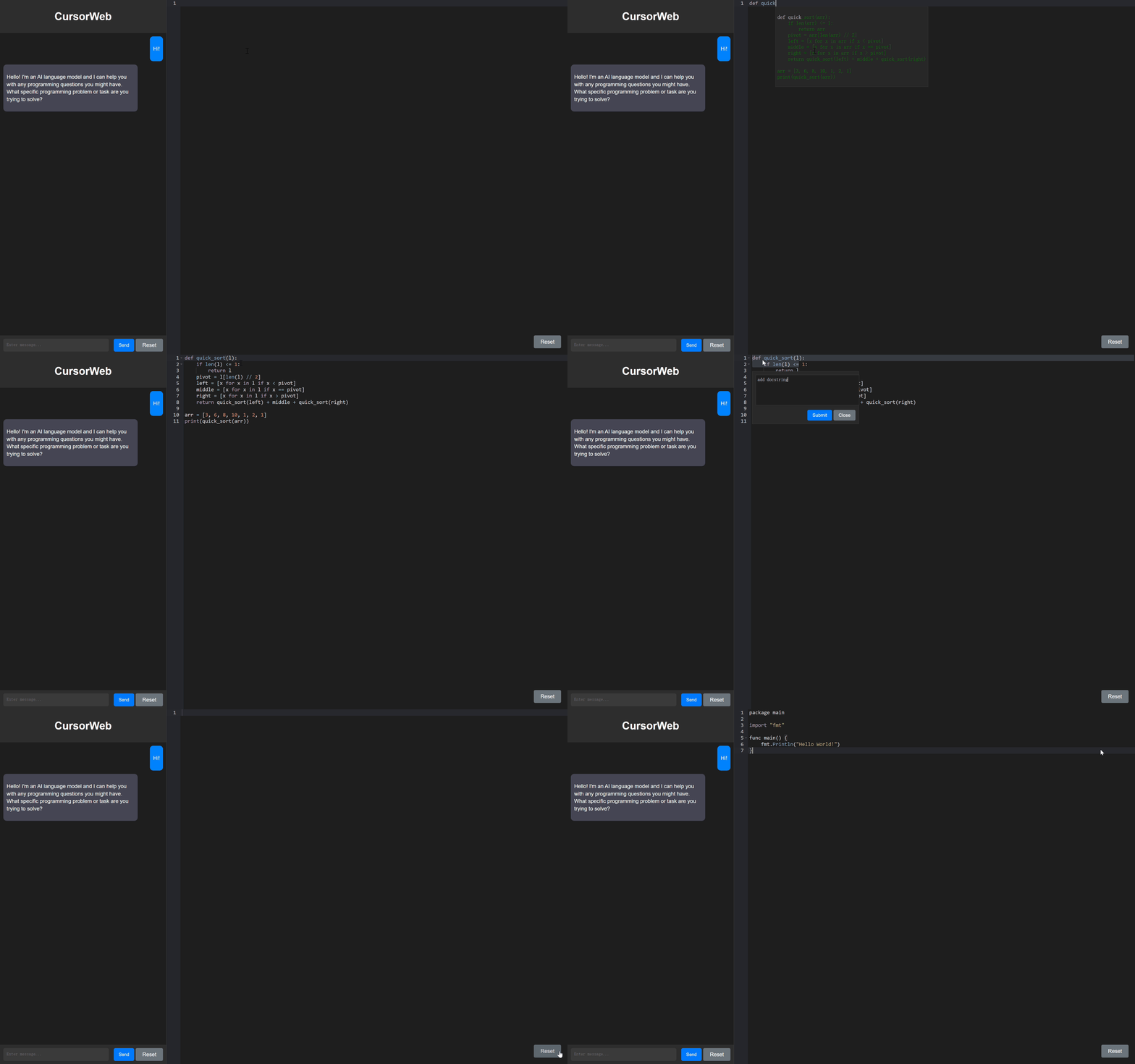
We create a web demo for CursorCore. Please visit CursorWeb for more details.
CursorCore is still in a very early stage, and lots of work is needed to achieve a better user experience. For example:
@article{jiang2024cursorcore,
  title   = {CursorCore: Assist Programming through Aligning Anything},
  author  = {Hao Jiang and Qi Liu and Rui Li and Shengyu Ye and Shijin Wang},
  year    = {2024},
  journal = {arXiv preprint arXiv: 2410.07002}
}
Contributions are welcome! If you find any bugs or have suggestions for improvements, please open an issue or submit a pull request.