




Total runs:
83
Run Growth:
-41
Growth Rate:
-49.40%

 Online Demo
|
Online Demo
|
 GitHub
|
GitHub
|
 Paper
|
Paper
|
 Discord
Sponsored by RunPod

To use this model, we highly recommend installing the OpenChat package by following the
installation guide
in our repository and using the OpenChat OpenAI-compatible API server by running the serving command from the table below. The server is optimized for high-throughput deployment using
vLLM
and can run on a consumer GPU with 24GB RAM. To enable tensor parallelism, append
--tensor-parallel-size N
to the serving command.
Once started, the server listens at
localhost:18888
for requests and is compatible with the
OpenAI ChatCompletion API specifications
. Please refer to the example request below for reference. Additionally, you can use the
OpenChat Web UI
for a user-friendly experience.
If you want to deploy the server as an online service, you can use
--api-keys sk-KEY1 sk-KEY2 ...
to specify allowed API keys and
--disable-log-requests --disable-log-stats --log-file openchat.log
for logging only to a file. For security purposes, we recommend using an
HTTPS gateway
in front of the server.
| Model | Size | Context | Weights | Serving |
|---|---|---|---|---|
| OpenChat-3.5-0106 | 7B | 8192 | Huggingface |
python -m ochat.serving.openai_api_server --model openchat/openchat-3.5-0106 --engine-use-ray --worker-use-ray
|
💡 Default Mode (GPT4 Correct) : Best for coding, chat and general tasks
curl http://localhost:18888/v1/chat/completions \
  -H "Content-Type: application/json" \
  -d '{
    "model": "openchat_3.5",
    "messages": [{"role": "user", "content": "You are a large language model named OpenChat. Write a poem to describe yourself"}]
  }'
🧮 Mathematical Reasoning Mode : Tailored for solving math problems
curl http://localhost:18888/v1/chat/completions \
  -H "Content-Type: application/json" \
  -d '{
    "model": "openchat_3.5",
    "condition": "Math Correct",
    "messages": [{"role": "user", "content": "10.3 − 7988.8133 = "}]
  }'
💡 Default Mode (GPT4 Correct) : Best for coding, chat and general tasks
GPT4 Correct User: Hello<|end_of_turn|>GPT4 Correct Assistant: Hi<|end_of_turn|>GPT4 Correct User: How are you today?<|end_of_turn|>GPT4 Correct Assistant:
🧮 Mathematical Reasoning Mode : Tailored for solving math problems
Math Correct User: 10.3 − 7988.8133=<|end_of_turn|>Math Correct Assistant:
⚠️
Notice:
Remember to set
<|end_of_turn|>
as end of generation token.
The default (GPT4 Correct) template is also available as the integrated
tokenizer.chat_template
,
which can be used instead of manually specifying the template:
messages = [
    {"role": "user", "content": "Hello"},
    {"role": "assistant", "content": "Hi"},
    {"role": "user", "content": "How are you today?"}
]
tokens = tokenizer.apply_chat_template(messages, add_generation_prompt=True)
assert tokens == [1, 420, 6316, 28781, 3198, 3123, 1247, 28747, 22557, 32000, 420, 6316, 28781, 3198, 3123, 21631, 28747, 15359, 32000, 420, 6316, 28781, 3198, 3123, 1247, 28747, 1602, 460, 368, 3154, 28804, 32000, 420, 6316, 28781, 3198, 3123, 21631, 28747]
We've included evaluator capabilities in this release to advance open-source models as evaluators. You can use
Default Mode (GPT4 Correct)
with the following prompt (same as
Prometheus
) to evaluate a response.
###Task Description:
An instruction (might include an Input inside it), a response to evaluate, a reference answer that gets a score of 5, and a score rubric representing a evaluation criteria are given.
1. Write a detailed feedback that assess the quality of the response strictly based on the given score rubric, not evaluating in general.
2. After writing a feedback, write a score that is an integer between 1 and 5. You should refer to the score rubric.
3. The output format should look as follows: "Feedback: (write a feedback for criteria) [RESULT] (an integer number between 1 and 5)"
4. Please do not generate any other opening, closing, and explanations.

###The instruction to evaluate:
{orig_instruction}

###Response to evaluate:
{orig_response}

###Reference Answer (Score 5):
{orig_reference_answer}

###Score Rubrics:
[{orig_criteria}]
Score 1: {orig_score1_description}
Score 2: {orig_score2_description}
Score 3: {orig_score3_description}
Score 4: {orig_score4_description}
Score 5: {orig_score5_description}

###Feedback:
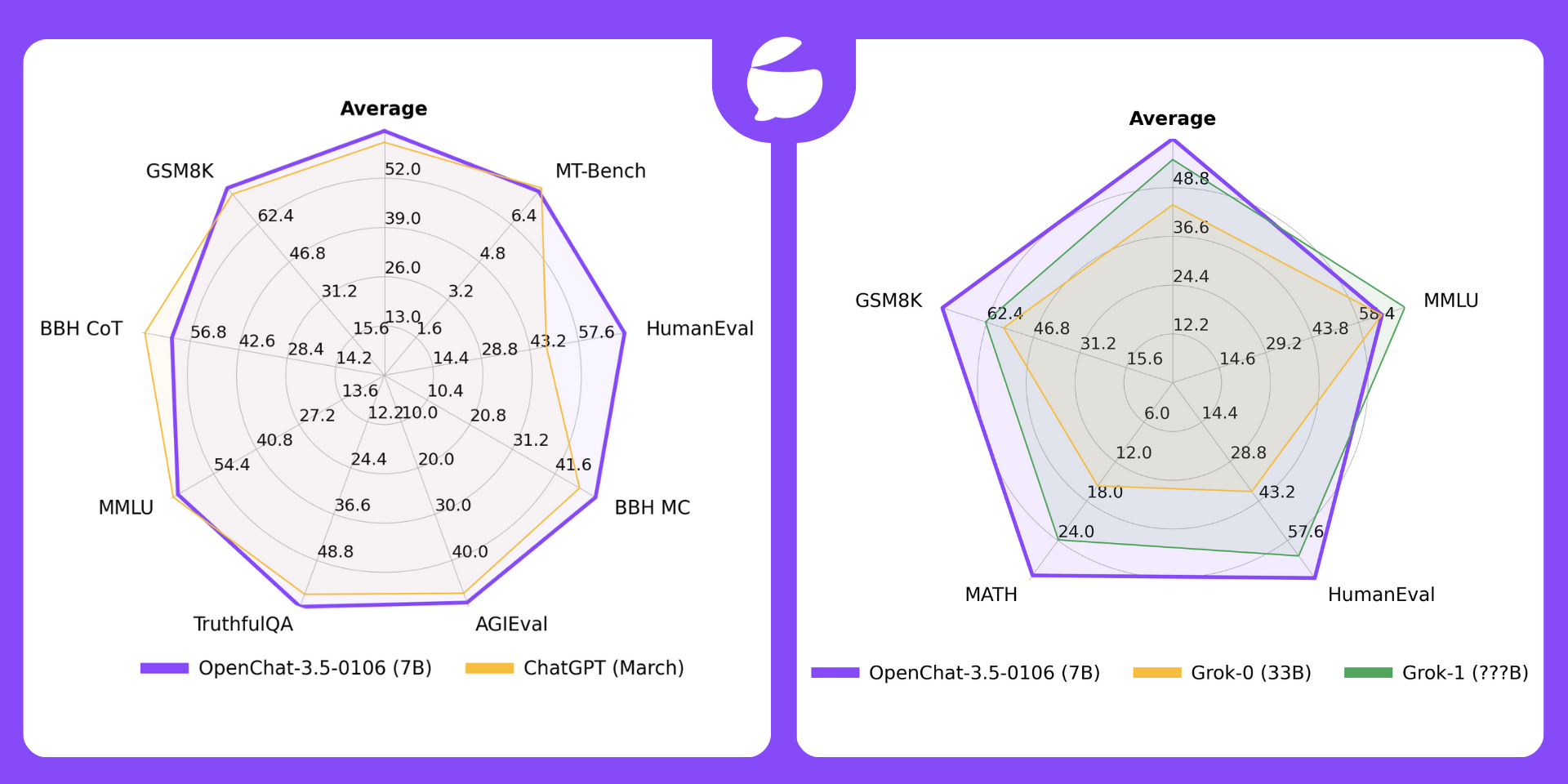
| Model | # Params | Average | MT-Bench | HumanEval | BBH MC | AGIEval | TruthfulQA | MMLU | GSM8K | BBH CoT |
|---|---|---|---|---|---|---|---|---|---|---|
| OpenChat-3.5-0106 | 7B | 64.5 | 7.8 | 71.3 | 51.5 | 49.1 | 61.0 | 65.8 | 77.4 | 62.2 |
| OpenChat-3.5-1210 | 7B | 63.8 | 7.76 | 68.9 | 49.5 | 48.0 | 61.8 | 65.3 | 77.3 | 61.8 |
| OpenChat-3.5 | 7B | 61.6 | 7.81 | 55.5 | 47.6 | 47.4 | 59.1 | 64.3 | 77.3 | 63.5 |
| ChatGPT (March)* | ???B | 61.5 | 7.94 | 48.1 | 47.6 | 47.1 | 57.7 | 67.3 | 74.9 | 70.1 |
| OpenHermes 2.5 | 7B | 59.3 | 7.54 | 48.2 | 49.4 | 46.5 | 57.5 | 63.8 | 73.5 | 59.9 |
| OpenOrca Mistral | 7B | 52.7 | 6.86 | 38.4 | 49.4 | 42.9 | 45.9 | 59.3 | 59.1 | 58.1 |
| Zephyr-β^ | 7B | 34.6 | 7.34 | 22.0 | 40.6 | 39.0 | 40.8 | 39.8 | 5.1 | 16.0 |
| Mistral | 7B | - | 6.84 | 30.5 | 39.0 | 38.0 | - | 60.1 | 52.2 | - |
*: ChatGPT (March) results are from GPT-4 Technical Report , Chain-of-Thought Hub , and our evaluation. Please note that ChatGPT is not a fixed baseline and evolves rapidly over time.
^: Zephyr-β often fails to follow few-shot CoT instructions, likely because it was aligned with only chat data but not trained on few-shot data.
**: Mistral and Open-source SOTA results are taken from reported results in instruction-tuned model papers and official repositories.
All models are evaluated in chat mode (e.g. with the respective conversation template applied). All zero-shot benchmarks follow the same setting as in the AGIEval paper and Orca paper. CoT tasks use the same configuration as Chain-of-Thought Hub, HumanEval is evaluated with EvalPlus, and MT-bench is run using FastChat. To reproduce our results, follow the instructions in our repository .
| Model | Size | HumanEval+ pass@1 |
|---|---|---|
| OpenChat-3.5-0106 | 7B | 65.9 |
| ChatGPT (December 12, 2023) | ???B | 64.6 |
| WizardCoder-Python-34B-V1.0 | 34B | 64.6 |
| OpenChat 3.5 1210 | 7B | 63.4 |
| OpenHermes 2.5 | 7B | 41.5 |
🔥 OpenChat-3.5-0106 (7B) now outperforms Grok-0 (33B) on all 4 benchmarks and Grok-1 (???B) on average and 3/4 benchmarks .
| License | # Param | Average | MMLU | HumanEval | MATH | GSM8k | |
|---|---|---|---|---|---|---|---|
| OpenChat-3.5-0106 | Apache-2.0 | 7B | 61.0 | 65.8 | 71.3 | 29.3 | 77.4 |
| OpenChat-3.5-1210 | Apache-2.0 | 7B | 60.1 | 65.3 | 68.9 | 28.9 | 77.3 |
| OpenChat-3.5 | Apache-2.0 | 7B | 56.4 | 64.3 | 55.5 | 28.6 | 77.3 |
| Grok-0 | Proprietary | 33B | 44.5 | 65.7 | 39.7 | 15.7 | 56.8 |
| Grok-1 | Proprietary | ???B | 55.8 | 73 | 63.2 | 23.9 | 62.9 |
*: Grok results are reported by X.AI .
Foundation Model Limitations Despite its advanced capabilities, OpenChat is still bound by the limitations inherent in its foundation models. These limitations may impact the model's performance in areas such as:
Hallucination of Non-existent Information OpenChat may sometimes generate information that does not exist or is not accurate, also known as "hallucination". Users should be aware of this possibility and verify any critical information obtained from the model.
Safety OpenChat may sometimes generate harmful, hate speech, biased responses, or answer unsafe questions. It's crucial to apply additional AI safety measures in use cases that require safe and moderated responses.
Our OpenChat 3.5 code and models are distributed under the Apache License 2.0.
@article{wang2023openchat,
  title={OpenChat: Advancing Open-source Language Models with Mixed-Quality Data},
  author={Wang, Guan and Cheng, Sijie and Zhan, Xianyuan and Li, Xiangang and Song, Sen and Liu, Yang},
  journal={arXiv preprint arXiv:2309.11235},
  year={2023}
}