



Total runs:
12.3K
Run Growth:
5.8K
Growth Rate:
43.32%
This model (remote code on the Hub) is deprecated. Please use https://huggingface.co/microsoft/kosmos-2-patch14-224
There are some changes in terms of input formats: see the model card in https://huggingface.co/microsoft/kosmos-2-patch14-224
(There is an on going effort to port
Kosmos-2
directly into
transformers
. This repository (remote code) might need some more bug fixes later, including breaking changes.)
This Hub repository contains a HuggingFace's
transformers
implementation of
the original Kosmos-2 model
from Microsoft.
Use the code below to get started with the model.
import requests

from PIL import Image
from transformers import AutoProcessor, AutoModelForVision2Seq


model = AutoModelForVision2Seq.from_pretrained("ydshieh/kosmos-2-patch14-224", trust_remote_code=True)
processor = AutoProcessor.from_pretrained("ydshieh/kosmos-2-patch14-224", trust_remote_code=True)

prompt = "<grounding>An image of"

url = "https://huggingface.co/ydshieh/kosmos-2-patch14-224/resolve/main/snowman.png"
image = Image.open(requests.get(url, stream=True).raw)

# The original Kosmos-2 demo saves the image first then reload it. For some images, this will give slightly different image input and change the generation outputs.
# Uncomment the following 2 lines if you want to match the original demo's outputs.
# (One example is the `two_dogs.jpg` from the demo)
# image.save("new_image.jpg")
# image = Image.open("new_image.jpg")

inputs = processor(text=prompt, images=image, return_tensors="pt")

generated_ids = model.generate(
    pixel_values=inputs["pixel_values"],
    input_ids=inputs["input_ids"][:, :-1],
    attention_mask=inputs["attention_mask"][:, :-1],
    img_features=None,
    img_attn_mask=inputs["img_attn_mask"][:, :-1],
    use_cache=True,
    max_new_tokens=64,
)
generated_text = processor.batch_decode(generated_ids, skip_special_tokens=True)[0]

# Specify `cleanup_and_extract=False` in order to see the raw model generation.
processed_text = processor.post_process_generation(generated_text, cleanup_and_extract=False)

print(processed_text)
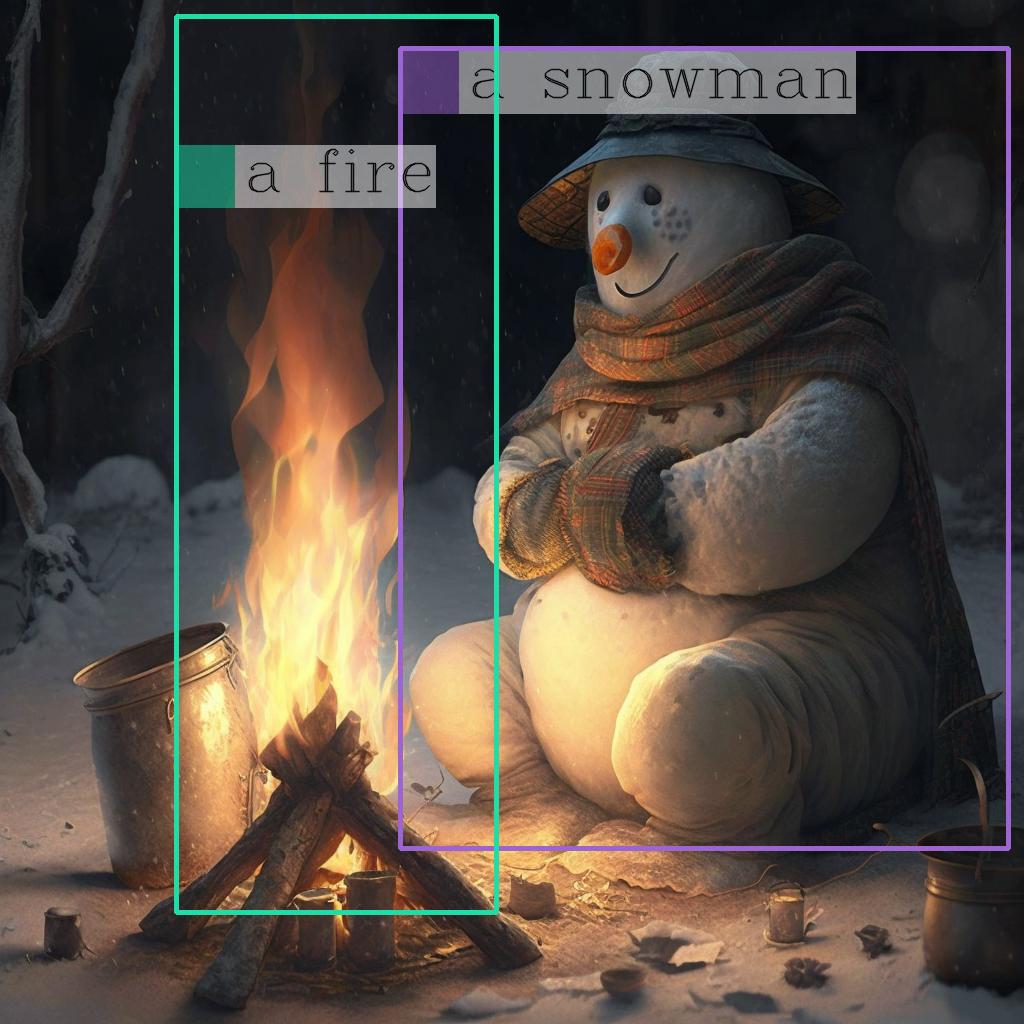
# `<grounding> An image of<phrase> a snowman</phrase><object><patch_index_0044><patch_index_0863></object> warming himself by<phrase> a fire</phrase><object><patch_index_0005><patch_index_0911></object>.`

# By default, the generated  text is cleanup and the entities are extracted.
processed_text, entities = processor.post_process_generation(generated_text)

print(processed_text)
# `An image of a snowman warming himself by a fire.`

print(entities)
# `[('a snowman', (12, 21), [(0.390625, 0.046875, 0.984375, 0.828125)]), ('a fire', (41, 47), [(0.171875, 0.015625, 0.484375, 0.890625)])]`
Once you have the
entities
, you can use the following helper function to draw their bounding bboxes on the image:
import cv2
import numpy as np
import os
import requests
import torch
import torchvision.transforms as T

from PIL import Image


def is_overlapping(rect1, rect2):
    x1, y1, x2, y2 = rect1
    x3, y3, x4, y4 = rect2
    return not (x2 < x3 or x1 > x4 or y2 < y3 or y1 > y4)


def draw_entity_boxes_on_image(image, entities, show=False, save_path=None):
    """_summary_
    Args:
        image (_type_): image or image path
        collect_entity_location (_type_): _description_
    """
    if isinstance(image, Image.Image):
        image_h = image.height
        image_w = image.width
        image = np.array(image)[:, :, [2, 1, 0]]
    elif isinstance(image, str):
        if os.path.exists(image):
            pil_img = Image.open(image).convert("RGB")
            image = np.array(pil_img)[:, :, [2, 1, 0]]
            image_h = pil_img.height
            image_w = pil_img.width
        else:
            raise ValueError(f"invaild image path, {image}")
    elif isinstance(image, torch.Tensor):
        # pdb.set_trace()
        image_tensor = image.cpu()
        reverse_norm_mean = torch.tensor([0.48145466, 0.4578275, 0.40821073])[:, None, None]
        reverse_norm_std = torch.tensor([0.26862954, 0.26130258, 0.27577711])[:, None, None]
        image_tensor = image_tensor * reverse_norm_std + reverse_norm_mean
        pil_img = T.ToPILImage()(image_tensor)
        image_h = pil_img.height
        image_w = pil_img.width
        image = np.array(pil_img)[:, :, [2, 1, 0]]
    else:
        raise ValueError(f"invaild image format, {type(image)} for {image}")

    if len(entities) == 0:
        return image

    new_image = image.copy()
    previous_bboxes = []
    # size of text
    text_size = 1
    # thickness of text
    text_line = 1  # int(max(1 * min(image_h, image_w) / 512, 1))
    box_line = 3
    (c_width, text_height), _ = cv2.getTextSize("F", cv2.FONT_HERSHEY_COMPLEX, text_size, text_line)
    base_height = int(text_height * 0.675)
    text_offset_original = text_height - base_height
    text_spaces = 3

    for entity_name, (start, end), bboxes in entities:
        for (x1_norm, y1_norm, x2_norm, y2_norm) in bboxes:
            orig_x1, orig_y1, orig_x2, orig_y2 = int(x1_norm * image_w), int(y1_norm * image_h), int(x2_norm * image_w), int(y2_norm * image_h)
            # draw bbox
            # random color
            color = tuple(np.random.randint(0, 255, size=3).tolist())
            new_image = cv2.rectangle(new_image, (orig_x1, orig_y1), (orig_x2, orig_y2), color, box_line)

            l_o, r_o = box_line // 2 + box_line % 2, box_line // 2 + box_line % 2 + 1

            x1 = orig_x1 - l_o
            y1 = orig_y1 - l_o

            if y1 < text_height + text_offset_original + 2 * text_spaces:
                y1 = orig_y1 + r_o + text_height + text_offset_original + 2 * text_spaces
                x1 = orig_x1 + r_o

            # add text background
            (text_width, text_height), _ = cv2.getTextSize(f"  {entity_name}", cv2.FONT_HERSHEY_COMPLEX, text_size, text_line)
            text_bg_x1, text_bg_y1, text_bg_x2, text_bg_y2 = x1, y1 - (text_height + text_offset_original + 2 * text_spaces), x1 + text_width, y1

            for prev_bbox in previous_bboxes:
                while is_overlapping((text_bg_x1, text_bg_y1, text_bg_x2, text_bg_y2), prev_bbox):
                    text_bg_y1 += (text_height + text_offset_original + 2 * text_spaces)
                    text_bg_y2 += (text_height + text_offset_original + 2 * text_spaces)
                    y1 += (text_height + text_offset_original + 2 * text_spaces)

                    if text_bg_y2 >= image_h:
                        text_bg_y1 = max(0, image_h - (text_height + text_offset_original + 2 * text_spaces))
                        text_bg_y2 = image_h
                        y1 = image_h
                        break

            alpha = 0.5
            for i in range(text_bg_y1, text_bg_y2):
                for j in range(text_bg_x1, text_bg_x2):
                    if i < image_h and j < image_w:
                        if j < text_bg_x1 + 1.35 * c_width:
                            # original color
                            bg_color = color
                        else:
                            # white
                            bg_color = [255, 255, 255]
                        new_image[i, j] = (alpha * new_image[i, j] + (1 - alpha) * np.array(bg_color)).astype(np.uint8)

            cv2.putText(
                new_image, f"  {entity_name}", (x1, y1 - text_offset_original - 1 * text_spaces), cv2.FONT_HERSHEY_COMPLEX, text_size, (0, 0, 0), text_line, cv2.LINE_AA
            )
            # previous_locations.append((x1, y1))
            previous_bboxes.append((text_bg_x1, text_bg_y1, text_bg_x2, text_bg_y2))

    pil_image = Image.fromarray(new_image[:, :, [2, 1, 0]])
    if save_path:
        pil_image.save(save_path)
    if show:
        pil_image.show()

    return new_image


# (The same image from the previous code example)
url = "https://huggingface.co/ydshieh/kosmos-2-patch14-224/resolve/main/snowman.jpg"
image = Image.open(requests.get(url, stream=True).raw)

# From the previous code example
entities = [('a snowman', (12, 21), [(0.390625, 0.046875, 0.984375, 0.828125)]), ('a fire', (41, 47), [(0.171875, 0.015625, 0.484375, 0.890625)])]

# Draw the bounding bboxes
draw_entity_boxes_on_image(image, entities, show=True)
Here is the annotated image:
This model is capable of performing different tasks through changing the prompts.
First, let's define a function to run a prompt.
import requests

from PIL import Image
from transformers import AutoProcessor, AutoModelForVision2Seq


model = AutoModelForVision2Seq.from_pretrained("ydshieh/kosmos-2-patch14-224", trust_remote_code=True)
processor = AutoProcessor.from_pretrained("ydshieh/kosmos-2-patch14-224", trust_remote_code=True)

url = "https://huggingface.co/ydshieh/kosmos-2-patch14-224/resolve/main/snowman.png"
image = Image.open(requests.get(url, stream=True).raw)

def run_example(prompt):

    inputs = processor(text=prompt, images=image, return_tensors="pt")
    generated_ids = model.generate(
        pixel_values=inputs["pixel_values"],
        input_ids=inputs["input_ids"][:, :-1],
        attention_mask=inputs["attention_mask"][:, :-1],
        img_features=None,
        img_attn_mask=inputs["img_attn_mask"][:, :-1],
        use_cache=True,
        max_new_tokens=64,
    )
    generated_text = processor.batch_decode(generated_ids, skip_special_tokens=True)[0]
    _processed_text = processor.post_process_generation(generated_text, cleanup_and_extract=False)
    processed_text, entities = processor.post_process_generation(generated_text)
    print(processed_text)
    print(entities)
    print(_processed_text)
Here are the tasks
Kosmos-2
could perform:
prompt = "<grounding><phrase> a snowman</phrase>"
run_example(prompt)

# a snowman is warming himself by the fire
# [('a snowman', (0, 9), [(0.390625, 0.046875, 0.984375, 0.828125)]), ('the fire', (32, 40), [(0.203125, 0.015625, 0.453125, 0.859375)])]

# <grounding><phrase> a snowman</phrase><object><patch_index_0044><patch_index_0863></object> is warming himself by<phrase> the fire</phrase><object><patch_index_0006><patch_index_0878></object>
prompt = "<grounding><phrase> a snowman next to a fire</phrase>"
run_example(prompt)

# a snowman next to a fire
# [('a snowman next to a fire', (0, 24), [(0.390625, 0.046875, 0.984375, 0.828125)])]

# <grounding><phrase> a snowman next to a fire</phrase><object><patch_index_0044><patch_index_0863></object>
prompt = "<grounding><phrase> It</phrase><object><patch_index_0044><patch_index_0863></object> is"
run_example(prompt)

# It is snowman in a hat and scarf
# [('It', (0, 2), [(0.390625, 0.046875, 0.984375, 0.828125)])]

# <grounding><phrase> It</phrase><object><patch_index_0044><patch_index_0863></object> is snowman in a hat and scarf
prompt = "<grounding> Question: What is special about this image? Answer:"
run_example(prompt)

# Question: What is special about this image? Answer: The image features a snowman sitting by a campfire in the snow.
# [('a snowman', (71, 80), [(0.390625, 0.046875, 0.984375, 0.828125)]), ('a campfire', (92, 102), [(0.109375, 0.640625, 0.546875, 0.984375)])]

# <grounding> Question: What is special about this image? Answer: The image features<phrase> a snowman</phrase><object><patch_index_0044><patch_index_0863></object> sitting by<phrase> a campfire</phrase><object><patch_index_0643><patch_index_1009></object> in the snow.
prompt = "<grounding> Question: Where is<phrase> the fire</phrase><object><patch_index_0005><patch_index_0911></object> next to? Answer:"
run_example(prompt)

# Question: Where is the fire next to? Answer: Near the snowman.
# [('the fire', (19, 27), [(0.171875, 0.015625, 0.484375, 0.890625)]), ('the snowman', (50, 61), [(0.390625, 0.046875, 0.984375, 0.828125)])]

# <grounding> Question: Where is<phrase> the fire</phrase><object><patch_index_0005><patch_index_0911></object> next to? Answer: Near<phrase> the snowman</phrase><object><patch_index_0044><patch_index_0863></object>.
prompt = "<grounding> An image of"
run_example(prompt)

# An image of a snowman warming himself by a campfire.
# [('a snowman', (12, 21), [(0.390625, 0.046875, 0.984375, 0.828125)]), ('a campfire', (41, 51), [(0.109375, 0.640625, 0.546875, 0.984375)])]

# <grounding> An image of<phrase> a snowman</phrase><object><patch_index_0044><patch_index_0863></object> warming himself by<phrase> a campfire</phrase><object><patch_index_0643><patch_index_1009></object>.
prompt = "<grounding> Describe this image in detail:"
run_example(prompt)

# Describe this image in detail: The image features a snowman sitting by a campfire in the snow. He is wearing a hat, scarf, and gloves, with a pot nearby and a cup
# [('a campfire', (71, 81), [(0.171875, 0.015625, 0.484375, 0.984375)]), ('a hat', (109, 114), [(0.515625, 0.046875, 0.828125, 0.234375)]), ('scarf', (116, 121), [(0.515625, 0.234375, 0.890625, 0.578125)]), ('gloves', (127, 133), [(0.515625, 0.390625, 0.640625, 0.515625)]), ('a pot', (140, 145), [(0.078125, 0.609375, 0.265625, 0.859375)])]

# <grounding> Describe this image in detail: The image features a snowman sitting by<phrase> a campfire</phrase><object><patch_index_0005><patch_index_1007></object> in the snow. He is wearing<phrase> a hat</phrase><object><patch_index_0048><patch_index_0250></object>,<phrase> scarf</phrase><object><patch_index_0240><patch_index_0604></object>, and<phrase> gloves</phrase><object><patch_index_0400><patch_index_0532></object>, with<phrase> a pot</phrase><object><patch_index_0610><patch_index_0872></object> nearby and<phrase> a cup</phrase><object>
flask_kosmos2.py shows the implementation of a Flask server for the model. It allowes the model to be approached as a REST API.
After starting the server. You can send a POST request to
http://localhost:8005/process_prompt
with the following form data:
prompt
: For example
<grounding> an image of
image
: The image file as binary data
This in turn will produce a reply with the following JSON format:
message
: The Kosmos-2 generated text
entities
: The extracted entities
An easy way to test this is through an application like Postman. Make sure the image field is set to
File
.
from PIL import Image
from transformers import AutoProcessor, AutoModelForVision2Seq
from flask import Flask, request, jsonify
import json

app = Flask(__name__)

model = AutoModelForVision2Seq.from_pretrained("ydshieh/kosmos-2-patch14-224", trust_remote_code=True)
processor = AutoProcessor.from_pretrained("ydshieh/kosmos-2-patch14-224", trust_remote_code=True)


@app.route('/process_prompt', methods=['POST'])
def process_prompt():
    try:
        # Get the uploaded image data from the POST request
        uploaded_file = request.files['image']
        prompt = request.form.get('prompt')
        image = Image.open(uploaded_file.stream)

        print(image.size)

        inputs = processor(text=prompt, images=image, return_tensors="pt")

        generated_ids = model.generate(
            pixel_values=inputs["pixel_values"],
            input_ids=inputs["input_ids"][:, :-1],
            attention_mask=inputs["attention_mask"][:, :-1],
            img_features=None,
            img_attn_mask=inputs["img_attn_mask"][:, :-1],
            use_cache=True,
            max_new_tokens=64,
        )
        generated_text = processor.batch_decode(generated_ids, skip_special_tokens=True)[0]

        # By default, the generated  text is cleanup and the entities are extracted.
        processed_text, entities = processor.post_process_generation(generated_text)
        parsed_entities = entities_to_json(entities)
        print(generated_text)
        print(processed_text)
        return jsonify({"message": processed_text, 'entities': parsed_entities})
    except Exception as e:
        return jsonify({"error": str(e)})


def entities_to_json(entities):
    result = []
    for e in entities:
        label = e[0]
        box_coords = e[1]
        box_size = e[2][0]
        entity_result = {
            "label": label,
            "boundingBoxPosition": {"x": box_coords[0], "y": box_coords[1]},
            "boundingBox": {"x_min": box_size[0], "y_min": box_size[1], "x_max": box_size[2], "y_max": box_size[3]}
        }
        print(entity_result)
        result.append(entity_result)

    return result


if __name__ == '__main__':
    app.run(host='localhost', port=8005)