































Table of Contents
- Key Points
- Top AI Code Assistants for Programmers
- AI Code Assistant Feature Comparison
- Pros and Cons of AI Code Assistants
- Frequently Asked Questions
- More on AI Coding Assistants



Top AI Code Assistants for Programmers
CodeGeex: AI-Powered Code Assistance
CodeGeex is an AI-based coding assistant designed to suggest code and streamline the development process. It works as an extension within VS Code, integrating seamlessly into your existing workflow.
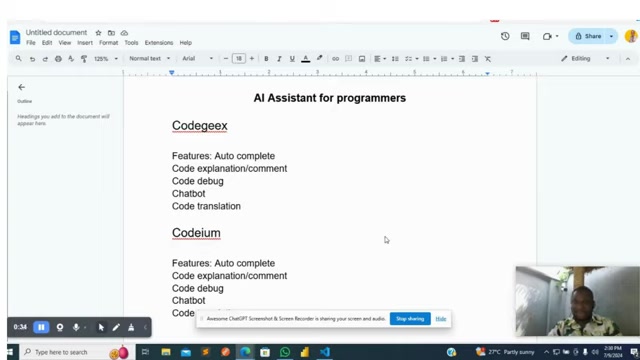
Let's dive into its key features:
- Autocomplete: CodeGeex offers intelligent autocomplete suggestions, predicting your next lines of code to speed up development. As you type, it analyzes the context of your code and provides Relevant suggestions. This helps reduce errors, improves coding speed, and increases code quality.
- Code Explanation and Commenting: Understanding complex code blocks can be time-consuming. CodeGeex can automatically generate explanations and comments for your code, making it easier to maintain and collaborate with others. The auto commenting features make it easy to create and update code.
- Code Debugging: Debugging is a crucial part of development. CodeGeex assists in identifying and resolving errors in your code, suggesting potential solutions. It can identify errors such as missing semicolon.
- Chatbot Integration: CodeGeex also includes a chatbot feature, allowing you to ask questions about your code and receive immediate assistance, sort of like having a coding buddy on standby.
- Code Translation: For developers working with multiple languages, CodeGeex can Translate code from one language to another. This can be extremely useful when porting code or working on cross-platform projects. It supports translation from python to c++.
Codeium: AI Code Completion and Chat
Codeium is another AI coding superpower intended to increase code velocity and minimize developer burden. Codeium streamlines autocomplete to provide better, quicker code completion. Key capabilities are:
- Autocomplete: Like CodeGeex, Codeium offers enhanced autocomplete functionality, predicting code sequences as you type. It accelerates code creation and reduces manual entry efforts.
- Code Explanation and Commenting: Codeium provides Code Explanation and auto-commenting, ensuring the readability of code.
- Code Debugging: Finding and fixing bugs can take up developer hours. Codeium offers debugging, making it easier and quicker to clean your code.
- Chatbot: Codeium includes a chatbot, allowing you to ask questions and get responses that are AI-driven. Having a coding Pal at the ready is invaluable. Codeium is focused on quick and easier code production, especially when used in VS Code.
GitHub Copilot: Your AI Pair Programmer
GitHub Copilot is an AI pair programmer that provides code suggestions, autocompletions, and even complete code blocks. COPILOT has been trained on billions of lines of public code, enabling it to provide better coding assistance.
GitHub Copilot comes in two tiers:
- Copilot Individual: $10 per month or $100 per year
- Copilot Business: $19 per user per month
GitHub Copilot provides inline suggestions, code generation from comments, and can be a great help when coding. Although copilot is not free, the paid version has a lot to offer for a monthly or yearly fee.


Most people like






































Report
Please select a reason for reporting
- 13 Reasons to Switch from Snapchat to Text Messaging
- 7 Powerful Speech to Text Apps to Boost Productivity
- 10 Best Speech to Text Tools for Effortless Transcription
- 13 Free Tools to Easily Transcribe Audio to Text
- 15 Surprising Ways Google's Speech-to-Text Boosts Productivity
- 7 Best Free Online Audio to Text Transcription Tools
- 9 Tips to Transcribe Speech to Text Faster and Better
- 13 Best Speech to Text Software for Windows 10 in 2023
- 7 Tips for Choosing the Best Transcriber for Audio to Text
- 11 Reasons Why Dragon Speech-to-Text Apps are Game-Changers
- 6 Secrets to Enhance Your Speech to Text Transcription
- 6 Brilliant Ways to Boost Productivity with Talk-to-Text on Your MacBook
- 6 Ways Transcription Software Converts Audio to Text
- 8 Tips to Transcribe Speech to Text Like a Pro
- 6 Reasons IBM Watson Speech to Text is a Game-Changer
- 14 Powerful Ways Talk-to-Text Improves Your Workflow
- 12 Top Windows Speech-to-Text Software for Efficient Transcription
- 12 Game-Changing Benefits of Apple's Speech to Text Technology
- 9 Powerful Use Cases for AWS Speech to Text Technology
- 10 Easy Steps to Transcribe YouTube Videos to Text
- transcription audio en texte
- online audio transcription
- free audio file transcription
- free ai audio transcription
- audio transcription service
- audio transcription online free
- audio transcription free online
- audio to transcription software
- audio and transcript
- ai audio transcription free
- voice recording to text converter
- translate voice recording to text
- record voice to text
- audio recording to text converter
- voice recording and transcription
- chatgpt voice to text
- gmail voice to text
- speech to text reader
- speech to text ai free
- speech to talk
- Twitter/X API Alternatives for AI Agents and Developers in 2026
- ChatGPT Knows Ford. It Just Doesn't Quote Ford
- Meshy AI: How to Create 3D Models from Text and Images
- How SEO and Marketing Dashboards Empower Agencies to Drive Results
- How to Use AI Tools to Find Internal Linking Opportunities Across a Business Website
- Discover Your Perfect Haircut with AI Hairstyle Apps
- Free Reputation Calculator Tools: How They're Adapting to Score AI Visibility, Not Just Rankings
- Design Professional Flyers for Free on Your Phone
- Best Free Flyer Maker Apps for Android: Design Like a Pro
- How to Know If Your Business Is Ready for an AI Customer Service Agent
- Top 10 AI Marketing Tools Content Creators Need in 2025
- Top 5 Cold Email Software: Maximize Your Outreach in 2025
- Inside Motion Syncr: A Real-World Test of AI Character Animation
- Twitter/X API Alternatives for AI Agents and Developers in 2026
- Your Business Data Could Be Worth Up to $4M. Find Out Without Uploading a Single File.
- Can an eSIM Plan Save You Time During Travel Setup?
- AI Video Editor Review: A Hands-On Look at Prompt-Based Video Editing
- Keep Characters Consistent Across Scenes With Image-to-Video AI
- How to Convert BTC to HNT
- ProxyWing DuckDuckGo Proxy Review: Plans, Setup and Who It Is For

Copyright ©2026 toolify