































Upgrading an Ancient i7 Processor: Gaming Performance Tests in 2023


Table of Contents
- Introduction
- Finding the Components
- The Processor
- The Motherboard
- RAM
- Storage Drives
- Graphics Card
- Power Supply Unit
- Overclocking
- Performance Tests
- Conclusion
🖥️ Article: Upgrading an Ancient i7 Processor: Performance Tests and Results
Welcome, friends! Today, we embark on a journey to explore the capabilities of a build featuring an ancient i7 processor that I stumbled upon by chance. Rather than assembling a complete computer, we will focus on examining the performance of this old i7, which I bought Second-HAND for just 1700 rubles. Get comfortable and join me on Shaggy Donut Channel as we explore what this setup is capable of.
Finding the Components
It all began with my search for a power supply unit on Avito. While scrolling through the listings, I came across an interesting offer. A person was selling a bunch of computer parts, including a power supply unit. However, when I went to buy the unit, I managed to strike a deal for not just the power supply but also the processor, motherboard, RAM, stock cooler, and graphics card. Admittedly, the graphics card turned out to be faulty, but I wasn't too disappointed since the entire setup only cost me 3700 rubles. Considering the average price of a power supply unit alone is around 2000 rubles or more, it can be considered a bargain. Let's dive into the details of each component.
The Processor
🔋 i7 First Generation
This i7 processor was released way back in 2009 and features 4 cores and 8 Threads. It has a clock speed of 2.93 GHz, a 3rd level cache of 8MB, and tends to run quite hot. The stock cooler included in the bundle isn't sufficient for proper cooling. Therefore, I decided to install a cooler with a 120mm fan and 4 copper heat pipes. On Avito, sellers are asking around 2000 rubles for this processor.
The Motherboard
⚙️ Elitegroup IC55H-A
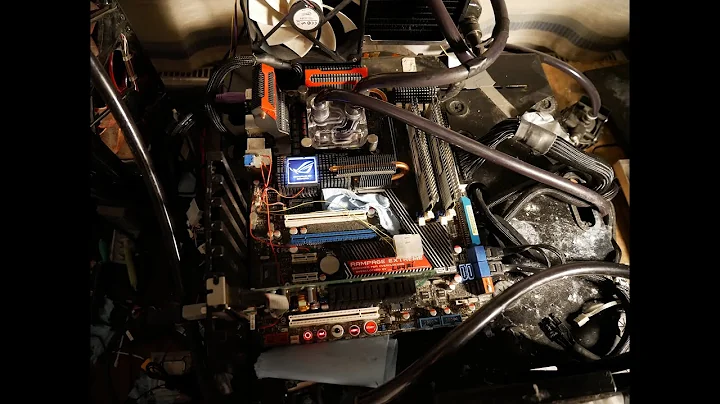
The motherboard is an Elitegroup IC55H-A model on the 1156 socket. Unfortunately, it lacks any VRM heatsinks. This might pose a challenge for additional cooling, especially if we decide to overclock the processor. While this motherboard may not be the best option for our processor, we will make do with what we have.
RAM
💾 16GB DDR3
The bundle came with 4 modules of 16GB DDR3 RAM. This is great because we won't be limited by memory constraints.
Storage Drives
🖴 240GB SSD and 1TB HDD
To boot the system, we will use a 240GB SSD, and for testing games, we'll rely on a 1TB HDD.
Graphics Card
🎮 Testing the GTX 1660 Ti
Let's see if this setup can handle a GTX 1660 Ti graphics card. We have plenty of room for it without any bottlenecks.
Power Supply Unit
⚡ Corsair 650W
For the power supply unit, we have a Corsair 650W. We could have used a less powerful and cheaper one, but since it came with the bundle, we decided to use it.
Overclocking
🔥 Pushing the Limits
Before running the tests, I managed to overclock the processor to achieve a clock speed of 3.4 GHz on all cores. I also slightly tweaked the RAM timings. These adjustments resulted in a performance gain of approximately 10%.
Performance Tests
🧪 Benchmark Results
Using CPU-Z, I ran a multithreaded performance test without overclocking, which gave us a score of around 1500. Not bad for a processor that's already 14 years old.
Now, let's move on to the exciting part: testing the performance of this setup in modern games.
Hogwarts Legacy
🧙♂️ Medium Settings, Full HD
Running Hogwarts Legacy on average settings at Full HD resolution, the graphics card is not fully utilized, but we achieve a comfortable 55 fps, with a smooth frame rate.
Spider-Man Miles Morales
🕷️ High Settings, Full HD
With Spider-Man Miles Morales set to high graphics settings and Full HD resolution, the Game pushes the graphics card harder than the previous test. Yet, the frame rate remains steady, averaging 60-70 fps. It's a comfortable gaming experience.
Forza Horizon 5
🏎️ Very High Settings, Full HD
In Forza Horizon 5, we can see the full potential of the GTX 1660 Ti, delivering a smooth 60-70 fps on very high graphics settings and Full HD resolution. The experience is outstanding.
Stray
🐱 High Settings, Full HD
Stray performs excellently at Full HD resolution and high graphics settings, providing over 70 fps on average. Occasionally, there are minor stutters during location loading, but this isn't due to the HDD. On other systems, this HDD works without any issues.
Apex
🔫 Medium Settings, Full HD
Playing APEX with medium settings and Full HD resolution reveals occasional drops to 70-80 fps in certain locations. However, even during intense gameplay, the average frame rate exceeds 110 fps. It's a highly enjoyable gaming experience.
Cyberpunk 2077
🌆 Medium Settings, Full HD
At medium settings and Full HD resolution, Cyberpunk 2077 produces frame rates ranging from 40 to 60 fps. While the game is quite CPU-dependent, the graphics card doesn't hold us back. Overall, the performance is impressive, and the game is playable.
Red Dead Redemption 2
🤠 High Settings, Full HD
Lastly, Red Dead Redemption 2 performs smoothly at Full HD resolution with high graphics settings. The focus here is on the processor, leading to some minor lag during location loading. However, these infrequent stutters are not significant enough to cause discomfort. It's completely feasible to complete the game on this system without any issues.
Conclusion
The performance of this 14-year-old i7 processor in modern games has pleasantly surprised me. The results would have been even better if I had a different motherboard, which could unlock the full potential of a graphics card like the GTX 1660 Ti or 1660 Super. However, building a computer from scratch on this platform in 2023 would not make much sense. I made this video solely out of Curiosity and to demonstrate that old hardware can still be used for modern gaming.
If you've made it this far, it means you've likely found the video interesting. If so, please leave a like, subscribe to the channel, and hit the notification Bell. Good luck, and goodbye for now!
Highlights
- Exploring the capabilities of an ancient i7 processor
- Finding a bargain on Avito for a bundle of components
- Specifications of the i7 first-generation processor
- Overview of the Elitegroup IC55H-A motherboard
- The importance of having ample RAM
- Utilizing an SSD and HDD for storage
- Testing the performance of a GTX 1660 Ti graphics card
- An overview of the Corsair 650W power supply unit
- Overclocking the processor and achieving a performance boost
- Performance tests and results in popular games
- Conclusion: The surprising performance of a 14-year-old processor in modern games
FAQ
Q: Can I build a computer with the same components in 2023? A: While technically possible, it wouldn't be wise to build a computer with such old components in 2023. There are more powerful and efficient options available.
Q: Can I overclock the i7 processor further? A: It's possible to push the limits further with better cooling and an appropriate motherboard. However, with the current setup, we've already achieved a 10% performance gain through overclocking.
Q: Are there any compatibility issues with the components? A: As long as all the components are compatible with the motherboard socket and form factor, there should be no compatibility issues.
Q: Can I use a different graphics card? A: Yes, you can use a different graphics card as long as it is compatible with the motherboard and power supply unit.
Q: What games were tested in the performance tests? A: The games tested include Hogwarts Legacy, Spider-Man Miles Morales, Forza Horizon 5, Stray, Apex, Cyberpunk 2077, and Red Dead Redemption 2.
Resources
- Avito: www.avito.ru








Most people like

































Report
Please select a reason for reporting
- 13 Reasons to Switch from Snapchat to Text Messaging
- 7 Powerful Speech to Text Apps to Boost Productivity
- 10 Best Speech to Text Tools for Effortless Transcription
- 13 Free Tools to Easily Transcribe Audio to Text
- 15 Surprising Ways Google's Speech-to-Text Boosts Productivity
- 7 Best Free Online Audio to Text Transcription Tools
- 9 Tips to Transcribe Speech to Text Faster and Better
- 13 Best Speech to Text Software for Windows 10 in 2023
- 7 Tips for Choosing the Best Transcriber for Audio to Text
- 11 Reasons Why Dragon Speech-to-Text Apps are Game-Changers
- 6 Secrets to Enhance Your Speech to Text Transcription
- 6 Brilliant Ways to Boost Productivity with Talk-to-Text on Your MacBook
- 6 Ways Transcription Software Converts Audio to Text
- 8 Tips to Transcribe Speech to Text Like a Pro
- 6 Reasons IBM Watson Speech to Text is a Game-Changer
- 14 Powerful Ways Talk-to-Text Improves Your Workflow
- 12 Top Windows Speech-to-Text Software for Efficient Transcription
- 12 Game-Changing Benefits of Apple's Speech to Text Technology
- 9 Powerful Use Cases for AWS Speech to Text Technology
- 10 Easy Steps to Transcribe YouTube Videos to Text
- transcription audio en texte
- online audio transcription
- free audio file transcription
- free ai audio transcription
- audio transcription service
- audio transcription online free
- audio transcription free online
- audio to transcription software
- audio and transcript
- ai audio transcription free
- voice recording to text converter
- translate voice recording to text
- record voice to text
- audio recording to text converter
- voice recording and transcription
- chatgpt voice to text
- gmail voice to text
- speech to text reader
- speech to text ai free
- speech to talk
- How SEO and Marketing Dashboards Empower Agencies to Drive Results
- How to Use AI Tools to Find Internal Linking Opportunities Across a Business Website
- Discover Your Perfect Haircut with AI Hairstyle Apps
- Free Reputation Calculator Tools: How They're Adapting to Score AI Visibility, Not Just Rankings
- Design Professional Flyers for Free on Your Phone
- Best Free Flyer Maker Apps for Android: Design Like a Pro
- How to Know If Your Business Is Ready for an AI Customer Service Agent
- Revolutionizing Storytelling: From Novels to Screenplays with AI
- Create Engaging Animated Explainer Videos with a Free AI Tool
- Stop Multi-Subscribing: Benchmark Top AI Visual Models in One Canvas
- ASOMobile Helps Teams Benchmark App Store Screenshots Against Competitors
- How to Match LMS Software With Your Organization's Training Plan
- Revolutionizing Email Marketing Agency with AI
- How to Convert BTC to HNT
- Unleashing the Power of AI: Cognizant's Roadmap for Transformation
- Frame to Video Review: A Practical Look at Turning Two Still Frames Into Motion
- NVIDIA NIM: Revolutionizing Supply Chain Data Analysis with AI
- Top AI Tools That Help Brands Stand Out Offline (Not Just Online)
- Top 5 Cold Email Software: Maximize Your Outreach in 2025
- Magic School AI: Revolutionizing Quiz & Assessment Generation

Copyright ©2026 toolify