



Total runs:
6.5K
Run Growth:
2.0K
Growth Rate:
31.45%
This repo contains State Of The Art quantized GGUF format model files for OpenCodeInterpreter DS 6.7B .
Quantization was done with an importance matrix that was trained for ~1M tokens (256 batches of 4096 tokens) of answers from the CodeFeedback-Filtered-Instruction dataset.
Everything has been reconverted and quantized with a new importance matrix using llama.cpp from April 29th 2024 onwards, as of commit f4ab2a4 to ensure correct pre-tokenization. The new GGUFs will work with older llama.cpp, but this may not generate correct prompt tokens, please use a recent build to ensure the best possible results!
You are an AI programming assistant, utilizing the Deepseek Coder model, developed by Deepseek Company, and you only answer questions related to computer science. For politically sensitive questions, security and privacy issues, and other non-computer science questions, you will refuse to answer.
### Instruction:
{prompt}
### Response:
These quantised GGUFv3 files are compatible with llama.cpp from February 27th 2024 onwards, as of commit 0becb22
They are also compatible with many third party UIs and libraries provided they are built using a recent llama.cpp.
The new methods available are:
Refer to the Provided Files table below to see what files use which methods, and how.
| Name | Quant method | Bits | Size | Max RAM required | Use case |
|---|---|---|---|---|---|
| OpenCodeInterpreter-DS-6.7B.IQ1_S.gguf | IQ1_S | 1 | 1.5 GB | 3.5 GB | smallest, significant quality loss - TBD : Waiting for this issue to be resolved |
| OpenCodeInterpreter-DS-6.7B.IQ2_XXS.gguf | IQ2_XXS | 2 | 1.8 GB | 3.8 GB | very small, high quality loss |
| OpenCodeInterpreter-DS-6.7B.IQ2_XS.gguf | IQ2_XS | 2 | 1.9 GB | 3.9 GB | very small, high quality loss |
| OpenCodeInterpreter-DS-6.7B.IQ2_S.gguf | IQ2_S | 2 | 2.1 GB | 4.1 GB | small, substantial quality loss |
| OpenCodeInterpreter-DS-6.7B.IQ2_M.gguf | IQ2_M | 2 | 2.2 GB | 4.2 GB | small, greater quality loss |
| OpenCodeInterpreter-DS-6.7B.IQ3_XXS.gguf | IQ3_XXS | 3 | 2.5 GB | 4.5 GB | very small, high quality loss |
| OpenCodeInterpreter-DS-6.7B.IQ3_XS.gguf | IQ3_XS | 3 | 2.7 GB | 4.7 GB | small, substantial quality loss |
| OpenCodeInterpreter-DS-6.7B.IQ3_S.gguf | IQ3_S | 3 | 2.8 GB | 4.8 GB | small, greater quality loss |
| OpenCodeInterpreter-DS-6.7B.IQ3_M.gguf | IQ3_M | 3 | 3.0 GB | 5.0 GB | medium, balanced quality - recommended |
| OpenCodeInterpreter-DS-6.7B.IQ4_XS.gguf | IQ4_XS | 4 | 3.4 GB | 5.4 GB | small, substantial quality loss |
Generated importance matrix file: OpenCodeInterpreter-DS-6.7B.imatrix.dat
Note : the above RAM figures assume no GPU offloading with 4K context. If layers are offloaded to the GPU, this will reduce RAM usage and use VRAM instead.
llama.cpp
command
Make sure you are using
llama.cpp
from commit
0becb22
or later.
./main -ngl 33 -m OpenCodeInterpreter-DS-6.7B.IQ3_M.gguf --color -c 16384 --temp 0.7 --repeat_penalty 1.1 -n -1 -p "You are an AI programming assistant, utilizing the Deepseek Coder model, developed by Deepseek Company, and you only answer questions related to computer science. For politically sensitive questions, security and privacy issues, and other non-computer science questions, you will refuse to answer.\n### Instruction:\n{prompt}\n### Response:"
Change
-ngl 33
to the number of layers to offload to GPU. Remove it if you don't have GPU acceleration.
Change
-c 16384
to the desired sequence length.
If you want to have a chat-style conversation, replace the
-p <PROMPT>
argument with
-i -ins
If you are low on V/RAM try quantizing the K-cache with
-ctk q8_0
or even
-ctk q4_0
for big memory savings (depending on context size).
There is a similar option for V-cache (
-ctv
), however that is
not working yet
.
For other parameters and how to use them, please refer to the llama.cpp documentation
You can use GGUF models from Python using the llama-cpp-python module.
For full documentation, please see: llama-cpp-python docs .
Run one of the following commands, according to your system:
# Prebuilt wheel with basic CPU support
pip install llama-cpp-python --extra-index-url https://abetlen.github.io/llama-cpp-python/whl/cpu
# Prebuilt wheel with NVidia CUDA acceleration
pip install llama-cpp-python --extra-index-url https://abetlen.github.io/llama-cpp-python/whl/cu121 (or cu122 etc.)
# Prebuilt wheel with Metal GPU acceleration
pip install llama-cpp-python --extra-index-url https://abetlen.github.io/llama-cpp-python/whl/metal
# Build base version with no GPU acceleration
pip install llama-cpp-python
# With NVidia CUDA acceleration
CMAKE_ARGS="-DLLAMA_CUDA=on" pip install llama-cpp-python
# Or with OpenBLAS acceleration
CMAKE_ARGS="-DLLAMA_BLAS=ON -DLLAMA_BLAS_VENDOR=OpenBLAS" pip install llama-cpp-python
# Or with CLBLast acceleration
CMAKE_ARGS="-DLLAMA_CLBLAST=on" pip install llama-cpp-python
# Or with AMD ROCm GPU acceleration (Linux only)
CMAKE_ARGS="-DLLAMA_HIPBLAS=on" pip install llama-cpp-python
# Or with Metal GPU acceleration for macOS systems only
CMAKE_ARGS="-DLLAMA_METAL=on" pip install llama-cpp-python
# Or with Vulkan acceleration
CMAKE_ARGS="-DLLAMA_VULKAN=on" pip install llama-cpp-python
# Or with Kompute acceleration
CMAKE_ARGS="-DLLAMA_KOMPUTE=on" pip install llama-cpp-python
# Or with SYCL acceleration
CMAKE_ARGS="-DLLAMA_SYCL=on -DCMAKE_C_COMPILER=icx -DCMAKE_CXX_COMPILER=icpx" pip install llama-cpp-python

# In windows, to set the variables CMAKE_ARGS in PowerShell, follow this format; eg for NVidia CUDA:
$env:CMAKE_ARGS = "-DLLAMA_CUDA=on"
pip install llama-cpp-python
from llama_cpp import Llama

# Chat Completion API

llm = Llama(model_path="./OpenCodeInterpreter-DS-6.7B.IQ3_M.gguf", n_gpu_layers=33, n_ctx=16384)
print(llm.create_chat_completion(
    messages = [
        {"role": "system", "content": "You are an expert AI coding assistant."},
        {
            "role": "user",
            "content": "Pick a LeetCode challenge and solve it in Python."
        }
    ]
))
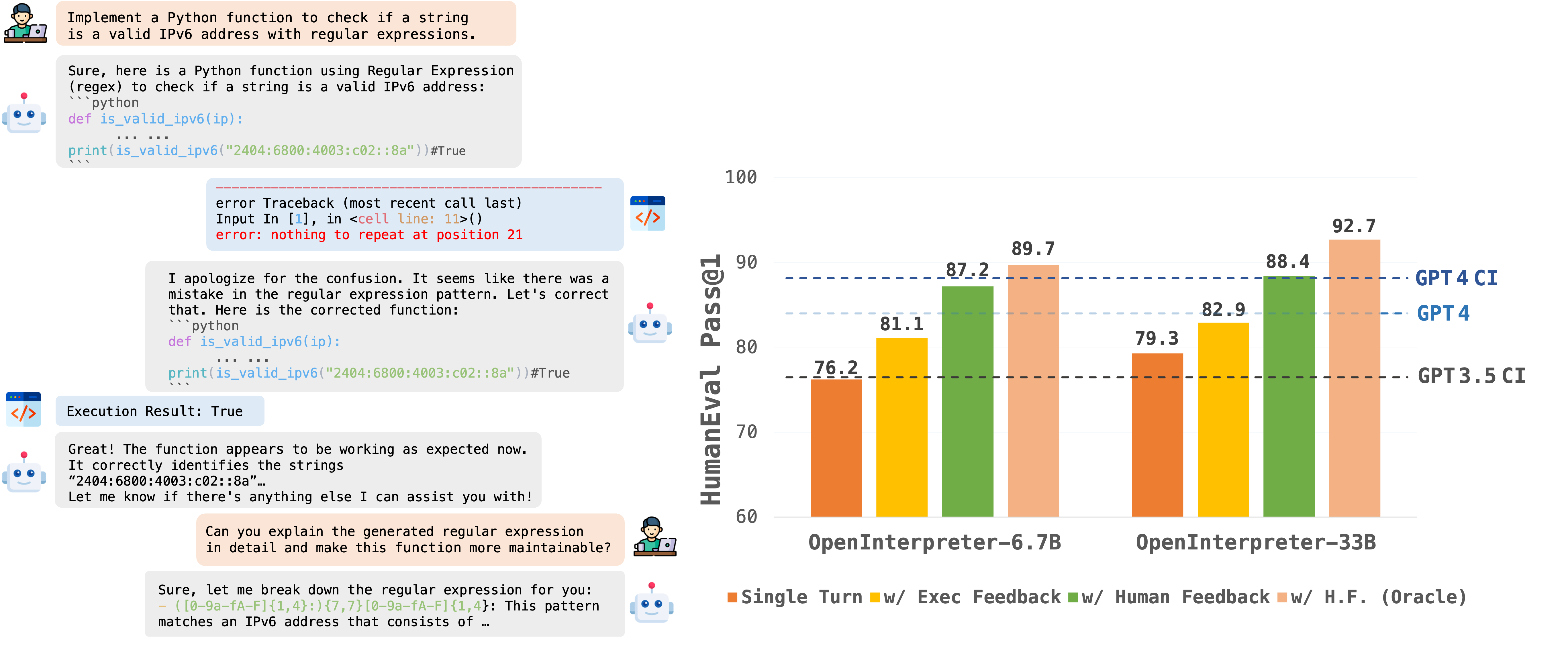
OpenCodeInterpreter is a family of open-source code generation systems designed to bridge the gap between large language models and advanced proprietary systems like the GPT-4 Code Interpreter. It significantly advances code generation capabilities by integrating execution and iterative refinement functionalities.
For further information and related work, refer to our paper: "OpenCodeInterpreter: A System for Enhanced Code Generation and Execution" available on arXiv.
This model is based on deepseek-coder-6.7b-base .
import torch
from transformers import AutoTokenizer, AutoModelForCausalLM
model_path="m-a-p/OpenCodeInterpreter-DS-6.7B"

tokenizer = AutoTokenizer.from_pretrained(model_path)
model = AutoModelForCausalLM.from_pretrained(
    model_path,
    torch_dtype=torch.bfloat16,
    device_map="auto",
)
model.eval()

prompt = "Write a function to find the shared elements from the given two lists."
inputs = tokenizer.apply_chat_template(
        [{'role': 'user', 'content': prompt }],
        return_tensors="pt"
    ).to(model.device)
outputs = model.generate(
    inputs,
    max_new_tokens=1024,
    do_sample=False,
    pad_token_id=tokenizer.eos_token_id,
    eos_token_id=tokenizer.eos_token_id,
)
print(tokenizer.decode(outputs[0][len(inputs[0]):], skip_special_tokens=True))
If you have any inquiries, please feel free to raise an issue or reach out to us via email at: [email protected] , [email protected] . We're here to assist you!"