



Sponsored by
AdsCreator.com
lamm-mit / Cephalo-Idefics-2-vision-8b-alpha
Model's Last Updated: May 30 2024
image-text-to-text
Introduction of Cephalo-Idefics-2-vision-8b-alpha
Model Details of Cephalo-Idefics-2-vision-8b-alpha
Model Summary
Cephalo is a series of multimodal materials science focused vision large language models (V-LLMs) designed to integrate visual and linguistic data for advanced understanding and interaction in human-AI or multi-agent AI frameworks.
A novel aspect of Cephalo's development is the innovative dataset generation method. The extraction process employs advanced algorithms to accurately detect and separate images and their corresponding textual descriptions from complex PDF documents. It involves extracting images and captions from PDFs to create well-reasoned image-text pairs, utilizing large language models (LLMs) for natural language processing. These image-text pairs are then refined and validated through LLM-based NLP processing, ensuring high-quality and contextually relevant data for training.
Cephalo can interpret complex visual scenes and generating contextually accurate language descriptions and answer queries.
The model is developed to process diverse inputs, including images and text, facilitating a broad range of applications such as image captioning, visual question answering, and multimodal content generation. The architecture combines a vision encoder model and an autoregressive transformer to process complex natural language understanding.

Cephalo provides a robust framework for multimodal interaction and understanding, including the development of complex generative pipelines to create 2D and 3D renderings of material microstructures as input for additive manufacturing methods.
This version of Cephalo, lamm-mit/Cephalo-Idefics-2-vision-8b-alpha, is based on the HuggingFaceM4/idefics2-8b-chatty model. The model was trained on a combination of scientific text-image data extracted from Wikipedia and scientific papers. For further details on the base model, see: https://huggingface.co/HuggingFaceM4/idefics2-8b-chatty . More details about technical aspects of the model, training and example applications to materials science problems are provided in the paper (reference at the bottom).
Chat Format
The lamm-mit/Cephalo-Idefics-2-vision-8b-alpha is suiteable for one or more image inputs, wih prompts using the chat format as follows:
User: You carefully study the image, and respond accurately, but succinctly. Think step-by-step.
<image>What is shown in this image, and what is the relevance for materials design? Include a discussion of multi-agent AI.<end_of_utterance>
Assistant:
where the model generates the text after
Assistant:
. For multi-turn conversations, the prompt should be formatted as follows:
User: You carefully study the image, and respond accurately, but succinctly. Think step-by-step.
<image>What is shown in this image, and what is the relevance for materials design? Include a discussion of multi-agent AI.<end_of_utterance>
Assistant: The image depicts ants climbing a vertical surface using their legs and claws. This behavior is observed in nature and can inspire the design of multi-agent AI systems that mimic the coordinated movement of these insects. The relevance lies in the potential application of such systems in robotics and materials science, where efficient and adaptive movement is crucial.<end_of_utterance>
User: How could this be used to design a fracture resistant material?<end_of_utterance>
Assistant:
If you need to manually set the chat template:
IDEFICS2_CHAT_TEMPLATE = "{% for message in messages %}{{message['role'].capitalize()}}{% if message['content'][0]['type'] == 'image' %}{{':'}}{% else %}{{': '}}{% endif %}{% for line in message['content'] %}{% if line['type'] == 'text' %}{{line['text']}}{% elif line['type'] == 'image' %}{{ '<image>' }}{% endif %}{% endfor %}<end_of_utterance>\n{% endfor %}{% if add_generation_prompt %}{{ 'Assistant:' }}{% endif %}"
Sample inference code
This code snippets show how to get quickly started on a GPU:
from PIL import Image
import requests

DEVICE='cuda:0'

from transformers import AutoProcessor, Idefics2ForConditionalGeneration
from tqdm.notebook import tqdm

model_id='lamm-mit/Cephalo-Idefics-2-vision-8b-alpha'

model = Idefics2ForConditionalGeneration.from_pretrained(  model_id,
                                                           torch_dtype=torch.bfloat16, #if your GPU allows
                                                           _attn_implementation="flash_attention_2", #make sure Flash Attention 2 is installed
                                                           trust_remote_code=True,
                                                        ).to (DEVICE)
processor = AutoProcessor.from_pretrained(
    f"{model_id}",
    do_image_splitting=True
)
See section towards the end for more comments on model optimization, including quantization.
If you need to manually set the chat template:
IDEFICS2_CHAT_TEMPLATE = "{% for message in messages %}{{message['role'].capitalize()}}{% if message['content'][0]['type'] == 'image' %}{{':'}}{% else %}{{': '}}{% endif %}{% for line in message['content'] %}{% if line['type'] == 'text' %}{{line['text']}}{% elif line['type'] == 'image' %}{{ '<image>' }}{% endif %}{% endfor %}<end_of_utterance>\n{% endfor %}{% if add_generation_prompt %}{{ 'Assistant:' }}{% endif %}"
tokenizer = AutoTokenizer.from_pretrained(base_model_id, use_fast=True)
tokenizer.chat_template = IDEFICS2_CHAT_TEMPLATE
processor.tokenizer = tokenizer
Simple inference example:
from transformers.image_utils import load_image

image = load_image("https://d2r55xnwy6nx47.cloudfront.net/uploads/2018/02/Ants_Lede1300.jpg")

# Create inputs
messages = [
    {
        "role": "user",
        "content": [
            {"type": "image"},
            {"type": "text", "text": "What is shown in this image, and what is the relevance for materials design? Include a discussion of multi-agent AI."},
        ]
    },
]
prompt = processor.apply_chat_template(messages, add_generation_prompt=True)

# Get inputs using the processor
inputs = processor(text=prompt, images=[image], return_tensors="pt")
inputs = {k: v.to(DEVICE) for k, v in inputs.items()}

# Generate
generated_ids = model.generate(**inputs, max_new_tokens=500)
generated_texts = processor.batch_decode(generated_ids, skip_special_tokens=True)

print(generated_texts)
Next we provide a convenience function for inference. This function takes the model, processor, question, and images, along with messages and images objects for repeated chat-like interactions with the model.
def ask_about_image (model, processor, question,
                     images_input=[],
                     verbatim=False,
                     temperature=0.1,
                     show_image=False,
                     system="You are a biomaterials scientist who responds accurately. ",
                     init_instr = "",
                     show_conversation=True,
                     max_new_tokens=256,
                     messages=[],
                     images=[],
                     use_Markdown=False,
                    ):


    query = question
    images_input=ensure_list(images_input)
    if len (images)==0:
        if len (images_input)>0:
            for image in tqdm (images_input) :
                if is_url(image):
                    image= load_image(image)
                images.append (image)

                if show_image:
                    display ( image )
    if len (messages)==0:

        base_message = {
            "role": "user",
            "content": [
                {"type": "text", "text": system + init_instr},
                # Image messages will be added dynamically here
                {"type": "text", "text": query}
            ]
        }

        # Ensure the images_input is a list
        images_input = ensure_list(images_input)

        # Add image messages dynamically
        image_messages = [{"type": "image"} for _ in images_input]
        base_message["content"][1:1] = image_messages  # Insert image messages before the last text message

        # Append the constructed message to messages list
        messages.append(base_message)

    else:
        messages.append (
            {
                "role": "user",
                "content": [
                    {"type": "text", "text": query
                    }
                ]
            }
        )
    if verbatim:
        print (messages)

    text = processor.apply_chat_template(messages, add_generation_prompt=True)
    inputs = processor(text=[text.strip()], images=images, return_tensors="pt", padding=True).to(DEVICE)

    generated_ids = model.generate(**inputs, max_new_tokens=max_new_tokens, temperature=temperature, do_sample=True)
    generated_texts = processor.batch_decode(generated_ids[:, inputs["input_ids"].size(1):], skip_special_tokens=True)

    messages.append (
        {
            "role": "assistant",
            "content": [ {"type": "text", "text": generated_texts[0]}, ]
        }
    )
    formatted_conversation = format_conversation(messages, images)

    # Display the formatted conversation, e.g. in Jupyter Notebook
    if show_conversation:

        if use_Markdown:
            display(Markdown(formatted_conversation))
        else:
            display(HTML(formatted_conversation))

    return generated_texts, messages, images

question = "What is shown in this image, and what is the relevance for materials design? Include a discussion of multi-agent AI."

url1 = "https://d2r55xnwy6nx47.cloudfront.net/uploads/2018/02/Ants_Lede1300.jpg"

response, messages,images= ask_about_image ( model, processor, question,
                                             images_input=[url1,],
                                             temperature=0.1,
                                             system= '', init_instr='You carefully study the image, and respond accurately, but succinctly. Think step-by-step.\n\n',
                                             show_conversation=True,
                                             max_new_tokens=512, messages=[], images=[])
Sample output:
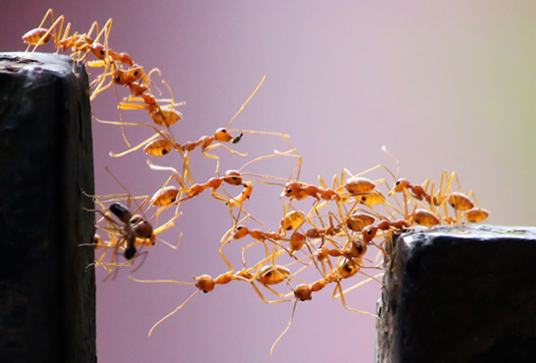 Image by
Vaishakh Manohar
Image by
Vaishakh Manohar
The image depicts a group of ants moving in a coordinated manner to climb a vertical surface. This behavior is known as cooperative climbing and involves the use of multiple agents working together to achieve a common goal. The relevance for materials design lies in the potential application of multi-agent AI in developing new materials with improved properties through the collaboration of multiple agents.
Dataset generation
The schematic below shows a visualization of the approach to generate datasets for training the vision model. The extraction process employs advanced algorithms to accurately detect and separate images and their corresponding textual descriptions from complex PDF documents. It involves extracting images and captions from PDFs to create well-reasoned image-text pairs, utilizing large language models (LLMs) for natural language processing. These image-text pairs are then refined and validated through LLM-based NLP processing, ensuring high-quality and contextually relevant data for training.
The image below shows reproductions of two representative pages of the scientific article (here, Spivak, Buehler, et al., 2011), and how they are used to extract visual scientific data for training the Cephalo model.

Further model optimizations
If your GPU allows, load and run inference in half precision (
torch.float16
or
torch.bfloat16
).
model = AutoModelForVision2Seq.from_pretrained(
    "lamm-mit/Cephalo-Idefics-2-vision-8b-alpha",
+    torch_dtype=torch.float16,
).to(DEVICE)
Vision encoder efficiency
Given the high resolution supported, the vision part of the model can be memory hungry depending on your configuration. If you are GPU-memory-constrained, you can:
-
deactivate the image splitting.
To do so, add
do_image_splitting=Falsewhen initializing the processor (AutoProcessor.from_pretrained). There are no changes required on the model side. Note that only the sft model has been trained with image splitting. -
decrease the maximum image resolution.
To do so, add
size= {"longest_edge": 448, "shortest_edge": 378}when initializing the processor (AutoProcessor.from_pretrained). In particular, thelongest_edgevalue can be adapted to fit the need (the default value is980). We recommend using values that are multiples of 14. There are no changes required on the model side.
do_image_splitting=True
is especially needed to boost performance on complex tasks where a very large image is used as input. The model was fine-tuned with image splitting turned on. For simple tasks, this argument can be safely set to
False
.
Using Flash-attention 2 to speed up generation
Click to expand.
Mke sure to install
flash-attn
. Refer to the
original repository of Flash Attention
for the package installation. Simply change the snippet above with:
model = AutoModelForVision2Seq.from_pretrained(
    "lamm-mit/Cephalo-Idefics-2-vision-8b-alpha",
+    torch_dtype=torch.bfloat16,
+    _attn_implementation="flash_attention_2",
).to(DEVICE)
4 bit quantization with bitsandbytes
Click to expand.
It is possible to load Idefics2 in 4bits with `bitsandbytes`. Make sure that you have `accelerate` and `bitsandbytes` installed.+ from transformers import BitsAndBytesConfig
quantization_config = BitsAndBytesConfig(
load_in_4bit=True,
bnb_4bit_quant_type="nf4",
bnb_4bit_use_double_quant=True,
bnb_4bit_compute_dtype=torch.bfloat16
)
model = AutoModelForVision2Seq.from_pretrained(
"lamm-mit/Cephalo-Idefics-2-vision-8b-alpha",
+ torch_dtype=torch.bfloat16,
+ quantization_config=quantization_config,
).to(DEVICE)
Citation
Please cite as:
@article{Buehler_Cephalo_2024,
  title={Cephalo: Multi-Modal Vision-Language Models for Bio-Inspired Materials Analysis and Design},
  author={Markus J. Buehler},
  journal={arXiv preprint arXiv:2405.19076},
  year={2024}
}
Runs of lamm-mit Cephalo-Idefics-2-vision-8b-alpha on huggingface.co
28
Total runs
0
24-hour runs
-1
3-day runs
1
7-day runs
6
30-day runs
More Information About Cephalo-Idefics-2-vision-8b-alpha huggingface.co Model
Url of Cephalo-Idefics-2-vision-8b-alpha
Cephalo-Idefics-2-vision-8b-alpha huggingface.co Url
Provider of Cephalo-Idefics-2-vision-8b-alpha huggingface.co
Other API from lamm-mit
Total runs:
546
Run Growth:
361
Growth Rate:
66.48%
Total runs:
246
Run Growth:
13
Growth Rate:
5.28%
Total runs:
206
Run Growth:
118
Growth Rate:
57.28%
Total runs:
181
Run Growth:
113
Growth Rate:
59.16%
Total runs:
132
Run Growth:
-41
Growth Rate:
-31.30%
Total runs:
116
Run Growth:
1
Growth Rate:
0.86%
Total runs:
109
Run Growth:
-68
Growth Rate:
-64.76%
Total runs:
102
Run Growth:
-14
Growth Rate:
-13.73%
Total runs:
93
Run Growth:
-3
Growth Rate:
-3.16%
Total runs:
93
Run Growth:
89
Growth Rate:
95.70%
Total runs:
78
Run Growth:
65
Growth Rate:
83.33%
Total runs:
72
Run Growth:
-91
Growth Rate:
-133.82%
Total runs:
70
Run Growth:
-67
Growth Rate:
-94.37%
Total runs:
58
Run Growth:
-30
Growth Rate:
-51.72%
Total runs:
58
Run Growth:
50
Growth Rate:
86.21%
Total runs:
55
Run Growth:
29
Growth Rate:
52.73%
Total runs:
54
Run Growth:
24
Growth Rate:
43.64%
Total runs:
52
Run Growth:
0
Growth Rate:
0.00%
Total runs:
49
Run Growth:
22
Growth Rate:
44.90%
Total runs:
49
Run Growth:
0
Growth Rate:
0.00%
Total runs:
42
Run Growth:
19
Growth Rate:
45.24%
Total runs:
42
Run Growth:
-32
Growth Rate:
-76.19%
Total runs:
42
Run Growth:
6
Growth Rate:
14.29%
Total runs:
42
Run Growth:
15
Growth Rate:
35.71%
Total runs:
39
Run Growth:
-32
Growth Rate:
-82.05%
Total runs:
37
Run Growth:
-76
Growth Rate:
-205.41%
Total runs:
37
Run Growth:
27
Growth Rate:
72.97%
Total runs:
33
Run Growth:
3
Growth Rate:
9.38%
Total runs:
32
Run Growth:
18
Growth Rate:
58.06%
Total runs:
29
Run Growth:
17
Growth Rate:
58.62%
Total runs:
28
Run Growth:
6
Growth Rate:
21.43%
Total runs:
27
Run Growth:
-2
Growth Rate:
-8.00%
Total runs:
26
Run Growth:
-28
Growth Rate:
-112.00%
Total runs:
26
Run Growth:
1
Growth Rate:
3.85%
Total runs:
25
Run Growth:
10
Growth Rate:
40.00%
Total runs:
25
Run Growth:
11
Growth Rate:
44.00%
Total runs:
21
Run Growth:
4
Growth Rate:
20.00%
Total runs:
20
Run Growth:
13
Growth Rate:
65.00%
Total runs:
20
Run Growth:
-6
Growth Rate:
-31.58%
Total runs:
20
Run Growth:
2
Growth Rate:
10.00%
Total runs:
19
Run Growth:
-13
Growth Rate:
-68.42%
Total runs:
19
Run Growth:
1
Growth Rate:
5.56%
Total runs:
18
Run Growth:
7
Growth Rate:
38.89%
Total runs:
18
Run Growth:
2
Growth Rate:
12.50%
Total runs:
18
Run Growth:
13
Growth Rate:
48.15%
Total runs:
17
Run Growth:
0
Growth Rate:
0.00%
Total runs:
16
Run Growth:
-5
Growth Rate:
-33.33%
Total runs:
16
Run Growth:
-3
Growth Rate:
-18.75%
Total runs:
16
Run Growth:
-16
Growth Rate:
-106.67%
Total runs:
14
Run Growth:
7
Growth Rate:
50.00%
Total runs:
14
Run Growth:
-5
Growth Rate:
-35.71%
Total runs:
14
Run Growth:
5
Growth Rate:
38.46%
Total runs:
14
Run Growth:
-8
Growth Rate:
-57.14%
Total runs:
13
Run Growth:
9
Growth Rate:
69.23%
Total runs:
13
Run Growth:
1
Growth Rate:
7.69%
Total runs:
13
Run Growth:
7
Growth Rate:
53.85%
Total runs:
13
Run Growth:
-3
Growth Rate:
-23.08%
Total runs:
12
Run Growth:
5
Growth Rate:
41.67%
Total runs:
11
Run Growth:
-2
Growth Rate:
-18.18%
Total runs:
10
Run Growth:
-8
Growth Rate:
-80.00%
Total runs:
10
Run Growth:
5
Growth Rate:
50.00%
Total runs:
9
Run Growth:
-3
Growth Rate:
-33.33%
Total runs:
9
Run Growth:
2
Growth Rate:
22.22%
Total runs:
9
Run Growth:
0
Growth Rate:
0.00%
Total runs:
9
Run Growth:
0
Growth Rate:
0.00%
Total runs:
8
Run Growth:
0
Growth Rate:
0.00%
Total runs:
7
Run Growth:
-1
Growth Rate:
-14.29%
Total runs:
7
Run Growth:
-14
Growth Rate:
-200.00%
Total runs:
5
Run Growth:
1
Growth Rate:
20.00%
Total runs:
5
Run Growth:
-4
Growth Rate:
-80.00%
Total runs:
3
Run Growth:
3
Growth Rate:
100.00%
Total runs:
1
Run Growth:
1
Growth Rate:
100.00%
Total runs:
0
Run Growth:
0
Growth Rate:
0.00%
Total runs:
0
Run Growth:
0
Growth Rate:
0.00%
Total runs:
0
Run Growth:
0
Growth Rate:
0.00%
Total runs:
0
Run Growth:
0
Growth Rate:
0.00%
Total runs:
0
Run Growth:
0
Growth Rate:
0.00%
Total runs:
0
Run Growth:
0
Growth Rate:
0.00%
Total runs:
0
Run Growth:
0
Growth Rate:
0.00%
Total runs:
0
Run Growth:
0
Growth Rate:
0.00%
Total runs:
0
Run Growth:
0
Growth Rate:
0.00%
Total runs:
0
Run Growth:
0
Growth Rate:
0.00%