




Total runs:
675.1K
Run Growth:
132.0K
Growth Rate:
18.60%
[
Github
] [
Hugging Face
] [Paper]:
to appear
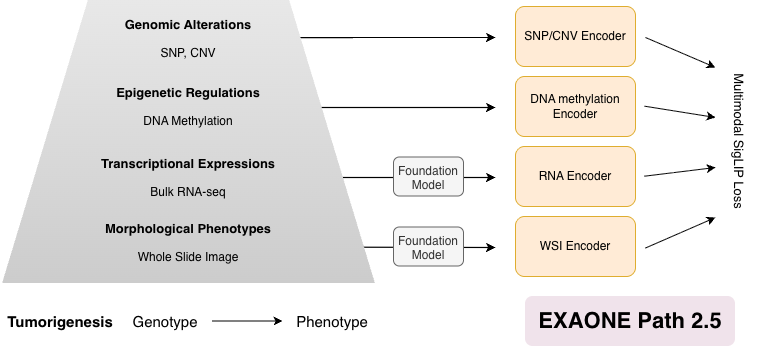
EXAONE Path 2.5 is a biologically informed multimodal framework that enriches histopathology representations by aligning whole-slide images with genomic, epigenetic, and transcriptomic data . By enabling all-pairwise cross-modal alignment across multiple layers of tumor biology, the model captures coherent genotype-to-phenotype relationships within a unified embedding space. This domain-informed design improves resource efficiency, enabling the model to achieve competitive performance across diverse tasks while using substantially fewer training samples and parameters than existing approaches.
Load EXAONE Path 2.5 and extract features.
Note: This implementation requires NVIDIA GPU and drivers. The provided environment setup specifically uses CUDA-enabled PyTorch, making NVIDIA GPU mandatory for running the model.
First, install Micromamba if you haven't already. You can find installation instructions here . Then create and activate the environment using the provided configuration:
git clone https://github.com/LG-AI-EXAONE/EXAONE-Path-2.5.git
cd EXAONE-Path-2.5
micromamba create -n exaonepath python=3.12
micromamba activate exaonepath
pip install -r requirements.txt
EXAONE Path 2.5 inference follows a two-stage pipeline. (1) Patch-level feature extraction : extract pretrained patch embeddings from either image patches or full WSIs. (2) Slide-level feature extraction : aggregate patch embeddings into slide representations aligned with genomics data. Sections 3.1 and 3.2 describe these steps in detail.
You can extract the pretained patch features (without multimodal alignment) in two ways.
Assuming you have an image, you can run the following code snippet to extract pretrained patch features.
import torch
from PIL import Image
from torchvision import transforms
from transformers import AutoModel

repo_id = "LGAI-EXAONE/EXAONE-Path-2.5"
device = "cuda"

# Input
png_path = "path/to/your/sample_patch.png"

# Load patch encoder
patch_encoder_model = AutoModel.from_pretrained(
    repo_id,
    subfolder="patch-encoder",
    trust_remote_code=True,
).to(device).eval()

# Image preprocessing (must match patch encoder training)
transform = transforms.Compose([
    transforms.Resize(256),
    transforms.CenterCrop(224),
    transforms.ToTensor(),
    transforms.Normalize(mean=[0.485, 0.456, 0.406], std=[0.229, 0.224, 0.225]),
])

img = Image.open(png_path).convert("RGB")
image_tensor = transform(img).unsqueeze(0).to(device)  # [1, 3, 224, 224]

with torch.no_grad():
    patch_encoder_embedding = patch_encoder_model(image_tensor)  # [B=1, C]
Outputs
patch_encoder_embedding
: a tensor of shape
[B=1, C]
where
B
is the batch size, and
C
is the embedding dimension
The step is further broken into smaller steps.
(1)
Generate patch coordinates (and contour indices)
with Python function API
patchfy
that you can import and call directly to:
coords
+
contour_index
from exaonepath.patches import patchfy

wsi_path = "path/to/your/slide.svs"  # .svs/.tif/.tiff/.ndpi/.mrxs/...
out_dir = "path/to/output_dir"

h5_path, coords, contour_idx = patchfy(
    wsi=wsi_path,
    out=out_dir,
    patch_size=256,
    step_size=256,
    patch_level=0,
    save_h5=True,
    save_mask=True,
    auto_skip=True,
)
Outputs
save_h5=True
, the patches are saved to:
<out_dir>/patches/<slide_id>.h5
save_mask=True
, a segmentation visualization is saved to:
<out_dir>/masks/<slide_id>.jpg
<out_dir>/skipped/<slide_id>.txt
Note: the effective
patch_size
/
step_size
written to the HDF5 may be MPP-normalized internally (see the
patchfy
docstring for details).
The returned arrays are:
coords
: $N \times 2$ int array of patch coordinates $(x, y)$ in
level-0
pixel space.
contour_idx
: length-$N$ int array holding tissue contour index of each patch.
Useful parameters
seg_downsample
(float): extra downsampling factor
for segmentation only
(speed vs accuracy).
max_seg_pixels
(float): skip very large slides at the chosen segmentation level (set
<=0
to disable).
patchfy
docstring in
exaonepath/patches/patchify.py
.
(e.g.,
sthresh
,
mthresh
,
close
,
use_otsu
,
a_t
,
a_h
,
max_n_holes
,
line_thickness
).
(2) Extract patch features from the WSI using those coordinates:
python -m exaonepath.feature_extraction.extract_single_slide_feature \
    --slide_path "path/to/your/slide.svs" \
    --coords_h5_path "<out_dir>/patches/<slide_id>.h5" \
    --out_h5_path "<out_dir>/patches/<slide_id>_features.h5" \
    --batch_size_per_gpu 32
coords_h5_path
must be the H5 produced by
patchfy
(
save_h5=True
). Future slide encoder requires
coords
, ideally with
contour_index
.
out_h5_path
) will contain:
features
[N, C],
coords
[N, 2],
contour_index
[N].
Patch features, coordinates, (contour index) must be available. Use the below code snippet if patch feature extraction was conducted with 3.1.2.
patch_features_h5_path
should be identical as
out_h5_path
from the previous step.
import h5py
import torch
from transformers import AutoModel

device = "cuda"

# Load slide encoder (HF)
repo_id = "LGAI-EXAONE/EXAONE-Path-2.5"
slide_encoder = AutoModel.from_pretrained(
    repo_id,
    subfolder="slide-encoder",
    trust_remote_code=True,
).to(device).eval()

# Load patch-level features exported as an HDF5 file
# Expected keys: features [N, C], coords [N, 2], contour_index [N]
patch_features_h5_path = "<out_dir>/patches/<slide_id>_features.h5"
with h5py.File(patch_features_h5_path, "r") as f:
    patch_features = torch.from_numpy(f["features"][:]).float()  # [N, C]
    patch_coords = torch.from_numpy(f["coords"][:]).long()  # [N, 2]
    patch_contour_index = torch.from_numpy(f["contour_index"][:]).long()  # [N]

patch_features = patch_features.unsqueeze(0).to(device)  # [B=1, N, C]
patch_coords = patch_coords.unsqueeze(0).to(device)  # [B=1, N, 2]
patch_contour_index = patch_contour_index.unsqueeze(0).to(device)  # [B=1, N]

# All patches are valid (if you use padding later, set False for padded tokens)
patch_mask = torch.ones(
    (patch_features.shape[0], patch_features.shape[1]),
    dtype=torch.bool,
    device=device,
)

with torch.no_grad():
    outputs = slide_encoder(
        patch_features=patch_features,
        patch_mask=patch_mask,
        patch_coords=patch_coords,
        patch_contour_index=patch_contour_index,
    )

patch_embedding = outputs["patch_embedding"]
slide_embedding = outputs["slide_embedding"]
If you padded patches and want to keep only valid patch embeddings (ragged), use the mask to index. (This returns a Python list because $N_{valid}$ can differ per slide.)
valid_patch_embeddings = [
    patch_embedding[b, patch_mask[b]] for b in range(patch_embedding.size(0))
]
Output
patch_embedding
:
[B, N, C]
updated patch-level embeddings after multi-modal alignment
slide_embedding
:
[B, C]
slide-level embeddings to be used for downstream tasks
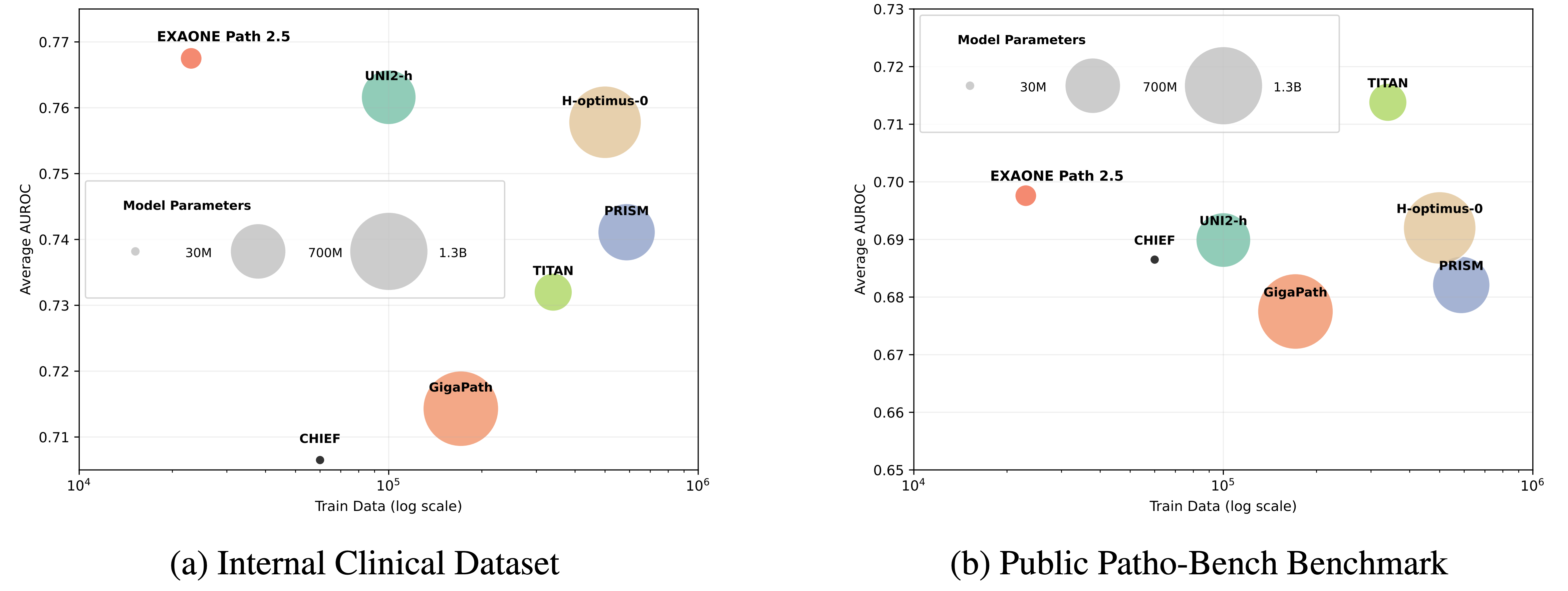
Experiments on internal multi-institutional clinical datasets and the 80-task Patho-Bench benchmark show that EXAONE Path 2.5 matches or surpasses state-of-the-art pathology foundation models while requiring significantly fewer parameters and less pretraining data.
The model is licensed under EXAONEPath AI Model License Agreement 1.0 - NC
LG AI Research Technical Support: [email protected]