




Total runs:
14.6K
Run Growth:
13.9K
Growth Rate:
95.63%
This repo contains llamafile format model files for WizardLM's WizardCoder Python 34B V1.0 .
WARNING: This README may contain inaccuracies. It was generated automatically by forking TheBloke/WizardCoder-Python-34B-V1.0-GGUF and piping the README through sed. Errors should be reported to jartine, and do not reflect TheBloke. You can also support his work on Patreon .
llamafile is a new format introduced by Mozilla Ocho on Nov 20th 2023. It uses Cosmopolitan Libc to turn LLM weights into runnable llama.cpp binaries that run on the stock installs of six OSes for both ARM64 and AMD64. llamafile offers numerous advantages over GGML, such as better tokenisation, and support for special tokens. It is also supports metadata, and is designed to be extensible.
Here is an incomplate list of clients and libraries that are known to support llamafile:
Below is an instruction that describes a task. Write a response that appropriately completes the request.

### Instruction:
{prompt}

### Response:
These quantised llamafilev2 files are compatible with llama.cpp from August 27th onwards, as of commit d0cee0d36d5be95a0d9088b674dbb27354107221
They are also compatible with many third party UIs and libraries - please see the list at the top of this README.
The new methods available are:
Refer to the Provided Files table below to see what files use which methods, and how.
| Name | Quant method | Bits | Size | Max RAM required | Use case |
|---|---|---|---|---|---|
| wizardcoder-python-34b-v1.0.Q2_K.llamafile | Q2_K | 2 | 14.21 GB | 16.71 GB | smallest, significant quality loss - not recommended for most purposes |
| wizardcoder-python-34b-v1.0.Q3_K_S.llamafile | Q3_K_S | 3 | 14.61 GB | 17.11 GB | very small, high quality loss |
| wizardcoder-python-34b-v1.0.Q3_K_M.llamafile | Q3_K_M | 3 | 16.28 GB | 18.78 GB | very small, high quality loss |
| wizardcoder-python-34b-v1.0.Q3_K_L.llamafile | Q3_K_L | 3 | 17.77 GB | 20.27 GB | small, substantial quality loss |
| wizardcoder-python-34b-v1.0.Q4_0.llamafile | Q4_0 | 4 | 19.05 GB | 21.55 GB | legacy; small, very high quality loss - prefer using Q3_K_M |
| wizardcoder-python-34b-v1.0.Q4_K_S.llamafile | Q4_K_S | 4 | 19.15 GB | 21.65 GB | small, greater quality loss |
| wizardcoder-python-34b-v1.0.Q4_K_M.llamafile | Q4_K_M | 4 | 20.22 GB | 22.72 GB | medium, balanced quality - recommended |
| wizardcoder-python-34b-v1.0.Q5_0.llamafile | Q5_0 | 5 | 23.24 GB | 25.74 GB | legacy; medium, balanced quality - prefer using Q4_K_M |
| wizardcoder-python-34b-v1.0.Q5_K_S.llamafile | Q5_K_S | 5 | 23.24 GB | 25.74 GB | large, low quality loss - recommended |
| wizardcoder-python-34b-v1.0.Q5_K_M.llamafile | Q5_K_M | 5 | 23.84 GB | 26.34 GB | large, very low quality loss - recommended |
| wizardcoder-python-34b-v1.0.Q6_K.llamafile | Q6_K | 6 | 27.68 GB | 30.18 GB | very large, extremely low quality loss |
| wizardcoder-python-34b-v1.0.Q8_0.llamafile | Q8_0 | 8 | 35.86 GB | 38.36 GB | very large, extremely low quality loss - not recommended |
Note : the above RAM figures assume no GPU offloading. If layers are offloaded to the GPU, this will reduce RAM usage and use VRAM instead.
Note for manual downloaders: You almost never want to clone the entire repo! Multiple different quantisation formats are provided, and most users only want to pick and download a single file.
The following clients/libraries will automatically download models for you, providing a list of available models to choose from:
text-generation-webui
Under Download Model, you can enter the model repo: jartine/WizardCoder-Python-34B-V1.0-llamafile and below it, a specific filename to download, such as: wizardcoder-python-34b-v1.0.q4_K_M.llamafile.
Then click Download.
I recommend using the
huggingface-hub
Python library:
pip3 install huggingface-hub>=0.17.1
Then you can download any individual model file to the current directory, at high speed, with a command like this:
huggingface-cli download jartine/WizardCoder-Python-34B-V1.0-llamafile wizardcoder-python-34b-v1.0.q4_K_M.llamafile --local-dir . --local-dir-use-symlinks False
You can also download multiple files at once with a pattern:
huggingface-cli download jartine/WizardCoder-Python-34B-V1.0-llamafile --local-dir . --local-dir-use-symlinks False --include='*Q4_K*llamafile'
For more documentation on downloading with
huggingface-cli
, please see:
HF -> Hub Python Library -> Download files -> Download from the CLI
.
To accelerate downloads on fast connections (1Gbit/s or higher), install
hf_transfer
:
pip3 install hf_transfer
And set environment variable
HF_HUB_ENABLE_HF_TRANSFER
to
1
:
HUGGINGFACE_HUB_ENABLE_HF_TRANSFER=1 huggingface-cli download jartine/WizardCoder-Python-34B-V1.0-llamafile wizardcoder-python-34b-v1.0.q4_K_M.llamafile --local-dir . --local-dir-use-symlinks False
Windows CLI users: Use
set HUGGINGFACE_HUB_ENABLE_HF_TRANSFER=1
before running the download command.
llama.cpp
command
Make sure you are using
llama.cpp
from commit
d0cee0d36d5be95a0d9088b674dbb27354107221
or later.
./main -ngl 32 -m wizardcoder-python-34b-v1.0.q4_K_M.llamafile --color -c 4096 --temp 0.7 --repeat_penalty 1.1 -n -1 -p "Below is an instruction that describes a task. Write a response that appropriately completes the request.\n\n### Instruction:\n{prompt}\n\n### Response:"
Change
-ngl 32
to the number of layers to offload to GPU. Remove it if you don't have GPU acceleration.
Change
-c 4096
to the desired sequence length. For extended sequence models - eg 8K, 16K, 32K - the necessary RoPE scaling parameters are read from the llamafile file and set by llama.cpp automatically.
If you want to have a chat-style conversation, replace the
-p <PROMPT>
argument with
-i -ins
For other parameters and how to use them, please refer to the llama.cpp documentation
text-generation-webui
Further instructions here: text-generation-webui/docs/llama.cpp.md .
You can use llamafile models from Python using the llama-cpp-python or ctransformers libraries.
# Base ctransformers with no GPU acceleration
pip install ctransformers>=0.2.24
# Or with CUDA GPU acceleration
pip install ctransformers[cuda]>=0.2.24
# Or with ROCm GPU acceleration
CT_HIPBLAS=1 pip install ctransformers>=0.2.24 --no-binary ctransformers
# Or with Metal GPU acceleration for macOS systems
CT_METAL=1 pip install ctransformers>=0.2.24 --no-binary ctransformers
from ctransformers import AutoModelForCausalLM

# Set gpu_layers to the number of layers to offload to GPU. Set to 0 if no GPU acceleration is available on your system.
llm = AutoModelForCausalLM.from_pretrained("jartine/WizardCoder-Python-34B-V1.0-llamafile", model_file="wizardcoder-python-34b-v1.0.q4_K_M.llamafile", model_type="llama", gpu_layers=50)

print(llm("AI is going to"))
Here's guides on using llama-cpp-python or ctransformers with LangChain:
For further support, and discussions on these models and AI in general, join us at:
I've had a lot of people ask if they can contribute. I enjoy providing models and helping people, and would love to be able to spend even more time doing it, as well as expanding into new projects like fine tuning/training.
If you're able and willing to contribute it will be most gratefully received and will help me to keep providing more models, and to start work on new AI projects.
And thank you again to mozilla for their generous grant.
🤗
HF Repo
•🐱
Github Repo
• 🐦
Twitter
• 📃
[WizardLM]
• 📃
[WizardCoder]
• 📃
[WizardMath]
👋 Join our Discord
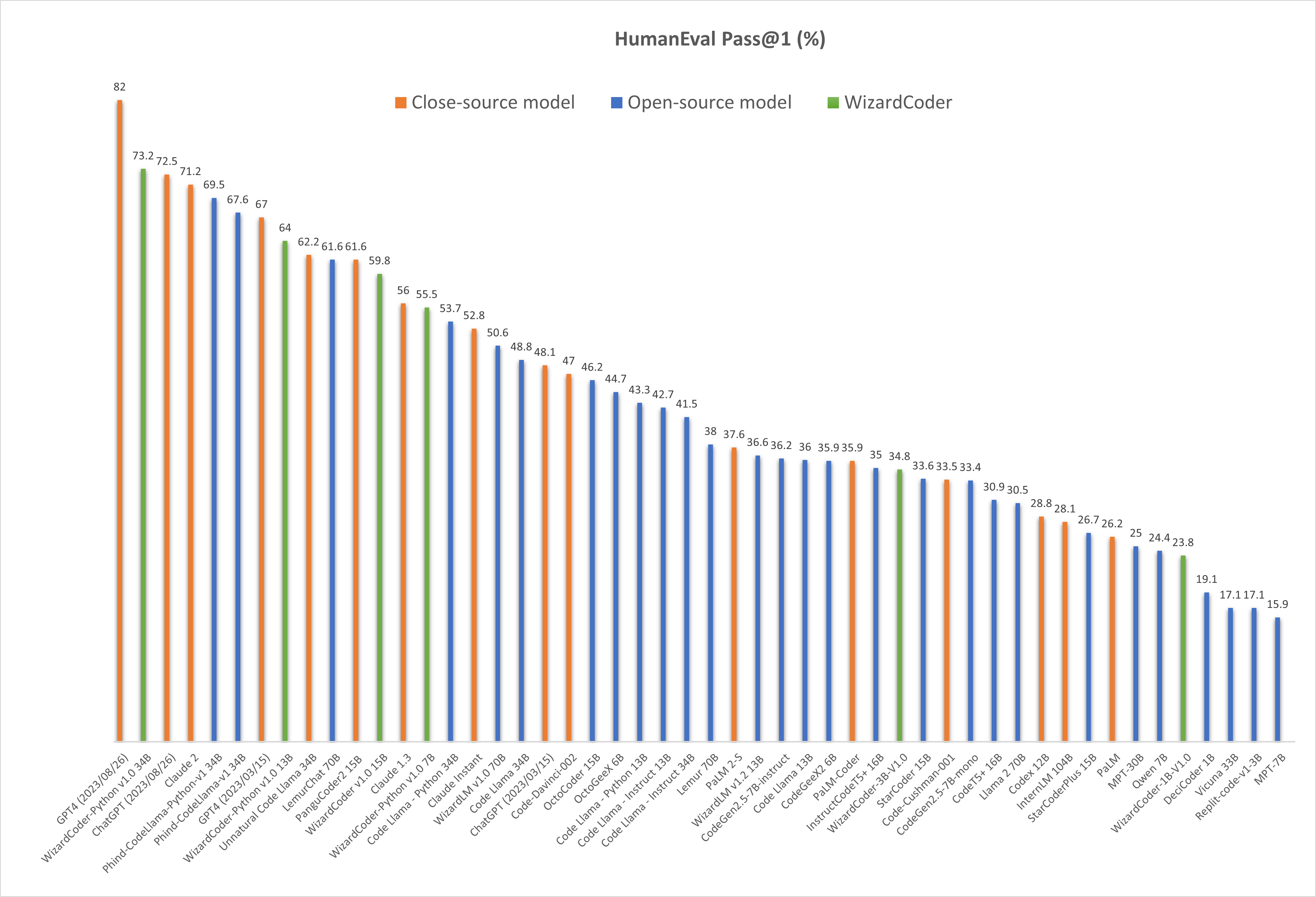
❗Note: There are two HumanEval results of GPT4 and ChatGPT-3.5. The 67.0 and 48.1 are reported by the official GPT4 Report (2023/03/15) of OpenAI . The 82.0 and 72.5 are tested by ourselves with the latest API (2023/08/26).
| Model | Checkpoint | Paper | HumanEval | MBPP | Demo | License |
|---|---|---|---|---|---|---|
| WizardCoder-Python-34B-V1.0 | 🤗 HF Link | 📃 [WizardCoder] | 73.2 | 61.2 | Demo | Llama2 |
| WizardCoder-15B-V1.0 | 🤗 HF Link | 📃 [WizardCoder] | 59.8 | 50.6 | -- | OpenRAIL-M |
| WizardCoder-Python-13B-V1.0 | 🤗 HF Link | 📃 [WizardCoder] | 64.0 | 55.6 | -- | Llama2 |
| WizardCoder-3B-V1.0 | 🤗 HF Link | 📃 [WizardCoder] | 34.8 | 37.4 | Demo | OpenRAIL-M |
| WizardCoder-1B-V1.0 | 🤗 HF Link | 📃 [WizardCoder] | 23.8 | 28.6 | -- | OpenRAIL-M |
| Model | Checkpoint | Paper | GSM8k | MATH | Online Demo | License |
|---|---|---|---|---|---|---|
| WizardMath-70B-V1.0 | 🤗 HF Link | 📃 [WizardMath] | 81.6 | 22.7 | Demo | Llama 2 |
| WizardMath-13B-V1.0 | 🤗 HF Link | 📃 [WizardMath] | 63.9 | 14.0 | Demo | Llama 2 |
| WizardMath-7B-V1.0 | 🤗 HF Link | 📃 [WizardMath] | 54.9 | 10.7 | Demo | Llama 2 |
| Model | Checkpoint | Paper | MT-Bench | AlpacaEval | GSM8k | HumanEval | License |
|---|---|---|---|---|---|---|---|
| WizardLM-70B-V1.0 | 🤗 HF Link | 📃 Coming Soon | 7.78 | 92.91% | 77.6% | 50.6 | Llama 2 License |
| WizardLM-13B-V1.2 | 🤗 HF Link | 7.06 | 89.17% | 55.3% | 36.6 | Llama 2 License | |
| WizardLM-13B-V1.1 | 🤗 HF Link | 6.76 | 86.32% | 25.0 | Non-commercial | ||
| WizardLM-30B-V1.0 | 🤗 HF Link | 7.01 | 37.8 | Non-commercial | |||
| WizardLM-13B-V1.0 | 🤗 HF Link | 6.35 | 75.31% | 24.0 | Non-commercial | ||
| WizardLM-7B-V1.0 | 🤗 HF Link | 📃 [WizardLM] | 19.1 | Non-commercial | |||
🔥 The following figure shows that our WizardCoder-Python-34B-V1.0 attains the second position in this benchmark , surpassing GPT4 (2023/03/15, 73.2 vs. 67.0), ChatGPT-3.5 (73.2 vs. 72.5) and Claude2 (73.2 vs. 71.2).
"Below is an instruction that describes a task. Write a response that appropriately completes the request.\n\n### Instruction:\n{instruction}\n\n### Response:"
We provide the inference demo code here .
Please cite the repo if you use the data, method or code in this repo.
@article{luo2023wizardcoder,
  title={WizardCoder: Empowering Code Large Language Models with Evol-Instruct},
  author={Luo, Ziyang and Xu, Can and Zhao, Pu and Sun, Qingfeng and Geng, Xiubo and Hu, Wenxiang and Tao, Chongyang and Ma, Jing and Lin, Qingwei and Jiang, Daxin},
  journal={arXiv preprint arXiv:2306.08568},
  year={2023}
}