































Table of Contents
- Key Points
- Understanding the Need for PDF Translation
- Introducing OnlineDocTranslator: A Seamless Solution
- Step-by-Step Guide to Translating a PDF with OnlineDocTranslator
- Understanding OnlineDocTranslator Pricing
- Advantages and Disadvantages of Using OnlineDocTranslator
- Highlighting Key Features of OnlineDocTranslator
- Frequently Asked Questions
- Related Questions



Understanding the Need for PDF Translation
Why Translate PDF Documents?
PDF, or Portable Document Format, files are widely used for sharing documents across various platforms and devices due to their ability to maintain formatting regardless of the software or operating system used to view them. If the source file is RTF, use an RTF to PDF Converter before sharing it. However, the content within these PDFs is not always in a language that every user understands. This is where the need for PDF translation arises. Translating PDFs opens up a wealth of information to a broader audience, enabling individuals and organizations to access documents in their native languages.
Whether it’s for business, academic, or personal use, the ability to translate PDFs is invaluable. Imagine receiving a critical business proposal in a foreign language or needing to understand a legal document written in a language you’re unfamiliar with. PDF translation bridges these language gaps, ensuring that vital information is accessible and understandable to everyone. It enhances communication, facilitates international collaborations, and ensures no one is left out due to language barriers.
PDF translation isn't just about converting words from one language to another. It's about ensuring that the context, meaning, and original formatting are preserved to maintain the document's integrity and readability. By accurately translating PDFs, you can make information more accessible and inclusive, driving better understanding and decision-making.
Challenges with Traditional PDF Translation Methods
Traditional methods of translating PDF documents often come with several challenges. One of the most significant issues is the loss of formatting. When using basic translation tools, the text may be converted, but the original layout, images, and other design elements can be disrupted or completely lost. This results in a document that is difficult to read and unprofessional in appearance.
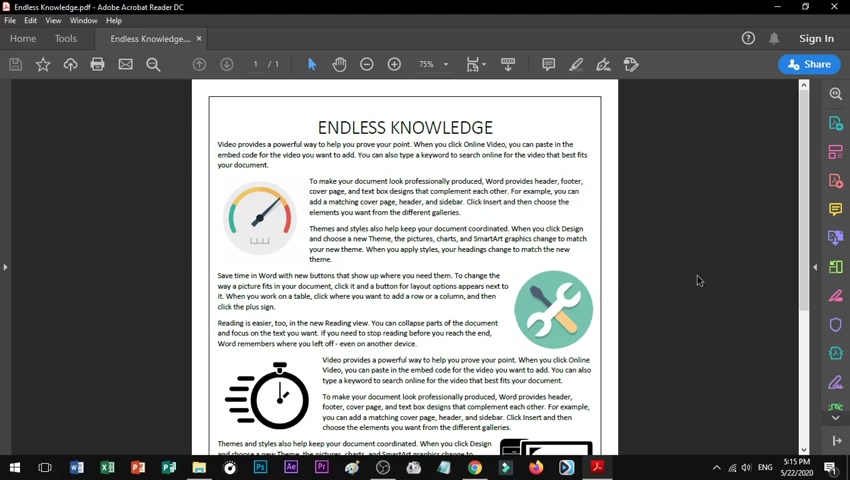
Another common problem is the need for manual copy-pasting. Users have to manually copy the text from the PDF, paste it into a translation tool, and then reformat the translated text back into the original document. This process is not only time-consuming but also prone to errors, especially with large documents. It requires significant effort and can be frustrating.
Moreover, many translation tools are not equipped to handle complex PDFs containing images, tables, or other non-textual elements. These tools often fail to accurately extract text from such documents, leading to incomplete or inaccurate translations. This can be particularly problematic when dealing with documents that rely heavily on visual elements to convey information.
Finally, the cost of professional translation services can be prohibitive for many individuals and small businesses. While professional translators offer high accuracy and expertise, their services can be expensive, making them an impractical option for translating large volumes of documents or for users on a limited budget. This highlights the need for more accessible, cost-effective solutions that still provide accurate and reliable PDF translation.
Step-by-Step Guide to Translating a PDF with OnlineDocTranslator
Accessing OnlineDocTranslator
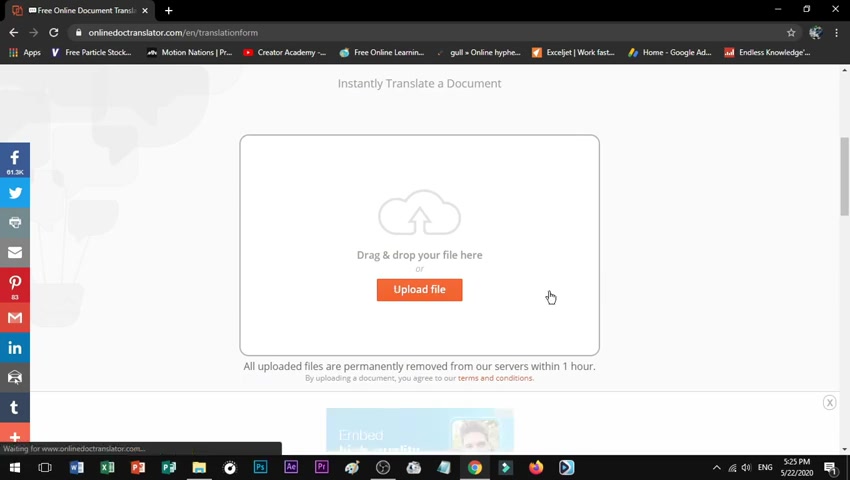
First, open your preferred web browser. Google Chrome is recommended for optimal performance, but other browsers such as Firefox, Safari, or Edge will also work. In the search bar, type OnlineDocTranslator and press Enter, or directly input the URL of the OnlineDocTranslator website if you have it.
Navigating to the Translation Interface
Once the OnlineDocTranslator website is open, scroll down the page until you find the Translate Now button. This button redirects you to the translation form.
Uploading Your PDF File
On the translation form page, you'll see an Upload File button. Click this button to open your file explorer. Locate the PDF document you wish to translate on your computer and select it. Click Open to upload the file to the OnlineDocTranslator platform.
Specifying Source and Target Languages
After uploading your PDF, the website will attempt to detect the language of your document automatically. However, it's always good to double-check and manually specify the source language if necessary.
Next, select the language you want to translate your PDF into. OnlineDocTranslator supports a wide range of languages, so scroll through the options and choose your desired target language.
Initiating the Translation Process
With both the source and target languages selected, click the Translate button. This initiates the translation process. Depending on the size and complexity of your PDF, this might take a few minutes.
Downloading the Translated Document
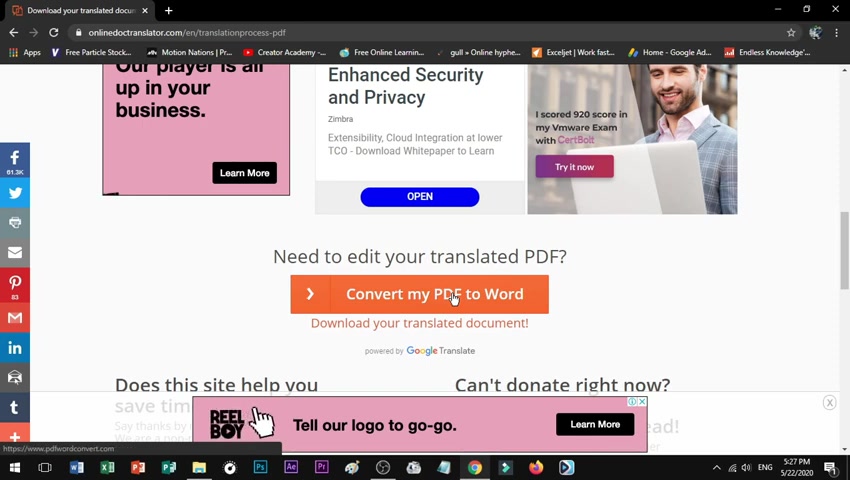
Once the translation is complete, a link will appear that says Download Your Translated Document. Click this link to download the translated PDF to your computer.
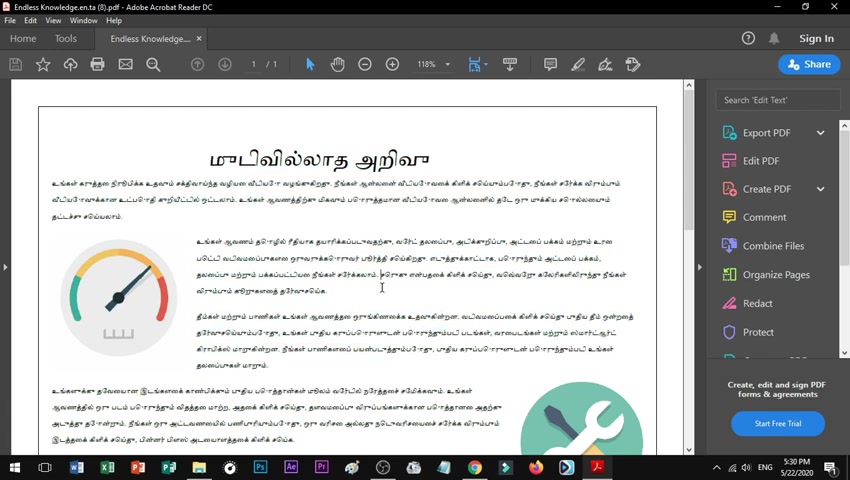
After downloading, open the translated PDF to verify the content and formatting. You should find that the text has been translated accurately, and the original layout and formatting of the document have been preserved.
Highlighting Key Features of OnlineDocTranslator
File Format Support
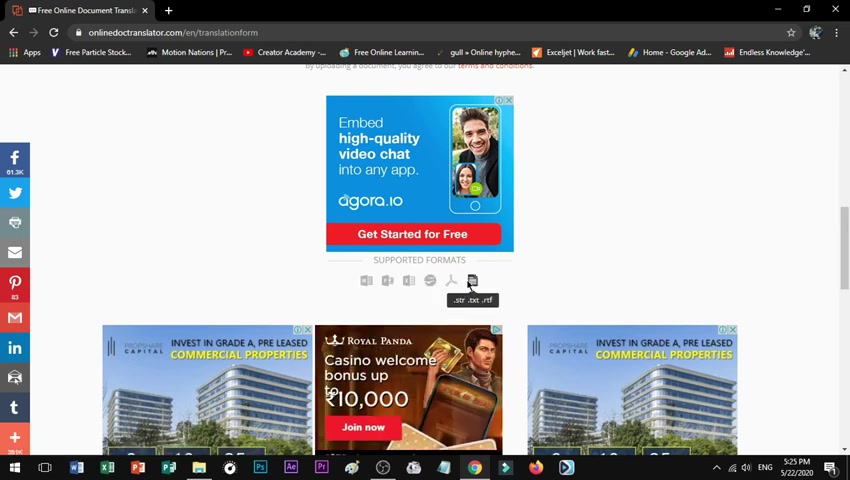
In addition to PDFs, OnlineDocTranslator typically supports a variety of document formats, including: Word documents (.doc, .docx), PowerPoint presentations (.ppt, .pptx), Excel spreadsheets (.xls, .xlsx), OpenOffice documents (.odt, .ods, .odp), text files (.txt), and rich text format files (.rtf).
Language Availability
OnlineDocTranslator usually provides support for over one hundred languages. This broad range ensures that users from many different linguistic backgrounds can translate documents effectively, enabling international business, academic research, and personal communication across language barriers.
Layout Retention
One of the most vital features of OnlineDocTranslator is its ability to retain the original layout and formatting of documents. This is particularly important for complex documents with images, tables, and other design elements. Preserving the layout ensures the translated document is both readable and professional in appearance.


Most people like




































Report
Please select a reason for reporting
- 13 Reasons to Switch from Snapchat to Text Messaging
- 7 Powerful Speech to Text Apps to Boost Productivity
- 10 Best Speech to Text Tools for Effortless Transcription
- 13 Free Tools to Easily Transcribe Audio to Text
- 15 Surprising Ways Google's Speech-to-Text Boosts Productivity
- 7 Best Free Online Audio to Text Transcription Tools
- 9 Tips to Transcribe Speech to Text Faster and Better
- 13 Best Speech to Text Software for Windows 10 in 2023
- 7 Tips for Choosing the Best Transcriber for Audio to Text
- 11 Reasons Why Dragon Speech-to-Text Apps are Game-Changers
- 6 Secrets to Enhance Your Speech to Text Transcription
- 6 Brilliant Ways to Boost Productivity with Talk-to-Text on Your MacBook
- 6 Ways Transcription Software Converts Audio to Text
- 8 Tips to Transcribe Speech to Text Like a Pro
- 6 Reasons IBM Watson Speech to Text is a Game-Changer
- 14 Powerful Ways Talk-to-Text Improves Your Workflow
- 12 Top Windows Speech-to-Text Software for Efficient Transcription
- 12 Game-Changing Benefits of Apple's Speech to Text Technology
- 9 Powerful Use Cases for AWS Speech to Text Technology
- 10 Easy Steps to Transcribe YouTube Videos to Text
- transcription audio en texte
- online audio transcription
- free audio file transcription
- free ai audio transcription
- audio transcription service
- audio transcription online free
- audio transcription free online
- audio to transcription software
- audio and transcript
- ai audio transcription free
- voice recording to text converter
- translate voice recording to text
- record voice to text
- audio recording to text converter
- voice recording and transcription
- chatgpt voice to text
- gmail voice to text
- speech to text reader
- speech to text ai free
- speech to talk
- ChatGPT Knows Ford. It Just Doesn't Quote Ford
- Meshy AI: How to Create 3D Models from Text and Images
- How SEO and Marketing Dashboards Empower Agencies to Drive Results
- How to Use AI Tools to Find Internal Linking Opportunities Across a Business Website
- Discover Your Perfect Haircut with AI Hairstyle Apps
- Free Reputation Calculator Tools: How They're Adapting to Score AI Visibility, Not Just Rankings
- Design Professional Flyers for Free on Your Phone
- Best Free Flyer Maker Apps for Android: Design Like a Pro
- How to Know If Your Business Is Ready for an AI Customer Service Agent
- Revolutionizing Storytelling: From Novels to Screenplays with AI
- AI Video Editor Review: A Hands-On Look at Prompt-Based Video Editing
- Keep Characters Consistent Across Scenes With Image-to-Video AI
- How to Convert BTC to HNT
- ProxyWing DuckDuckGo Proxy Review: Plans, Setup and Who It Is For
- ChatGPT Knows Ford. It Just Doesn't Quote Ford
- Automate Lead Generation: A Comprehensive Guide with AI Agents
- Revideo.io: The Future of Reverse Video Search Technology
- Revolutionizing Email Marketing Agency with AI
- Breaking the Character Drift Dilemma: A Practical Test of Smart Shot
- Meshy AI: How to Create 3D Models from Text and Images

Copyright ©2026 toolify