




Total runs:
704.3K
Run Growth:
72.0K
Growth Rate:
10.22%
[📂 GitHub] [🆕 Blog] [📜 InternVL 1.0 Paper] [📜 InternVL 1.5 Report]
[🗨️ Chat Demo] [🤗 HF Demo] [🚀 Quick Start] [📖 中文解读] [📖 Documents]
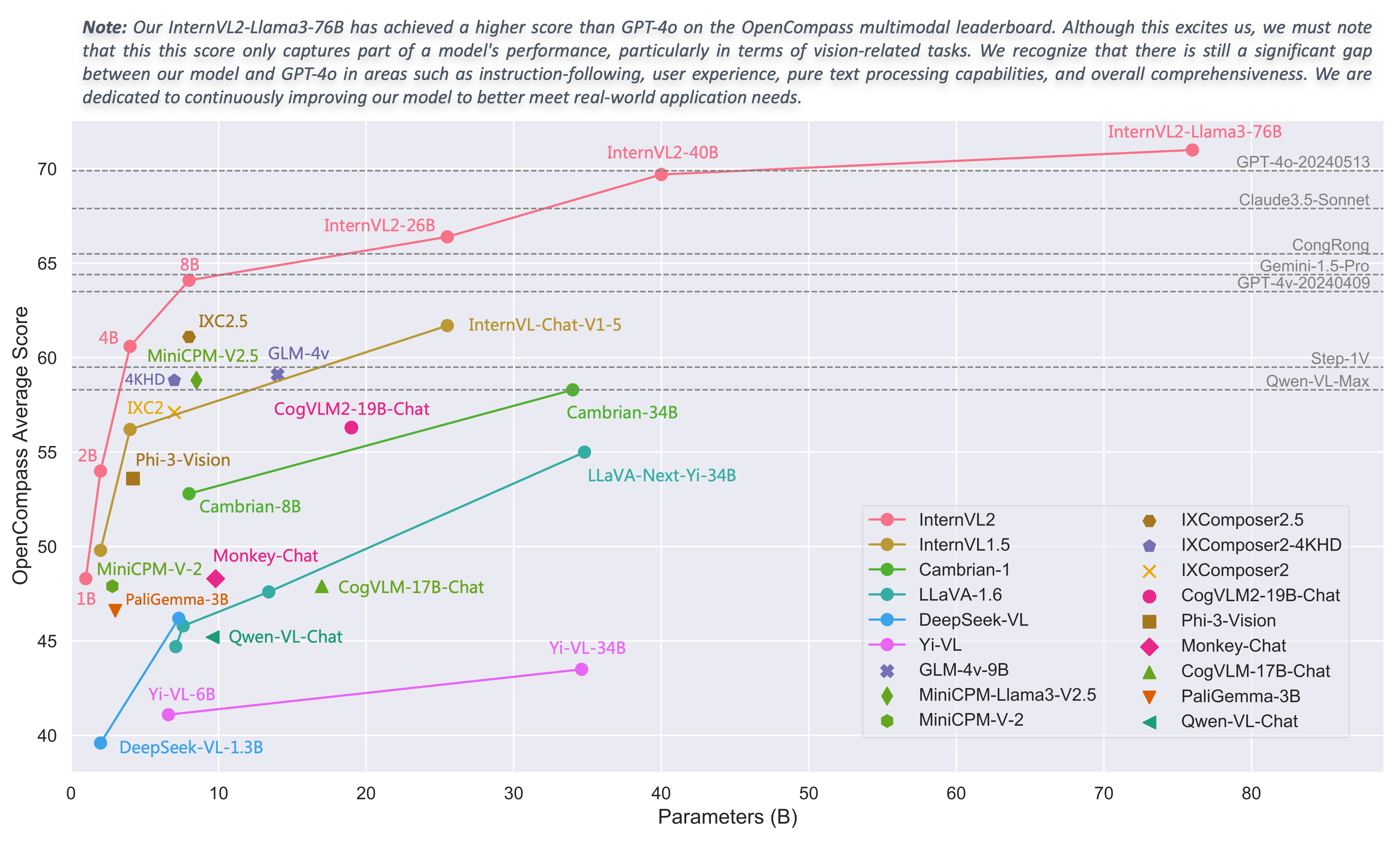
We are excited to announce the release of InternVL 2.0, the latest addition to the InternVL series of multimodal large language models. InternVL 2.0 features a variety of instruction-tuned models , ranging from 1 billion to 108 billion parameters. This repository contains the instruction-tuned InternVL2-1B model.
Compared to the state-of-the-art open-source multimodal large language models, InternVL 2.0 surpasses most open-source models. It demonstrates competitive performance on par with proprietary commercial models across various capabilities, including document and chart comprehension, infographics QA, scene text understanding and OCR tasks, scientific and mathematical problem solving, as well as cultural understanding and integrated multimodal capabilities.
InternVL 2.0 is trained with an 8k context window and utilizes training data consisting of long texts, multiple images, and videos, significantly improving its ability to handle these types of inputs compared to InternVL 1.5. For more details, please refer to our blog and GitHub .
| Model Name | Vision Part | Language Part | HF Link | MS Link |
|---|---|---|---|---|
| InternVL2-1B | InternViT-300M-448px | Qwen2-0.5B-Instruct | 🤗 link | 🤖 link |
| InternVL2-2B | InternViT-300M-448px | internlm2-chat-1_8b | 🤗 link | 🤖 link |
| InternVL2-4B | InternViT-300M-448px | Phi-3-mini-128k-instruct | 🤗 link | 🤖 link |
| InternVL2-8B | InternViT-300M-448px | internlm2_5-7b-chat | 🤗 link | 🤖 link |
| InternVL2-26B | InternViT-6B-448px-V1-5 | internlm2-chat-20b | 🤗 link | 🤖 link |
| InternVL2-40B | InternViT-6B-448px-V1-5 | Nous-Hermes-2-Yi-34B | 🤗 link | 🤖 link |
| InternVL2-Llama3-76B | InternViT-6B-448px-V1-5 | Hermes-2-Theta-Llama-3-70B | 🤗 link | 🤖 link |
InternVL 2.0 is a multimodal large language model series, featuring models of various sizes. For each size, we release instruction-tuned models optimized for multimodal tasks. InternVL2-1B consists of InternViT-300M-448px , an MLP projector, and Qwen2-0.5B-Instruct .
| Benchmark | PaliGemma-3B | Mini-InternVL-2B-1-5 | InternVL2-2B | InternVL2-1B |
|---|---|---|---|---|
| Model Size | 2.9B | 2.2B | 2.2B | 0.9B |
| DocVQA test | - | 85.0 | 86.9 | 81.7 |
| ChartQA test | - | 74.8 | 76.2 | 72.9 |
| InfoVQA test | - | 55.4 | 58.9 | 50.9 |
| TextVQA val | 68.1 | 70.5 | 73.4 | 70.5 |
| OCRBench | 614 | 654 | 784 | 754 |
| MME sum | 1686.1 | 1901.5 | 1876.8 | 1794.4 |
| RealWorldQA | 55.2 | 57.9 | 57.3 | 50.3 |
| AI2D test | 68.3 | 69.8 | 74.1 | 64.1 |
| MMMU val | 34.9 | 34.6 / 37.4 | 34.3 / 36.3 | 35.4 / 36.7 |
| MMBench-EN test | 71.0 | 70.9 | 73.2 | 65.4 |
| MMBench-CN test | 63.6 | 66.2 | 70.9 | 60.7 |
| CCBench dev | 29.6 | 63.5 | 74.7 | 75.7 |
| MMVet GPT-4-0613 | - | 39.3 | 44.6 | 37.8 |
| MMVet GPT-4-Turbo | 33.1 | 35.5 | 39.5 | 33.3 |
| SEED-Image | 69.6 | 69.8 | 71.6 | 65.6 |
| HallBench avg | 32.2 | 37.5 | 37.9 | 33.4 |
| MathVista testmini | 28.7 | 41.1 | 46.3 | 37.7 |
| OpenCompass avg | 46.6 | 49.8 | 54.0 | 48.3 |
We simultaneously use InternVL and VLMEvalKit repositories for model evaluation. Specifically, the results reported for DocVQA, ChartQA, InfoVQA, TextVQA, MME, AI2D, MMBench, CCBench, MMVet, and SEED-Image were tested using the InternVL repository. OCRBench, RealWorldQA, HallBench, and MathVista were evaluated using the VLMEvalKit.
For MMMU, we report both the original scores (left side: evaluated using the InternVL codebase for InternVL series models, and sourced from technical reports or webpages for other models) and the VLMEvalKit scores (right side: collected from the OpenCompass leaderboard).
Please note that evaluating the same model using different testing toolkits like InternVL and VLMEvalKit can result in slight differences, which is normal. Updates to code versions and variations in environment and hardware can also cause minor discrepancies in results.
| Benchmark | VideoChat2-Phi3 | Mini-InternVL-2B-1-5 | InternVL2-2B | InternVL2-1B |
|---|---|---|---|---|
| Model Size | 4B | 2.2B | 2.2B | 0.9B |
| MVBench | 55.1 | 37.0 | 60.2 | 57.9 |
| MMBench-Video 8f | - | 0.99 | 0.97 | 0.95 |
| MMBench-Video 16f | - | 1.04 | 1.03 | 0.98 |
|
Video-MME
w/o subs |
- | 42.9 | 45.0 | 42.6 |
|
Video-MME
w subs |
- | 44.7 | 47.3 | 44.7 |
| Model | avg. |
RefCOCO
(val) |
RefCOCO
(testA) |
RefCOCO
(testB) |
RefCOCO+
(val) |
RefCOCO+
(testA) |
RefCOCO+
(testB) |
RefCOCO‑g
(val) |
RefCOCO‑g
(test) |
|---|---|---|---|---|---|---|---|---|---|
|
UNINEXT-H
(Specialist SOTA) |
88.9 | 92.6 | 94.3 | 91.5 | 85.2 | 89.6 | 79.8 | 88.7 | 89.4 |
|
Mini-InternVL-
Chat-2B-V1-5 |
75.8 | 80.7 | 86.7 | 72.9 | 72.5 | 82.3 | 60.8 | 75.6 | 74.9 |
|
Mini-InternVL-
Chat-4B-V1-5 |
84.4 | 88.0 | 91.4 | 83.5 | 81.5 | 87.4 | 73.8 | 84.7 | 84.6 |
| InternVL‑Chat‑V1‑5 | 88.8 | 91.4 | 93.7 | 87.1 | 87.0 | 92.3 | 80.9 | 88.5 | 89.3 |
| InternVL2‑1B | 79.9 | 83.6 | 88.7 | 79.8 | 76.0 | 83.6 | 67.7 | 80.2 | 79.9 |
| InternVL2‑2B | 77.7 | 82.3 | 88.2 | 75.9 | 73.5 | 82.8 | 63.3 | 77.6 | 78.3 |
| InternVL2‑4B | 84.4 | 88.5 | 91.2 | 83.9 | 81.2 | 87.2 | 73.8 | 84.6 | 84.6 |
| InternVL2‑8B | 82.9 | 87.1 | 91.1 | 80.7 | 79.8 | 87.9 | 71.4 | 82.7 | 82.7 |
| InternVL2‑26B | 88.5 | 91.2 | 93.3 | 87.4 | 86.8 | 91.0 | 81.2 | 88.5 | 88.6 |
| InternVL2‑40B | 90.3 | 93.0 | 94.7 | 89.2 | 88.5 | 92.8 | 83.6 | 90.3 | 90.6 |
|
InternVL2-
Llama3‑76B |
90.0 | 92.2 | 94.8 | 88.4 | 88.8 | 93.1 | 82.8 | 89.5 | 90.3 |
Please provide the bounding box coordinates of the region this sentence describes: <ref>{}</ref>
Limitations: Although we have made efforts to ensure the safety of the model during the training process and to encourage the model to generate text that complies with ethical and legal requirements, the model may still produce unexpected outputs due to its size and probabilistic generation paradigm. For example, the generated responses may contain biases, discrimination, or other harmful content. Please do not propagate such content. We are not responsible for any consequences resulting from the dissemination of harmful information.
We welcome MLLM benchmark developers to assess our InternVL1.5 and InternVL2 series models. If you need to add your evaluation results here, please contact me at [email protected] .
We provide an example code to run InternVL2-1B using
transformers
.
We also welcome you to experience the InternVL2 series models in our online demo .
Please use transformers==4.37.2 to ensure the model works normally.
import torch
from transformers import AutoTokenizer, AutoModel
path = "OpenGVLab/InternVL2-1B"
model = AutoModel.from_pretrained(
    path,
    torch_dtype=torch.bfloat16,
    low_cpu_mem_usage=True,
    trust_remote_code=True).eval().cuda()
import torch
from transformers import AutoTokenizer, AutoModel
path = "OpenGVLab/InternVL2-1B"
model = AutoModel.from_pretrained(
    path,
    torch_dtype=torch.bfloat16,
    load_in_8bit=True,
    low_cpu_mem_usage=True,
    trust_remote_code=True).eval()
import torch
from transformers import AutoTokenizer, AutoModel
path = "OpenGVLab/InternVL2-1B"
model = AutoModel.from_pretrained(
    path,
    torch_dtype=torch.bfloat16,
    load_in_4bit=True,
    low_cpu_mem_usage=True,
    trust_remote_code=True).eval()
The reason for writing the code this way is to avoid errors that occur during multi-GPU inference due to tensors not being on the same device. By ensuring that the first and last layers of the large language model (LLM) are on the same device, we prevent such errors.
import math
import torch
from transformers import AutoTokenizer, AutoModel

def split_model(model_name):
    device_map = {}
    world_size = torch.cuda.device_count()
    num_layers = {
        'InternVL2-1B': 24, 'InternVL2-2B': 24, 'InternVL2-4B': 32, 'InternVL2-8B': 32,
        'InternVL2-26B': 48, 'InternVL2-40B': 60, 'InternVL2-Llama3-76B': 80}[model_name]
    # Since the first GPU will be used for ViT, treat it as half a GPU.
    num_layers_per_gpu = math.ceil(num_layers / (world_size - 0.5))
    num_layers_per_gpu = [num_layers_per_gpu] * world_size
    num_layers_per_gpu[0] = math.ceil(num_layers_per_gpu[0] * 0.5)
    layer_cnt = 0
    for i, num_layer in enumerate(num_layers_per_gpu):
        for j in range(num_layer):
            device_map[f'language_model.model.layers.{layer_cnt}'] = i
            layer_cnt += 1
    device_map['vision_model'] = 0
    device_map['mlp1'] = 0
    device_map['language_model.model.tok_embeddings'] = 0
    device_map['language_model.model.embed_tokens'] = 0
    device_map['language_model.output'] = 0
    device_map['language_model.model.norm'] = 0
    device_map['language_model.lm_head'] = 0
    device_map[f'language_model.model.layers.{num_layers - 1}'] = 0

    return device_map

path = "OpenGVLab/InternVL2-1B"
device_map = split_model('InternVL2-1B')
model = AutoModel.from_pretrained(
    path,
    torch_dtype=torch.bfloat16,
    low_cpu_mem_usage=True,
    trust_remote_code=True,
    device_map=device_map).eval()
import numpy as np
import torch
import torchvision.transforms as T
from decord import VideoReader, cpu
from PIL import Image
from torchvision.transforms.functional import InterpolationMode
from transformers import AutoModel, AutoTokenizer

IMAGENET_MEAN = (0.485, 0.456, 0.406)
IMAGENET_STD = (0.229, 0.224, 0.225)

def build_transform(input_size):
    MEAN, STD = IMAGENET_MEAN, IMAGENET_STD
    transform = T.Compose([
        T.Lambda(lambda img: img.convert('RGB') if img.mode != 'RGB' else img),
        T.Resize((input_size, input_size), interpolation=InterpolationMode.BICUBIC),
        T.ToTensor(),
        T.Normalize(mean=MEAN, std=STD)
    ])
    return transform

def find_closest_aspect_ratio(aspect_ratio, target_ratios, width, height, image_size):
    best_ratio_diff = float('inf')
    best_ratio = (1, 1)
    area = width * height
    for ratio in target_ratios:
        target_aspect_ratio = ratio[0] / ratio[1]
        ratio_diff = abs(aspect_ratio - target_aspect_ratio)
        if ratio_diff < best_ratio_diff:
            best_ratio_diff = ratio_diff
            best_ratio = ratio
        elif ratio_diff == best_ratio_diff:
            if area > 0.5 * image_size * image_size * ratio[0] * ratio[1]:
                best_ratio = ratio
    return best_ratio

def dynamic_preprocess(image, min_num=1, max_num=12, image_size=448, use_thumbnail=False):
    orig_width, orig_height = image.size
    aspect_ratio = orig_width / orig_height

    # calculate the existing image aspect ratio
    target_ratios = set(
        (i, j) for n in range(min_num, max_num + 1) for i in range(1, n + 1) for j in range(1, n + 1) if
        i * j <= max_num and i * j >= min_num)
    target_ratios = sorted(target_ratios, key=lambda x: x[0] * x[1])

    # find the closest aspect ratio to the target
    target_aspect_ratio = find_closest_aspect_ratio(
        aspect_ratio, target_ratios, orig_width, orig_height, image_size)

    # calculate the target width and height
    target_width = image_size * target_aspect_ratio[0]
    target_height = image_size * target_aspect_ratio[1]
    blocks = target_aspect_ratio[0] * target_aspect_ratio[1]

    # resize the image
    resized_img = image.resize((target_width, target_height))
    processed_images = []
    for i in range(blocks):
        box = (
            (i % (target_width // image_size)) * image_size,
            (i // (target_width // image_size)) * image_size,
            ((i % (target_width // image_size)) + 1) * image_size,
            ((i // (target_width // image_size)) + 1) * image_size
        )
        # split the image
        split_img = resized_img.crop(box)
        processed_images.append(split_img)
    assert len(processed_images) == blocks
    if use_thumbnail and len(processed_images) != 1:
        thumbnail_img = image.resize((image_size, image_size))
        processed_images.append(thumbnail_img)
    return processed_images

def load_image(image_file, input_size=448, max_num=12):
    image = Image.open(image_file).convert('RGB')
    transform = build_transform(input_size=input_size)
    images = dynamic_preprocess(image, image_size=input_size, use_thumbnail=True, max_num=max_num)
    pixel_values = [transform(image) for image in images]
    pixel_values = torch.stack(pixel_values)
    return pixel_values

# If you want to load a model using multiple GPUs, please refer to the `Multiple GPUs` section.
path = 'OpenGVLab/InternVL2-1B'
model = AutoModel.from_pretrained(
    path,
    torch_dtype=torch.bfloat16,
    low_cpu_mem_usage=True,
    trust_remote_code=True).eval().cuda()
tokenizer = AutoTokenizer.from_pretrained(path, trust_remote_code=True, use_fast=False)

# set the max number of tiles in `max_num`
pixel_values = load_image('./examples/image1.jpg', max_num=12).to(torch.bfloat16).cuda()
generation_config = dict(max_new_tokens=1024, do_sample=False)

# pure-text conversation (纯文本对话)
question = 'Hello, who are you?'
response, history = model.chat(tokenizer, None, question, generation_config, history=None, return_history=True)
print(f'User: {question}\nAssistant: {response}')

question = 'Can you tell me a story?'
response, history = model.chat(tokenizer, None, question, generation_config, history=history, return_history=True)
print(f'User: {question}\nAssistant: {response}')

# single-image single-round conversation (单图单轮对话)
question = '<image>\nPlease describe the image shortly.'
response = model.chat(tokenizer, pixel_values, question, generation_config)
print(f'User: {question}\nAssistant: {response}')

# single-image multi-round conversation (单图多轮对话)
question = '<image>\nPlease describe the image in detail.'
response, history = model.chat(tokenizer, pixel_values, question, generation_config, history=None, return_history=True)
print(f'User: {question}\nAssistant: {response}')

question = 'Please write a poem according to the image.'
response, history = model.chat(tokenizer, pixel_values, question, generation_config, history=history, return_history=True)
print(f'User: {question}\nAssistant: {response}')

# multi-image multi-round conversation, combined images (多图多轮对话,拼接图像)
pixel_values1 = load_image('./examples/image1.jpg', max_num=12).to(torch.bfloat16).cuda()
pixel_values2 = load_image('./examples/image2.jpg', max_num=12).to(torch.bfloat16).cuda()
pixel_values = torch.cat((pixel_values1, pixel_values2), dim=0)

question = '<image>\nDescribe the two images in detail.'
response, history = model.chat(tokenizer, pixel_values, question, generation_config,
                               history=None, return_history=True)
print(f'User: {question}\nAssistant: {response}')

question = 'What are the similarities and differences between these two images.'
response, history = model.chat(tokenizer, pixel_values, question, generation_config,
                               history=history, return_history=True)
print(f'User: {question}\nAssistant: {response}')

# multi-image multi-round conversation, separate images (多图多轮对话,独立图像)
pixel_values1 = load_image('./examples/image1.jpg', max_num=12).to(torch.bfloat16).cuda()
pixel_values2 = load_image('./examples/image2.jpg', max_num=12).to(torch.bfloat16).cuda()
pixel_values = torch.cat((pixel_values1, pixel_values2), dim=0)
num_patches_list = [pixel_values1.size(0), pixel_values2.size(0)]

question = 'Image-1: <image>\nImage-2: <image>\nDescribe the two images in detail.'
response, history = model.chat(tokenizer, pixel_values, question, generation_config,
                               num_patches_list=num_patches_list,
                               history=None, return_history=True)
print(f'User: {question}\nAssistant: {response}')

question = 'What are the similarities and differences between these two images.'
response, history = model.chat(tokenizer, pixel_values, question, generation_config,
                               num_patches_list=num_patches_list,
                               history=history, return_history=True)
print(f'User: {question}\nAssistant: {response}')

# batch inference, single image per sample (单图批处理)
pixel_values1 = load_image('./examples/image1.jpg', max_num=12).to(torch.bfloat16).cuda()
pixel_values2 = load_image('./examples/image2.jpg', max_num=12).to(torch.bfloat16).cuda()
num_patches_list = [pixel_values1.size(0), pixel_values2.size(0)]
pixel_values = torch.cat((pixel_values1, pixel_values2), dim=0)

questions = ['<image>\nDescribe the image in detail.'] * len(num_patches_list)
responses = model.batch_chat(tokenizer, pixel_values,
                             num_patches_list=num_patches_list,
                             questions=questions,
                             generation_config=generation_config)
for question, response in zip(questions, responses):
    print(f'User: {question}\nAssistant: {response}')

# video multi-round conversation (视频多轮对话)
def get_index(bound, fps, max_frame, first_idx=0, num_segments=32):
    if bound:
        start, end = bound[0], bound[1]
    else:
        start, end = -100000, 100000
    start_idx = max(first_idx, round(start * fps))
    end_idx = min(round(end * fps), max_frame)
    seg_size = float(end_idx - start_idx) / num_segments
    frame_indices = np.array([
        int(start_idx + (seg_size / 2) + np.round(seg_size * idx))
        for idx in range(num_segments)
    ])
    return frame_indices

def load_video(video_path, bound=None, input_size=448, max_num=1, num_segments=32):
    vr = VideoReader(video_path, ctx=cpu(0), num_threads=1)
    max_frame = len(vr) - 1
    fps = float(vr.get_avg_fps())

    pixel_values_list, num_patches_list = [], []
    transform = build_transform(input_size=input_size)
    frame_indices = get_index(bound, fps, max_frame, first_idx=0, num_segments=num_segments)
    for frame_index in frame_indices:
        img = Image.fromarray(vr[frame_index].asnumpy()).convert('RGB')
        img = dynamic_preprocess(img, image_size=input_size, use_thumbnail=True, max_num=max_num)
        pixel_values = [transform(tile) for tile in img]
        pixel_values = torch.stack(pixel_values)
        num_patches_list.append(pixel_values.shape[0])
        pixel_values_list.append(pixel_values)
    pixel_values = torch.cat(pixel_values_list)
    return pixel_values, num_patches_list

video_path = './examples/red-panda.mp4'
pixel_values, num_patches_list = load_video(video_path, num_segments=8, max_num=1)
pixel_values = pixel_values.to(torch.bfloat16).cuda()
video_prefix = ''.join([f'Frame{i+1}: <image>\n' for i in range(len(num_patches_list))])
question = video_prefix + 'What is the red panda doing?'
# Frame1: <image>\nFrame2: <image>\n...\nFrame8: <image>\n{question}
response, history = model.chat(tokenizer, pixel_values, question, generation_config,
                               num_patches_list=num_patches_list, history=None, return_history=True)
print(f'User: {question}\nAssistant: {response}')

question = 'Describe this video in detail. Don\'t repeat.'
response, history = model.chat(tokenizer, pixel_values, question, generation_config,
                               num_patches_list=num_patches_list, history=history, return_history=True)
print(f'User: {question}\nAssistant: {response}')
Besides this method, you can also use the following code to get streamed output.
from transformers import TextIteratorStreamer
from threading import Thread

# Initialize the streamer
streamer = TextIteratorStreamer(tokenizer, skip_prompt=True, skip_special_tokens=True, timeout=10)
# Define the generation configuration
generation_config = dict(max_new_tokens=1024, do_sample=False, streamer=streamer)
# Start the model chat in a separate thread
thread = Thread(target=model.chat, kwargs=dict(
    tokenizer=tokenizer, pixel_values=pixel_values, question=question,
    history=None, return_history=False, generation_config=generation_config,
))
thread.start()

# Initialize an empty string to store the generated text
generated_text = ''
# Loop through the streamer to get the new text as it is generated
for new_text in streamer:
    if new_text == model.conv_template.sep:
        break
    generated_text += new_text
    print(new_text, end='', flush=True)  # Print each new chunk of generated text on the same line
SWIFT from ModelScope community has supported the fine-tuning (Image/Video) of InternVL, please check this link for more details.
Warning: This model is not yet supported by LMDeploy.
TODO
TODO
This project is released under the MIT license, while Qwen2 is licensed under the Tongyi Qianwen LICENSE.
If you find this project useful in your research, please consider citing:
@article{chen2023internvl,
  title={InternVL: Scaling up Vision Foundation Models and Aligning for Generic Visual-Linguistic Tasks},
  author={Chen, Zhe and Wu, Jiannan and Wang, Wenhai and Su, Weijie and Chen, Guo and Xing, Sen and Zhong, Muyan and Zhang, Qinglong and Zhu, Xizhou and Lu, Lewei and Li, Bin and Luo, Ping and Lu, Tong and Qiao, Yu and Dai, Jifeng},
  journal={arXiv preprint arXiv:2312.14238},
  year={2023}
}
@article{chen2024far,
  title={How Far Are We to GPT-4V? Closing the Gap to Commercial Multimodal Models with Open-Source Suites},
  author={Chen, Zhe and Wang, Weiyun and Tian, Hao and Ye, Shenglong and Gao, Zhangwei and Cui, Erfei and Tong, Wenwen and Hu, Kongzhi and Luo, Jiapeng and Ma, Zheng and others},
  journal={arXiv preprint arXiv:2404.16821},
  year={2024}
}
我们很高兴宣布 InternVL 2.0 的发布,这是 InternVL 系列多模态大语言模型的最新版本。InternVL 2.0 提供了多种 指令微调 的模型,参数从 10 亿到 1080 亿不等。此仓库包含经过指令微调的 InternVL2-1B 模型。
与最先进的开源多模态大语言模型相比,InternVL 2.0 超越了大多数开源模型。它在各种能力上表现出与闭源商业模型相媲美的竞争力,包括文档和图表理解、信息图表问答、场景文本理解和 OCR 任务、科学和数学问题解决,以及文化理解和综合多模态能力。
InternVL 2.0 使用 8k 上下文窗口进行训练,训练数据包含长文本、多图和视频数据,与 InternVL 1.5 相比,其处理这些类型输入的能力显著提高。更多详细信息,请参阅我们的博客和 GitHub。
| 模型名称 | 视觉部分 | 语言部分 | HF 链接 | MS 链接 |
|---|---|---|---|---|
| InternVL2-1B | InternViT-300M-448px | Qwen2-0.5B-Instruct | 🤗 link | 🤖 link |
| InternVL2-2B | InternViT-300M-448px | internlm2-chat-1_8b | 🤗 link | 🤖 link |
| InternVL2-4B | InternViT-300M-448px | Phi-3-mini-128k-instruct | 🤗 link | 🤖 link |
| InternVL2-8B | InternViT-300M-448px | internlm2_5-7b-chat | 🤗 link | 🤖 link |
| InternVL2-26B | InternViT-6B-448px-V1-5 | internlm2-chat-20b | 🤗 link | 🤖 link |
| InternVL2-40B | InternViT-6B-448px-V1-5 | Nous-Hermes-2-Yi-34B | 🤗 link | 🤖 link |
| InternVL2-Llama3-76B | InternViT-6B-448px-V1-5 | Hermes-2-Theta-Llama-3-70B | 🤗 link | 🤖 link |
InternVL 2.0 是一个多模态大语言模型系列,包含各种规模的模型。对于每个规模的模型,我们都会发布针对多模态任务优化的指令微调模型。InternVL2-1B 包含 InternViT-300M-448px 、一个 MLP 投影器和 Qwen2-0.5B-Instruct 。
| 评测数据集 | PaliGemma-3B | Mini-InternVL-2B-1-5 | InternVL2-2B | InternVL2-1B |
|---|---|---|---|---|
| 模型大小 | 2.9B | 2.2B | 2.2B | 0.9B |
| DocVQA test | - | 85.0 | 86.9 | 81.7 |
| ChartQA test | - | 74.8 | 76.2 | 72.9 |
| InfoVQA test | - | 55.4 | 58.9 | 50.9 |
| TextVQA val | 68.1 | 70.5 | 73.4 | 70.5 |
| OCRBench | 614 | 654 | 784 | 754 |
| MME sum | 1686.1 | 1901.5 | 1876.8 | 1794.4 |
| RealWorldQA | 55.2 | 57.9 | 57.3 | 50.3 |
| AI2D test | 68.3 | 69.8 | 74.1 | 64.1 |
| MMMU val | 34.9 | 34.6 / 37.4 | 34.3 / 36.3 | 35.4 / 36.7 |
| MMBench-EN test | 71.0 | 70.9 | 73.2 | 65.4 |
| MMBench-CN test | 63.6 | 66.2 | 70.9 | 60.7 |
| CCBench dev | 29.6 | 63.5 | 74.7 | 75.7 |
| MMVet GPT-4-0613 | - | 39.3 | 44.6 | 37.8 |
| MMVet GPT-4-Turbo | 33.1 | 35.5 | 39.5 | 37.3 |
| SEED-Image | 69.6 | 69.8 | 71.6 | 65.6 |
| HallBench avg | 32.2 | 37.5 | 37.9 | 33.4 |
| MathVista testmini | 28.7 | 41.1 | 46.3 | 37.7 |
| OpenCompass avg | 46.6 | 49.8 | 54.0 | 48.3 |
我们同时使用 InternVL 和 VLMEvalKit 仓库进行模型评估。具体来说,DocVQA、ChartQA、InfoVQA、TextVQA、MME、AI2D、MMBench、CCBench、MMVet 和 SEED-Image 的结果是使用 InternVL 仓库测试的。OCRBench、RealWorldQA、HallBench 和 MathVista 是使用 VLMEvalKit 进行评估的。
对于MMMU,我们报告了原始分数(左侧:InternVL系列模型使用InternVL代码库评测,其他模型的分数来自其技术报告或网页)和VLMEvalKit分数(右侧:从OpenCompass排行榜收集)。
请注意,使用不同的测试工具包(如 InternVL 和 VLMEvalKit)评估同一模型可能会导致细微差异,这是正常的。代码版本的更新、环境和硬件的变化也可能导致结果的微小差异。
| 评测数据集 | VideoChat2-Phi3 | Mini-InternVL-2B-1-5 | InternVL2-2B | InternVL2-1B |
|---|---|---|---|---|
| 模型大小 | 4B | 2.2B | 2.2B | 0.9B |
| MVBench | 55.1 | 37.0 | 60.2 | 57.9 |
| MMBench-Video 8f | - | 0.99 | 0.97 | 0.95 |
| MMBench-Video 16f | - | 1.04 | 1.03 | 0.98 |
|
Video-MME
w/o subs |
- | 42.9 | 45.0 | 42.6 |
|
Video-MME
w subs |
- | 44.7 | 47.3 | 44.7 |
| 模型 | avg. |
RefCOCO
(val) |
RefCOCO
(testA) |
RefCOCO
(testB) |
RefCOCO+
(val) |
RefCOCO+
(testA) |
RefCOCO+
(testB) |
RefCOCO‑g
(val) |
RefCOCO‑g
(test) |
|---|---|---|---|---|---|---|---|---|---|
|
UNINEXT-H
(Specialist SOTA) |
88.9 | 92.6 | 94.3 | 91.5 | 85.2 | 89.6 | 79.8 | 88.7 | 89.4 |
|
Mini-InternVL-
Chat-2B-V1-5 |
75.8 | 80.7 | 86.7 | 72.9 | 72.5 | 82.3 | 60.8 | 75.6 | 74.9 |
|
Mini-InternVL-
Chat-4B-V1-5 |
84.4 | 88.0 | 91.4 | 83.5 | 81.5 | 87.4 | 73.8 | 84.7 | 84.6 |
| InternVL‑Chat‑V1‑5 | 88.8 | 91.4 | 93.7 | 87.1 | 87.0 | 92.3 | 80.9 | 88.5 | 89.3 |
| InternVL2‑1B | 79.9 | 83.6 | 88.7 | 79.8 | 76.0 | 83.6 | 67.7 | 80.2 | 79.9 |
| InternVL2‑2B | 77.7 | 82.3 | 88.2 | 75.9 | 73.5 | 82.8 | 63.3 | 77.6 | 78.3 |
| InternVL2‑4B | 84.4 | 88.5 | 91.2 | 83.9 | 81.2 | 87.2 | 73.8 | 84.6 | 84.6 |
| InternVL2‑8B | 82.9 | 87.1 | 91.1 | 80.7 | 79.8 | 87.9 | 71.4 | 82.7 | 82.7 |
| InternVL2‑26B | 88.5 | 91.2 | 93.3 | 87.4 | 86.8 | 91.0 | 81.2 | 88.5 | 88.6 |
| InternVL2‑40B | 90.3 | 93.0 | 94.7 | 89.2 | 88.5 | 92.8 | 83.6 | 90.3 | 90.6 |
|
InternVL2-
Llama3‑76B |
90.0 | 92.2 | 94.8 | 88.4 | 88.8 | 93.1 | 82.8 | 89.5 | 90.3 |
Please provide the bounding box coordinates of the region this sentence describes: <ref>{}</ref>
限制:尽管在训练过程中我们非常注重模型的安全性,尽力促使模型输出符合伦理和法律要求的文本,但受限于模型大小以及概率生成范式,模型可能会产生各种不符合预期的输出,例如回复内容包含偏见、歧视等有害内容,请勿传播这些内容。由于传播不良信息导致的任何后果,本项目不承担责任。
我们欢迎各位 MLLM benchmark 的开发者对我们的 InternVL1.5 以及 InternVL2 系列模型进行评测。如果需要在此处添加评测结果,请与我联系( [email protected] )。
我们提供了一个示例代码,用于使用
transformers
运行 InternVL2-1B。
我们也欢迎你在我们的 在线demo 中体验InternVL2的系列模型。
请使用 transformers==4.37.2 以确保模型正常运行。
示例代码请 点击这里 。
来自ModelScope社区的SWIFT已经支持对InternVL进行微调(图像/视频),详情请查看 此链接 。
注意:此模型尚未被 LMDeploy 支持。
TODO
TODO
该项目采用 MIT 许可证发布,而 Qwen2 则采用 通义千问 许可证。
如果您发现此项目对您的研究有用,可以考虑引用我们的论文:
@article{chen2023internvl,
  title={InternVL: Scaling up Vision Foundation Models and Aligning for Generic Visual-Linguistic Tasks},
  author={Chen, Zhe and Wu, Jiannan and Wang, Wenhai and Su, Weijie and Chen, Guo and Xing, Sen and Zhong, Muyan and Zhang, Qinglong and Zhu, Xizhou and Lu, Lewei and Li, Bin and Luo, Ping and Lu, Tong and Qiao, Yu and Dai, Jifeng},
  journal={arXiv preprint arXiv:2312.14238},
  year={2023}
}
@article{chen2024far,
  title={How Far Are We to GPT-4V? Closing the Gap to Commercial Multimodal Models with Open-Source Suites},
  author={Chen, Zhe and Wang, Weiyun and Tian, Hao and Ye, Shenglong and Gao, Zhangwei and Cui, Erfei and Tong, Wenwen and Hu, Kongzhi and Luo, Jiapeng and Ma, Zheng and others},
  journal={arXiv preprint arXiv:2404.16821},
  year={2024}
}