



Total runs:
16.9M
Run Growth:
11.8M
Growth Rate:
69.76%

Qwen3-Coder is available in multiple sizes. Today, we're excited to introduce Qwen3-Coder-30B-A3B-Instruct . This streamlined model maintains impressive performance and efficiency, featuring the following key enhancements:
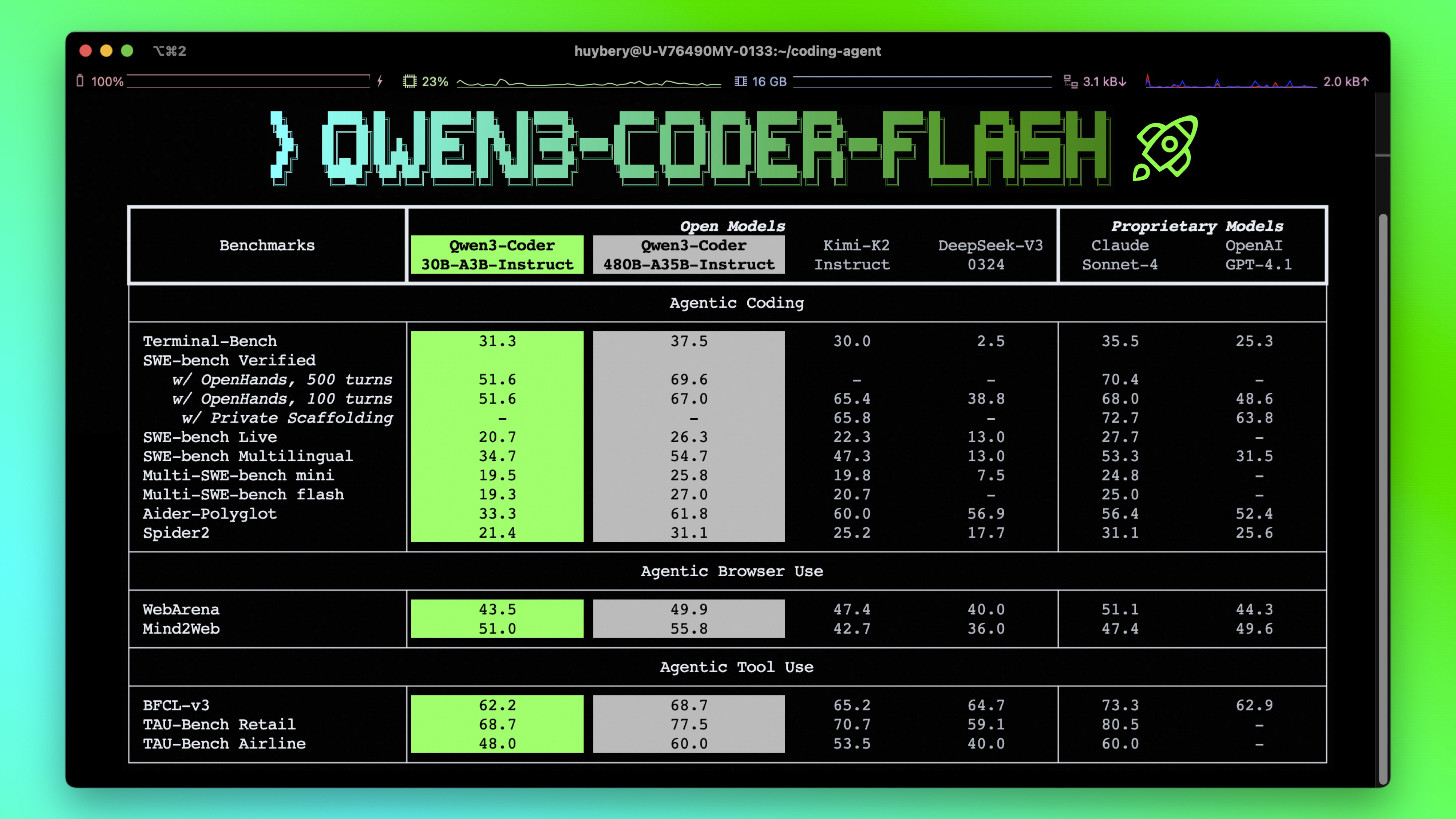
Qwen3-Coder-30B-A3B-Instruct has the following features:
NOTE: This model supports only non-thinking mode and does not generate
<think></think>
blocks in its output. Meanwhile, specifying
enable_thinking=False
is no longer required.
For more details, including benchmark evaluation, hardware requirements, and inference performance, please refer to our blog , GitHub , and Documentation .
We advise you to use the latest version of
transformers
.
With
transformers<4.51.0
, you will encounter the following error:
KeyError: 'qwen3_moe'
The following contains a code snippet illustrating how to use the model generate content based on given inputs.
from transformers import AutoModelForCausalLM, AutoTokenizer

model_name = "Qwen/Qwen3-Coder-30B-A3B-Instruct"

# load the tokenizer and the model
tokenizer = AutoTokenizer.from_pretrained(model_name)
model = AutoModelForCausalLM.from_pretrained(
    model_name,
    torch_dtype="auto",
    device_map="auto"
)

# prepare the model input
prompt = "Write a quick sort algorithm."
messages = [
    {"role": "user", "content": prompt}
]
text = tokenizer.apply_chat_template(
    messages,
    tokenize=False,
    add_generation_prompt=True,
)
model_inputs = tokenizer([text], return_tensors="pt").to(model.device)

# conduct text completion
generated_ids = model.generate(
    **model_inputs,
    max_new_tokens=65536
)
output_ids = generated_ids[0][len(model_inputs.input_ids[0]):].tolist()

content = tokenizer.decode(output_ids, skip_special_tokens=True)

print("content:", content)
Note: If you encounter out-of-memory (OOM) issues, consider reducing the context length to a shorter value, such as
32,768
.
For local use, applications such as Ollama, LMStudio, MLX-LM, llama.cpp, and KTransformers have also supported Qwen3.
Qwen3-Coder excels in tool calling capabilities.
You can simply define or use any tools as following example.
# Your tool implementation
def square_the_number(num: float) -> dict:
    return num ** 2

# Define Tools
tools=[
    {
        "type":"function",
        "function":{
            "name": "square_the_number",
            "description": "output the square of the number.",
            "parameters": {
                "type": "object",
                "required": ["input_num"],
                "properties": {
                    'input_num': {
                        'type': 'number',
                        'description': 'input_num is a number that will be squared'
                        }
                },
            }
        }
    }
]

import OpenAI
# Define LLM
client = OpenAI(
    # Use a custom endpoint compatible with OpenAI API
    base_url='http://localhost:8000/v1',  # api_base
    api_key="EMPTY"
)

messages = [{'role': 'user', 'content': 'square the number 1024'}]

completion = client.chat.completions.create(
    messages=messages,
    model="Qwen3-Coder-30B-A3B-Instruct",
    max_tokens=65536,
    tools=tools,
)

print(completion.choice[0])
To achieve optimal performance, we recommend the following settings:
Sampling Parameters :
temperature=0.7
,
top_p=0.8
,
top_k=20
,
repetition_penalty=1.05
.
Adequate Output Length : We recommend using an output length of 65,536 tokens for most queries, which is adequate for instruct models.
If you find our work helpful, feel free to give us a cite.
@misc{qwen3technicalreport,
      title={Qwen3 Technical Report},
      author={Qwen Team},
      year={2025},
      eprint={2505.09388},
      archivePrefix={arXiv},
      primaryClass={cs.CL},
      url={https://arxiv.org/abs/2505.09388},
}