



Sponsored by
PostMcpAi
Qwen / Qwen3-Coder-30B-A3B-Instruct-FP8
Model's Last Updated: December 03 2025
text-generation
Introduction of Qwen3-Coder-30B-A3B-Instruct-FP8
Model Details of Qwen3-Coder-30B-A3B-Instruct-FP8
Qwen3-Coder-3B-A3B-Instruct-FP8

Highlights
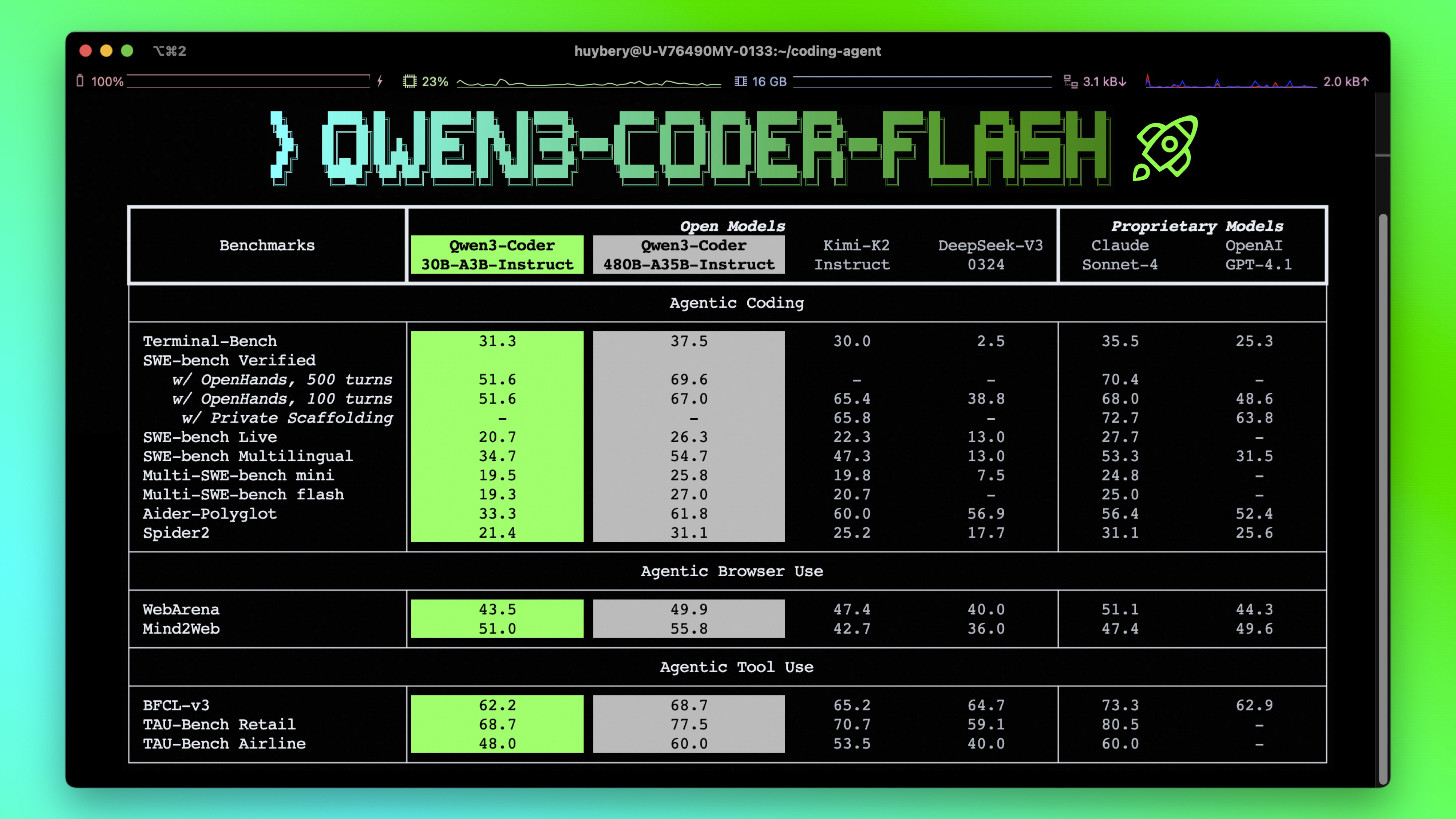
Qwen3-Coder is available in multiple sizes. Today, we're excited to introduce Qwen3-Coder-30B-A3B-Instruct-FP8 . This streamlined model maintains impressive performance and efficiency, featuring the following key enhancements:
- Significant Performance among open models on Agentic Coding , Agentic Browser-Use , and other foundational coding tasks.
- Long-context Capabilities with native support for 256K tokens, extendable up to 1M tokens using Yarn, optimized for repository-scale understanding.
- Agentic Coding supporting for most platform such as Qwen Code , CLINE , featuring a specially designed function call format.
Model Overview
Qwen3-Coder-30B-A3B-Instruct-FP8 has the following features:
- Type: Causal Language Models
- Training Stage: Pretraining & Post-training
- Number of Parameters: 30.5B in total and 3.3B activated
- Number of Layers: 48
- Number of Attention Heads (GQA): 32 for Q and 4 for KV
- Number of Experts: 128
- Number of Activated Experts: 8
- Context Length: 262,144 natively .
NOTE: This model supports only non-thinking mode and does not generate
<think></think>
blocks in its output. Meanwhile, specifying
enable_thinking=False
is no longer required.
For more details, including benchmark evaluation, hardware requirements, and inference performance, please refer to our blog , GitHub , and Documentation .
Quickstart
We advise you to use the latest version of
transformers
.
With
transformers<4.51.0
, you will encounter the following error:
KeyError: 'qwen3_moe'
The following contains a code snippet illustrating how to use the model generate content based on given inputs.
from transformers import AutoModelForCausalLM, AutoTokenizer

model_name = "Qwen/Qwen3-Coder-30B-A3B-Instruct-FP8"

# load the tokenizer and the model
tokenizer = AutoTokenizer.from_pretrained(model_name)
model = AutoModelForCausalLM.from_pretrained(
    model_name,
    torch_dtype="auto",
    device_map="auto"
)

# prepare the model input
prompt = "Write a quick sort algorithm."
messages = [
    {"role": "user", "content": prompt}
]
text = tokenizer.apply_chat_template(
    messages,
    tokenize=False,
    add_generation_prompt=True,
)
model_inputs = tokenizer([text], return_tensors="pt").to(model.device)

# conduct text completion
generated_ids = model.generate(
    **model_inputs,
    max_new_tokens=65536
)
output_ids = generated_ids[0][len(model_inputs.input_ids[0]):].tolist()

content = tokenizer.decode(output_ids, skip_special_tokens=True)

print("content:", content)
Note: If you encounter out-of-memory (OOM) issues, consider reducing the context length to a shorter value, such as
32,768
.
Note on FP8
For convenience and performance, we have provided
fp8
-quantized model checkpoint for Qwen3, whose name ends with
-FP8
. The quantization method is fine-grained
fp8
quantization with block size of 128. You can find more details in the
quantization_config
field in
config.json
.
You can use the Qwen3-30B-A3B-Instruct-FP8 model with serveral inference frameworks, including
transformers
,
sglang
, and
vllm
, as the original bfloat16 model.
However, please pay attention to the following known issues:
-
transformers:-
there are currently issues with the "fine-grained fp8" method in
transformersfor distributed inference. You may need to set the environment variableCUDA_LAUNCH_BLOCKING=1if multiple devices are used in inference.
-
there are currently issues with the "fine-grained fp8" method in
Agentic Coding
Qwen3-Coder excels in tool calling capabilities.
You can simply define or use any tools as following example.
# Your tool implementation
def square_the_number(num: float) -> dict:
    return num ** 2

# Define Tools
tools=[
    {
        "type":"function",
        "function":{
            "name": "square_the_number",
            "description": "output the square of the number.",
            "parameters": {
                "type": "object",
                "required": ["input_num"],
                "properties": {
                    'input_num': {
                        'type': 'number',
                        'description': 'input_num is a number that will be squared'
                        }
                },
            }
        }
    }
]

import OpenAI
# Define LLM
client = OpenAI(
    # Use a custom endpoint compatible with OpenAI API
    base_url='http://localhost:8000/v1',  # api_base
    api_key="EMPTY"
)

messages = [{'role': 'user', 'content': 'square the number 1024'}]

completion = client.chat.completions.create(
    messages=messages,
    model="Qwen3-Coder-30B-A3B-Instruct-FP8",
    max_tokens=65536,
    tools=tools,
)

print(completion.choice[0])
Best Practices
To achieve optimal performance, we recommend the following settings:
-
Sampling Parameters :
-
We suggest using
temperature=0.7,top_p=0.8,top_k=20,repetition_penalty=1.05.
-
We suggest using
-
Adequate Output Length : We recommend using an output length of 65,536 tokens for most queries, which is adequate for instruct models.
Citation
If you find our work helpful, feel free to give us a cite.
@misc{qwen3technicalreport,
      title={Qwen3 Technical Report},
      author={Qwen Team},
      year={2025},
      eprint={2505.09388},
      archivePrefix={arXiv},
      primaryClass={cs.CL},
      url={https://arxiv.org/abs/2505.09388},
}
Runs of Qwen Qwen3-Coder-30B-A3B-Instruct-FP8 on huggingface.co
941.7K
Total runs
0
24-hour runs
23.7K
3-day runs
-81.4K
7-day runs
-130.1K
30-day runs
More Information About Qwen3-Coder-30B-A3B-Instruct-FP8 huggingface.co Model
Url of Qwen3-Coder-30B-A3B-Instruct-FP8
Qwen3-Coder-30B-A3B-Instruct-FP8 huggingface.co Url
Provider of Qwen3-Coder-30B-A3B-Instruct-FP8 huggingface.co
Other API from Qwen
Total runs:
8.8M
Run Growth:
-8.0M
Growth Rate:
-90.92%
Total runs:
8.5M
Run Growth:
549.3K
Growth Rate:
6.45%
Total runs:
7.8M
Run Growth:
-2.3M
Growth Rate:
-29.76%
Total runs:
7.0M
Run Growth:
-506.8K
Growth Rate:
-7.28%
Total runs:
6.3M
Run Growth:
-940.6K
Growth Rate:
-14.91%
Total runs:
5.3M
Run Growth:
-2.2M
Growth Rate:
-40.97%
Total runs:
4.3M
Run Growth:
-1.1M
Growth Rate:
-25.98%
Total runs:
3.5M
Run Growth:
-19.9K
Growth Rate:
-0.56%
Total runs:
3.2M
Run Growth:
-477.2K
Growth Rate:
-15.05%
Total runs:
3.1M
Run Growth:
-1.0M
Growth Rate:
-32.16%
Total runs:
2.7M
Run Growth:
2.6M
Growth Rate:
96.22%
Total runs:
2.5M
Run Growth:
-494.3K
Growth Rate:
-19.51%
Total runs:
2.4M
Run Growth:
-717.7K
Growth Rate:
-18.34%
Total runs:
2.2M
Run Growth:
-409.1K
Growth Rate:
-18.39%
Total runs:
2.2M
Run Growth:
-104.3K
Growth Rate:
-4.69%
Total runs:
2.1M
Run Growth:
-862.5K
Growth Rate:
-40.77%
Total runs:
2.0M
Run Growth:
88.1K
Growth Rate:
4.30%
Total runs:
2.0M
Run Growth:
352.7K
Growth Rate:
17.59%
Total runs:
1.9M
Run Growth:
1.3M
Growth Rate:
68.67%
Total runs:
1.8M
Run Growth:
-609.2K
Growth Rate:
-33.66%
Total runs:
1.8M
Run Growth:
-947.9K
Growth Rate:
-53.10%
Total runs:
1.7M
Run Growth:
-166.4K
Growth Rate:
-9.67%
Total runs:
1.7M
Run Growth:
-244.3K
Growth Rate:
-14.67%
Total runs:
1.7M
Run Growth:
-250.9K
Growth Rate:
-14.47%
Total runs:
1.6M
Run Growth:
-1.1M
Growth Rate:
-64.77%
Total runs:
1.6M
Run Growth:
-404.6K
Growth Rate:
-24.88%
Total runs:
1.6M
Run Growth:
0
Growth Rate:
0.00%
Total runs:
1.5M
Run Growth:
302.5K
Growth Rate:
20.60%
Total runs:
1.1M
Run Growth:
-224.4K
Growth Rate:
-21.02%
Total runs:
1.1M
Run Growth:
-58.1K
Growth Rate:
-7.15%
Total runs:
1.1M
Run Growth:
-1.7M
Growth Rate:
-160.87%
Total runs:
1.0M
Run Growth:
18.0K
Growth Rate:
1.72%
Total runs:
1.0M
Run Growth:
-683.9K
Growth Rate:
-67.87%
Total runs:
961.4K
Run Growth:
-26.0K
Growth Rate:
-2.70%
Total runs:
944.1K
Run Growth:
-601.1K
Growth Rate:
-63.58%
Total runs:
896.8K
Run Growth:
-253.5K
Growth Rate:
-28.27%
Total runs:
803.3K
Run Growth:
179.7K
Growth Rate:
22.37%
Total runs:
800.3K
Run Growth:
-733.8K
Growth Rate:
-91.69%
Total runs:
790.6K
Run Growth:
-525.6K
Growth Rate:
-66.48%
Total runs:
734.6K
Run Growth:
-30.8K
Growth Rate:
-4.19%
Total runs:
719.5K
Run Growth:
-13.4K
Growth Rate:
-1.46%
Total runs:
707.5K
Run Growth:
-172.9K
Growth Rate:
-24.60%
Total runs:
701.1K
Run Growth:
-94.1K
Growth Rate:
-13.42%
Total runs:
689.3K
Run Growth:
101.8K
Growth Rate:
15.57%
Total runs:
662.1K
Run Growth:
-487.0K
Growth Rate:
-73.57%
Total runs:
593.4K
Run Growth:
194.9K
Growth Rate:
32.84%
Total runs:
588.4K
Run Growth:
-63.2K
Growth Rate:
-10.74%
Total runs:
579.3K
Run Growth:
-39.0K
Growth Rate:
-6.67%
Total runs:
564.7K
Run Growth:
-61.0K
Growth Rate:
-10.59%
Total runs:
563.7K
Run Growth:
-226.9K
Growth Rate:
-42.26%
Total runs:
548.4K
Run Growth:
1.1M
Growth Rate:
59.55%
Total runs:
539.3K
Run Growth:
172.1K
Growth Rate:
31.91%
Total runs:
507.2K
Run Growth:
-19.6K
Growth Rate:
-3.86%
Total runs:
502.2K
Run Growth:
163.5K
Growth Rate:
32.55%
Total runs:
482.6K
Run Growth:
341.4K
Growth Rate:
75.69%
Total runs:
482.4K
Run Growth:
266.2K
Growth Rate:
55.49%
Total runs:
477.3K
Run Growth:
-147.7K
Growth Rate:
-30.94%
Total runs:
474.9K
Run Growth:
4.9K
Growth Rate:
1.03%
Total runs:
471.8K
Run Growth:
-109.2K
Growth Rate:
-47.84%
Total runs:
459.6K
Run Growth:
-9.3K
Growth Rate:
-2.03%
Total runs:
429.4K
Run Growth:
129.8K
Growth Rate:
30.24%
Total runs:
423.7K
Run Growth:
22.6K
Growth Rate:
5.14%
Total runs:
416.5K
Run Growth:
6.1K
Growth Rate:
1.46%
Total runs:
415.9K
Run Growth:
55.0K
Growth Rate:
13.23%
Total runs:
400.4K
Run Growth:
-157.7K
Growth Rate:
-39.50%
Total runs:
392.6K
Run Growth:
354.2K
Growth Rate:
90.20%
Total runs:
392.0K
Run Growth:
-47.7K
Growth Rate:
-12.16%
Total runs:
390.1K
Run Growth:
390.1K
Growth Rate:
100.00%
Total runs:
383.8K
Run Growth:
-287.7K
Growth Rate:
-74.96%
Total runs:
381.6K
Run Growth:
-385.2K
Growth Rate:
-100.96%
Total runs:
378.4K
Run Growth:
-287.4K
Growth Rate:
-75.95%
Total runs:
375.1K
Run Growth:
82.5K
Growth Rate:
21.99%
Total runs:
374.7K
Run Growth:
-149.3K
Growth Rate:
-39.84%
Total runs:
372.5K
Run Growth:
-6.2K
Growth Rate:
-1.65%
Total runs:
370.1K
Run Growth:
-23.2K
Growth Rate:
-6.26%
Total runs:
361.8K
Run Growth:
-90.9K
Growth Rate:
-7.92%
Total runs:
354.0K
Run Growth:
68.2K
Growth Rate:
19.68%
Total runs:
335.5K
Run Growth:
-156.8K
Growth Rate:
-46.75%
Total runs:
332.4K
Run Growth:
109.5K
Growth Rate:
32.93%