



Total runs:
306.1K
Run Growth:
-355.0K
Growth Rate:
-115.97%



dots.ocr is a powerful, multilingual document parser that unifies layout detection and content recognition within a single vision-language model while maintaining good reading order. Despite its compact 1.7B-parameter LLM foundation, it achieves state-of-the-art(SOTA) performance.
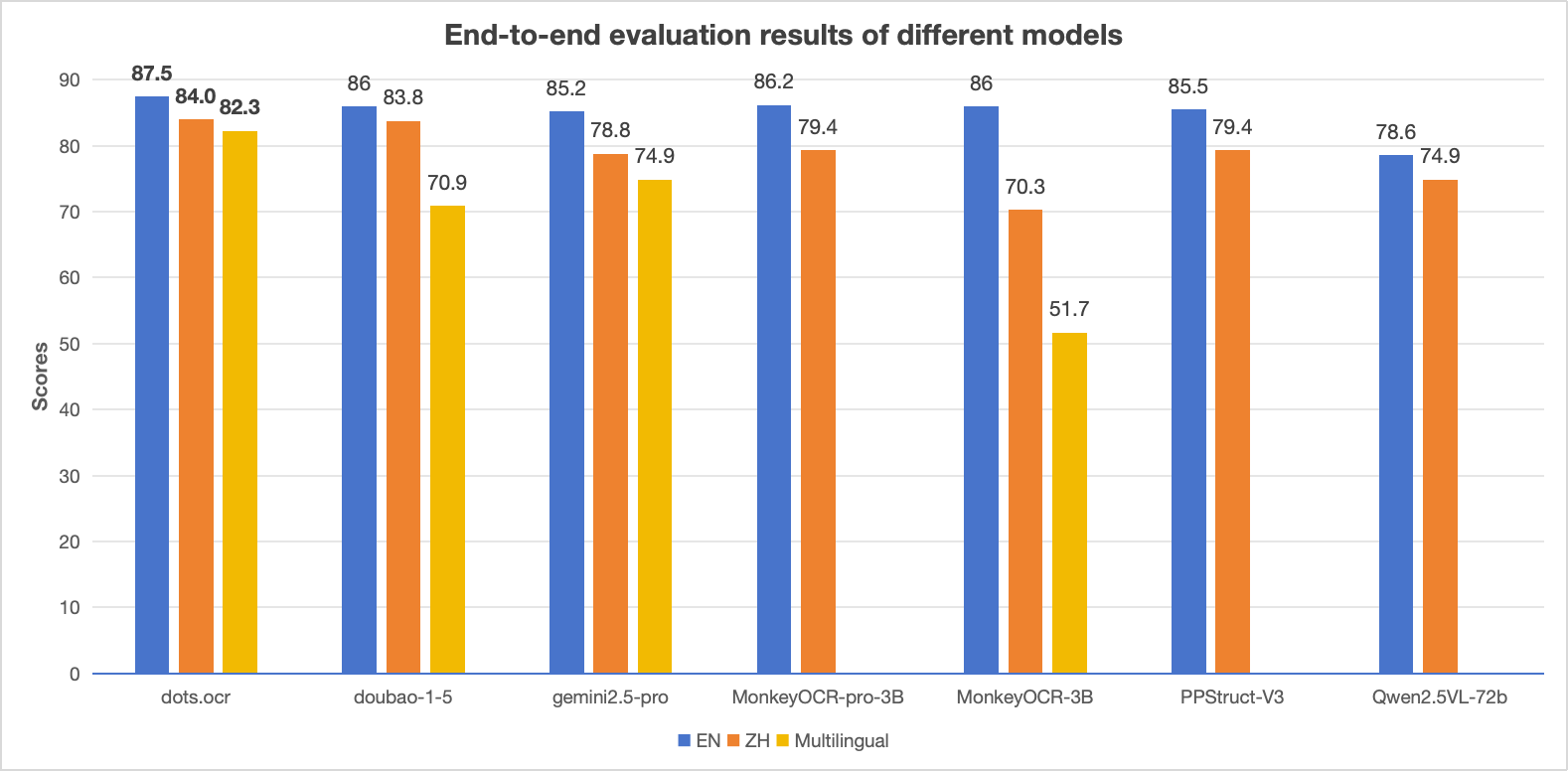
Notes:
- The EN, ZH metrics are the end2end evaluation results of OmniDocBench , and Multilingual metric is the end2end evaluation results of dots.ocr-bench.
2025.07.30
🚀 We release
dots.ocr
, — a multilingual documents parsing model based on 1.7b llm, with SOTA performance.
|
Model
Type |
Methods | Overall Edit ↓ | Text Edit ↓ | Formula Edit ↓ | Table TEDS ↑ | Table Edit ↓ | Read Order Edit ↓ | ||||||
|---|---|---|---|---|---|---|---|---|---|---|---|---|---|
| EN | ZH | EN | ZH | EN | ZH | EN | ZH | EN | ZH | EN | ZH | ||
|
Pipeline
Tools |
MinerU | 0.150 | 0.357 | 0.061 | 0.215 | 0.278 | 0.577 | 78.6 | 62.1 | 0.180 | 0.344 | 0.079 | 0.292 |
| Marker | 0.336 | 0.556 | 0.080 | 0.315 | 0.530 | 0.883 | 67.6 | 49.2 | 0.619 | 0.685 | 0.114 | 0.340 | |
| Mathpix | 0.191 | 0.365 | 0.105 | 0.384 | 0.306 | 0.454 | 77.0 | 67.1 | 0.243 | 0.320 | 0.108 | 0.304 | |
| Docling | 0.589 | 0.909 | 0.416 | 0.987 | 0.999 | 1 | 61.3 | 25.0 | 0.627 | 0.810 | 0.313 | 0.837 | |
| Pix2Text | 0.320 | 0.528 | 0.138 | 0.356 | 0.276 | 0.611 | 73.6 | 66.2 | 0.584 | 0.645 | 0.281 | 0.499 | |
| Unstructured | 0.586 | 0.716 | 0.198 | 0.481 | 0.999 | 1 | 0 | 0.06 | 1 | 0.998 | 0.145 | 0.387 | |
| OpenParse | 0.646 | 0.814 | 0.681 | 0.974 | 0.996 | 1 | 64.8 | 27.5 | 0.284 | 0.639 | 0.595 | 0.641 | |
| PPStruct-V3 | 0.145 | 0.206 | 0.058 | 0.088 | 0.295 | 0.535 | - | - | 0.159 | 0.109 | 0.069 | 0.091 | |
|
Expert
VLMs |
GOT-OCR | 0.287 | 0.411 | 0.189 | 0.315 | 0.360 | 0.528 | 53.2 | 47.2 | 0.459 | 0.520 | 0.141 | 0.280 |
| Nougat | 0.452 | 0.973 | 0.365 | 0.998 | 0.488 | 0.941 | 39.9 | 0 | 0.572 | 1.000 | 0.382 | 0.954 | |
| Mistral OCR | 0.268 | 0.439 | 0.072 | 0.325 | 0.318 | 0.495 | 75.8 | 63.6 | 0.600 | 0.650 | 0.083 | 0.284 | |
| OLMOCR-sglang | 0.326 | 0.469 | 0.097 | 0.293 | 0.455 | 0.655 | 68.1 | 61.3 | 0.608 | 0.652 | 0.145 | 0.277 | |
| SmolDocling-256M | 0.493 | 0.816 | 0.262 | 0.838 | 0.753 | 0.997 | 44.9 | 16.5 | 0.729 | 0.907 | 0.227 | 0.522 | |
| Dolphin | 0.206 | 0.306 | 0.107 | 0.197 | 0.447 | 0.580 | 77.3 | 67.2 | 0.180 | 0.285 | 0.091 | 0.162 | |
| MinerU 2 | 0.139 | 0.240 | 0.047 | 0.109 | 0.297 | 0.536 | 82.5 | 79.0 | 0.141 | 0.195 | 0.069< | 0.118 | |
| OCRFlux | 0.195 | 0.281 | 0.064 | 0.183 | 0.379 | 0.613 | 71.6 | 81.3 | 0.253 | 0.139 | 0.086 | 0.187 | |
| MonkeyOCR-pro-3B | 0.138 | 0.206 | 0.067 | 0.107 | 0.246 | 0.421 | 81.5 | 87.5 | 0.139 | 0.111 | 0.100 | 0.185 | |
|
General
VLMs |
GPT4o | 0.233 | 0.399 | 0.144 | 0.409 | 0.425 | 0.606 | 72.0 | 62.9 | 0.234 | 0.329 | 0.128 | 0.251 |
| Qwen2-VL-72B | 0.252 | 0.327 | 0.096 | 0.218 | 0.404 | 0.487 | 76.8 | 76.4 | 0.387 | 0.408 | 0.119 | 0.193 | |
| Qwen2.5-VL-72B | 0.214 | 0.261 | 0.092 | 0.18 | 0.315 | 0.434 | 82.9 | 83.9 | 0.341 | 0.262 | 0.106 | 0.168 | |
| Gemini2.5-Pro | 0.148 | 0.212 | 0.055 | 0.168 | 0.356 | 0.439 | 85.8 | 86.4 | 0.13 | 0.119 | 0.049 | 0.121 | |
| doubao-1-5-thinking-vision-pro-250428 | 0.140 | 0.162 | 0.043 | 0.085 | 0.295 | 0.384 | 83.3 | 89.3 | 0.165 | 0.085 | 0.058 | 0.094 | |
| Expert VLMs | dots.ocr | 0.125 | 0.160 | 0.032 | 0.066 | 0.329 | 0.416 | 88.6 | 89.0 | 0.099 | 0.092 | 0.040 | 0.067 |
|
Model
Type |
Models | Book | Slides |
Financial
Report |
Textbook |
Exam
Paper |
Magazine |
Academic
Papers |
Notes | Newspaper | Overall |
|---|---|---|---|---|---|---|---|---|---|---|---|
|
Pipeline
Tools |
MinerU | 0.055 | 0.124 | 0.033 | 0.102 | 0.159 | 0.072 | 0.025 | 0.984 | 0.171 | 0.206 |
| Marker | 0.074 | 0.340 | 0.089 | 0.319 | 0.452 | 0.153 | 0.059 | 0.651 | 0.192 | 0.274 | |
| Mathpix | 0.131 | 0.220 | 0.202 | 0.216 | 0.278 | 0.147 | 0.091 | 0.634 | 0.690 | 0.300 | |
|
Expert
VLMs |
GOT-OCR | 0.111 | 0.222 | 0.067 | 0.132 | 0.204 | 0.198 | 0.179 | 0.388 | 0.771 | 0.267 |
| Nougat | 0.734 | 0.958 | 1.000 | 0.820 | 0.930 | 0.830 | 0.214 | 0.991 | 0.871 | 0.806 | |
| Dolphin | 0.091 | 0.131 | 0.057 | 0.146 | 0.231 | 0.121 | 0.074 | 0.363 | 0.307 | 0.177 | |
| OCRFlux | 0.068 | 0.125 | 0.092 | 0.102 | 0.119 | 0.083 | 0.047 | 0.223 | 0.536 | 0.149 | |
| MonkeyOCR-pro-3B | 0.084 | 0.129 | 0.060 | 0.090 | 0.107 | 0.073 | 0.050 | 0.171 | 0.107 | 0.100 | |
|
General
VLMs |
GPT4o | 0.157 | 0.163 | 0.348 | 0.187 | 0.281 | 0.173 | 0.146 | 0.607 | 0.751 | 0.316 |
| Qwen2.5-VL-7B | 0.148 | 0.053 | 0.111 | 0.137 | 0.189 | 0.117 | 0.134 | 0.204 | 0.706 | 0.205 | |
| InternVL3-8B | 0.163 | 0.056 | 0.107 | 0.109 | 0.129 | 0.100 | 0.159 | 0.150 | 0.681 | 0.188 | |
| doubao-1-5-thinking-vision-pro-250428 | 0.048 | 0.048 | 0.024 | 0.062 | 0.085 | 0.051 | 0.039 | 0.096 | 0.181 | 0.073 | |
| Expert VLMs | dots.ocr | 0.031 | 0.047 | 0.011 | 0.082 | 0.079 | 0.028 | 0.029 | 0.109 | 0.056 | 0.055 |
Notes:
- The metrics are from MonkeyOCR , OmniDocBench , and our own internal evaluations.
- We delete the Page-header and Page-footer cells in the result markdown.
- We use tikz_preprocess pipeline to upsample the images to dpi 200.
This is an inhouse benchmark which contain 1493 pdf images with 100 languages.
| Methods | Overall Edit ↓ | Text Edit ↓ | Formula Edit ↓ | Table TEDS ↑ | Table Edit ↓ | Read Order Edit ↓ |
|---|---|---|---|---|---|---|
| MonkeyOCR-3B | 0.483 | 0.445 | 0.627 | 50.93 | 0.452 | 0.409 |
| doubao-1-5-thinking-vision-pro-250428 | 0.291 | 0.226 | 0.440 | 71.2 | 0.260 | 0.238 |
| doubao-1-6 | 0.299 | 0.270 | 0.417 | 71.0 | 0.258 | 0.253 |
| Gemini2.5-Pro | 0.251 | 0.163 | 0.402 | 77.1 | 0.236 | 0.202 |
| dots.ocr | 0.177 | 0.075 | 0.297 | 79.2 | 0.186 | 0.152 |
Notes:
- We use the same metric calculation pipeline of OmniDocBench .
- We delete the Page-header and Page-footer cells in the result markdown.
| Method | F1@IoU=.50:.05:.95↑ | F1@IoU=.50↑ | ||||||||
|---|---|---|---|---|---|---|---|---|---|---|
| Overall | Text | Formula | Table | Picture | Overall | Text | Formula | Table | Picture | |
| DocLayout-YOLO-DocStructBench | 0.733 | 0.694 | 0.480 | 0.803 | 0.619 | 0.806 | 0.779 | 0.620 | 0.858 | 0.678 |
| dots.ocr-parse all | 0.831 | 0.801 | 0.654 | 0.838 | 0.748 | 0.922 | 0.909 | 0.770 | 0.888 | 0.831 |
| dots.ocr-detection only | 0.845 | 0.816 | 0.716 | 0.875 | 0.765 | 0.930 | 0.917 | 0.832 | 0.918 | 0.843 |
Notes:
- prompt_layout_all_en for parse all , prompt_layout_only_en for detection only , please refer to prompts
| Model | ArXiv |
Old Scans
Math |
Tables | Old Scans |
Headers and
Footers |
Multi
column |
Long Tiny
Text |
Base | Overall |
|---|---|---|---|---|---|---|---|---|---|
| GOT OCR | 52.7 | 52.0 | 0.2 | 22.1 | 93.6 | 42.0 | 29.9 | 94.0 | 48.3 ± 1.1 |
| Marker | 76.0 | 57.9 | 57.6 | 27.8 | 84.9 | 72.9 | 84.6 | 99.1 | 70.1 ± 1.1 |
| MinerU | 75.4 | 47.4 | 60.9 | 17.3 | 96.6 | 59.0 | 39.1 | 96.6 | 61.5 ± 1.1 |
| Mistral OCR | 77.2 | 67.5 | 60.6 | 29.3 | 93.6 | 71.3 | 77.1 | 99.4 | 72.0 ± 1.1 |
| Nanonets OCR | 67.0 | 68.6 | 77.7 | 39.5 | 40.7 | 69.9 | 53.4 | 99.3 | 64.5 ± 1.1 |
|
GPT-4o
(No Anchor) |
51.5 | 75.5 | 69.1 | 40.9 | 94.2 | 68.9 | 54.1 | 96.7 | 68.9 ± 1.1 |
|
GPT-4o
(Anchored) |
53.5 | 74.5 | 70.0 | 40.7 | 93.8 | 69.3 | 60.6 | 96.8 | 69.9 ± 1.1 |
|
Gemini Flash 2
(No Anchor) |
32.1 | 56.3 | 61.4 | 27.8 | 48.0 | 58.7 | 84.4 | 94.0 | 57.8 ± 1.1 |
|
Gemini Flash 2
(Anchored) |
54.5 | 56.1 | 72.1 | 34.2 | 64.7 | 61.5 | 71.5 | 95.6 | 63.8 ± 1.2 |
|
Qwen 2 VL
(No Anchor) |
19.7 | 31.7 | 24.2 | 17.1 | 88.9 | 8.3 | 6.8 | 55.5 | 31.5 ± 0.9 |
|
Qwen 2.5 VL
(No Anchor) |
63.1 | 65.7 | 67.3 | 38.6 | 73.6 | 68.3 | 49.1 | 98.3 | 65.5 ± 1.2 |
|
olmOCR v0.1.75
(No Anchor) |
71.5 | 71.4 | 71.4 | 42.8 | 94.1 | 77.7 | 71.0 | 97.8 | 74.7 ± 1.1 |
|
olmOCR v0.1.75
(Anchored) |
74.9 | 71.2 | 71.0 | 42.2 | 94.5 | 78.3 | 73.3 | 98.3 | 75.5 ± 1.0 |
| MonkeyOCR-pro-3B | 83.8 | 68.8 | 74.6 | 36.1 | 91.2 | 76.6 | 80.1 | 95.3 | 75.8 ± 1.0 |
| dots.ocr | 82.1 | 64.2 | 88.3 | 40.9 | 94.1 | 82.4 | 81.2 | 99.5 | 79.1 ± 1.0 |
Note:
conda create -n dots_ocr python=3.12
conda activate dots_ocr

git clone https://github.com/rednote-hilab/dots.ocr.git
cd dots.ocr

# Install pytorch, see https://pytorch.org/get-started/previous-versions/ for your cuda version
pip install torch==2.7.0 torchvision==0.22.0 torchaudio==2.7.0 --index-url https://download.pytorch.org/whl/cu128
pip install -e .
If you have trouble with the installation, try our Docker Image for an easier setup, and follow these steps:
git clone https://github.com/rednote-hilab/dots.ocr.git
cd dots.ocr
pip install -e .
💡 Note: Please use a directory name without periods (e.g.,
DotsOCRinstead ofdots.ocr) for the model save path. This is a temporary workaround pending our integration with Transformers.
python tools/download_model.py
We highly recommend using vllm for deployment and inference. All of our evaluations results are based on vllm version 0.9.1. The Docker Image is based on the official vllm image. You can also follow Dockerfile to build the deployment environment by yourself.
# You need to register model to vllm at first
export hf_model_path=./weights/DotsOCR  # Path to your downloaded model weights
export PYTHONPATH=$(dirname "$hf_model_path"):$PYTHONPATH
sed -i '/^from vllm\.entrypoints\.cli\.main import main$/a\
from DotsOCR import modeling_dots_ocr_vllm' `which vllm`

# launch vllm server
CUDA_VISIBLE_DEVICES=0 vllm serve ${hf_model_path} --tensor-parallel-size 1 --gpu-memory-utilization 0.95  --chat-template-content-format string --served-model-name model --trust-remote-code

# vllm api demo
python3 ./demo/demo_vllm.py --prompt_mode prompt_layout_all_en
python3 demo/demo_hf.py
import torch
from transformers import AutoModelForCausalLM, AutoProcessor, AutoTokenizer
from qwen_vl_utils import process_vision_info
from dots_ocr.utils import dict_promptmode_to_prompt

model_path = "./weights/DotsOCR"
model = AutoModelForCausalLM.from_pretrained(
    model_path,
    attn_implementation="flash_attention_2",
    torch_dtype=torch.bfloat16,
    device_map="auto",
    trust_remote_code=True
)
processor = AutoProcessor.from_pretrained(model_path, trust_remote_code=True)

image_path = "demo/demo_image1.jpg"
prompt = """Please output the layout information from the PDF image, including each layout element's bbox, its category, and the corresponding text content within the bbox.

1. Bbox format: [x1, y1, x2, y2]

2. Layout Categories: The possible categories are ['Caption', 'Footnote', 'Formula', 'List-item', 'Page-footer', 'Page-header', 'Picture', 'Section-header', 'Table', 'Text', 'Title'].

3. Text Extraction & Formatting Rules:
    - Picture: For the 'Picture' category, the text field should be omitted.
    - Formula: Format its text as LaTeX.
    - Table: Format its text as HTML.
    - All Others (Text, Title, etc.): Format their text as Markdown.

4. Constraints:
    - The output text must be the original text from the image, with no translation.
    - All layout elements must be sorted according to human reading order.

5. Final Output: The entire output must be a single JSON object.
"""

messages = [
        {
            "role": "user",
            "content": [
                {
                    "type": "image",
                    "image": image_path
                },
                {"type": "text", "text": prompt}
            ]
        }
    ]

# Preparation for inference
text = processor.apply_chat_template(
    messages,
    tokenize=False,
    add_generation_prompt=True
)
image_inputs, video_inputs = process_vision_info(messages)
inputs = processor(
    text=[text],
    images=image_inputs,
    videos=video_inputs,
    padding=True,
    return_tensors="pt",
)

inputs = inputs.to("cuda")

# Inference: Generation of the output
generated_ids = model.generate(**inputs, max_new_tokens=24000)
generated_ids_trimmed = [
    out_ids[len(in_ids) :] for in_ids, out_ids in zip(inputs.input_ids, generated_ids)
]
output_text = processor.batch_decode(
    generated_ids_trimmed, skip_special_tokens=True, clean_up_tokenization_spaces=False
)
print(output_text)
Based on vLLM server , you can parse an image or a pdf file using the following commands:
# Parse all layout info, both detection and recognition
# Parse a single image
python3 dots_ocr/parser.py demo/demo_image1.jpg
# Parse a single PDF
python3 dots_ocr/parser.py demo/demo_pdf1.pdf  --num_threads 64  # try bigger num_threads for pdf with a large number of pages

# Layout detection only
python3 dots_ocr/parser.py demo/demo_image1.jpg --prompt prompt_layout_only_en

# Parse text only, except Page-header and Page-footer
python3 dots_ocr/parser.py demo/demo_image1.jpg --prompt prompt_ocr

# Parse layout info by bbox
python3 dots_ocr/parser.py demo/demo_image1.jpg --prompt prompt_grounding_ocr --bbox 163 241 1536 705
demo_image1.json
): A JSON file containing the detected layout elements, including their bounding boxes, categories, and extracted text.
demo_image1.md
): A Markdown file generated from the concatenated text of all detected cells.
demo_image1_nohf.md
, is also provided, which excludes page headers and footers for compatibility with benchmarks like Omnidocbench and olmOCR-bench.
demo_image1.jpg
): The original image with the detected layout bounding boxes drawn on it.
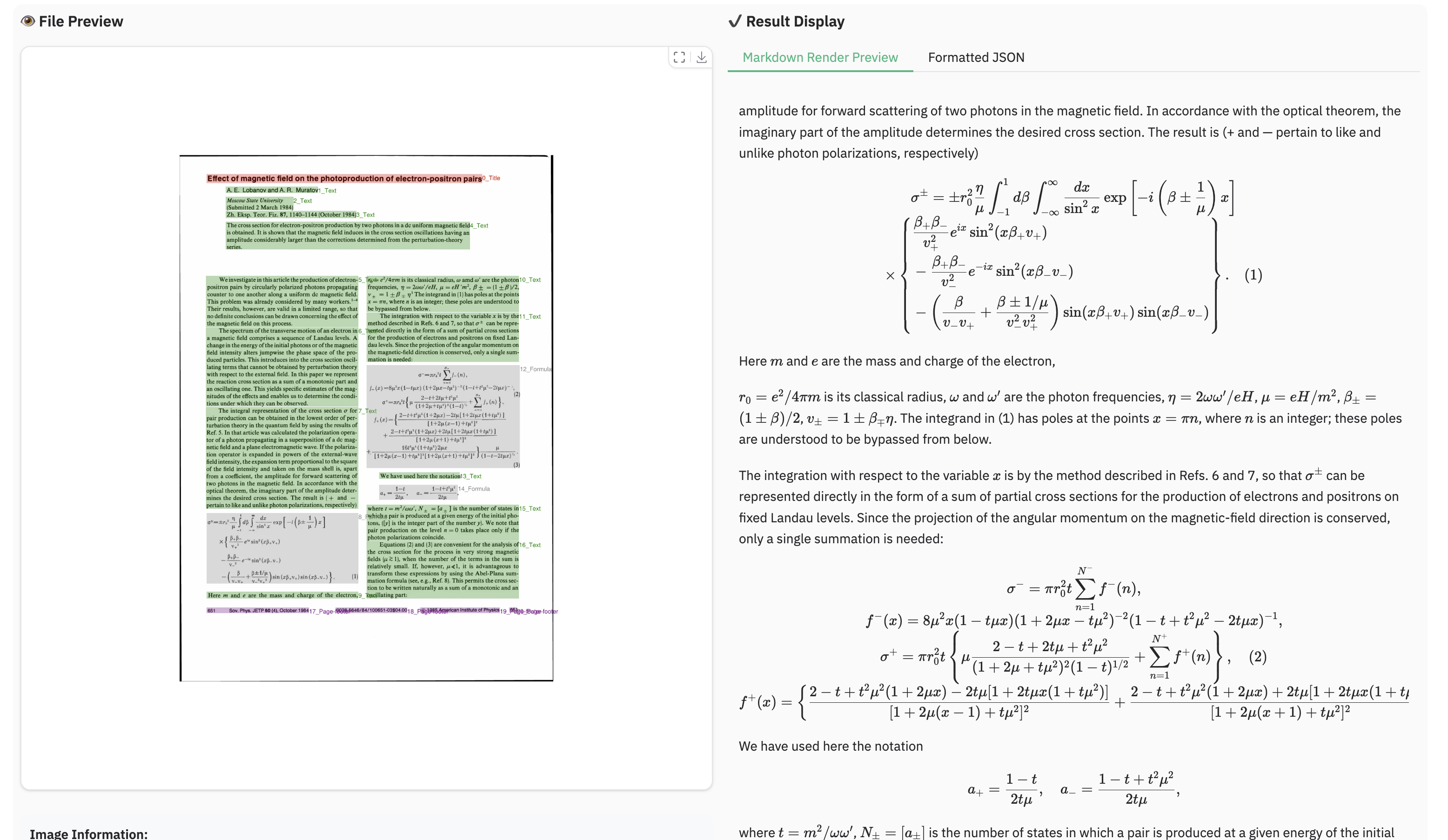
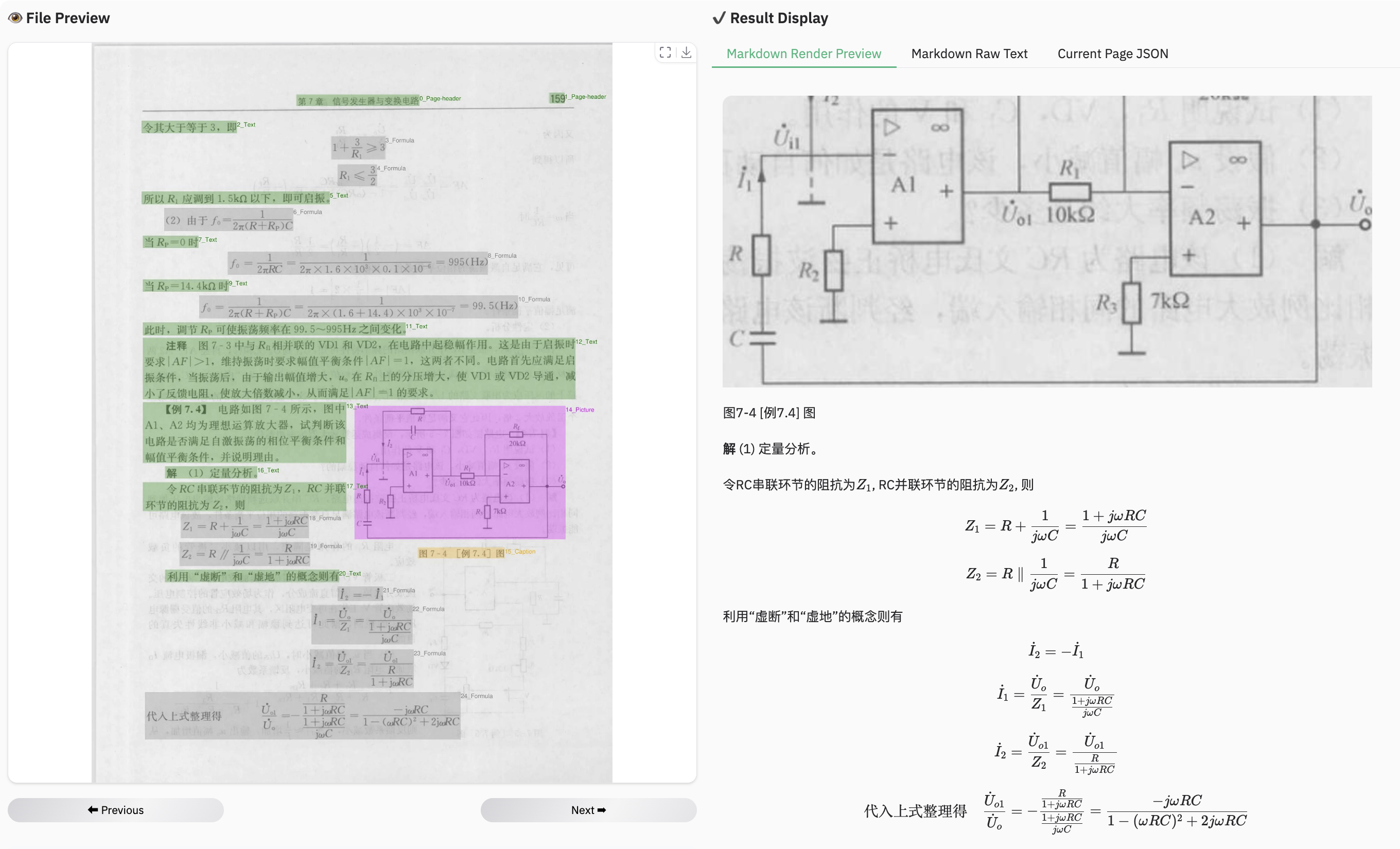
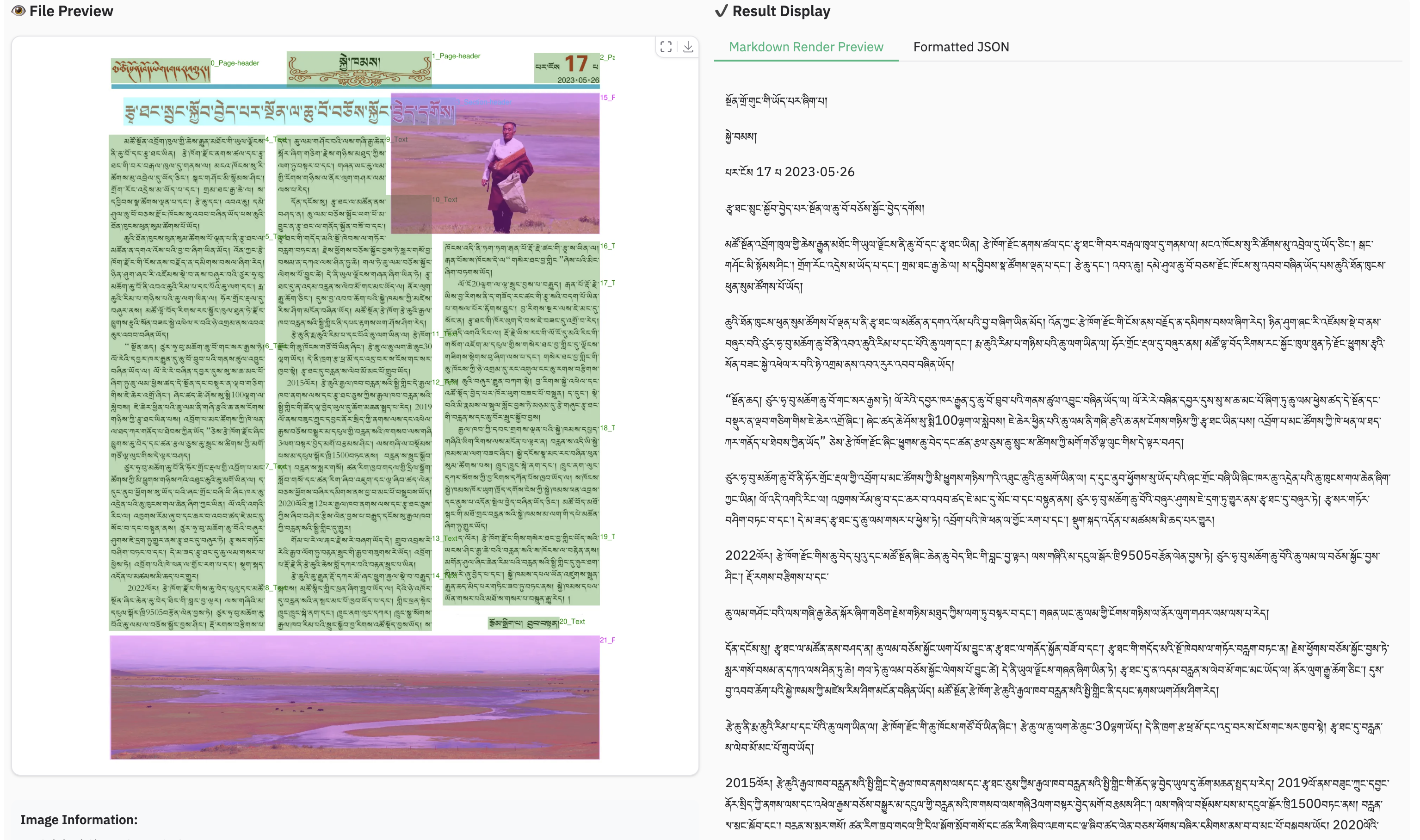
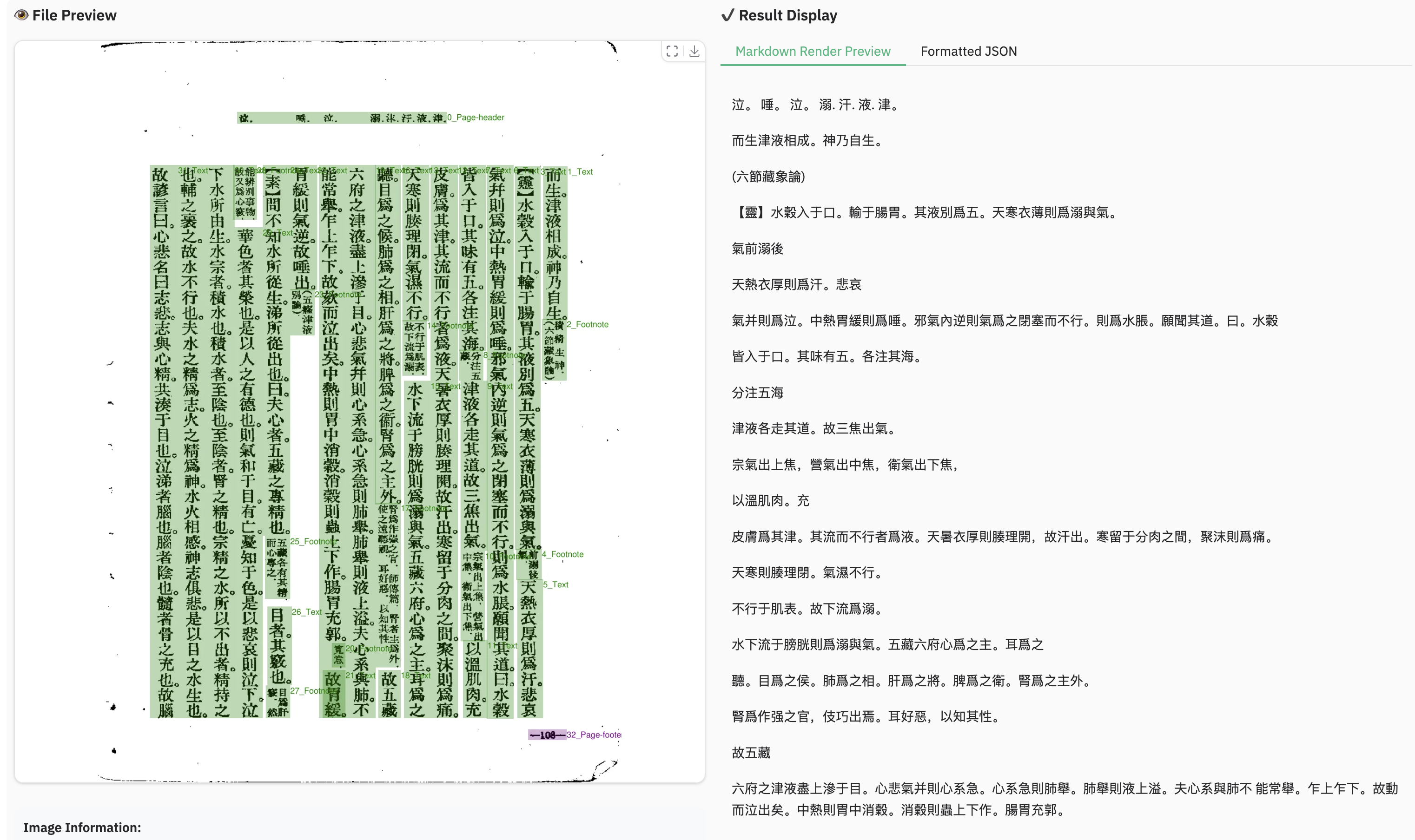
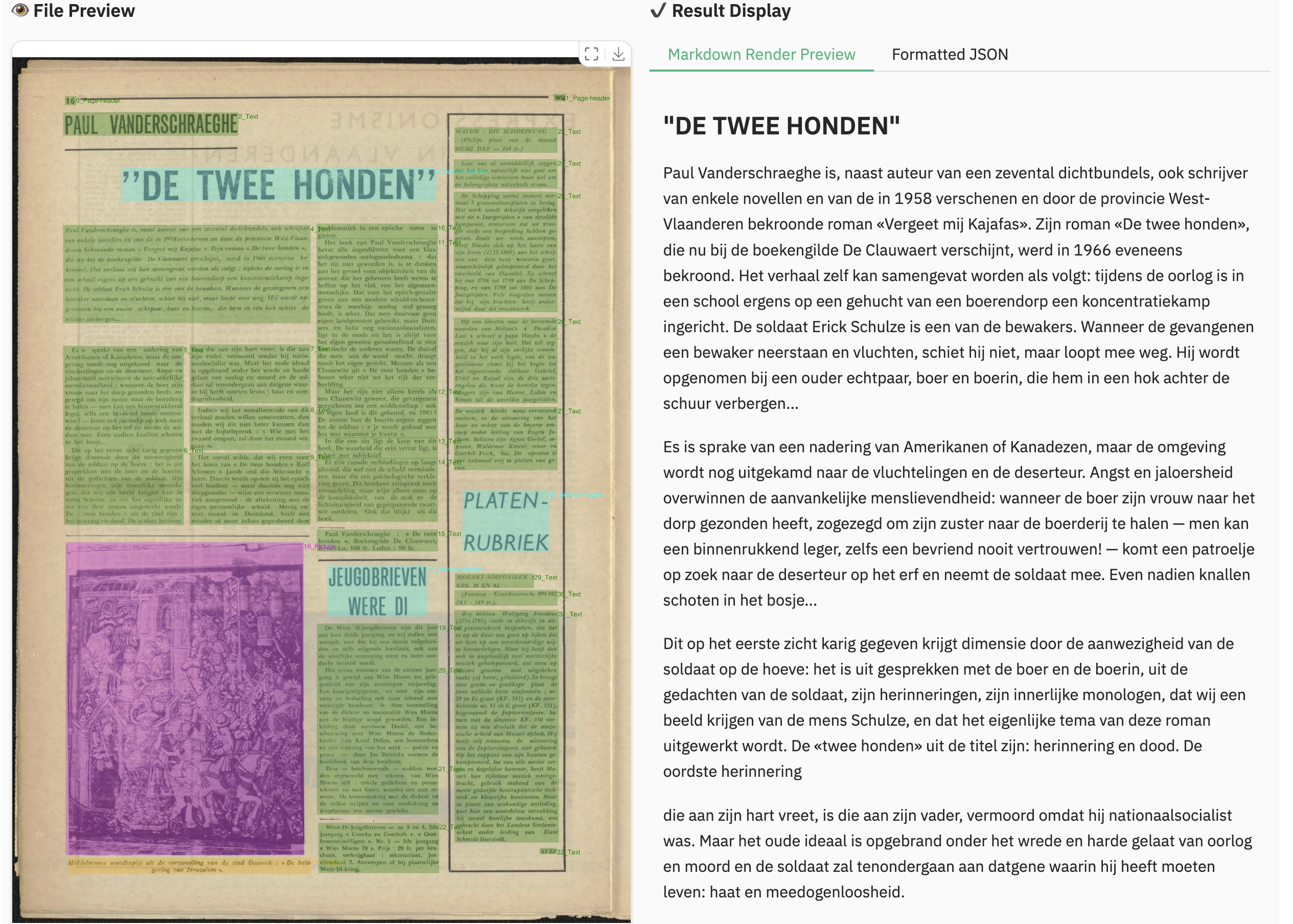
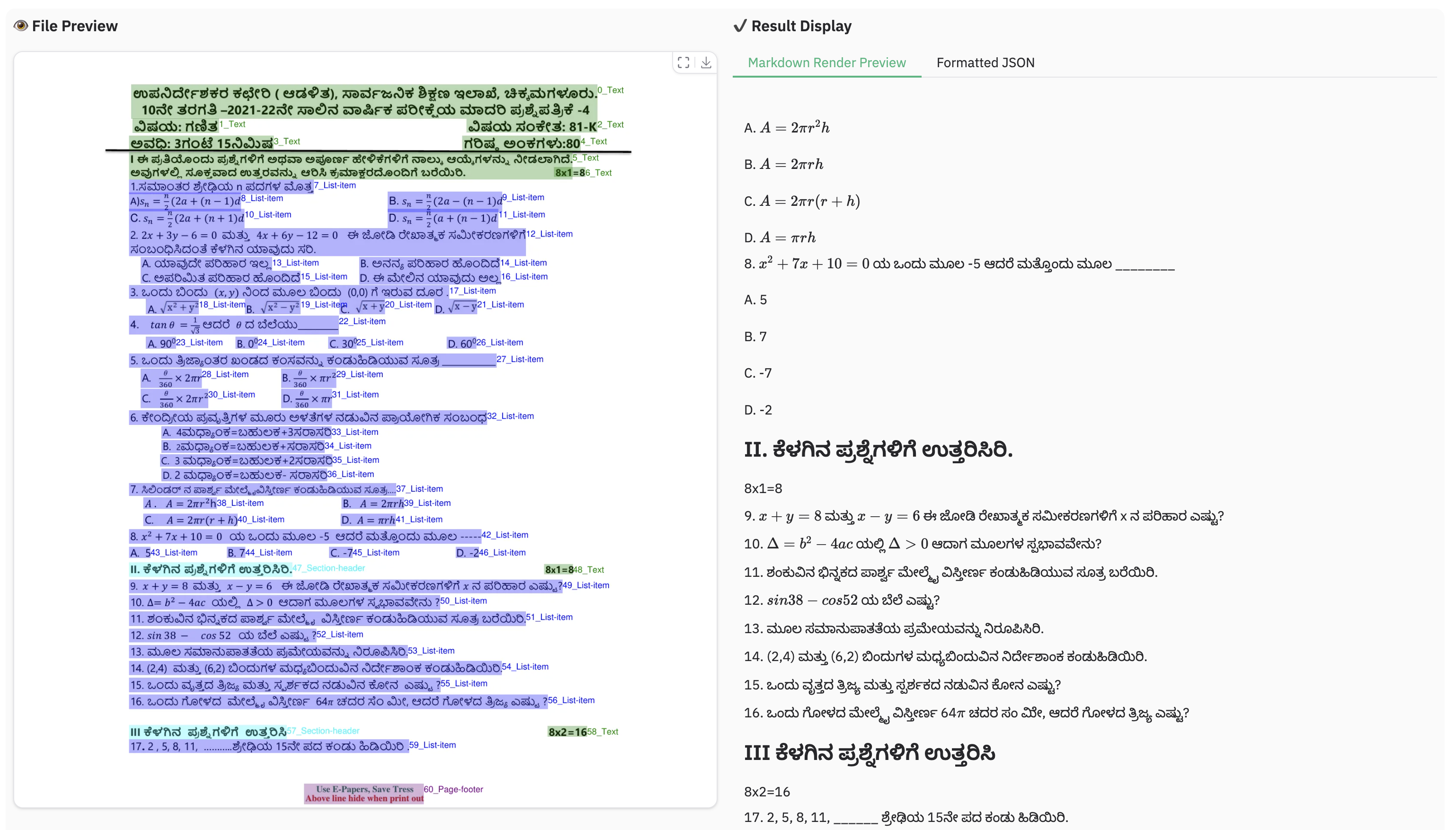
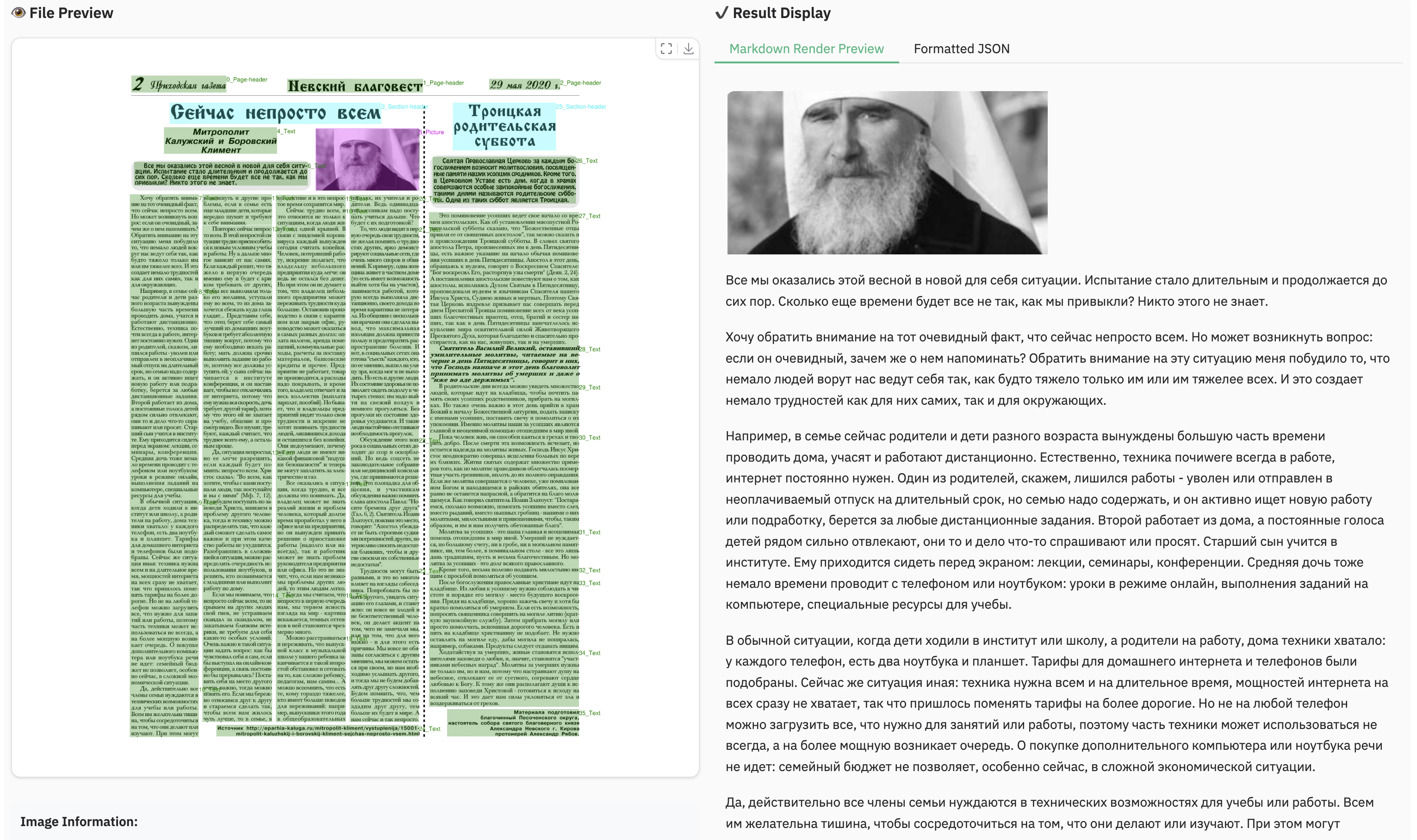
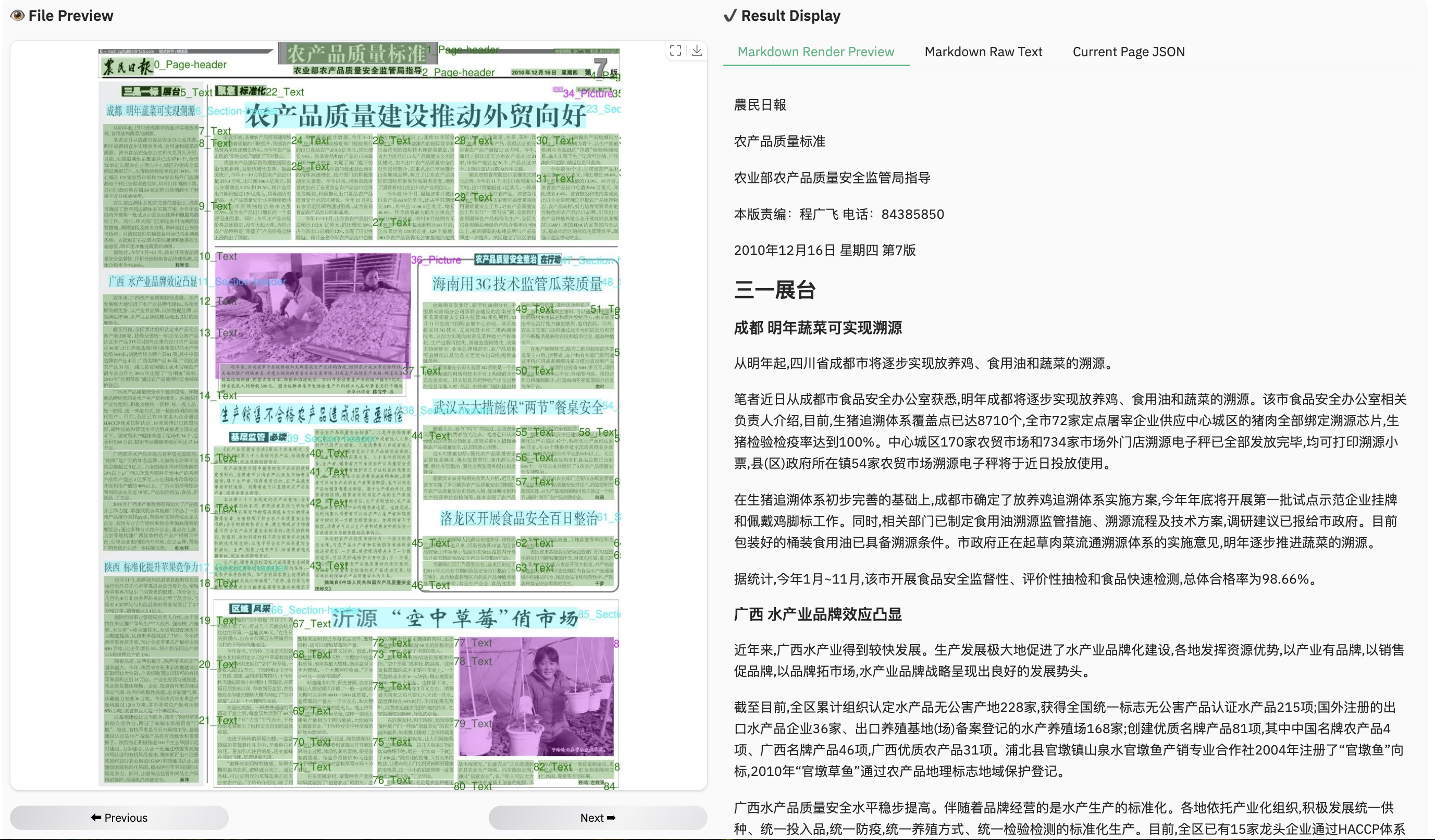
You can run the demo with the following command, or try directly at live demo
python demo/demo_gradio.py
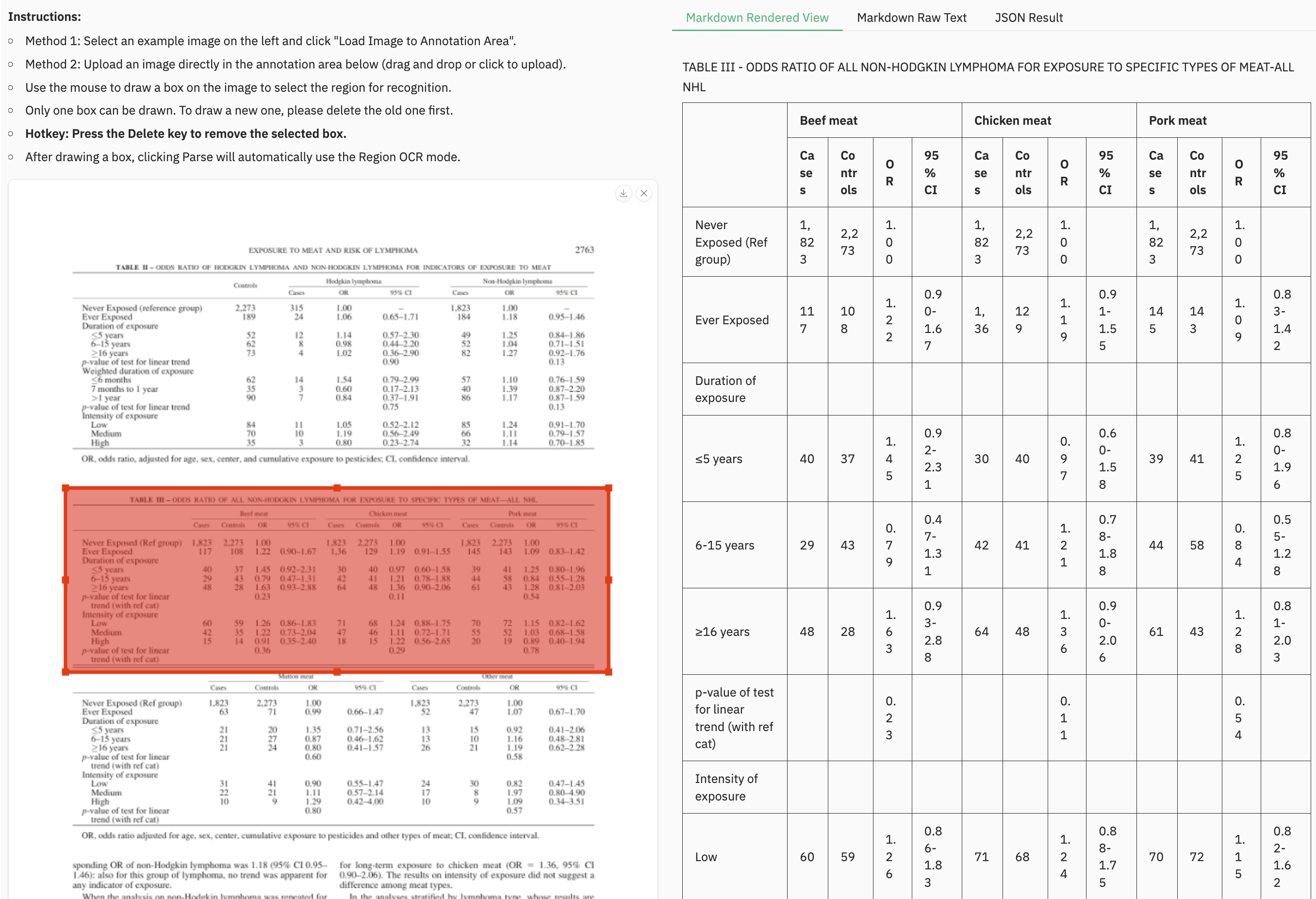
We also provide a demo for grounding ocr:
python demo/demo_gradio_annotion.py
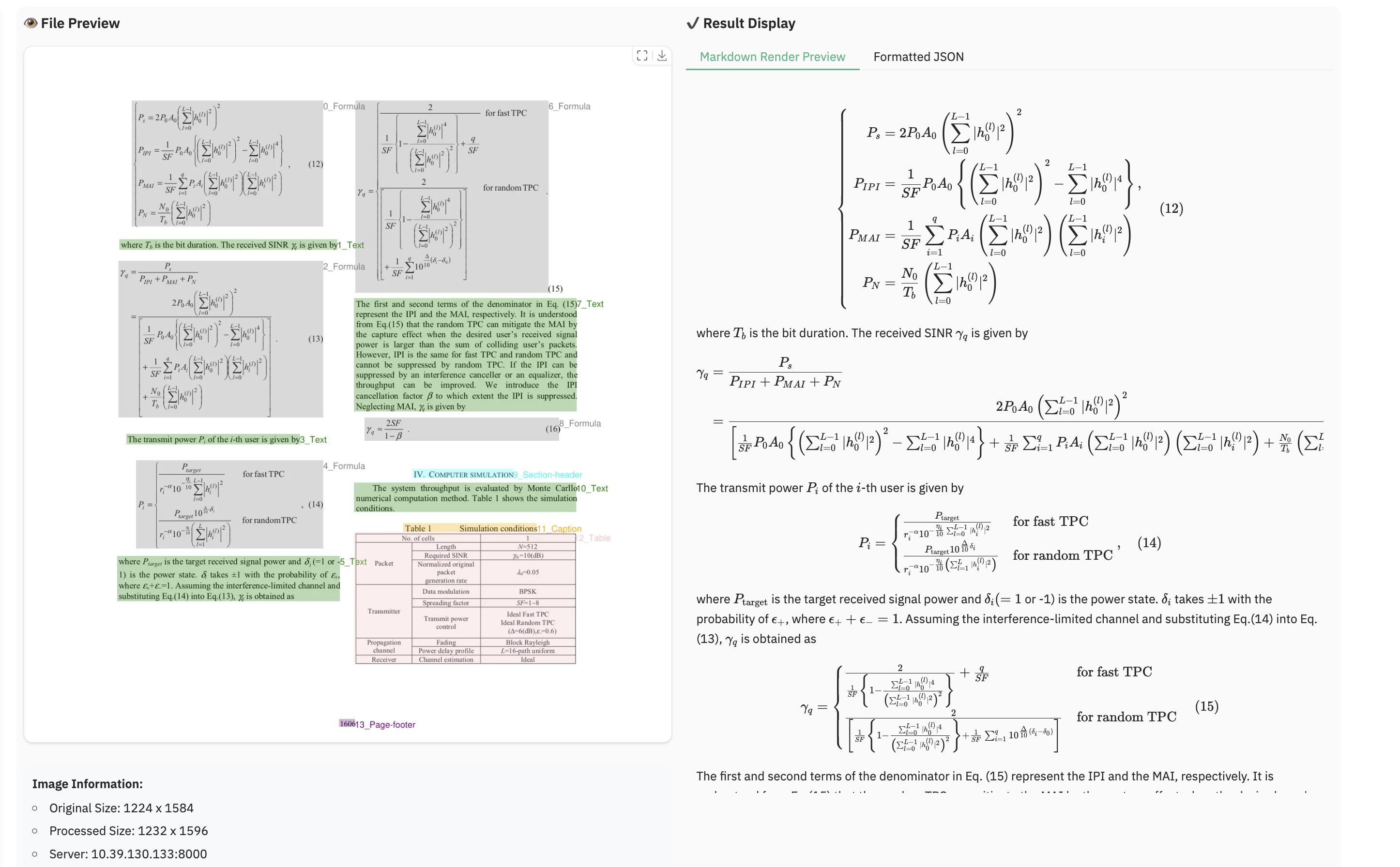
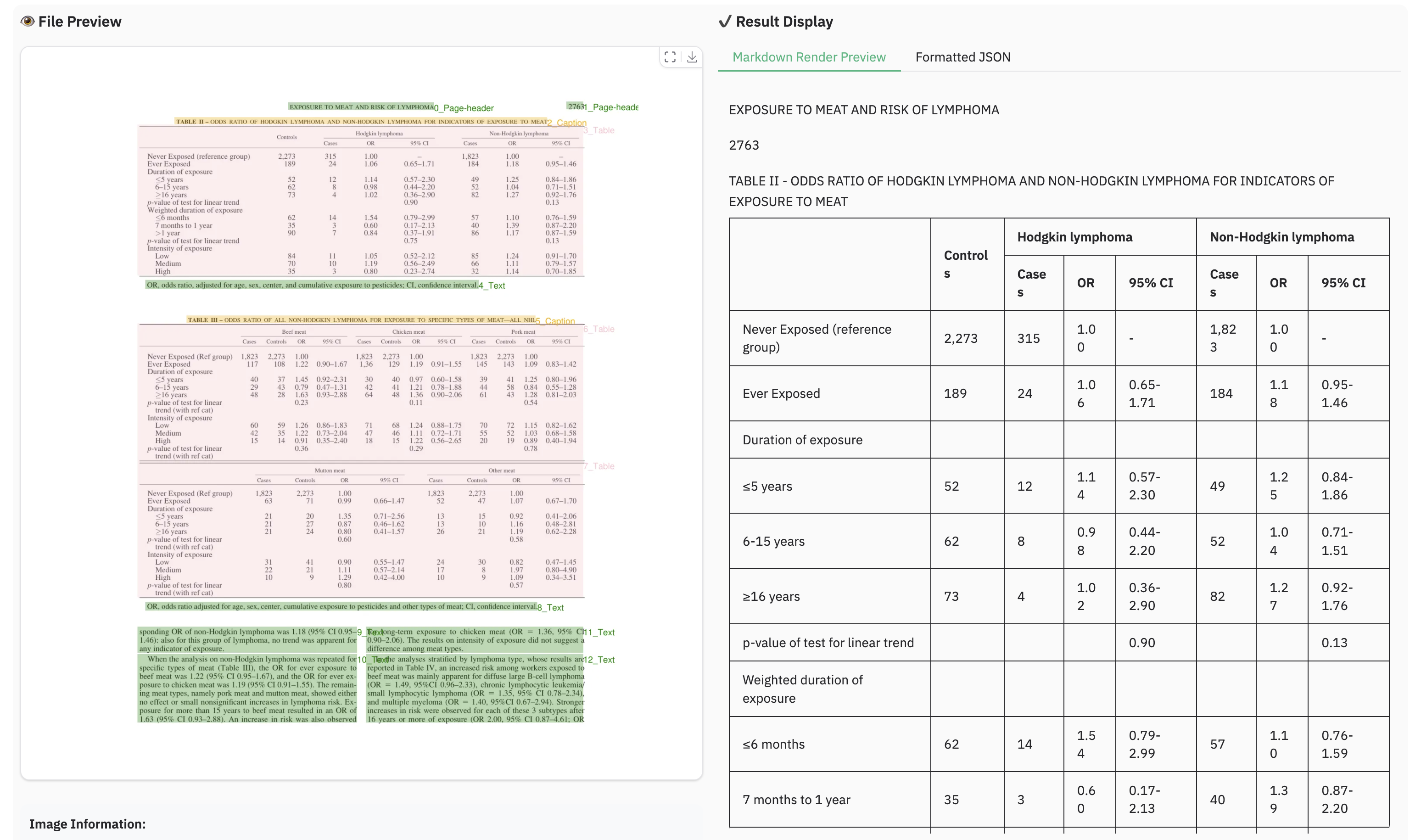
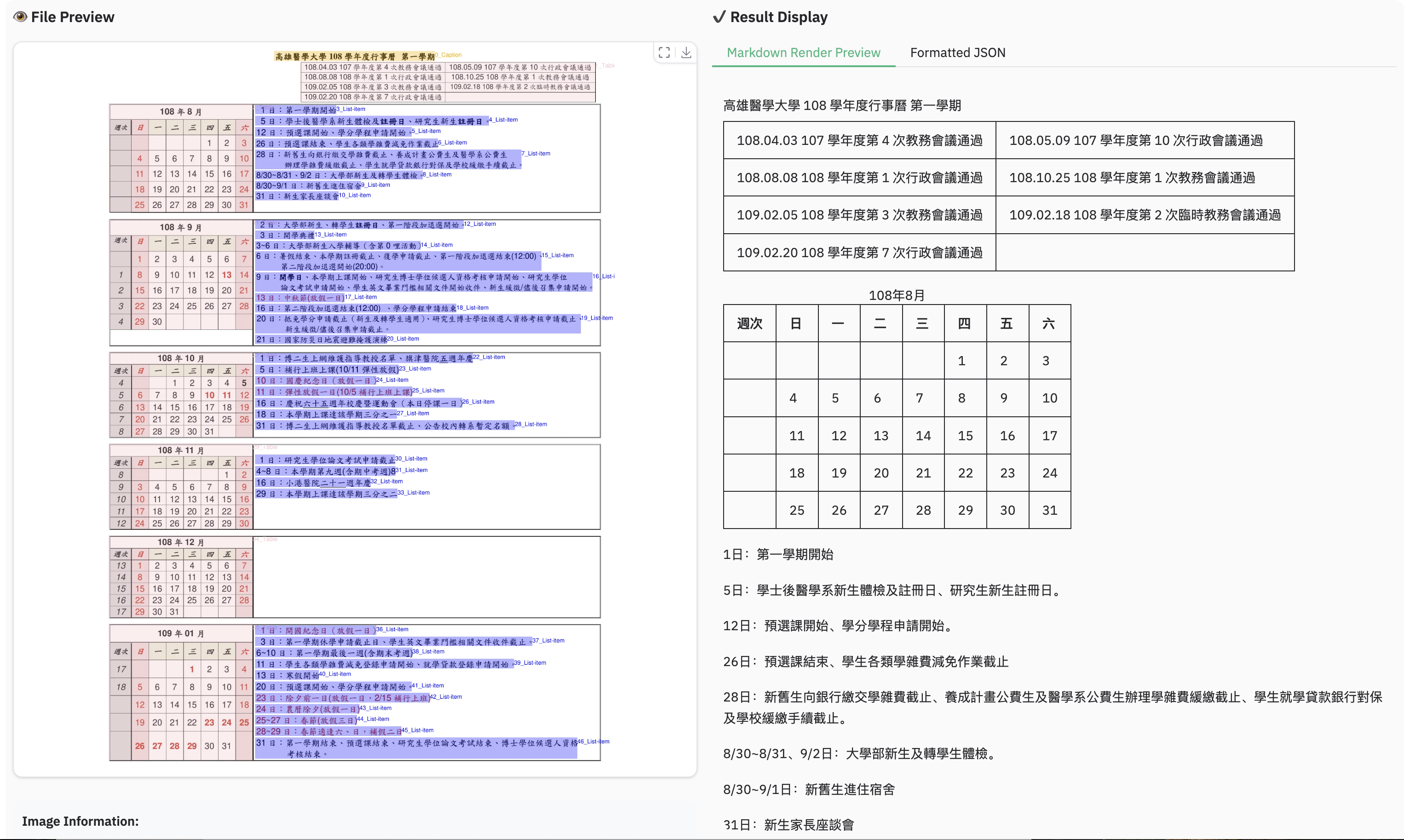
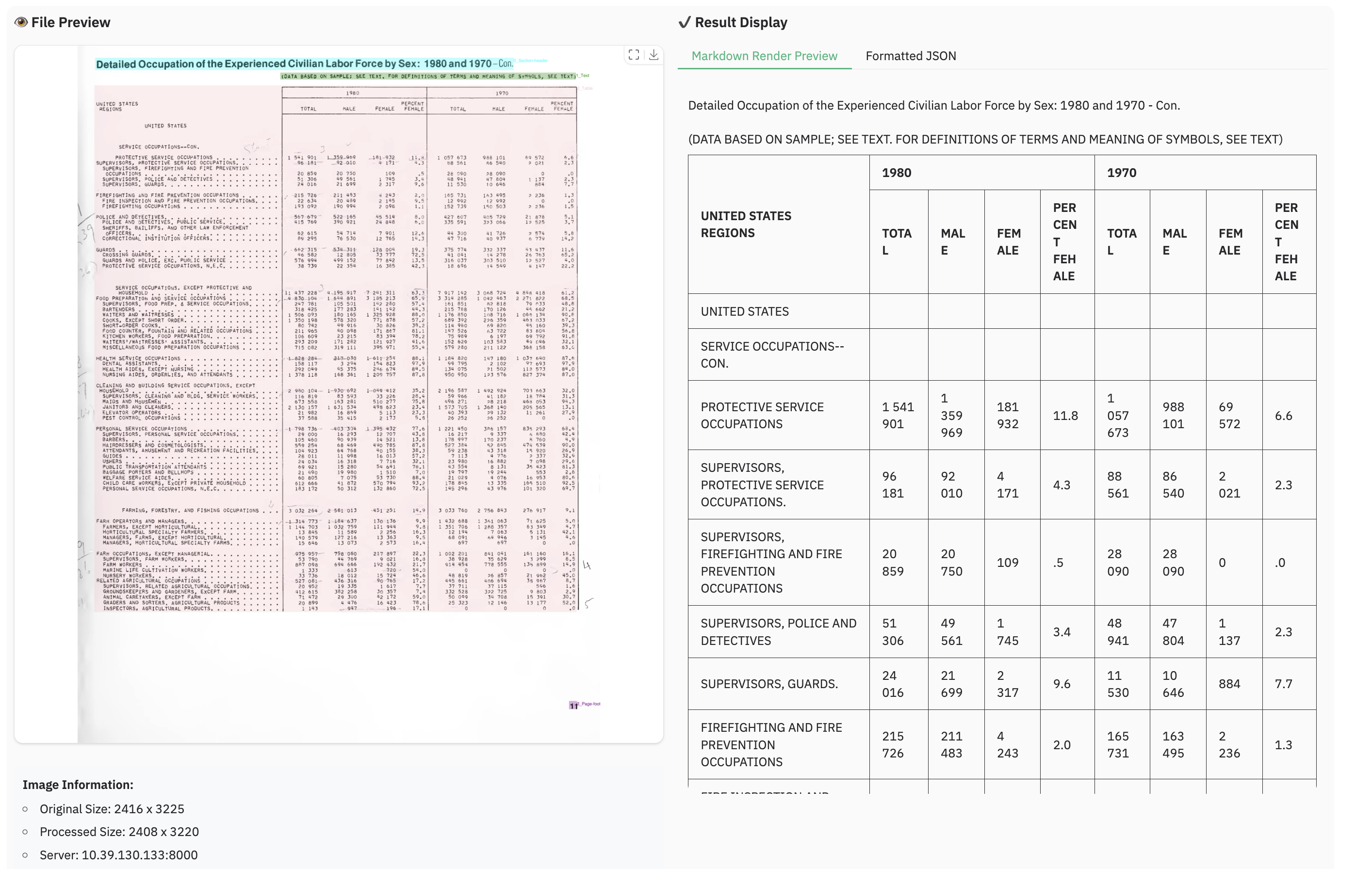
We would like to thank Qwen2.5-VL , aimv2 , MonkeyOCR , OmniDocBench , PyMuPDF , for providing code and models.
We also thank DocLayNet , M6Doc , CDLA , D4LA for providing valuable datasets.
Complex Document Elements:
Parsing Failures: The model may fail to parse under certain conditions:
...
) and underscores (
_
), may cause the prediction output to repeat endlessly. In such scenarios, consider using alternative prompts like
prompt_layout_only_en
,
prompt_ocr
, or
prompt_grounding_ocr
(
details here
).
Performance Bottleneck: Despite its 1.7B parameter LLM foundation, dots.ocr is not yet optimized for high-throughput processing of large PDF volumes.
We are committed to achieving more accurate table and formula parsing, as well as enhancing the model's OCR capabilities for broader generalization, all while aiming for a more powerful, more efficient model . Furthermore, we are actively considering the development of a more general-purpose perception model based on Vision-Language Models (VLMs), which would integrate general detection, image captioning, and OCR tasks into a unified framework. Parsing the content of the pictures in the documents is also a key priority for our future work. We believe that collaboration is the key to tackling these exciting challenges. If you are passionate about advancing the frontiers of document intelligence and are interested in contributing to these future endeavors, we would love to hear from you. Please reach out to us via email at: [ [email protected] ].