




Total runs:
100.8K
Run Growth:
61.8K
Growth Rate:
61.30%
🌐 Homepage | 📖 arXiv | 🖥️ Code | 📊 I2V-Bench | 🤗 Space
We propose ConsistI2V, a diffusion-based method to enhance visual consistency for I2V generation. Specifically, we introduce (1) spatiotemporal attention over the first frame to maintain spatial and motion consistency, (2) noise initialization from the low-frequency band of the first frame to enhance layout consistency. These two approaches enable ConsistI2V to generate highly consistent videos.
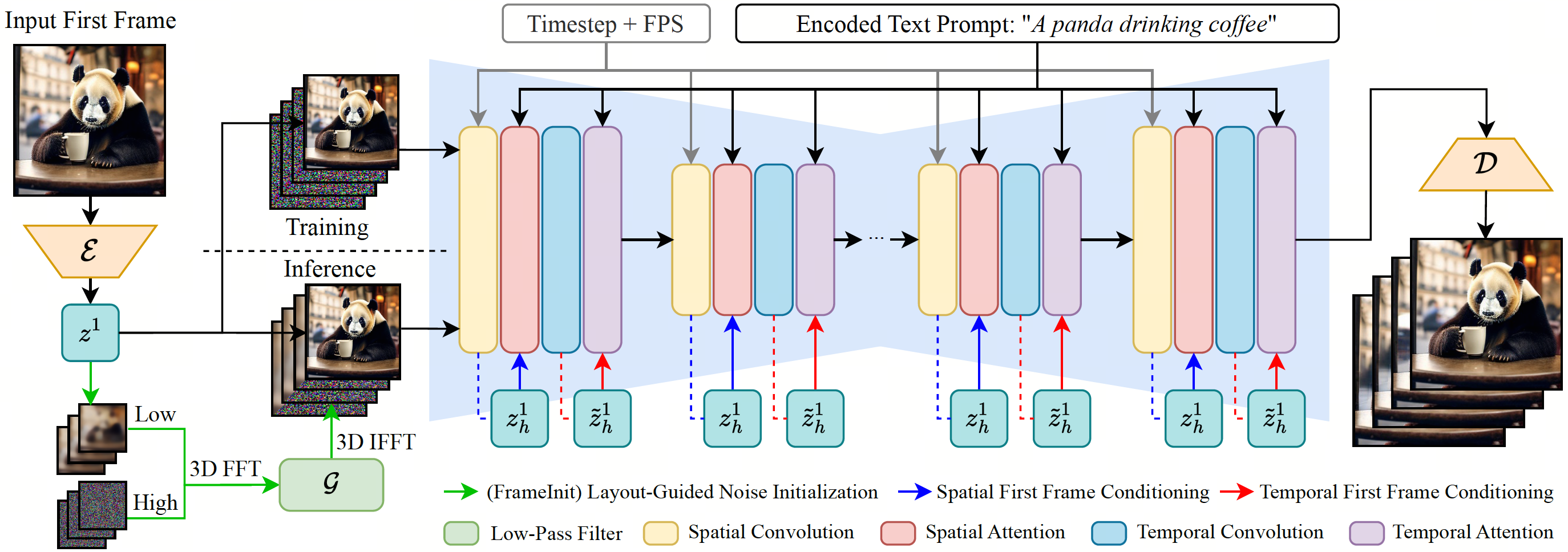
Prepare codebase and Conda environment using the following commands:
git clone https://github.com/TIGER-AI-Lab/ConsistI2V
cd ConsistI2V

conda env create -f environment.yaml
conda activate consisti2v
Checkout our GitHub codebase for detailed inference setups.
To generate videos with ConsistI2V, modify the inference configurations in
configs/inference/inference.yaml
and the input prompt file
configs/prompts/default.yaml
, and then run the sampling script with the following command:
python -m scripts.animate \
    --inference_config configs/inference/inference.yaml \
    --prompt_config configs/prompts/default.yaml \
    --format mp4
The inference script automatically downloads the model from Hugging Face by specifying
pretrained_model_path
in
configs/inference/inference.yaml
as
TIGER-Lab/ConsistI2V
(default configuration). If you are having trouble downloading the model from the script, you can store the model on your local storage and modify
pretrained_model_path
to the local model path.
You can also explicitly define the input text prompt, negative prompt, sampling seed and first frame path as:
python -m scripts.animate \
    --inference_config configs/inference/inference.yaml \
    --prompt "timelapse at the snow land with aurora in the sky." \
    --n_prompt "your negative prompt" \
    --seed 42 \
    --path_to_first_frame assets/example/example_01.png \
    --format mp4
To modify inference configurations in
configs/inference/inference.yaml
from command line, append extra arguments to the end of the inference command:
python -m scripts.animate \
    --inference_config configs/inference/inference.yaml \
    ... # additional arguments
    --format mp4
    sampling_kwargs.num_videos_per_prompt=4 \ # overwrite the configs in the config file
    frameinit_kwargs.filter_params.d_s=0.5
Modify the training configurations in
configs/training/training.yaml
and run the following command to train the model:
python -m torch.distributed.run \
    --nproc_per_node=${GPU_PER_NODE} \
    --master_addr=${MASTER_ADDR} \
    --master_port=${MASTER_PORT} \
    --nnodes=${NUM_NODES} \
    --node_rank=${NODE_RANK} \
    train.py \
    --config configs/training/training.yaml \
    -n consisti2v_training \
    --wandb
The dataloader in our code assumes a root folder
train_data.webvid_config.video_folder
containing all videos and a
jsonl
file
train_data.webvid_config.json_path
containing video relative paths and captions, with each line in the following format:
{"text": "A man rolling a winter sled with a child sitting on it in the snow close-up", "time": "30.030", "file": "relative/path/to/video.mp4", "fps": 29.97002997002997}
Videos can be stored in multiple subdirectories. Alternatively, you can modify the dataloader to support your own dataset. Similar to model inference, you can also add additional arguments at the end of the training command to modify the training configurations in
configs/training/training.yaml
.
Please kindly cite our paper if you find our code, data, models or results to be helpful.
@article{ren2024consisti2v,
  title={ConsistI2V: Enhancing Visual Consistency for Image-to-Video Generation},
  author={Ren, Weiming and Yang, Harry and Zhang, Ge and Wei, Cong and Du, Xinrun and Huang, Stephen and Chen, Wenhu},
  journal={arXiv preprint arXiv:2402.04324},
  year={2024}
}