































Table of Contents
- Key Points
- The Power of AI in YouTube Short Scriptwriting
- Tips for Optimizing AI-Generated Scripts
- Step-by-Step Guide to Using Synthesia AI Script Generator
- Synthesia AI Script Generator: Pros and Cons
- Frequently Asked Questions
- Related Questions



The Power of AI in YouTube Short Scriptwriting
What is an AI Script Generator?
An AI script generator is a tool that uses artificial intelligence to automate the process of writing scripts for videos, presentations, or marketing campaigns. These generators can analyze user inputs, such as topics, objectives, and tones of voice, to produce complete scripts in a matter of minutes.

For YouTube Shorts, AI script generators offer a way to overcome writer's block and efficiently create engaging content that captures audience attention.
Key benefits include:
- Time Savings: Reduces scriptwriting time from hours to minutes.
- Idea Generation: Helps brainstorm and refine content ideas.
- Content Structure: Provides a structured framework for your video scripts.
- Versatility: Suitable for various niches and content types, from unboxing videos to tech reviews.
Why Use AI for YouTube Short Scripts?
Creating compelling YouTube Shorts requires a strategic approach to scriptwriting. High-quality scripts are essential to grab viewers’ attention quickly and maintain engagement throughout the short video. However, developing these scripts can be time-consuming and challenging.
Using AI for scriptwriting offers numerous advantages:
- Enhanced Efficiency: AI can create scripts much faster than traditional methods, allowing content creators to focus on filming, editing, and promotion.
- Consistent Quality: AI ensures a consistent level of quality in your scripts, maintaining a professional tone and structure.
- Creative Inspiration: AI can suggest innovative ideas and angles, helping you produce unique and engaging content.
- Reduced Effort: AI eliminates the need to start from scratch, providing a solid foundation that you can customize and refine.
Step-by-Step Guide to Using Synthesia AI Script Generator
Step 1: Access Synthesia AI Script Generator
To begin, you’ll need to access the Synthesia AI Script Generator. Synthesia is a platform known for its AI video creation capabilities, offering tools that streamline the video production process.

To access the script generator, follow these steps:
- Open Google Chrome: Launch your Google Chrome browser.
- Search for Synthesia: Type “Synthesia” into the search bar and press Enter.
- Visit the Synthesia Website: Click on the first link that appears in the search results, which should direct you to Synthesia's official website (synthesia.io).
Once on the Synthesia website, navigate to the menu (usually represented by three horizontal lines in the top right corner).
Step 2: Navigate to AI Script Generator
Once you are on the Synthesia platform, finding the AI Script Generator is straightforward. Follow these instructions:
-
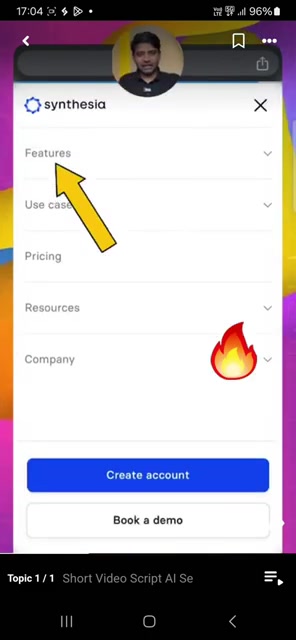
Click on Features: Locate and click on the “Features” option in the menu. This will open a dropdown menu with various options.
-
Select All Features: From the dropdown menu, choose “All Features.” This will take you to a comprehensive list of Synthesia's offerings.
-
Scroll to AI Script Generator: Scroll down the page until you find the “AI Script Generator” option. It is usually located towards the bottom of the list.
-
Click AI Script Generator: Click on the “AI Script Generator” link to open the AI script creation tool.
Step 3: Input Your Script Details
With the AI Script Generator now open, you can start inputting the details for your YouTube Short script. The generator typically presents a form with several fields to help tailor the script to your specific needs.
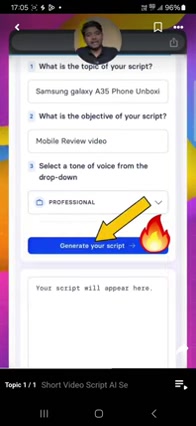
Here’s how to fill out the form:
- Topic of Your Script: Enter the main topic of your video in the “What is the topic of your script?” field. This could be anything from “Samsung Galaxy A35 Phone Unboxing” to “Tips for Better Sleep.”
- Objective of Your Script: Specify the objective of your video in the “What is the objective of your script?” field. For example, “Mobile Review Video” or “Promote a New Product.”
- Tone of Voice: Select the desired tone of voice for your script from the dropdown menu. Options may include “Professional,” “Friendly,” “Straightforward,” or “Casual.”
Step 4: Generate and Review Your Script
After inputting all the necessary details, it’s time to generate your script. Follow these steps:
-
Click “Generate your script”: Click the button labeled “Generate your script” to initiate the AI script creation process.
-
Review the Generated Script: The AI will generate a script based on your inputs. Take the time to carefully review the script to ensure it aligns with your vision and objectives.
-
Edit and Customize: If necessary, edit the script to refine the language, add specific details, or adjust the tone of voice. You have the flexibility to tailor the script to your liking.
Step 5: Translate Your Script to Other language (Hindi)
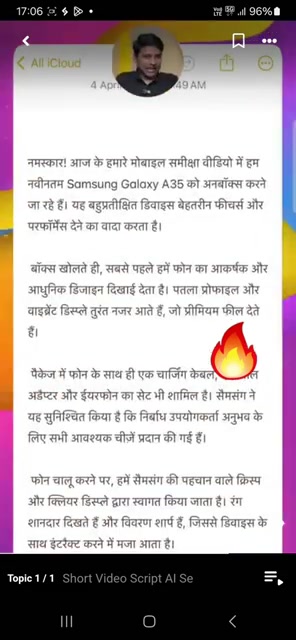
If your target audience speaks a different language (Hindi), you can easily Translate the AI-generated script using tools like Google Gemini, Google’s AI Chatbot. Here's how to do it:
- Copy the Script: Click the copy icon to copy the generated English script.
- Search for Google Gemini: Open a new tab in Google Chrome and search for “Google Gemini.”
- Access Google Gemini: Click on the first link to access the Google Gemini platform.
- Paste the Script: Paste the copied script into the input field of Google Gemini.
- Add Translation Prompt: Type the following Prompt at the end of the script: “Translate in human natural Hindi.”
- Generate Translated Script: Press Enter or click the send button to generate the translated Hindi script.
- Review and Customize: Review the translated script and make any necessary adjustments to ensure accuracy and cultural relevance.






Most people like





























Report
Please select a reason for reporting
- 13 Reasons to Switch from Snapchat to Text Messaging
- 7 Powerful Speech to Text Apps to Boost Productivity
- 10 Best Speech to Text Tools for Effortless Transcription
- 13 Free Tools to Easily Transcribe Audio to Text
- 15 Surprising Ways Google's Speech-to-Text Boosts Productivity
- 7 Best Free Online Audio to Text Transcription Tools
- 9 Tips to Transcribe Speech to Text Faster and Better
- 13 Best Speech to Text Software for Windows 10 in 2023
- 7 Tips for Choosing the Best Transcriber for Audio to Text
- 11 Reasons Why Dragon Speech-to-Text Apps are Game-Changers
- 6 Secrets to Enhance Your Speech to Text Transcription
- 6 Brilliant Ways to Boost Productivity with Talk-to-Text on Your MacBook
- 6 Ways Transcription Software Converts Audio to Text
- 8 Tips to Transcribe Speech to Text Like a Pro
- 6 Reasons IBM Watson Speech to Text is a Game-Changer
- 14 Powerful Ways Talk-to-Text Improves Your Workflow
- 12 Top Windows Speech-to-Text Software for Efficient Transcription
- 12 Game-Changing Benefits of Apple's Speech to Text Technology
- 9 Powerful Use Cases for AWS Speech to Text Technology
- 10 Easy Steps to Transcribe YouTube Videos to Text
- transcription audio en texte
- online audio transcription
- free audio file transcription
- free ai audio transcription
- audio transcription service
- audio transcription online free
- audio transcription free online
- audio to transcription software
- audio and transcript
- ai audio transcription free
- voice recording to text converter
- translate voice recording to text
- record voice to text
- audio recording to text converter
- voice recording and transcription
- chatgpt voice to text
- gmail voice to text
- speech to text reader
- speech to text ai free
- speech to talk
- Meshy AI: How to Create 3D Models from Text and Images
- How SEO and Marketing Dashboards Empower Agencies to Drive Results
- How to Use AI Tools to Find Internal Linking Opportunities Across a Business Website
- Discover Your Perfect Haircut with AI Hairstyle Apps
- Free Reputation Calculator Tools: How They're Adapting to Score AI Visibility, Not Just Rankings
- Design Professional Flyers for Free on Your Phone
- Best Free Flyer Maker Apps for Android: Design Like a Pro
- How to Know If Your Business Is Ready for an AI Customer Service Agent
- Revolutionizing Storytelling: From Novels to Screenplays with AI
- Create Engaging Animated Explainer Videos with a Free AI Tool
- Meshy AI: How to Create 3D Models from Text and Images
- ASOMobile Helps Teams Benchmark App Store Screenshots Against Competitors
- How to Match LMS Software With Your Organization's Training Plan
- Revolutionizing Email Marketing Agency with AI
- How to Convert BTC to HNT
- Unleashing the Power of AI: Cognizant's Roadmap for Transformation
- Frame to Video Review: A Practical Look at Turning Two Still Frames Into Motion
- NVIDIA NIM: Revolutionizing Supply Chain Data Analysis with AI
- Top AI Tools That Help Brands Stand Out Offline (Not Just Online)
- Top 5 Cold Email Software: Maximize Your Outreach in 2025

Copyright ©2026 toolify