































Table of Contents
- Key Points
- Understanding the AI Text Classifier
- Practical Applications for Educators
- Step-by-Step Guide to Using the AI Text Classifier
- Accessibility and Cost of the AI Text Classifier
- Pros and Cons of Using the AI Text Classifier
- Key Features and Functionality
- Practical Use Cases for Different Scenarios
- Frequently Asked Questions
- Related Questions



Understanding the AI Text Classifier
What is the AI Text Classifier?
The AI Text Classifier
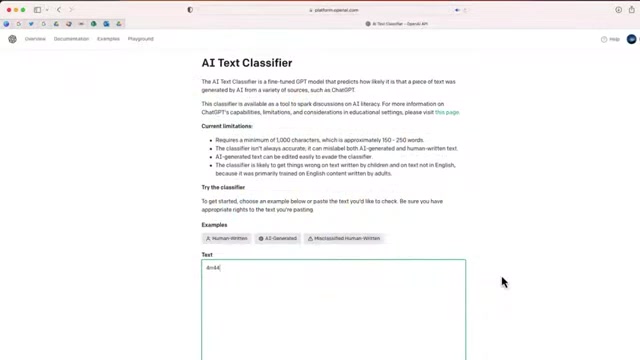
is a tool created by OpenAI designed to predict the likelihood that a given piece of text was generated by AI, specifically from sources like ChatGPT. It provides insights to help users determine if the content they are reviewing was created by a human or an artificial intelligence. This is increasingly important in various fields, especially education, where original work and authentic voices are highly valued.
This tool is a GPT model, fine-tuned to analyze and identify patterns that are typically associated with AI-generated content. By leveraging a vast dataset of both human-written and AI-generated texts, the classifier learns to differentiate between the two, offering a probability assessment to the user.
Understanding the nuances of the AI Text Classifier is essential for educators who need to evaluate student work for originality and authenticity. While not a foolproof solution, it serves as a valuable aid in maintaining academic integrity and encouraging students to develop their unique writing skills.
The classifier can be accessed at platform.openai.com.
The site offers a simple and straightforward interface for users to paste text and receive a probability assessment. This ease of use makes it accessible to educators with varying levels of technical expertise, ensuring that the tool can be widely adopted within educational institutions.
As technology evolves, tools like the AI Text Classifier will become increasingly critical in identifying and managing AI-generated content. Keeping abreast of these developments and understanding how to use them effectively will be a key skill for educators in the coming years. The AI Text Classifier is not just a detection tool but also a catalyst for conversations about AI literacy and the evolving nature of authorship.
How the AI Text Classifier Works
The AI Text Classifier operates through a straightforward process: users input a piece of text, and the classifier analyzes it to determine the likelihood of AI generation. Here’s a breakdown of how it works:
- Accessing the Tool: The classifier is available online at platform.openai.com. Users can access the site through any web browser.
- Inputting Text: The website features a text window where you can paste the content you want to analyze.
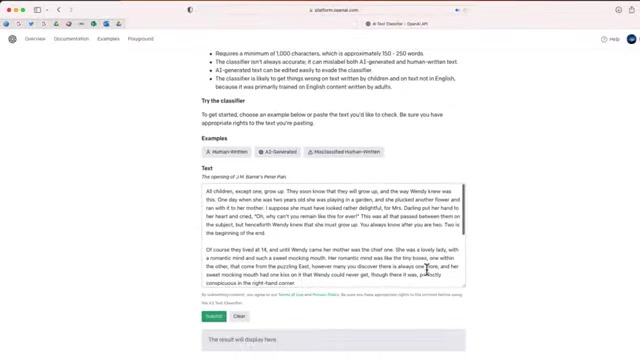
The classifier requires a minimum amount of text to provide an accurate assessment.
- Submitting for Analysis: After pasting the text, you click the 'Submit' button.
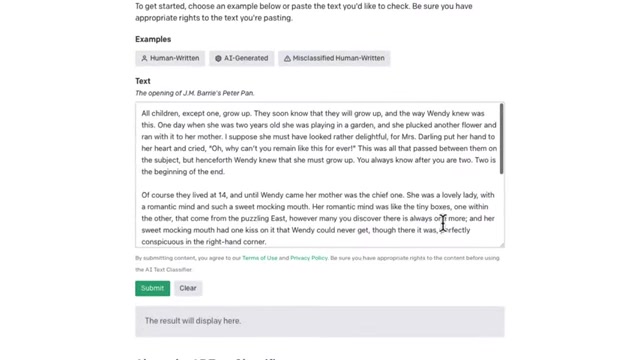
The classifier then processes the text, comparing it against patterns learned from its training data.
- Receiving Feedback: The classifier provides one of four assessments: very unlikely AI-generated, unlikely AI-generated, unclear if AI-generated, possibly AI-generated, or likely AI-generated. These categories help users understand the probability of the text being created by AI.
The AI Text Classifier relies on a complex algorithm trained on a vast dataset of text. It identifies patterns and characteristics typical of AI-generated content, such as formulaic writing, repetitive phrasing, and a lack of unique stylistic elements. It's important to remember that the classifier is not always accurate, as AI models continue to improve and can sometimes mimic human writing styles effectively.
This tool helps educators identify potential cases of AI-assisted writing in student submissions, sparking discussions about academic integrity and the importance of original work. It also encourages students to reflect on their writing processes and understand the characteristics that make their work uniquely their own.
Limitations of the AI Text Classifier
Despite its utility, the AI Text Classifier has several limitations that users, especially educators, should be aware of:

- Minimum Text Length: The classifier requires a minimum of 1,000 characters, equivalent to approximately 150-250 words. This can be restrictive for shorter assignments or text snippets.
- Accuracy: The classifier isn't always accurate. It can mislabel both AI-generated and human-written text. AI’s improving capabilities can sometimes mimic human writing, making it difficult to distinguish the source.
- Evading Detection: AI-generated text can be edited to evade the classifier. Altering the structure, vocabulary, or style of the text can sometimes trick the system.
- Training Data Bias: The classifier was primarily trained on English content written by adults. It is likely to get things wrong on text written by children or text not in English.
These limitations highlight the importance of using the AI Text Classifier as just one tool in a broader assessment strategy. Educators should not rely solely on this tool but should also consider other factors, such as the student's writing style, the assignment's complexity, and the student's overall academic performance.
Understanding these limitations ensures that educators use the AI Text Classifier responsibly and effectively. It also prompts a critical approach to evaluating AI's role in content creation and the importance of fostering original thought and expression in education.
Step-by-Step Guide to Using the AI Text Classifier
Step 1: Access the AI Text Classifier Website
First, navigate to the OpenAI AI Text Classifier website at platform.openai.com. This website is the official platform where you can access and use the classifier. Ensure you have a stable internet connection to avoid any interruptions during the analysis process. The website is designed to be user-friendly, with a straightforward interface that requires no special software or plugins.
Step 2: Locate the Text Input Window
Once on the website, find the text input window. This is where you will paste the text you want to analyze. The window is clearly labeled, making it easy to identify. Ensure the text you are analyzing meets the minimum length requirement of 1,000 characters for optimal results. You can copy and paste the text directly from a document, email, or any other source.
Step 3: Paste the Text into the Input Window
Carefully paste the text you want to analyze into the input window. Double-check to ensure that all the text is included and that there are no missing characters or formatting errors. The AI Text Classifier works best with clean, unformatted text. If your text contains any special characters or complex formatting, consider removing them before pasting.
Step 4: Submit the Text for Analysis
After pasting the text, click the 'Submit' button located near the input window. This action sends the text to the OpenAI server for analysis. Be patient, as the analysis process may take a few moments, depending on the length of the text and the server load. A loading indicator will typically be displayed while the analysis is in progress.
Step 5: Review the Classifier's Assessment
Once the analysis is complete, the AI Text Classifier will provide an assessment of the likelihood that the text was generated by AI. The assessment will fall into one of four categories: very unlikely AI-generated, unlikely AI-generated, unclear if AI-generated, possibly AI-generated, or likely AI-generated. Review the assessment carefully and consider it in the context of your overall evaluation.
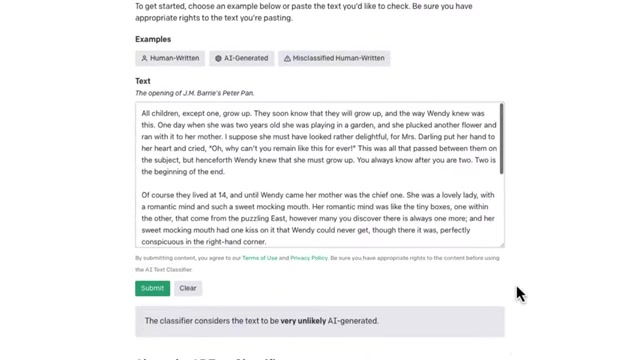
Remember, the classifier is not always accurate, so it’s important to consider other factors as well.
Accessibility and Cost of the AI Text Classifier
Free Access for Educational Purposes
One of the significant advantages of the AI Text Classifier is that it is currently available free of charge. This accessibility makes it an attractive option for educators and institutions with limited budgets.
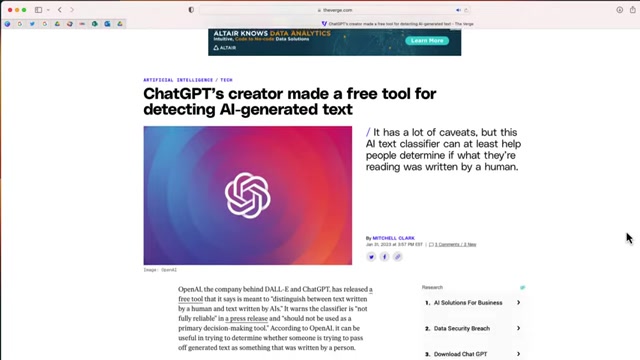
By providing free access, OpenAI encourages widespread adoption and use of the tool in educational settings, promoting academic integrity and AI literacy.
This free access allows educators to integrate the classifier into their assessment strategies without incurring additional costs. This is especially beneficial for smaller schools or individual teachers who may not have the resources to invest in more expensive AI detection tools. It enables them to leverage the power of AI to maintain academic standards and foster critical thinking among students.
It’s important to note that while the tool is currently free, OpenAI may introduce changes to its pricing model in the future. Educators should stay informed about any updates or changes to ensure continued access to this valuable resource. Nevertheless, the current free access makes the AI Text Classifier a highly accessible and cost-effective solution for detecting AI-generated content.





Most people like


































Report
Please select a reason for reporting
- 13 Reasons to Switch from Snapchat to Text Messaging
- 7 Powerful Speech to Text Apps to Boost Productivity
- 10 Best Speech to Text Tools for Effortless Transcription
- 13 Free Tools to Easily Transcribe Audio to Text
- 15 Surprising Ways Google's Speech-to-Text Boosts Productivity
- 7 Best Free Online Audio to Text Transcription Tools
- 9 Tips to Transcribe Speech to Text Faster and Better
- 13 Best Speech to Text Software for Windows 10 in 2023
- 7 Tips for Choosing the Best Transcriber for Audio to Text
- 11 Reasons Why Dragon Speech-to-Text Apps are Game-Changers
- 6 Secrets to Enhance Your Speech to Text Transcription
- 6 Brilliant Ways to Boost Productivity with Talk-to-Text on Your MacBook
- 6 Ways Transcription Software Converts Audio to Text
- 8 Tips to Transcribe Speech to Text Like a Pro
- 6 Reasons IBM Watson Speech to Text is a Game-Changer
- 14 Powerful Ways Talk-to-Text Improves Your Workflow
- 12 Top Windows Speech-to-Text Software for Efficient Transcription
- 12 Game-Changing Benefits of Apple's Speech to Text Technology
- 9 Powerful Use Cases for AWS Speech to Text Technology
- 10 Easy Steps to Transcribe YouTube Videos to Text
- transcription audio en texte
- online audio transcription
- free audio file transcription
- free ai audio transcription
- audio transcription service
- audio transcription online free
- audio transcription free online
- audio to transcription software
- audio and transcript
- ai audio transcription free
- voice recording to text converter
- translate voice recording to text
- record voice to text
- audio recording to text converter
- voice recording and transcription
- chatgpt voice to text
- gmail voice to text
- speech to text reader
- speech to text ai free
- speech to talk
- Meshy AI: How to Create 3D Models from Text and Images
- How SEO and Marketing Dashboards Empower Agencies to Drive Results
- How to Use AI Tools to Find Internal Linking Opportunities Across a Business Website
- Discover Your Perfect Haircut with AI Hairstyle Apps
- Free Reputation Calculator Tools: How They're Adapting to Score AI Visibility, Not Just Rankings
- Design Professional Flyers for Free on Your Phone
- Best Free Flyer Maker Apps for Android: Design Like a Pro
- How to Know If Your Business Is Ready for an AI Customer Service Agent
- Revolutionizing Storytelling: From Novels to Screenplays with AI
- Create Engaging Animated Explainer Videos with a Free AI Tool
- Automate Lead Generation: A Comprehensive Guide with AI Agents
- Revideo.io: The Future of Reverse Video Search Technology
- Revolutionizing Email Marketing Agency with AI
- Breaking the Character Drift Dilemma: A Practical Test of Smart Shot
- Meshy AI: How to Create 3D Models from Text and Images
- ASOMobile Helps Teams Benchmark App Store Screenshots Against Competitors
- How to Match LMS Software With Your Organization's Training Plan
- How to Convert BTC to HNT
- Unleashing the Power of AI: Cognizant's Roadmap for Transformation
- Frame to Video Review: A Practical Look at Turning Two Still Frames Into Motion

Copyright ©2026 toolify