































Table of Contents
- Key Points
- Understanding Synchronous vs. Concurrent Execution
- Deeper Dive into Threading and Asynchronous Programming
- Practical Examples: Comparing Threading and Async
- Pricing (Mock Server)
- Choosing Between Threading and Async: Pros and Cons
- Core Features (Mock Server)
- Use Cases (Mock Server)
- Frequently Asked Questions
- Related Questions


Understanding Synchronous vs. Concurrent Execution
The Basics of Synchronous Execution
In synchronous programming, operations are executed sequentially, one after another. This means that each line of code or block of code must complete its execution before the next one can start.

This approach is simple to understand and implement, but it can be inefficient when dealing with tasks that involve waiting, such as reading data from a file, querying a database, or making network requests. While the program waits for these operations to complete, it essentially does nothing. Imagine waiting for a server response – during this time, your program is idle. This can lead to a poor user experience and inefficient resource utilization. For smaller applications, synchronous execution might be acceptable, but as your application scales, the need for concurrency becomes critical.
Introduction to Concurrency: Threading and Async
To overcome the limitations of synchronous execution, Python offers two primary mechanisms for achieving concurrency: threading and asynchronous programming (async). Both techniques allow multiple tasks to progress simultaneously, but they operate in fundamentally different ways. Threading involves creating multiple threads within a process, each of which can execute a portion of the program independently. Async, on the other hand, uses a single thread to manage multiple operations by leveraging an event loop to avoid blocking. Concurrency, achieved through threading and async, is crucial for creating responsive and efficient applications, particularly when dealing with I/O-bound tasks. The key difference lies in how these approaches manage waiting times, which can significantly impact overall performance.
Deeper Dive into Threading and Asynchronous Programming
Threading: Parallel Execution Within a Process
Threading allows you to run multiple parts of your program concurrently. Each thread is a separate flow of execution within the same process, sharing the same memory space. This can be beneficial for tasks that involve I/O operations or waiting for external resources, as one thread can continue executing while another is waiting.

The key advantage of threading is that it can truly parallelize execution on multi-core processors. However, due to the Global Interpreter Lock (GIL) in CPython (the standard Python implementation), only one thread can hold control of the Python interpreter at any given time. This means that threading is best suited for I/O-bound tasks where threads spend more time waiting for external operations than executing Python code. Libraries like concurrent.futures provide a high-level interface for working with threads, simplifying the creation and management of thread pools. Threading enhances the app's responsiveness by preventing the UI or main process from freezing during long operations.
Asynchronous Programming (Async): Cooperative Concurrency
Asynchronous programming, often referred to as async, offers a different approach to concurrency. Async leverages a single thread and an event loop to manage multiple operations concurrently. Instead of blocking while waiting for an operation to complete, an async function can suspend its execution and allow other functions to run. When the operation is complete, the function resumes execution from where it left off. This cooperative multitasking model avoids the overhead associated with creating and managing multiple threads. Async is particularly well-suited for I/O-bound tasks, such as network requests, where waiting times are significant. Python's asyncio library provides the foundation for async programming, with keywords like async and await simplifying the creation of asynchronous functions and the management of the event loop. Async operations will never truly run in parallel, which makes them ideal for processes, requests, or operations that are I/O bound. These are all operations that spend some time waiting for some external resource. In simple terms, asynchronous is for waiting in parallel!
Practical Examples: Comparing Threading and Async
Synchronous Request Example
The following example demonstrates synchronous request execution using the requests library.
import requests
import time

def sync_version(urls):
    for url in urls:
        r = requests.get(url)
        print(r.json())

start = time.perf_counter()
urls = [f'http://127.0.0.1:8000/items/{i}' for i in range(1, 2501)]
sync_version(urls)
stop = time.perf_counter()

print(f'time taken: {stop - start}')
This code iterates through a list of URLs, making a synchronous GET request to each one. It waits for each request to complete before moving on to the next. This is a classic example of synchronous execution, where the program is idle while waiting for network responses.

The time taken to complete all requests can be significant, especially when dealing with a large number of URLs or slow network connections.
Threading Request Example
This example shows how to use threading to make requests concurrently.
import requests
import time
import concurrent.futures

def get_data(url):
    r = requests.get(url)
    return r.json()

start = time.perf_counter()
urls = [f'http://127.0.0.1:8000/items/{i}' for i in range(1, 2501)]

with concurrent.futures.ThreadPoolExecutor() as executor:
    results = executor.map(get_data, urls)

stop = time.perf_counter()

print(f'Time taken: {stop - start}')
Here, a ThreadPoolExecutor is used to create a pool of threads, each of which executes the get_data function for a different URL. This allows multiple requests to be made concurrently, reducing the overall time taken to complete all requests.
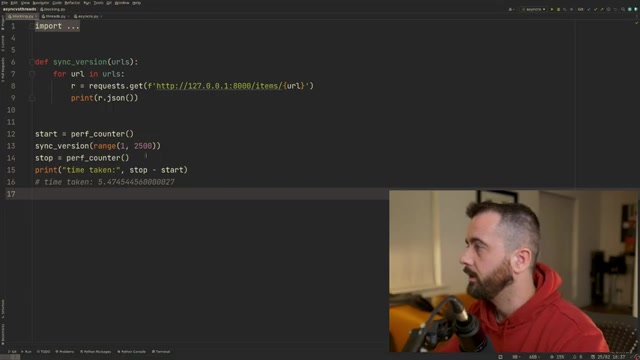
Threading is particularly effective when the GIL doesn't become a bottleneck, such as when the program spends most of its time waiting for I/O operations.
Asynchronous Request Example
This example demonstrates how to use asyncio and aiohttp to make asynchronous requests.
import asyncio
import aiohttp
import time

async def fetch(session, url):
    async with session.get(url) as response:
        return await response.text()

async def fetch_all(session, urls):
    tasks = []
    for url in urls:
        task = asyncio.create_task(fetch(session, url))
        tasks.append(task)
    return await asyncio.gather(*tasks)

async def main():
    urls = [f'http://127.0.0.1:8000/items/{i}' for i in range(1, 2501)]
    async with aiohttp.ClientSession() as session:
        htmls = await fetch_all(session, urls)
        print(htmls)

start = time.perf_counter()
asyncio.run(main())
stop = time.perf_counter()

print(f'Time taken: {stop - start}')
This code uses aiohttp to make asynchronous GET requests. The async and await keywords are used to define asynchronous functions and suspend execution while waiting for network responses. The asyncio.gather function is used to run multiple tasks concurrently, significantly reducing the overall time taken to complete all requests.
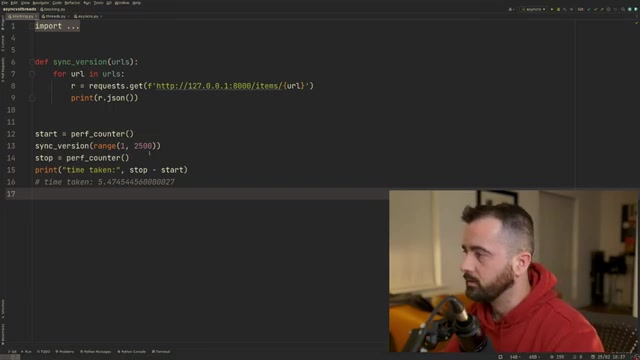
Async is ideal for network-bound applications where the program spends a significant amount of time waiting for network operations to complete.
Pricing (Mock Server)
Access to Items
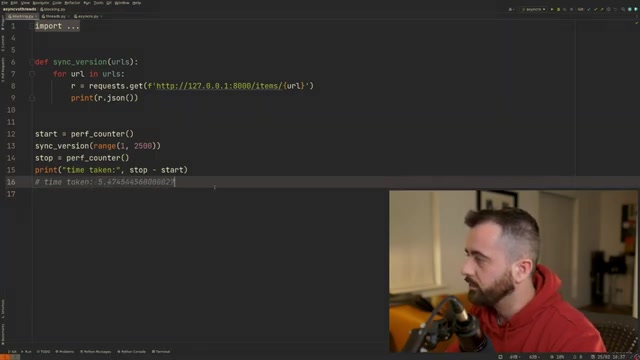
The example server in the Tutorial offers access to mock items and provides a foundation for exploring the concepts of sync vs async. Pricing would vary for real-world applications depending on the features.
Use Cases (Mock Server)
Testing synchronous vs asynchronous requests
The mock server allows easy testing of various http requests, including running it in async or sync environments. It can also be used to test threading.
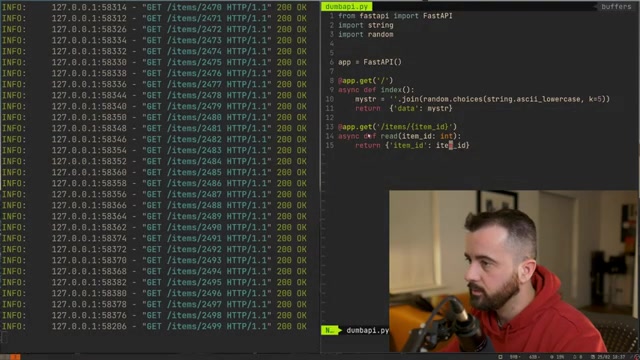
These tests provide insight as to which method best suits various scenarios, from working with a single server or having to use multiple servers at once.









Most people like


























Report
Please select a reason for reporting
- 13 Reasons to Switch from Snapchat to Text Messaging
- 7 Powerful Speech to Text Apps to Boost Productivity
- 10 Best Speech to Text Tools for Effortless Transcription
- 13 Free Tools to Easily Transcribe Audio to Text
- 15 Surprising Ways Google's Speech-to-Text Boosts Productivity
- 7 Best Free Online Audio to Text Transcription Tools
- 9 Tips to Transcribe Speech to Text Faster and Better
- 13 Best Speech to Text Software for Windows 10 in 2023
- 7 Tips for Choosing the Best Transcriber for Audio to Text
- 11 Reasons Why Dragon Speech-to-Text Apps are Game-Changers
- 6 Secrets to Enhance Your Speech to Text Transcription
- 6 Brilliant Ways to Boost Productivity with Talk-to-Text on Your MacBook
- 6 Ways Transcription Software Converts Audio to Text
- 8 Tips to Transcribe Speech to Text Like a Pro
- 6 Reasons IBM Watson Speech to Text is a Game-Changer
- 14 Powerful Ways Talk-to-Text Improves Your Workflow
- 12 Top Windows Speech-to-Text Software for Efficient Transcription
- 12 Game-Changing Benefits of Apple's Speech to Text Technology
- 9 Powerful Use Cases for AWS Speech to Text Technology
- 10 Easy Steps to Transcribe YouTube Videos to Text
- transcription audio en texte
- online audio transcription
- free audio file transcription
- free ai audio transcription
- audio transcription service
- audio transcription online free
- audio transcription free online
- audio to transcription software
- audio and transcript
- ai audio transcription free
- voice recording to text converter
- translate voice recording to text
- record voice to text
- audio recording to text converter
- voice recording and transcription
- chatgpt voice to text
- gmail voice to text
- speech to text reader
- speech to text ai free
- speech to talk
- Create Engaging Animated Explainer Videos with a Free AI Tool
- Stop Multi-Subscribing: Benchmark Top AI Visual Models in One Canvas
- Best Seedance 2.5 API Provider: Every Price on the Market, Checked at Source
- AI OnlyFans: How to Generate $30,000/Month (Legally)
- Transform Your Script into an Engaging Video with AI Video Maker!
- AI Marketing Automation: A Comprehensive Guide for Small Businesses
- Midjourney Alternative for Anime Art Creators: Why PixAI May Be Better for Character Workflows
- 10 Things Most People Get Wrong About AI Image Search
- AI Girlfriend Apps: Top Choices Redefining Relationships 2025
- How to Reduce Quoting Errors in Salesforce with AI-Assisted Quote Creation
- AI Resume Builders: EnhanceCV, ResumeNerd AI, & Teal Compared
- ResumeAI: Crafting ATS-Optimized Resumes with AI
- AI in Resume Writing: A New Era for Job Seekers
- AI Resume Tools: Streamline Your Job Search and Land Your Dream Role
- AI Resume Optimization: The Right Way to Land Interviews
- Crafting a Killer Resume with AI: A Step-by-Step Guide
- Crafting a Winning Resume: AI Tools and Expert Tips
- AI Job Search: Level Up Your Career with AI Automation
- Empower Your Career Journey: Dynamic Resumes with AI
- AI Resume Builder: Create Professional Resumes Effortlessly

Copyright ©2026 toolify