






















BlinkCompose Tutorial: Crafting High-Converting Emails

Updated on Nov 10,2025

Table of Contents

In today's digital landscape, email marketing remains a cornerstone of effective communication and customer engagement. BlinkCompose is a powerful tool designed to help you create emails that not only capture attention but also foster relationships and drive conversions. Whether you're a seasoned email marketer or just starting, this tutorial will guide you through the essentials of using BlinkCompose to maximize your email marketing efforts. We'll explore key features like setting up your brand voice and creating compelling email campaigns.

Key Points

Understand BlinkCompose's dashboard interface.

Set up your brand voice to maintain consistent communication.

Learn how to create single emails and email series.

Discover quick actions for efficient email marketing.

Utilize templates for streamlined email creation.

Getting Started with BlinkCompose

Understanding the BlinkCompose Dashboard

The first thing you'll notice upon logging into BlinkCompose is the intuitive dashboard. This serves as your central hub for all Email Marketing activities.
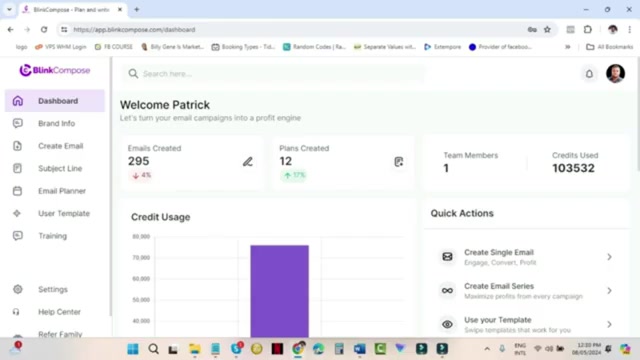
The dashboard provides a snapshot of your current email marketing performance, including the number of emails created, plans created, team members (if applicable), and credits used.

  • Emails Created: This metric shows the total number of emails you've crafted within the platform. Tracking this helps you monitor your activity and identify areas for improvement.
  • Plans Created: If you're organizing your emails into campaigns or automated sequences, this metric tracks the number of plans you've set up.
  • Team Members: Depending on your subscription plan, BlinkCompose allows you to add team members. This section displays the number of active team members associated with your account.
  • Credits Used: BlinkCompose operates on a credit-based system. Each email you send consumes a certain number of credits. This metric tracks your credit usage, ensuring you stay within your allocated limit.

Furthermore, the dashboard offers quick links to popular features, allowing you to swiftly create single emails, email series, or use pre-designed templates. These quick actions streamline your workflow and help you get started quickly. Always be mindful of your email marketing credits, which are displayed prominently on the dashboard.

Setting Up Your Brand Voice in BlinkCompose

While you can start creating emails immediately, it's highly recommended that you first set up your brand voice.
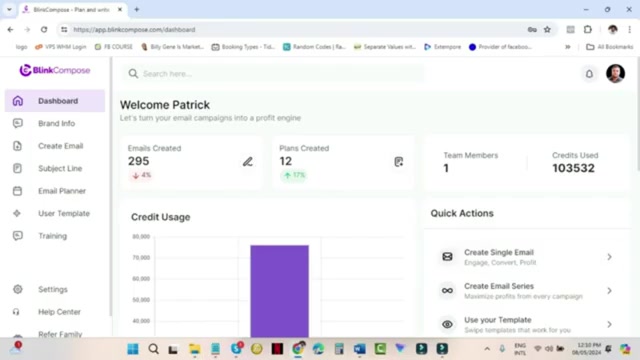
This ensures consistency across all your email communications and helps build a recognizable brand identity. Establishing a brand voice is not compulsory, but it's a strategic move, especially if you have a unique writing style or specific brand guidelines.

To set up your brand voice, navigate to the 'Brand Info' section in the left-hand menu and select 'Brand Voice'.
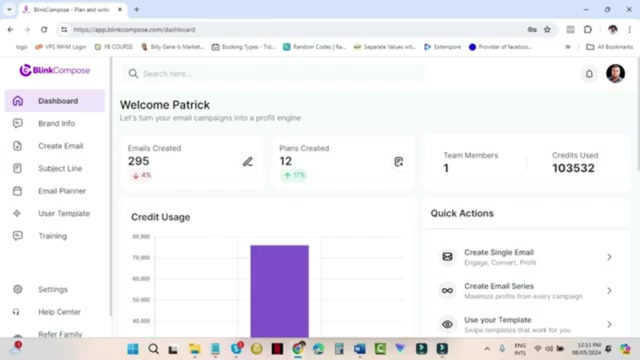
Here, you can add new brand voices by providing a name, description, email subject line, and email body. The idea is to feed the software with examples of your writing, allowing it to learn your style, tone, and structure.

How to Add a New Brand Voice:

  1. Click on 'Brand Info' in the left-hand menu.
  2. Select 'Brand Voice'.
  3. Click the “New Brand Voice” button.
  4. Give your new brand voice a relevant name.
  5. Provide a detailed description of your brand voice.
  6. Input email subject lines and bodies to train the AI to understand your brand's writing style.

By providing the software with your previous emails or content, you empower it to analyze your writing style, your voice, and the structure you typically use. This ensures that when you create new emails, the software can assist you in maintaining that consistent brand voice.

Maximizing BlinkCompose: Best Practices and Tips

Crafting Compelling Email Subject Lines

The subject line is the gatekeeper of your email's success. A compelling subject line is crucial for capturing the recipient's attention and enticing them to open your email. Here's a breakdown of how to create effective subject lines using BlinkCompose:

  • Keep it concise: Aim for subject lines that are short and to the point. Recipients should be able to grasp the main idea at a glance.
  • Use keywords: Incorporate relevant keywords that reflect the email's content. This can improve open rates and relevance to your audience.
  • Create a sense of urgency: Words like 'Limited Time,' 'Ends Soon,' or 'Today Only' can encourage immediate action.
  • Personalize: If possible, personalize the subject line using the recipient's name or other relevant information. Personalization can significantly boost open rates.
  • A/B test: Experiment with different subject lines to see what resonates best with your audience. BlinkCompose likely offers A/B testing features to facilitate this.

Here is an example list of high-performing keywords that can enhance your subject line:

Category Keywords
Urgency Limited Time, Ends Soon, Today Only, Don't Miss Out
Exclusivity Exclusive, VIP, Members Only, First Access
Value Proposition Free, Discount, Save, New, Improved
Curiosity Secret, Hidden, Discover, Unveiling
Personalization [Name], Your, You, Personalized, For You

Always remember that the best subject line is one that accurately represents the content of your email and compels the recipient to learn more.

Leveraging Email Templates for Efficiency

BlinkCompose likely offers a library of pre-designed email templates to streamline your email creation process. These templates can be customized to match your brand and messaging, saving you valuable time and effort. Templates provide a solid foundation upon which you can build compelling email campaigns.

Here’s how to effectively leverage email templates:

  • Browse the template library: Explore the available templates to find one that aligns with your email's purpose.
  • Customize the design: Modify the colors, fonts, and images to reflect your brand's visual identity.
  • Adapt the content: Tailor the content to suit your specific message and target audience.
  • Add personalization: Incorporate personalization elements to make the email more engaging.
  • Test and optimize: A/B test different template variations to determine what performs best.

By using email templates effectively, you can ensure that your emails are visually appealing, consistent with your brand, and optimized for maximum impact. Regularly update your templates to keep them fresh and relevant.

Step-by-Step Guide: Setting Up Your Brand Voice in BlinkCompose

Step 1: Accessing the Brand Voice Section

Begin by logging into your BlinkCompose account. On the dashboard, locate the 'Brand Info' section on the left-hand side menu. Click on 'Brand Info' to expand the options, and then select 'Brand Voice'. This will take you to the Brand Voice management page, where you can view existing brand voices or create new ones.

Step 2: Creating a New Brand Voice

On the Brand Voice management page, click the 'New Brand Voice' button. This will open a form where you can define the characteristics of your brand voice. Start by giving your brand voice a descriptive name that reflects its intended tone and style. Provide a detailed description of your brand voice that serves as a guideline for the AI and your team. What makes your brand sound unique? What words or phrases do you often use? What type of vocabulary best represents your company?

Step 3: Training the AI with Email Samples

To train the AI and establish your brand voice, you'll need to provide examples of your previous emails or content. Input email subject lines and bodies to train the AI to understand your brand's writing style. Aim to provide at least ten email content examples for the best results. This will allow the AI to accurately learn and replicate your brand's unique tone and style.

Step 4: Saving and Activating Your Brand Voice

Once you've provided the necessary information and trained the AI, click the 'Save Now' button to save your new brand voice. Once saved, your brand voice will be available for use when creating new emails. You can select it from the available options to ensure that your emails are written in the desired tone and style.

BlinkCompose Pricing Plans

Understanding BlinkCompose Pricing

BlinkCompose offers a variety of pricing plans tailored to different needs and budgets. These plans typically vary in terms of the number of credits included, the number of team members allowed, and the availability of premium features. While specifics can change over time, let’s consider how these plans generally stack up:

Feature Basic Plan Standard Plan Premium Plan
Monthly Credits 10,000 50,000 100,000
Team Members Allowed 1 3 5
A/B Testing No Yes Yes
Premium Templates Limited Full Full
Dedicated Support Email Priority 24/7

Each plan offers a distinct set of features, and it's essential to choose the one that best aligns with your specific requirements and growth goals. Consider the number of emails you plan to send each month, the size of your team, and the importance of advanced features like A/B testing and premium templates when making your decision.

BlinkCompose: Weighing the Pros and Cons

👍 Pros

Intuitive dashboard for easy navigation.

Brand voice integration for consistent communication.

Email template library for streamlined creation.

A/B testing capabilities for optimization.

Email automation features for efficiency.

👎 Cons

Credit-based system may require careful monitoring.

Team member limitations depending on the subscription plan.

Potential learning curve for users unfamiliar with AI-powered tools.

Exploring BlinkCompose's Core Features

Brand Voice Integration

As previously discussed, the brand voice feature allows you to maintain a consistent tone and style across all your email communications. By training the AI with examples of your writing, you ensure that your emails reflect your brand's unique personality.

Email Template Library

The template library provides a diverse collection of pre-designed email templates that you can customize to match your brand and messaging. These templates save you time and effort while ensuring that your emails are visually appealing and optimized for maximum impact.

A/B Testing

A/B testing allows you to experiment with different email elements, such as subject lines, content, and calls to action, to see what resonates best with your audience. This data-driven approach enables you to optimize your emails for improved open rates, click-through rates, and conversions.

Email Automation

BlinkCompose likely offers email automation features, allowing you to create automated sequences of emails triggered by specific events, such as new subscriber sign-ups or purchase confirmations. Automation helps you nurture leads, engage customers, and drive sales with minimal effort.

How to Effectively Use BlinkCompose

Lead Nurturing Campaigns

Use BlinkCompose to create automated email sequences that guide potential customers through the sales funnel. Provide valuable information, address their pain points, and showcase the benefits of your product or service.

Customer Onboarding

Welcome new customers with a series of onboarding emails that introduce them to your product, explain key features, and guide them through the initial setup process. This can improve customer satisfaction and reduce churn.

Promotional Campaigns

Announce new product launches, special offers, and upcoming events with visually appealing email campaigns. Use compelling subject lines and calls to action to drive sales and engagement.

Informational Newsletters

Keep your audience informed and engaged with regular newsletters that share industry insights, company updates, and valuable resources. This can help build trust and establish your brand as a thought leader.

Frequently Asked Questions About BlinkCompose

How do I set up my brand voice?
Navigate to 'Brand Info' > 'Brand Voice' and follow the steps to add your brand's writing style.
Can I add team members to my BlinkCompose account?
Yes, depending on your subscription plan, you can add team members to collaborate on email marketing campaigns.
How do I track my credit usage?
Your credit usage is displayed prominently on the dashboard, providing a real-time snapshot of your remaining credits.
Are there pre-designed email templates available?
Yes, BlinkCompose offers a library of pre-designed email templates that you can customize to match your brand.
How do I access the quick actions?
The quick actions are located on the dashboard, providing direct access to popular features such as creating single emails and email series.

Related Questions

What are the essential elements of a high-converting email?
A high-converting email typically includes a compelling subject line, engaging content, a clear call to action, personalized elements, and mobile optimization. A/B testing different variations of these elements can help you identify what works best for your audience. Ensure that your emails are visually appealing, consistent with your brand, and relevant to your target audience. Additionally, track your email performance metrics, such as open rates, click-through rates, and conversion rates, to identify areas for improvement and optimize your email marketing strategy. It is necessary to comply with email marketing regulations to avoid penalties. Compelling Subject Line: The subject line is the first thing recipients see, and it determines whether they open the email. It should be concise, engaging, and relevant to the email's content. Engaging Content: The email content should be well-written, informative, and tailored to the recipient's interests. Use visuals and formatting to make the email easy to read and understand. Clear Call to Action (CTA): The CTA should be prominent and clearly indicate what action you want the recipient to take, such as visiting a website, making a purchase, or signing up for a webinar. Personalization: Personalize the email with the recipient's name, location, or other relevant information to make it more engaging. Mobile Optimization: Ensure that your email is optimized for mobile devices, as a significant portion of recipients will be viewing it on their smartphones or tablets. By focusing on these essential elements, you can create emails that drive results and achieve your email marketing goals. Always be mindful of the balance between providing value and promoting your products or services.

Most people like












