































Table of Contents
- Key Points
- Unlocking Effective Learning with Goodnotes Study Sets
- Maximizing Long-Term Memory Retention
- Weighing the Benefits: Pros and Cons of Goodnotes Study Sets
- Frequently Asked Questions About Goodnotes Study Sets
- Related Questions About Memory and Learning


Unlocking Effective Learning with Goodnotes Study Sets
Transforming Notes into Study Powerhouses
Goodnotes offers a unique approach to studying by allowing you to convert your existing notes directly into interactive study sets.

This feature eliminates the need to create separate study materials, streamlining your learning process. Imagine turning your detailed lecture notes or meticulously crafted summaries into personalized flashcards ready for self-testing. This integrated system promotes active learning and significantly improves memory retention, making Goodnotes an invaluable asset for students and lifelong learners alike.
The Importance of Self-Testing: The core principle behind Goodnotes Study Sets is the emphasis on self-testing. Frequent self-assessment has been scientifically proven to be a highly effective learning technique. By regularly testing yourself on the material, you actively engage with the information, strengthening the neural pathways associated with memory and recall. This active approach contrasts with passive reading or reviewing, which often results in superficial understanding and poor retention.
Benefits of Goodnotes Study Sets:
- Active Learning: Encourages active engagement with the material, promoting deeper understanding.
- Improved Memory Retention: Strengthens memory through repeated self-testing and active recall.
- Personalized Learning: Allows you to customize study sets to focus on areas where you need the most improvement.
- Efficient Study Time: Streamlines the study process by integrating note-taking and self-testing into a single platform.
- Accessibility: Provides convenient access to study materials anytime, anywhere.
Creating Personalized Study Sets in Goodnotes
Crafting effective study sets in Goodnotes is a straightforward process that allows for customization to suit your individual learning style.
Here's a step-by-step guide:
Step 1: Creating a New Study Set
- Navigate to the Library View: Open Goodnotes and ensure you're in the main library view.
- Tap 'New': Locate and tap the 'New' button, typically represented by a plus (+) icon.
- Select 'Study Set': From the options presented, choose 'Study Set'. This will initiate the creation of a new, blank study set.
- Name and Customize: A pop-up window will appear, prompting you to name your study set. Give it a descriptive title that reflects the subject matter. You can also choose a thumbnail color for easy identification in your library.
Step 2: Adding Questions and Answers
Each page in a Goodnotes Study Set features two cards: a question card and an answer card. This structure is designed to mimic the traditional flashcard format, promoting active recall and self-testing.
- Accessing the Cards: Once you've created a new study set, you'll be presented with the initial question and answer cards.
- Inputting Questions: Tap anywhere on the question card to begin typing or Handwriting your question. You can use the keyboard, Apple Pencil, or any other compatible stylus.
- Inputting Answers: Similarly, tap on the answer card to input the corresponding answer. Be as detailed or concise as necessary to ensure a clear and comprehensive response.
Step 3: Customizing Your Cards
Goodnotes offers various customization options to enhance your study sets:
- Text Formatting: Utilize the text formatting tools to adjust Font size, style, and color for improved readability.
- Handwriting: Use the handwriting tool for a more personalized touch, especially useful for diagrams, formulas, or annotations.
- Images: Insert Relevant images to visually represent concepts, making them easier to remember. Tap the image icon to insert pictures.
Step 4: Adding New Pages/Cards
To expand your study set, you'll need to add new pages, each containing a question and answer card:
- Swipe Left: Drag your finger to the left on the screen to add a new card.
- Add Button: Alternatively, tap the "add" button located within your notebook interface.
Step 5: Converting Existing Notes (Tip)
If you already have notes in Goodnotes, converting them into study sets is a time-saving option: Open notes in split-screen mode to drag-and-drop or copy and paste.
- Open Notes: Open your existing notes alongside your new study set.
- Copy and Paste: Select and copy relevant content from your notes, then paste it into the question and answer cards of your study set.
By following these steps, you can create personalized and effective study sets that cater to your unique learning needs. The ability to incorporate various media and customize the presentation ensures an engaging and productive study experience.
Importing Flashcards: Streamlining Bulk Creation
For users transitioning from other flashcard applications or those with pre-existing digital flashcard collections, Goodnotes offers a convenient import feature. This allows you to seamlessly integrate your existing study materials into the Goodnotes ecosystem, saving you valuable time and effort.
Step 1: Exporting from Another App
If you're currently using a different flashcard app, the first step is to export your flashcard sets in a compatible format, typically a CSV (Comma Separated Values) file. Most flashcard applications offer this export option.
Step 2: Preparing Your CSV File
Ensure that your CSV file is properly formatted for Goodnotes import. The file should contain two columns: one for questions and another for answers. Each row represents a single flashcard. Here’s what a correctly formatted CSV might look like:
| Question | Answer |
|---|---|
| What is the capital of France? | Paris |
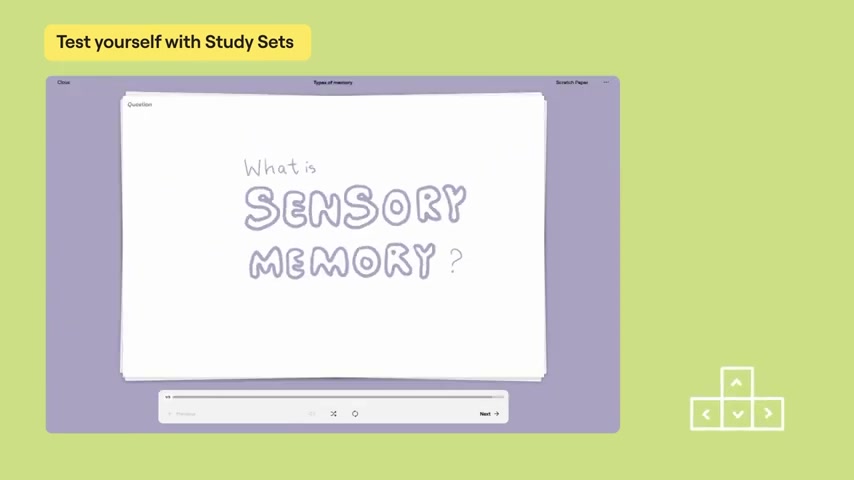
| What is sensory memory? | Mental representation of environmental events look, sound, feel, smell and taste. |
Step 3: Importing into Goodnotes
- Tap 'New': In the Goodnotes library view, tap the 'New' button (plus (+) icon).
- Select 'Import': Choose the 'Import' option from the menu.
- Locate Your CSV File: Navigate to the location where you saved your CSV file and select it.
Step 4: Goodnotes Creates the Study Set
Once you select the CSV file, Goodnotes will automatically process the data and create a new study set containing all of your flashcards. The questions and answers will be populated based on the columns in your CSV file.
Benefits of Importing:
- Time-Saving: Avoid manually recreating flashcards in Goodnotes.
- Seamless Transition: Integrate existing study materials from other apps.
- Bulk Creation: Quickly create large study sets with ease.
By utilizing the import feature, you can efficiently build comprehensive study sets in Goodnotes, maximizing your study time and enhancing your learning experience. This is especially beneficial for individuals with extensive flashcard libraries or those who prefer to use external tools for content creation.
Testing Your Knowledge: Practice and Smart Learn Modes
Goodnotes provides two distinct modes for testing your knowledge using the study sets you've created: Practice Mode and Smart Learn Mode. Each mode offers a unique approach to self-testing, catering to different learning preferences and study goals.
Practice Mode: Practice Mode is a straightforward and flexible way to review your flashcards.
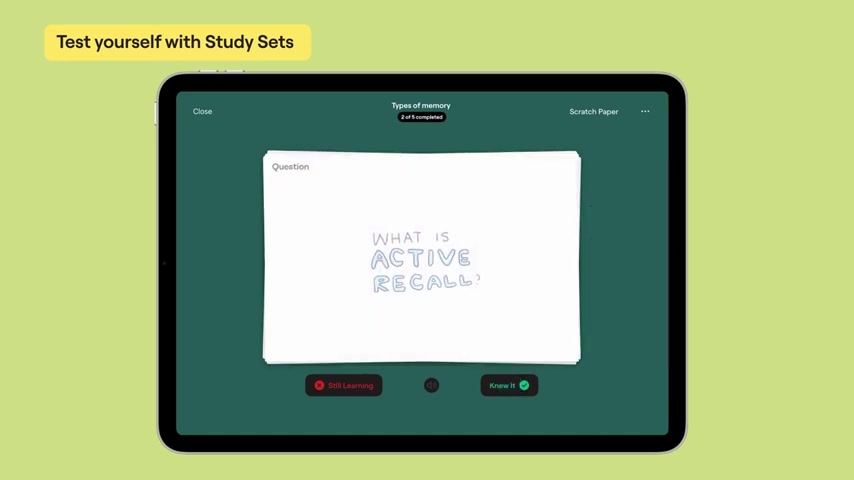
It allows you to flip through your cards at your own pace, reinforcing your understanding of the material. Key features of Practice Mode include:
- Sequential or Shuffled Order: Choose to review your cards in the order they were created or shuffle them for a more randomized experience. Use the shuffle option to switch the order of the cards.
- Question or Answer First: Decide whether to view the question or answer side of the card first. Answer side first option shows the answers to questions that will be presented later.
Smart Learn Mode: Smart Learn Mode takes a more scientific and adaptive approach to self-testing. It utilizes an algorithm that learns your strengths and weaknesses, tailoring your study Sessions to focus on areas where you need the most improvement. Key features of Smart Learn Mode include:
- Adaptive Learning: The algorithm tracks your performance and adjusts the frequency with which you see each card, focusing on those you struggle with the most. For example, the ones you are still learning will repeat.
- Spaced Repetition: Smart Learn Mode incorporates spaced repetition, a proven technique for enhancing long-term memory. The app will remind you when to study.
- Scratch Paper: Need to work out a problem? Open up the Scratch Paper. Scratch Paper can be opened up to provide you with the space to work out a problem.
Active Recall and Long-Term Memory: When testing yourself, you have to search your brain to produce an answer. This process is called active recall. This is achieved via Activating that cognitive stress.
Choosing the Right Mode: The decision of which mode to use depends on your individual learning style and study objectives.
- Practice Mode: Ideal for quick reviews, familiarizing yourself with the material, and reinforcing existing knowledge.
- Smart Learn Mode: Best suited for targeted learning, focusing on areas of weakness, and maximizing long-term retention.
By leveraging both Practice Mode and Smart Learn Mode, you can create a well-rounded and effective study strategy that optimizes your learning potential.








Most people like































Report
Please select a reason for reporting
- 13 Reasons to Switch from Snapchat to Text Messaging
- 7 Powerful Speech to Text Apps to Boost Productivity
- 10 Best Speech to Text Tools for Effortless Transcription
- 13 Free Tools to Easily Transcribe Audio to Text
- 15 Surprising Ways Google's Speech-to-Text Boosts Productivity
- 7 Best Free Online Audio to Text Transcription Tools
- 9 Tips to Transcribe Speech to Text Faster and Better
- 13 Best Speech to Text Software for Windows 10 in 2023
- 7 Tips for Choosing the Best Transcriber for Audio to Text
- 11 Reasons Why Dragon Speech-to-Text Apps are Game-Changers
- 6 Secrets to Enhance Your Speech to Text Transcription
- 6 Brilliant Ways to Boost Productivity with Talk-to-Text on Your MacBook
- 6 Ways Transcription Software Converts Audio to Text
- 8 Tips to Transcribe Speech to Text Like a Pro
- 6 Reasons IBM Watson Speech to Text is a Game-Changer
- 14 Powerful Ways Talk-to-Text Improves Your Workflow
- 12 Top Windows Speech-to-Text Software for Efficient Transcription
- 12 Game-Changing Benefits of Apple's Speech to Text Technology
- 9 Powerful Use Cases for AWS Speech to Text Technology
- 10 Easy Steps to Transcribe YouTube Videos to Text
- transcription audio en texte
- online audio transcription
- free audio file transcription
- free ai audio transcription
- audio transcription service
- audio transcription online free
- audio transcription free online
- audio to transcription software
- audio and transcript
- ai audio transcription free
- voice recording to text converter
- translate voice recording to text
- record voice to text
- audio recording to text converter
- voice recording and transcription
- chatgpt voice to text
- gmail voice to text
- speech to text reader
- speech to text ai free
- speech to talk
- How SEO and Marketing Dashboards Empower Agencies to Drive Results
- How to Use AI Tools to Find Internal Linking Opportunities Across a Business Website
- Discover Your Perfect Haircut with AI Hairstyle Apps
- Free Reputation Calculator Tools: How They're Adapting to Score AI Visibility, Not Just Rankings
- Design Professional Flyers for Free on Your Phone
- Best Free Flyer Maker Apps for Android: Design Like a Pro
- How to Know If Your Business Is Ready for an AI Customer Service Agent
- Revolutionizing Storytelling: From Novels to Screenplays with AI
- Create Engaging Animated Explainer Videos with a Free AI Tool
- Stop Multi-Subscribing: Benchmark Top AI Visual Models in One Canvas
- ASOMobile Helps Teams Benchmark App Store Screenshots Against Competitors
- How to Match LMS Software With Your Organization's Training Plan
- Revolutionizing Email Marketing Agency with AI
- How to Convert BTC to HNT
- Unleashing the Power of AI: Cognizant's Roadmap for Transformation
- Frame to Video Review: A Practical Look at Turning Two Still Frames Into Motion
- NVIDIA NIM: Revolutionizing Supply Chain Data Analysis with AI
- Top AI Tools That Help Brands Stand Out Offline (Not Just Online)
- Top 5 Cold Email Software: Maximize Your Outreach in 2025
- Magic School AI: Revolutionizing Quiz & Assessment Generation

Copyright ©2026 toolify