































Table of Contents
- Key Points
- Understanding RAG (Retrieval Augmented Generation)
- Building Blocks of the RAG Application
- Testing and Evaluating RAG Output
- Pricing Options for Essential Components
- Pros and Cons of Local RAG Application
- Core Features and Capabilities
- Use Cases for RAG Applications
- Frequently Asked Questions (FAQ)
- Related Questions


Understanding RAG (Retrieval Augmented Generation)
What is RAG?
Retrieval Augmented Generation (RAG) is a powerful technique that enhances Large Language Models (LLMs) by allowing them to access and incorporate external knowledge.
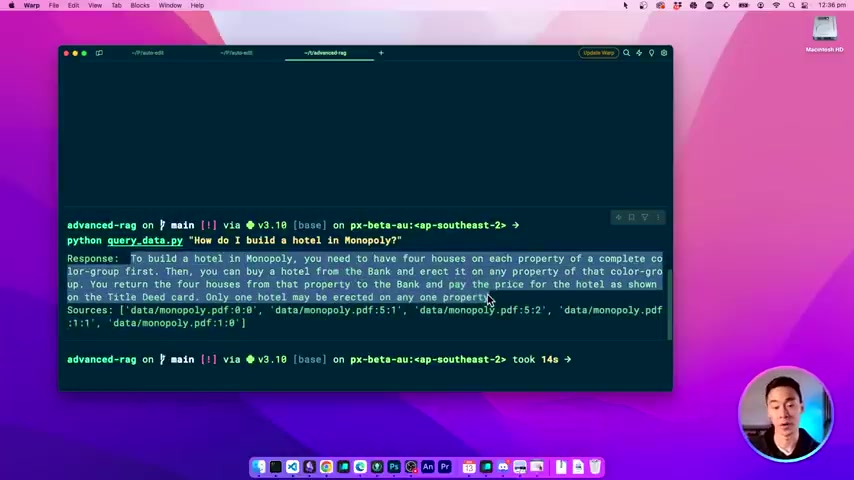
RAG helps to avoid the need for constant retraining with new data and enables LLMs to generate more accurate and contextually relevant responses.
Think of it like giving your AI assistant a library to consult before answering questions. The process involves:
- Indexing: Preparing a data source for efficient retrieval.
- Retrieval: Fetching the most relevant information from the indexed data based on a user's query.
- Generation: Using the retrieved information to inform the LLM's response.
This approach is particularly useful when dealing with large volumes of proprietary or frequently updated information, like internal documentation, research Papers, or in this case, board Game manuals.
By combining the strengths of both retrieval and generation, RAG allows for more grounded and insightful AI interactions. The key is to understand how this process works and tailor it to your specific needs.
Why Build a Local RAG Application?
Building a local RAG application offers several key advantages:
- Data Privacy: Keep your sensitive data secure by processing it entirely on your own machine.
No need to share confidential documents with external services.
- Cost Savings: Avoid the recurring costs associated with cloud-based AI services.
- Customization: Fine-tune your RAG application to precisely match your specific data and requirements.
- Offline Functionality: Access your Knowledge Base even without an internet connection.
- Enhanced Control: Full control over every aspect of the system, from data indexing to response generation.
These benefits make local RAG a compelling choice for individuals and organizations seeking greater control, privacy, and cost-effectiveness in their AI solutions.
Building Blocks of the RAG Application
Loading Data Sources with LangChain
The first step is to load your data source into a format that the RAG application can understand. In this guide, we're focusing on PDF documents, a common format for manuals, reports, and other information-rich content.
Here's how you can do it using LangChain, a powerful framework for building LLM applications:
from langchain.document_loaders.pdf import PyPDFDirectoryLoader

def load_documents():
    document_loader = PyPDFDirectoryLoader(DATA_PATH)
    return document_loader.load()
This code snippet leverages the PyPDFDirectoryLoader class from LangChain to efficiently load all PDF files from a specified directory (DATA_PATH). LangChain offers a variety of document loaders for different file types, including CSV, HTML, Markdown, and more. This allows for flexibility in choosing your data source.
With these document loaders, you can easily load all PDFs, CSVs, webpages, and more to extract data into your rag pipeline.
Splitting Documents into Manageable Chunks
LLMs typically have limitations on the amount of text they can process at once. To overcome this, we need to split the loaded documents into smaller, more manageable chunks.
This ensures that the LLM can effectively analyze the information and generate accurate responses.
LangChain provides the RecursiveCharacterTextSplitter class, which intelligently splits text while preserving semantic relationships:
from langchain.text_splitters import RecursiveCharacterTextSplitter
from langchain.schema.document import Document

def split_documents(documents: list[Document]):
    text_splitter = RecursiveCharacterTextSplitter(
        chunk_size=800,
        chunk_overlap=80,
        length_function=len,
        is_separator_regex=False,
    )
    return text_splitter.split_documents(documents)
This code splits the documents into chunks of 800 characters, with an overlap of 80 characters between chunks to maintain context. Fine-tuning these parameters can optimize performance for your specific data.
Creating Embeddings for Semantic Search
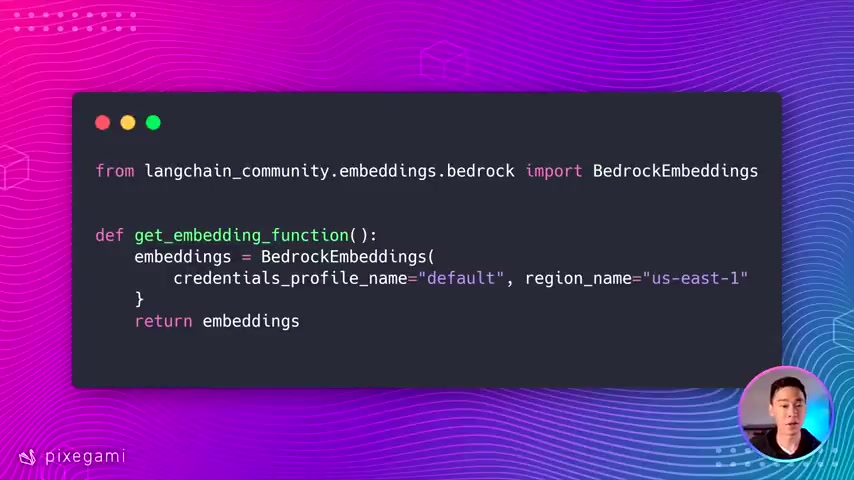
To enable semantic search, we need to convert the text chunks into numerical representations called embeddings. Embeddings capture the meaning of the text, allowing the RAG application to find relevant information based on semantic similarity. Here's how to define an embedding function using LangChain:
from langchain_community.embeddings.bedrock import BedrockEmbeddings

def get_embedding_function():
    embeddings = BedrockEmbeddings(
        credentials_profile_name="default", region_name="us-east-1"
    )
    return embeddings
This code uses AWS Bedrock to create embeddings. However, you can use other embedding models from providers like OpenAI, Hugging Face, or even run a model locally using Ollama. Using OLLAMA will be a fully local experience. The choice of embedding model can significantly impact the accuracy and performance of the RAG application. Remember that using the same embedding model for the database and for querying the database is highly important. If they are different, then the application may not work correctly.
Setting Up the Vector Database for Efficient Retrieval
A vector database is a specialized database designed to store and efficiently search embeddings. For this guide, we'll use Chroma, an open-source vector database that's easy to set up and use.
Here's how to add the processed text chunks to the Chroma database:
from get_embedding_function import get_embedding_function
from langchain.vectorstores.chroma import Chroma

def add_to_chroma(chunks: list[Document]):
    db = Chroma(
        persist_directory=CHROMA_PATH,
        embedding_function=get_embedding_function(),
    )
    db.add_documents(new_chunks, ids=new_chunk_ids)
    db.persist()
This code creates a Chroma database, specifies the storage directory (CHROMA_PATH), and associates it with the embedding function. The text chunks and their corresponding IDs are then added to the database, enabling efficient semantic search.
SEO Keywords: vector database, Chroma, semantic search, embeddings, LangChain, data storage.
Testing and Evaluating RAG Output
How to Test Responses
testing and evaluating the quality of the AI-generated responses is a crucial step in the RAG application development process.
It allows you to assess the accuracy, relevance, and overall usefulness of the chatbot.
Here's a basic outline of the testing process:
- Define Expected Responses: Create a set of questions and their corresponding expected answers based on your data source.
- Query the RAG Application: Submit the questions to your RAG application and record the generated responses.
- Compare Actual vs. Expected Responses: Evaluate the accuracy of the generated responses by comparing them to the expected answers.
- Measure Sources: Also comparing whether or not the appropriate sources are used is important. The sources should be relevant and correct.
By going through this process you will be able to correctly validate your app when you make a change to the data source, the code, or the LLM model.







Most people like
































Report
Please select a reason for reporting
- 13 Reasons to Switch from Snapchat to Text Messaging
- 7 Powerful Speech to Text Apps to Boost Productivity
- 10 Best Speech to Text Tools for Effortless Transcription
- 13 Free Tools to Easily Transcribe Audio to Text
- 15 Surprising Ways Google's Speech-to-Text Boosts Productivity
- 7 Best Free Online Audio to Text Transcription Tools
- 9 Tips to Transcribe Speech to Text Faster and Better
- 13 Best Speech to Text Software for Windows 10 in 2023
- 7 Tips for Choosing the Best Transcriber for Audio to Text
- 11 Reasons Why Dragon Speech-to-Text Apps are Game-Changers
- 6 Secrets to Enhance Your Speech to Text Transcription
- 6 Brilliant Ways to Boost Productivity with Talk-to-Text on Your MacBook
- 6 Ways Transcription Software Converts Audio to Text
- 8 Tips to Transcribe Speech to Text Like a Pro
- 6 Reasons IBM Watson Speech to Text is a Game-Changer
- 14 Powerful Ways Talk-to-Text Improves Your Workflow
- 12 Top Windows Speech-to-Text Software for Efficient Transcription
- 12 Game-Changing Benefits of Apple's Speech to Text Technology
- 9 Powerful Use Cases for AWS Speech to Text Technology
- 10 Easy Steps to Transcribe YouTube Videos to Text
- transcription audio en texte
- online audio transcription
- free audio file transcription
- free ai audio transcription
- audio transcription service
- audio transcription online free
- audio transcription free online
- audio to transcription software
- audio and transcript
- ai audio transcription free
- voice recording to text converter
- translate voice recording to text
- record voice to text
- audio recording to text converter
- voice recording and transcription
- chatgpt voice to text
- gmail voice to text
- speech to text reader
- speech to text ai free
- speech to talk
- How SEO and Marketing Dashboards Empower Agencies to Drive Results
- How to Use AI Tools to Find Internal Linking Opportunities Across a Business Website
- Discover Your Perfect Haircut with AI Hairstyle Apps
- Free Reputation Calculator Tools: How They're Adapting to Score AI Visibility, Not Just Rankings
- Design Professional Flyers for Free on Your Phone
- Best Free Flyer Maker Apps for Android: Design Like a Pro
- How to Know If Your Business Is Ready for an AI Customer Service Agent
- Revolutionizing Storytelling: From Novels to Screenplays with AI
- Create Engaging Animated Explainer Videos with a Free AI Tool
- Stop Multi-Subscribing: Benchmark Top AI Visual Models in One Canvas
- My Brand New Logo: AI-Powered Logo Design for Startups
- Create Stunning Logos with Free AI Logo Generator!
- AI Logo Maker: Design a Stunning Logo in Minutes
- Elevate Your Zoom Experience with Enhanced Name Tags by Warmly
- Top 5 AI Logo Makers in 2025: Design a Stunning Brand
- Creative Fabrica's AI Tools: Flow, Studio, and Font Generator
- Create Stunning Logos with Canva's Free AI Logo Generator
- Create Professional and Memorable Logos with LogoMaker.ai
- Design Your Own Font: A Step-by-Step Guide with Vectornator Pro
- AI Font Generator: Revolutionizing Typeface Design with AI

Copyright ©2026 toolify