































Table of Contents
- Key Points
- Introduction to Local Machine Learning Systems
- Advanced Tips for Enhancing Your ML System
- Step-by-Step Guide to Building a Local Python ML System
- Cost Analysis: The Benefits of a Local ML System
- Advantages and Disadvantages of a Local ML System
- Frequently Asked Questions
- Related Questions


Step-by-Step Guide to Building a Local Python ML System
Setting Up Your Python Environment
Before diving into the code, ensure you have Python installed, along with essential libraries such as pandas, and scikit-learn. Use pip, Python’s package installer, to download and install these libraries. It is always best practice to do that in a virtual environment such as venv.
pip install pandas scikit-learnSetting up Python for machine learning is not complicated. It only requires some foundational steps that can impact the success of your project. These steps are very important. They are:
- Install Python
- Create a Virtual Environment
- Install Essential Packages
- Verify Installation
Preparing Your Data
Start with a dataset. This example uses a CSV file containing call logs, including the issue ID, issue description, and resolution. This data will be used to train the ML model.
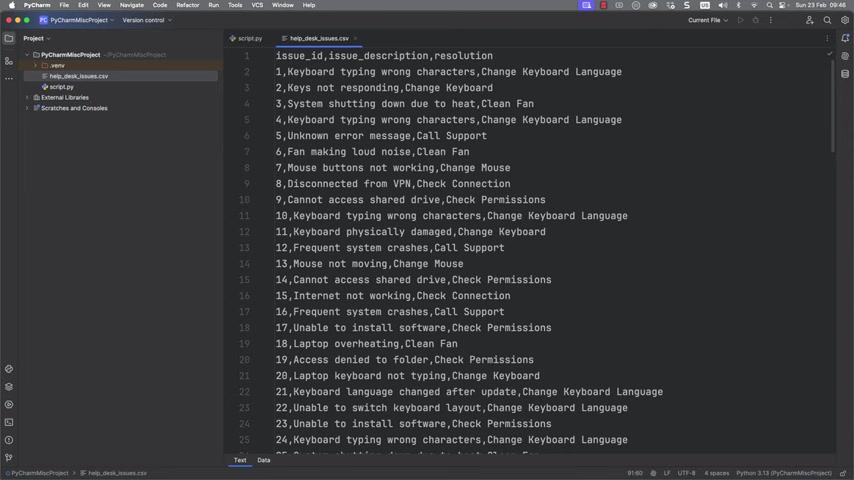
A well-prepared dataset is crucial for accurate machine learning. Ensure the data is clean, properly formatted, and free of errors. Remove any missing values or inconsistencies that could skew the model's training. Good data is the foundation upon which reliable insights and predictions are built.
Loading and Exploring the Data
Load the CSV file using pandas. This library allows you to create a data frame, providing a structured format for manipulating and analyzing data. Viewing a few rows helps understand the data structure. The script checks for missing values and selects the 'issue description' and 'resolution' as features and targets for the model.
import pandas as pd

file_path = 'help_desk_issues.csv'
df = pd.read_csv(file_path)

print("Data Sample:
", df.head())
print("
Missing Values:
", df.isnull().sum())

X = df['issue_description']
Y = df['resolution']
Once the dataset is available, the next step is to load the CSV file and explore the data. This is done with the pandas library.
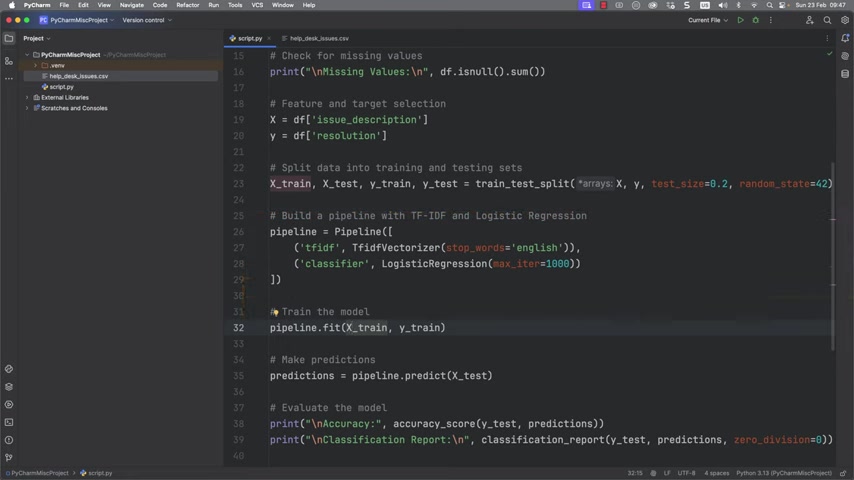
Pandas is a powerful tool that simplifies working with tabular data. It is used to:
- Load and read the CSV File.
- Print out some sample data.
Building the Machine Learning Pipeline
The core of the system lies in the ML pipeline. The script employs a TF-IDF vectorizer to convert text data into numerical representations and a Logistic Regression model for classification. This combination allows the system to predict resolutions based on issue descriptions. Proper tuning of these parameters and models will greatly affect the system's efficacy. This part of the guide will go over steps to build and implement an ML pipeline.
from sklearn.model_selection import train_test_split
from sklearn.feature_extraction.text import TfidfVectorizer
from sklearn.linear_model import LogisticRegression
from sklearn.pipeline import Pipeline
from sklearn.metrics import classification_report, accuracy_score

X_train, X_test, Y_train, Y_test = train_test_split(X, Y, test_size=0.2, random_state=42)

pipeline = Pipeline([
    ('tfidf', TfidfVectorizer(stop_words='english')),
    ('classifier', LogisticRegression(max_iter=1000))
])
The code implements the scikit-learn library for setting up a classification. A good way to describe this code is by looking at each element and understanding its goal:
- Data Splitting: Data needs to be trained, tested, and split appropriately.
- Build the Pipeline: Implement each stage so that all the data and requests are properly processed.
- Model Training and Predictions: The model is built to have predictive capability.
- Evaluating the Model: There are metrics that must be in place to ensure your team is getting the best product.
Training and Evaluating the Model
The pipeline is then trained on the training data. Evaluating the model’s accuracy and generating a classification report provides insight into its performance. This allows adjustments to improve its precision and recall. Proper training is vital. Make sure you have good datasets and clear requirements.
pipeline.fit(X_train, Y_train)

predictions = pipeline.predict(X_test)

print("
Accuracy:", accuracy_score(Y_test, predictions))
print("
Classification Report:
", classification_report(Y_test, predictions, zero_division=0))
Making Predictions and Refining the Model
The system is now capable of predicting resolutions for new issues based on their descriptions. This includes an interactive loop for continuous refinement and learning. The model can adapt to new situations and provide more accurate resolutions over time. This allows a product or system to increase effectiveness over time. For example, check out the code below.
new_issue = "Keys are overly noisy"
predicted_resolution = pipeline.predict([new_issue])
print("
Predicted Resolution for New Issue:", predicted_resolution[0])

while True:
    new_issue = input("
Enter a new issue description or exit to finish: ")
    if new_issue == "exit":
        break
    predicted_resolution = pipeline.predict([new_issue])
    print("
Predicted Resolution for New Issue:", predicted_resolution[0])








Most people like



































Report
Please select a reason for reporting
- 13 Reasons to Switch from Snapchat to Text Messaging
- 7 Powerful Speech to Text Apps to Boost Productivity
- 10 Best Speech to Text Tools for Effortless Transcription
- 13 Free Tools to Easily Transcribe Audio to Text
- 15 Surprising Ways Google's Speech-to-Text Boosts Productivity
- 7 Best Free Online Audio to Text Transcription Tools
- 9 Tips to Transcribe Speech to Text Faster and Better
- 13 Best Speech to Text Software for Windows 10 in 2023
- 7 Tips for Choosing the Best Transcriber for Audio to Text
- 11 Reasons Why Dragon Speech-to-Text Apps are Game-Changers
- 6 Secrets to Enhance Your Speech to Text Transcription
- 6 Brilliant Ways to Boost Productivity with Talk-to-Text on Your MacBook
- 6 Ways Transcription Software Converts Audio to Text
- 8 Tips to Transcribe Speech to Text Like a Pro
- 6 Reasons IBM Watson Speech to Text is a Game-Changer
- 14 Powerful Ways Talk-to-Text Improves Your Workflow
- 12 Top Windows Speech-to-Text Software for Efficient Transcription
- 12 Game-Changing Benefits of Apple's Speech to Text Technology
- 9 Powerful Use Cases for AWS Speech to Text Technology
- 10 Easy Steps to Transcribe YouTube Videos to Text
- transcription audio en texte
- online audio transcription
- free audio file transcription
- free ai audio transcription
- audio transcription service
- audio transcription online free
- audio transcription free online
- audio to transcription software
- audio and transcript
- ai audio transcription free
- voice recording to text converter
- translate voice recording to text
- record voice to text
- audio recording to text converter
- voice recording and transcription
- chatgpt voice to text
- gmail voice to text
- speech to text reader
- speech to text ai free
- speech to talk
- How to Use AI Tools to Find Internal Linking Opportunities Across a Business Website
- Discover Your Perfect Haircut with AI Hairstyle Apps
- Free Reputation Calculator Tools: How They're Adapting to Score AI Visibility, Not Just Rankings
- Design Professional Flyers for Free on Your Phone
- Best Free Flyer Maker Apps for Android: Design Like a Pro
- How to Know If Your Business Is Ready for an AI Customer Service Agent
- Revolutionizing Storytelling: From Novels to Screenplays with AI
- Create Engaging Animated Explainer Videos with a Free AI Tool
- Stop Multi-Subscribing: Benchmark Top AI Visual Models in One Canvas
- Best Seedance 2.5 API Provider: Every Price on the Market, Checked at Source
- Top AI Social Media Management Tools: Automate Your Content Strategy
- Free AI Text to Video Generator: Create Stunning Videos from Text
- Discover 17 ChatGPT Alternatives: A Comprehensive Comparison
- Character.AI vs. Janitor AI: Which AI Chat Platform Reigns Supreme?
- Top Virtual Assistant Companies in 2026: Reviews, Pricing, and Plans Compared
- Unveiling FaceCheck.ID: Revolutionizing Reverse Image Searches with AI
- 11 Best AI Dialers in 2026: Features, Pricing, Pros and Cons
- How I Direct Consistent AI Clips: A Hands-On Guide to Multi-Model Generation
- A Realistic Review of the Photo Generator Image Tool
- Playwright MCP Server: Automated Web Testing with Agent Mode

Copyright ©2026 toolify