































Table of Contents



Getting Started with Your AI Essay Generator Project
Setting Up Your Development Environment
Before diving into the code, it’s crucial to have a well-prepared development environment. This involves installing Python and the necessary libraries.
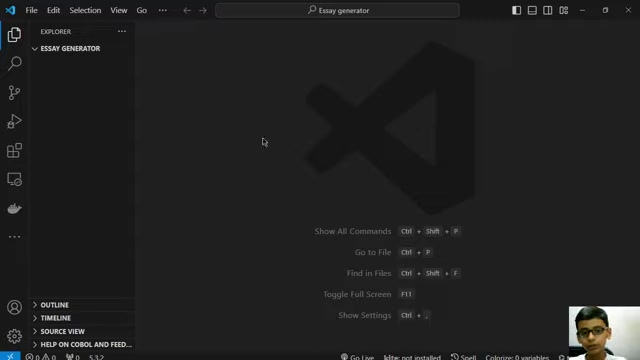
We'll be using Visual Studio Code (VS Code), a popular and versatile code editor, as our primary tool. VS Code is a product of Microsoft. Here are the steps to get started:
- Install Python: Ensure you have Python installed on your system. A version between 3.7 and 3.9 is recommended to avoid compatibility issues. You can download it from the official Python website.
- Install Visual Studio Code (VS Code): Download and install VS Code from the official website. VS Code provides excellent support for Python development, including debugging, syntax highlighting, and more.
- Create Project Directory: Create a new directory for your Essay generator project. This will help keep your files organized.
- Open Project in VS Code: Open the project directory in VS Code.
- Create Python File: Create a new Python file (e.g.,
app.py) in your project directory. This is where you'll write the code for your essay generator. - Install MagicPython Extension: I will suggest you install
MagicPythonExtension for Python. -
Install Required Libraries: Install the necessary Python libraries using pip, the Python package installer. Open the VS Code terminal and run the following command:
pip install streamlit langchain- Streamlit: This library allows you to quickly create interactive web applications from Python scripts. It’s perfect for building a user-friendly interface for your essay generator.
- Langchain: This library simplifies the process of working with Language Models(LLM), making it easier to connect to models like Google PaLM.
Acquiring a Google PaLM API Key
To use Google's PaLM (Pathways Language Model) for essay generation, you'll need an API key. This key will authenticate your requests to the PaLM model. Follow these steps to obtain your API key:
-
Visit Google AI Studio: Go to the Google AI Studio website and sign in with your Google account.
-
Create a Project: If you don't have one already, create a new project in Google AI Studio.
-
Get API Key: Navigate to the API key section and generate a new API key for your project.
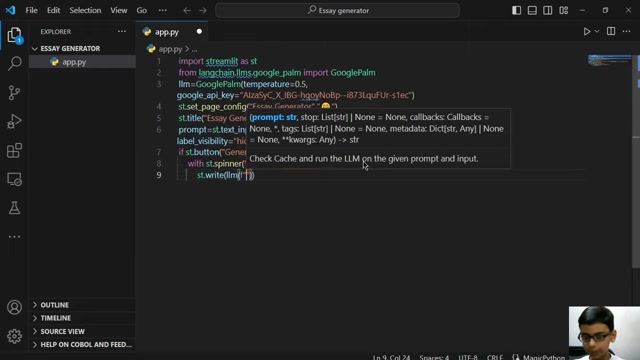
-
Secure Your API Key: Treat your API key like a password. Do not share it publicly or commit it to your code repository. Store it securely and access it through environment variables or a secure configuration file.





Most people like



































Report
Please select a reason for reporting
- 13 Reasons to Switch from Snapchat to Text Messaging
- 7 Powerful Speech to Text Apps to Boost Productivity
- 10 Best Speech to Text Tools for Effortless Transcription
- 13 Free Tools to Easily Transcribe Audio to Text
- 15 Surprising Ways Google's Speech-to-Text Boosts Productivity
- 7 Best Free Online Audio to Text Transcription Tools
- 9 Tips to Transcribe Speech to Text Faster and Better
- 13 Best Speech to Text Software for Windows 10 in 2023
- 7 Tips for Choosing the Best Transcriber for Audio to Text
- 11 Reasons Why Dragon Speech-to-Text Apps are Game-Changers
- 6 Secrets to Enhance Your Speech to Text Transcription
- 6 Brilliant Ways to Boost Productivity with Talk-to-Text on Your MacBook
- 6 Ways Transcription Software Converts Audio to Text
- 8 Tips to Transcribe Speech to Text Like a Pro
- 6 Reasons IBM Watson Speech to Text is a Game-Changer
- 14 Powerful Ways Talk-to-Text Improves Your Workflow
- 12 Top Windows Speech-to-Text Software for Efficient Transcription
- 12 Game-Changing Benefits of Apple's Speech to Text Technology
- 9 Powerful Use Cases for AWS Speech to Text Technology
- 10 Easy Steps to Transcribe YouTube Videos to Text
- transcription audio en texte
- online audio transcription
- free audio file transcription
- free ai audio transcription
- audio transcription service
- audio transcription online free
- audio transcription free online
- audio to transcription software
- audio and transcript
- ai audio transcription free
- voice recording to text converter
- translate voice recording to text
- record voice to text
- audio recording to text converter
- voice recording and transcription
- chatgpt voice to text
- gmail voice to text
- speech to text reader
- speech to text ai free
- speech to talk
- Meshy AI: How to Create 3D Models from Text and Images
- How SEO and Marketing Dashboards Empower Agencies to Drive Results
- How to Use AI Tools to Find Internal Linking Opportunities Across a Business Website
- Discover Your Perfect Haircut with AI Hairstyle Apps
- Free Reputation Calculator Tools: How They're Adapting to Score AI Visibility, Not Just Rankings
- Design Professional Flyers for Free on Your Phone
- Best Free Flyer Maker Apps for Android: Design Like a Pro
- How to Know If Your Business Is Ready for an AI Customer Service Agent
- Revolutionizing Storytelling: From Novels to Screenplays with AI
- Create Engaging Animated Explainer Videos with a Free AI Tool
- Revideo.io: The Future of Reverse Video Search Technology
- Revolutionize Learning: Discover Quizzes AI for Engaging Interactive Quizzes
- Revolutionizing Email Marketing Agency with AI
- Breaking the Character Drift Dilemma: A Practical Test of Smart Shot
- Meshy AI: How to Create 3D Models from Text and Images
- ASOMobile Helps Teams Benchmark App Store Screenshots Against Competitors
- How to Match LMS Software With Your Organization's Training Plan
- How to Convert BTC to HNT
- Unleashing the Power of AI: Cognizant's Roadmap for Transformation
- Frame to Video Review: A Practical Look at Turning Two Still Frames Into Motion

Copyright ©2026 toolify