































Table of Contents
- Key Points
- Getting Started with Your AI Summarizer Project
- Building the User Interface with Streamlit
- How to Use the AI Summarizer
- Pricing
- Pros and Cons of Building an AI Summarizer with Streamlit
- Core Features of the AI Summarizer
- Use Cases for the AI Summarizer
- Frequently Asked Questions (FAQ)
- Related Questions


Getting Started with Your AI Summarizer Project
Setting Up Your Python Environment
Before diving into the code, ensure you have a working Python environment. It is recommended to use a virtual environment to manage dependencies for your project. You can create one using the following command:
python -m venv venvActivate the virtual environment:
- On Windows:
.\venv\Scripts\activate - On macOS and Linux:
source venv/bin/activate
Once the virtual environment is active, install the necessary packages using pip:
pip install streamlit requestsStreamlit will be used for creating the user interface, and requests will help to interact with pre-trained AI models if needed. This setup ensures that your project has the correct dependencies without interfering with other Python projects.
Project Structure and File Creation
Create a new directory for your project. Inside this directory, create a Python file named app.py. This file will contain the code for your ai Summarizer application.
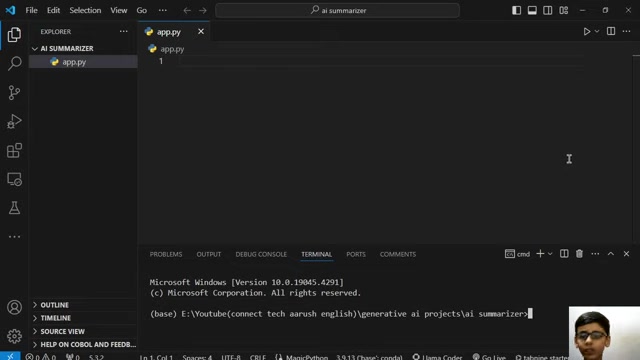
This is where we'll write the code to build our AI Summarizer.
Your project structure should look like this:
AI_Summarizer/
├── venv/  # Virtual environment (optional)
└── app.py  # Main application file
With your environment set up and the necessary file created, you are now ready to start coding the AI summarizer.
Building the User Interface with Streamlit
Creating the Basic Streamlit App
Streamlit makes it incredibly easy to create interactive web applications with Python. Let's start by importing the Streamlit library and adding a title to our app.
import streamlit as st

st.title('AI Summarizer')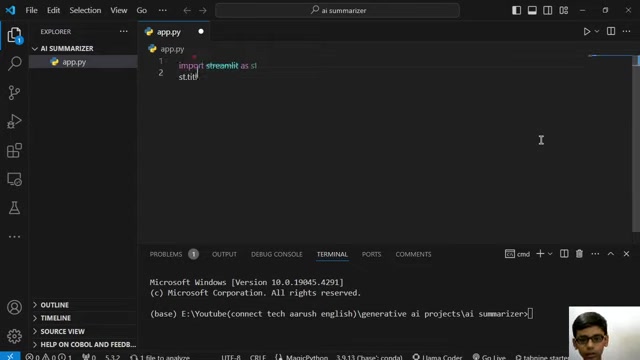
This code imports the streamlit library and uses the st.title() function to set the title of the application to "AI Summarizer." To run the app, save the app.py file and execute the following command in your terminal:
streamlit run app.pyThis will open a new tab in your web browser displaying the basic Streamlit application with the title you set.
Adding a Text Input Area
To allow users to input text for summarization, we can add a text input area using st.text_area().
text = st.text_area('Enter your text here:', height=300)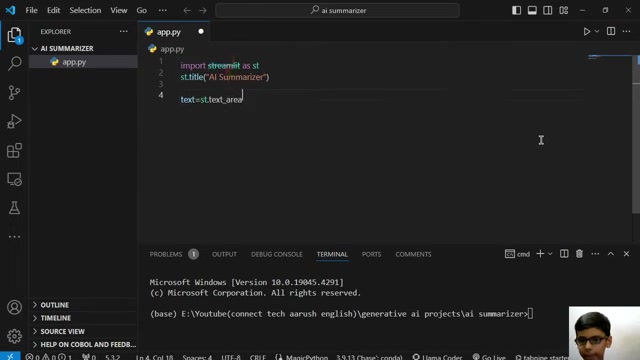
This creates a text area where users can paste or type in the text they want to summarize. The height parameter sets the initial height of the text area in pixels. The first argument inside is the Label for what the user needs to enter.
Next, we'll add a button that triggers the summarization process when clicked.
if st.button('Generate Summary'):
    # Summarization logic will go here
    st.write('Summary generated!')
This code creates a button labeled "Generate Summary." When the button is clicked, the code inside the if block will be executed. For now, it simply displays the text “Summary generated!”. We will replace this placeholder with the actual summarization logic later. It's important to add in a placeholder for later to verify that the button works.
Now, let’s combine these elements:
import streamlit as st

st.title('AI Summarizer')

text = st.text_area('Enter your text here:', height=300)

if st.button('Generate Summary'):
    st.write('Summary generated!')
This complete code snippet creates a Streamlit application with a title, a text input area, and a button. When the button is clicked, it displays the message "Summary generated!". In the next steps, we’ll add the AI summarization functionality.
How to Use the AI Summarizer
Implementing the AI Summarization Logic
To implement the AI summarization logic, we'll need to use a pre-trained model that can automatically condense text. One popular option is to use the Hugging Face Transformers library, which provides access to a wide range of pre-trained models.
First, install the Transformers library:
pip install transformersThen, you can use a summarization pipeline provided by the Transformers library. Here’s an example using the facebook/bart-large-cnn model:
from transformers import pipeline

def generate_summary(text):
    summarizer = pipeline("summarization", model="facebook/bart-large-cnn")
    summary = summarizer(text, max_length=130, min_length=30, do_sample=False)
    return summary[0]['summary_text']
This code defines a function generate_summary() that takes the input text as an argument and returns the summarized text. The pipeline function from the Transformers library is used to create a summarization pipeline using the facebook/bart-large-cnn model. The max_length and min_length parameters control the length of the summary, and do_sample=False disables sampling for more deterministic results.
Now, integrate this function into your Streamlit app:
import streamlit as st
from transformers import pipeline

st.title('AI Summarizer')

@st.cache_resource
def load_summarizer():
    return pipeline("summarization", model="facebook/bart-large-cnn")

summarizer = load_summarizer()

text = st.text_area('Enter your text here:', height=300)

if st.button('Generate Summary'):
    with st.spinner('Generating Summary...'):
        summary = summarizer(text, max_length=130, min_length=30, do_sample=False)
        st.write(summary[0]['summary_text'])
This code snippet first defines a function load_summarizer decorated with @st.cache_resource to cache the summarization pipeline.
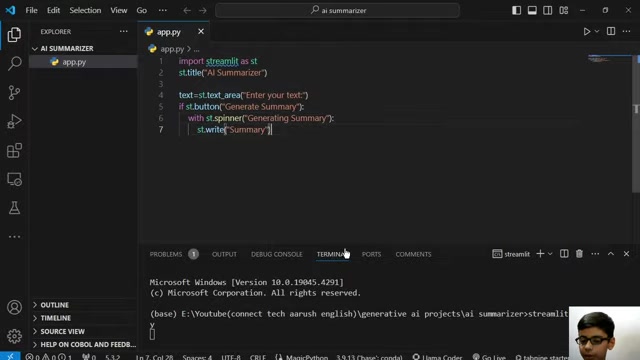
This ensures that the model is loaded only once, improving performance. Then, it uses st.spinner() to display a loading message while the summary is being generated. Finally, it displays the generated summary using st.write().
By using this approach, your AI summarizer will be able to automatically condense large amounts of text into shorter, more manageable summaries.








Most people like
































Report
Please select a reason for reporting
- 13 Reasons to Switch from Snapchat to Text Messaging
- 7 Powerful Speech to Text Apps to Boost Productivity
- 10 Best Speech to Text Tools for Effortless Transcription
- 13 Free Tools to Easily Transcribe Audio to Text
- 15 Surprising Ways Google's Speech-to-Text Boosts Productivity
- 7 Best Free Online Audio to Text Transcription Tools
- 9 Tips to Transcribe Speech to Text Faster and Better
- 13 Best Speech to Text Software for Windows 10 in 2023
- 7 Tips for Choosing the Best Transcriber for Audio to Text
- 11 Reasons Why Dragon Speech-to-Text Apps are Game-Changers
- 6 Secrets to Enhance Your Speech to Text Transcription
- 6 Brilliant Ways to Boost Productivity with Talk-to-Text on Your MacBook
- 6 Ways Transcription Software Converts Audio to Text
- 8 Tips to Transcribe Speech to Text Like a Pro
- 6 Reasons IBM Watson Speech to Text is a Game-Changer
- 14 Powerful Ways Talk-to-Text Improves Your Workflow
- 12 Top Windows Speech-to-Text Software for Efficient Transcription
- 12 Game-Changing Benefits of Apple's Speech to Text Technology
- 9 Powerful Use Cases for AWS Speech to Text Technology
- 10 Easy Steps to Transcribe YouTube Videos to Text
- transcription audio en texte
- online audio transcription
- free audio file transcription
- free ai audio transcription
- audio transcription service
- audio transcription online free
- audio transcription free online
- audio to transcription software
- audio and transcript
- ai audio transcription free
- voice recording to text converter
- translate voice recording to text
- record voice to text
- audio recording to text converter
- voice recording and transcription
- chatgpt voice to text
- gmail voice to text
- speech to text reader
- speech to text ai free
- speech to talk
- How SEO and Marketing Dashboards Empower Agencies to Drive Results
- How to Use AI Tools to Find Internal Linking Opportunities Across a Business Website
- Discover Your Perfect Haircut with AI Hairstyle Apps
- Free Reputation Calculator Tools: How They're Adapting to Score AI Visibility, Not Just Rankings
- Design Professional Flyers for Free on Your Phone
- Best Free Flyer Maker Apps for Android: Design Like a Pro
- How to Know If Your Business Is Ready for an AI Customer Service Agent
- Revolutionizing Storytelling: From Novels to Screenplays with AI
- Create Engaging Animated Explainer Videos with a Free AI Tool
- Stop Multi-Subscribing: Benchmark Top AI Visual Models in One Canvas
- DeepL Translator: The AI-Powered Translation Tool
- AI Video Upscaling: Top Tools Compared for Enhanced Quality
- Bridging the Gap: How One Indie Developer Solved the "Art Asset Nightmare" Using AI Style Transfer
- How I Direct Consistent AI Clips: A Hands-On Guide to Multi-Model Generation
- My Honest Review of VideoAI: The Ultimate Character Voice Generator I've Been Using Lately
- Why do so many AI tools underdeliver for online stores?
- My Brand New Logo: AI-Powered Logo Design for Startups
- Create Stunning Logos with Free AI Logo Generator!
- AI Logo Maker: Design a Stunning Logo in Minutes
- Elevate Your Zoom Experience with Enhanced Name Tags by Warmly

Copyright ©2026 toolify