































Table of Contents
- Key Points
- The Rise of No-Code and AI in Web Design
- The Power Trio: Relume, Webflow, and Spline
- Step-by-Step Guide: Building a Website with Relume, Webflow, and Spline
- Pricing Considerations for Each Tool
- Pros and Cons of Using These Tools
- Unveiling the Core Features of Each Tool
- Real-World Use Cases for Website Design
- Frequently Asked Questions
- Related Questions


The Power Trio: Relume, Webflow, and Spline
Relume: Crafting Sitemaps and Wireframes with AI

Relume emerges as a Game-changer for planning and structuring websites. This AI-powered tool allows you to create sitemaps and wireframes in minutes, saving valuable time and effort. A sitemap is a visual representation of your website's structure, showing all the pages and their hierarchy. A wireframe, on the other hand, outlines the content and layout of each page.
Relume simplifies this process by automating the creation of both sitemaps and wireframes. With a simple Prompt, you can describe your company or website concept, and Relume's AI will generate a comprehensive sitemap tailored to your needs. It even suggests relevant pages, ensuring that your website is well-structured and user-friendly.
Relume is not just about structure; it also helps with content. The AI can generate placeholder content for each section, providing a solid foundation for your website's messaging. You can then customize this content to align with your brand and target audience.
Key benefits of using Relume:
- Rapidly create sitemaps and wireframes.
- Generate AI-powered content suggestions.
- Customize page layouts and content.
- Collaborate seamlessly with your team.
- Export designs to other platforms like Webflow.
With Relume, you can streamline the initial stages of web design, ensuring a solid foundation for your project.
Webflow: Building Websites Visually Without Code

Webflow is a revolutionary no-code Website Builder that allows you to design and launch websites without writing code. It provides a visual interface where you can drag and drop elements, customize styles, and create interactive experiences. Webflow empowers designers and entrepreneurs to bring their visions to life without the need for developers.
Webflow's intuitive interface makes website building a breeze. You can add elements like text, images, buttons, and forms with a simple drag and drop. Then, you can customize their appearance and behavior using Webflow's styling tools. It gives you precise control over every aspect of your website's design, from typography to animations.
Key features of Webflow:
- Drag-and-drop interface.
- Visual styling tools.
- CMS (Content Management System) integration.
- E-commerce capabilities.
- SEO optimization tools.
- Hosting and domain management.
Webflow's flexibility allows you to create a wide range of websites, from simple landing pages to complex e-commerce stores. Its powerful features and user-friendly interface make it an ideal platform for anyone looking to build a professional website without coding.
Spline: Adding Stunning 3D Animations to Your Website
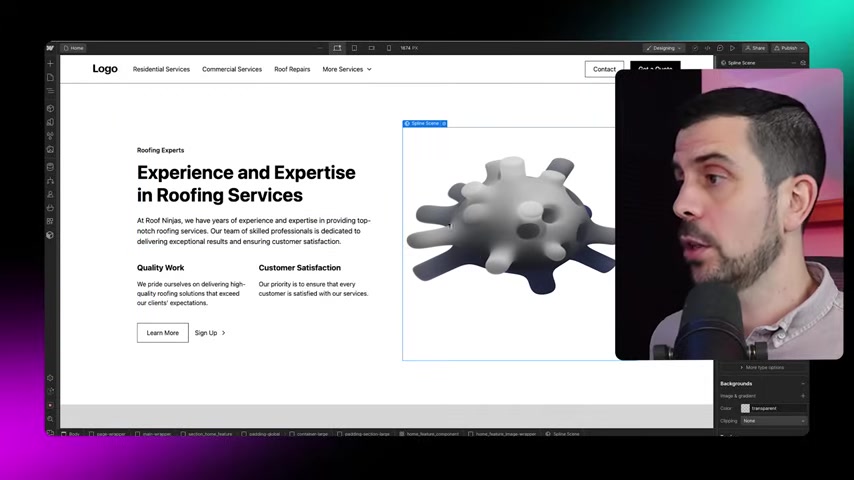
Spline is a 3D design tool that lets you create and integrate 3D elements into your websites. With Spline, you can add captivating animations, interactive models, and immersive experiences that set your website apart. Spline's seamless integration with Webflow makes it easy to bring your 3D creations to life online.
Spline's intuitive interface and extensive library of pre-built models make it easy to create 3D elements even without prior experience. You can customize the appearance and behavior of your 3D models, adding animations, lighting effects, and interactive features. Then, you can embed these creations into your Webflow website with just a few clicks.
Benefits of using Spline:
- Create interactive 3D elements without coding.
- Add captivating animations and effects.
- Enhance user engagement and website appeal.
- Seamless integration with Webflow.
- Extensive library of pre-built models and assets.
With Spline, you can transform your website into an immersive and engaging experience that leaves a lasting impression on your visitors. Remember to update the public URL after making changes in spline before placing to webflow.
Unveiling the Core Features of Each Tool
Relume
Relume stands out with its AI-powered sitemap and wireframe generation. You simply describe your company in one sentence, and the AI crafts a complete website structure, including relevant pages and sections.

Each page's wireframe is also auto-generated, complete with text, buttons, and image placeholders.
- AI Sitemap Generation: Creates comprehensive site structures from a brief description.
- AI Wireframe Generation: Outlines content and layout for each page.
- Rearrangeable Sections: Easily reorder or delete sections within a page.
- Content Generation: Generates placeholder text to guide content creation.
- Copy to Webflow: Directly transfers designs to Webflow.
Webflow
Webflow offers a visual, drag-and-drop interface, CMS integration, and e-commerce capabilities. Its core features enable comprehensive design control without coding.
- Drag-and-Drop Interface: Visual building without writing code.
- Visual Styling Tools: Precise control over typography, colors, and animations.
- CMS Integration: Manage website content dynamically.
- E-commerce: Set up online stores.
- SEO Optimization: Tools to improve Search Engine rankings.
Spline
Spline lets you create and integrate 3D elements, adding interactive models, animations, and lighting effects. A vast library of pre-built models helps enhance user engagement.
- 3D Modeling: Creation of custom 3D designs.
- Animations: Add movement and interactivity to models.
- Lighting Effects: Enhance visual appeal with realistic lighting.
- Webflow Integration: Seamlessly embed 3D creations.
- Model Library: Extensive collection of pre-built models.





Most people like


































Report
Please select a reason for reporting
- 13 Reasons to Switch from Snapchat to Text Messaging
- 7 Powerful Speech to Text Apps to Boost Productivity
- 10 Best Speech to Text Tools for Effortless Transcription
- 13 Free Tools to Easily Transcribe Audio to Text
- 15 Surprising Ways Google's Speech-to-Text Boosts Productivity
- 7 Best Free Online Audio to Text Transcription Tools
- 9 Tips to Transcribe Speech to Text Faster and Better
- 13 Best Speech to Text Software for Windows 10 in 2023
- 7 Tips for Choosing the Best Transcriber for Audio to Text
- 11 Reasons Why Dragon Speech-to-Text Apps are Game-Changers
- 6 Secrets to Enhance Your Speech to Text Transcription
- 6 Brilliant Ways to Boost Productivity with Talk-to-Text on Your MacBook
- 6 Ways Transcription Software Converts Audio to Text
- 8 Tips to Transcribe Speech to Text Like a Pro
- 6 Reasons IBM Watson Speech to Text is a Game-Changer
- 14 Powerful Ways Talk-to-Text Improves Your Workflow
- 12 Top Windows Speech-to-Text Software for Efficient Transcription
- 12 Game-Changing Benefits of Apple's Speech to Text Technology
- 9 Powerful Use Cases for AWS Speech to Text Technology
- 10 Easy Steps to Transcribe YouTube Videos to Text
- transcription audio en texte
- online audio transcription
- free audio file transcription
- free ai audio transcription
- audio transcription service
- audio transcription online free
- audio transcription free online
- audio to transcription software
- audio and transcript
- ai audio transcription free
- voice recording to text converter
- translate voice recording to text
- record voice to text
- audio recording to text converter
- voice recording and transcription
- chatgpt voice to text
- gmail voice to text
- speech to text reader
- speech to text ai free
- speech to talk
- Meshy AI: How to Create 3D Models from Text and Images
- How SEO and Marketing Dashboards Empower Agencies to Drive Results
- How to Use AI Tools to Find Internal Linking Opportunities Across a Business Website
- Discover Your Perfect Haircut with AI Hairstyle Apps
- Free Reputation Calculator Tools: How They're Adapting to Score AI Visibility, Not Just Rankings
- Design Professional Flyers for Free on Your Phone
- Best Free Flyer Maker Apps for Android: Design Like a Pro
- How to Know If Your Business Is Ready for an AI Customer Service Agent
- Revolutionizing Storytelling: From Novels to Screenplays with AI
- Create Engaging Animated Explainer Videos with a Free AI Tool
- Automate Lead Generation: A Comprehensive Guide with AI Agents
- Revideo.io: The Future of Reverse Video Search Technology
- Revolutionizing Email Marketing Agency with AI
- Breaking the Character Drift Dilemma: A Practical Test of Smart Shot
- Meshy AI: How to Create 3D Models from Text and Images
- ASOMobile Helps Teams Benchmark App Store Screenshots Against Competitors
- How to Match LMS Software With Your Organization's Training Plan
- How to Convert BTC to HNT
- Unleashing the Power of AI: Cognizant's Roadmap for Transformation
- Frame to Video Review: A Practical Look at Turning Two Still Frames Into Motion

Copyright ©2026 toolify