































Table of Contents
- Key Points
- Exploring ChatTTS: An Open-Source TTS Revolution
- Setting Up ChatTTS Locally
- ChatTTS Usage Guide
- Pricing
- Evaluating ChatTTS: Advantages and Disadvantages
- Core Features
- Ideal Use Cases for ChatTTS
- FAQ
- Related Questions



Exploring ChatTTS: An Open-Source TTS Revolution
What is ChatTTS?
ChatTTS
is a Text-to-Speech model specifically designed for dialogue scenarios, operating as a ULM (Universal Language Model) assistant. It’s open-source and designed for daily dialogue use cases, aiming to provide natural and expressive Speech Synthesis. The model supports both English and Chinese languages and is trained with 100,000+ hours of speech data. Its conversational nature aims to enable natural interactions, including prosody features like laughter and pauses.
Key Features:
- Open-source and accessible for various applications.
- Designed specifically for dialogue-based interactions.
- Supports mixed language input.
- Offers multi-speaker capabilities.
- Allows precise control over prosodic elements, including laughter, pauses, and intonation.
- Provides natural and expressive speech delivery.
Gaining Traction: Popularity on GitHub
ChatTTS is becoming increasingly popular within the open-source community. With almost 20,000 stars on GitHub
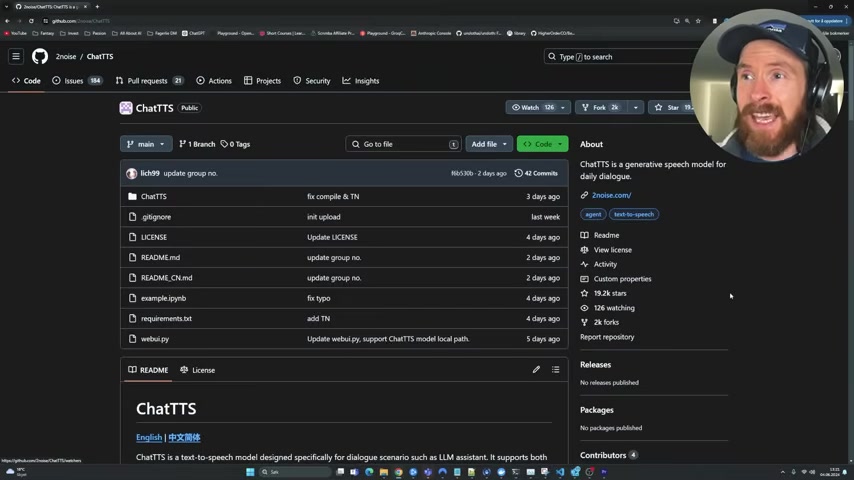
, the project is gaining a lot of attention. Being open-source allows developers to use and modify the model for various purposes, contributing to its popularity. This visibility and community support make it a promising tool for developers and researchers. The fact that it's gaining this traction in the open-source world is a big sign that it's worth checking out.
Setting Up ChatTTS Locally
Step-by-Step Installation Guide
To set up ChatTTS on your local machine, follow these steps:
- Clone the GitHub Repository: Use the command
git clone https://github.com/2noise/ChatTTS.git
in your terminal.
- Navigate to the Directory: Change the directory to the cloned repository using
cd ChatTTS. - Install Dependencies: Install the necessary Python packages using
pip install -r requirements.txt.
After completing these steps, ChatTTS should be installed and ready for use on your local system. The presenter mentioned they had already installed it so there should be no problems with the process.
Note: Check to ensure you have PyTorch installed before running the dependency command, this package can cause issues if installed incorrectly. The installation steps are clearly laid out in the Github, making it easier for you to get running.
Basic Usage: Running a Simple Text-to-Speech Conversion
Here’s how to run a basic text-to-speech conversion with ChatTTS. This example is adapted from the GitHub documentation
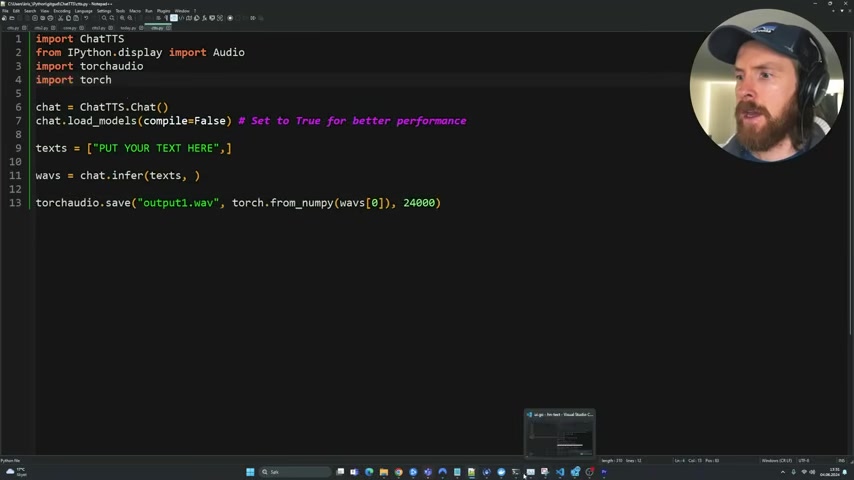
:
import ChatTTS
from IPython.display import Audio
import torch
import torchaudio

chat = ChatTTS.Chat()
chat.load_models(compile=False)  # Set to True for better performance

texts = ["PUT YOUR TEXT HERE"]

wavs = chat.infer(texts)
torchaudio.save("output1.wav", torch.from_numpy(wavs[0]), 24000)- Import Necessary Libraries: Import the required modules from ChatTTS, IPython, and torchaudio .
- Initialize ChatTTS: Create an instance of the ChatTTS model.
- Load Models: Load the pre-trained models using the
load_modelsmethod. - Define Text: Specify the text you want to convert to speech.
- Infer Speech: Use the
infermethod to generate the audio data. - Save the Audio: Save the generated audio data to a WAV file using
torchaudio.save.
However, there was a bit of a problem during the running of the script, with torch audio not being defined. But this was fixed with a simple import statement.
Note: Make sure that you have a strong enough system to run this model. As the presenter notes, if you run this on your local computer, it may take a while.
Advanced Usage: Injecting Emotion
One exciting aspect of ChatTTS is the ability to inject emotional cues into the synthesized speech. This is achieved through special tokens like [uv_break] (pauses) and [laugh] (laughter)
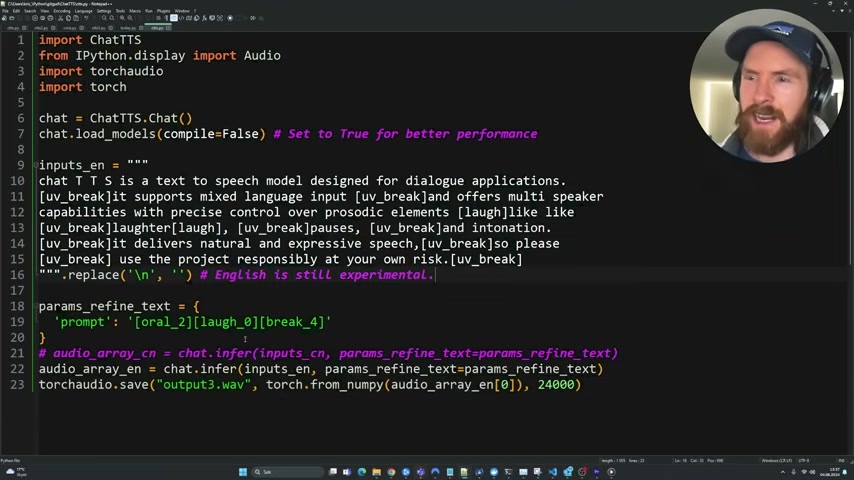
. Here’s an example of how to use these tokens:
import ChatTTS
from IPython.display import Audio
import torch
import torchaudio

inputs_en = """
ChatTTS is a text to speech model designed for dialogue applications.
[uv_break] It supports mixed language input [uv_break]and offers multi speaker
capabilities with precise control over prosodic elements [laugh]like like
[uv_break]laughter[laugh], [uv_break]pauses, [uv_break]and intonation.
[uv_break]It delivers natural and expressive speech,[uv_break]so please
[uv_break] use the project responsibly at your own risk.[uv_break]"""

param_refine_text = {"prompt": ["oral_2"][laugh_6][break_4]}
audio_array_cn = chat.infer(inputs_en, param_refine_text=param_refine_text)
torchaudio.save("output3.wav", torch.from_numpy(audio_array_cn[0]), 24000)
With some more tweaking, you can also get different voices to output, with the male voice seeming to have less emotion included.







Most people like





























Report
Please select a reason for reporting
- 13 Reasons to Switch from Snapchat to Text Messaging
- 7 Powerful Speech to Text Apps to Boost Productivity
- 10 Best Speech to Text Tools for Effortless Transcription
- 13 Free Tools to Easily Transcribe Audio to Text
- 15 Surprising Ways Google's Speech-to-Text Boosts Productivity
- 7 Best Free Online Audio to Text Transcription Tools
- 9 Tips to Transcribe Speech to Text Faster and Better
- 13 Best Speech to Text Software for Windows 10 in 2023
- 7 Tips for Choosing the Best Transcriber for Audio to Text
- 11 Reasons Why Dragon Speech-to-Text Apps are Game-Changers
- 6 Secrets to Enhance Your Speech to Text Transcription
- 6 Brilliant Ways to Boost Productivity with Talk-to-Text on Your MacBook
- 6 Ways Transcription Software Converts Audio to Text
- 8 Tips to Transcribe Speech to Text Like a Pro
- 6 Reasons IBM Watson Speech to Text is a Game-Changer
- 14 Powerful Ways Talk-to-Text Improves Your Workflow
- 12 Top Windows Speech-to-Text Software for Efficient Transcription
- 12 Game-Changing Benefits of Apple's Speech to Text Technology
- 9 Powerful Use Cases for AWS Speech to Text Technology
- 10 Easy Steps to Transcribe YouTube Videos to Text
- transcription audio en texte
- online audio transcription
- free audio file transcription
- free ai audio transcription
- audio transcription service
- audio transcription online free
- audio transcription free online
- audio to transcription software
- audio and transcript
- ai audio transcription free
- voice recording to text converter
- translate voice recording to text
- record voice to text
- audio recording to text converter
- voice recording and transcription
- chatgpt voice to text
- gmail voice to text
- speech to text reader
- speech to text ai free
- speech to talk
- Meshy AI: How to Create 3D Models from Text and Images
- How SEO and Marketing Dashboards Empower Agencies to Drive Results
- How to Use AI Tools to Find Internal Linking Opportunities Across a Business Website
- Discover Your Perfect Haircut with AI Hairstyle Apps
- Free Reputation Calculator Tools: How They're Adapting to Score AI Visibility, Not Just Rankings
- Design Professional Flyers for Free on Your Phone
- Best Free Flyer Maker Apps for Android: Design Like a Pro
- How to Know If Your Business Is Ready for an AI Customer Service Agent
- Revolutionizing Storytelling: From Novels to Screenplays with AI
- Create Engaging Animated Explainer Videos with a Free AI Tool
- Meshy AI: How to Create 3D Models from Text and Images
- ASOMobile Helps Teams Benchmark App Store Screenshots Against Competitors
- How to Match LMS Software With Your Organization's Training Plan
- Revolutionizing Email Marketing Agency with AI
- How to Convert BTC to HNT
- Unleashing the Power of AI: Cognizant's Roadmap for Transformation
- Frame to Video Review: A Practical Look at Turning Two Still Frames Into Motion
- NVIDIA NIM: Revolutionizing Supply Chain Data Analysis with AI
- Top AI Tools That Help Brands Stand Out Offline (Not Just Online)
- Top 5 Cold Email Software: Maximize Your Outreach in 2025

Copyright ©2026 toolify