































Table of Contents
- Key Points
- Unlocking Faceless Video Creation with CapCut AI
- Tips for Engaging Faceless AI Videos
- Step-by-Step Guide to Creating Faceless Videos on CapCut Mobile
- Weighing the Pros and Cons of Faceless AI Video Creation
- Frequently Asked Questions about Faceless AI Videos with CapCut
- Related Questions about Faceless AI Video Creation



Unlocking Faceless Video Creation with CapCut AI
Why Create Faceless AI Videos?
Creating faceless AI videos offers numerous advantages for content creators. It allows you to:
- Maintain privacy while still sharing your ideas and expertise.
- Overcome camera shyness or discomfort with being on screen.
- Focus on the content itself, rather than your personal appearance.
- Produce videos quickly and efficiently with the help of AI Tools.
-
Create diverse content without needing to film yourself in every video.
This makes it ideal for tutorials, explainers, storytelling, and various other content formats where your presence isn't crucial to the message.
This guide will provide a step-by-step approach to creating such videos using only your mobile phone and the robust features available in CapCut, the popular video editing tool. Let's begin!
Exploring CapCut's AI-Powered Features
CapCut's recently unveiled AI suite puts a wealth of tools directly at your fingertips. These features are designed to expedite video creation, enhance quality, and foster creativity. Notably, you can generate stunning visuals, create Music, polish your visuals, build expressive characters, speed up your editing and so much more. Let's delve into some core functionalities.
- AI Story Maker: This function turns your scripts into engaging videos, complete with generated visuals and voiceovers. Describe your script and let AI to help you create stunning videos, images and music.
- AutoCut: Quickly transform media into ready-to-share short videos, saving valuable time in editing.
- AI Replace: Swap elements within your video.

Need a different sky? Change it with AI.
- AI Dialogue Scene: This feature will make characters in the video to speak, the audio will sync and make it vivid.
Step-by-Step Guide to Creating Faceless Videos on CapCut Mobile
Step 1: Accessing the AI Story Maker
First, ensure you have CapCut downloaded on your mobile device from your Google play store or Apple store. After the install, launch the app and sign in to your CapCut account. Once logged in, navigate to the 'AI Lab' section. If you're in a region where AI Lab isn't directly available, you can still access the AI Story Maker through the 'Edit' function. Scroll to the ‘All tools’ section, then select “AI story maker”.
Step 2: Generating a Script
You have two options here: paste in a pre-written script or generate one from scratch using the AI. To generate a new script, tap the 'Generate script' option and enter a topic. For example, enter 'Zara's Adventures'. Then enter ‘A young lady was saved from a wildfire in a park while on a camping trip’ in the key points section.
The CapCut app allows you to create a short 1 min video to start off with.
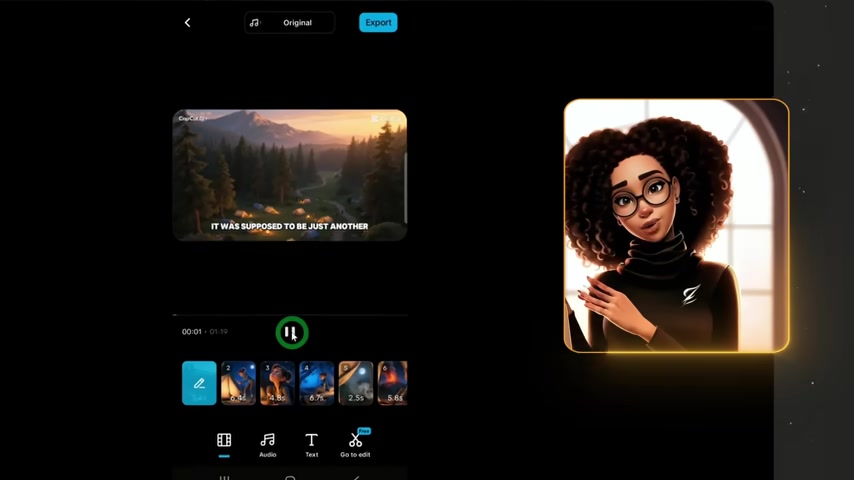
Select the duration (1min, 3min, or 5min), and tap 'Generate'. The AI will provide three script options. Review them and choose the one that best suits your vision.
Step 3: Customizing Visual and Audio Styles
With your script selected, now define the visual style of your video. CapCut offers a variety of styles, including 3D Cartoon, Movie, Anime, and more. Choose a style that complements your story.
Next, select a voiceover. You can choose from various AI-generated voices. Note that voices with a diamond icon require a CapCut Pro subscription. Select a voice and proceed.
Step 4: Generating the Video
Confirm your settings, noting the number of credits required for the generation. New users often have a free trial period with generous credits. Then, tap 'Generate'. CapCut will then weave together your script, visuals, and voiceover into a cohesive video.
Step 5: Refining Your Video in the Editing Suite
After CapCut generates your initial video, it's time to refine it.
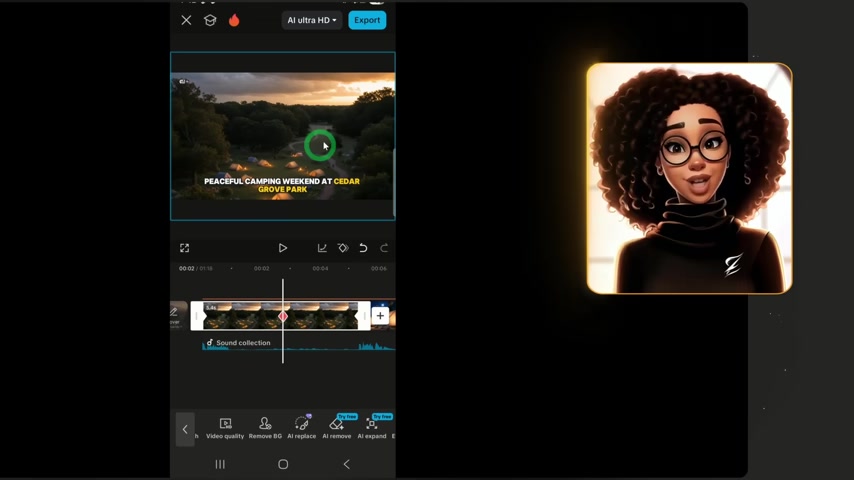
From the app’s Timeline section, go to edit. Some key techniques in the refinement process are:
-
Transcription Editing: A text transcript is created by the app using which the video can be edited. It identifies filler WORD or any pauses and eliminates them to make it concise. The changes made in the transcript will automatically be applied in the video to speed up and shorten the video.
-
AI replace: Here with the use of AI, you can replace the scene entirely. To replace the images you will need to be very specific with your prompts so that the app has the correct image to render for the visual you require in the image. What’s more is that the App lets you decide if you want to change the whole image or just a section of the image. In your prompts don’t forget to be descriptive and add ‘style’ into the prompts to give more definition.
-
Adding the right Sound to your videos: Here, you can add songs that can change the entire mood of the video. It does so much justice for your content. The capcut is designed to cater to this specific need by creating their own music. You can Prompt the app to create its own music by describing what your music is about. The app will take about a minute or two to create its own music.
With these edits, you can refine your video in capcut with ease and it’ll take less than an hour from the get-go.




Most people like


































Report
Please select a reason for reporting
- 13 Reasons to Switch from Snapchat to Text Messaging
- 7 Powerful Speech to Text Apps to Boost Productivity
- 10 Best Speech to Text Tools for Effortless Transcription
- 13 Free Tools to Easily Transcribe Audio to Text
- 15 Surprising Ways Google's Speech-to-Text Boosts Productivity
- 7 Best Free Online Audio to Text Transcription Tools
- 9 Tips to Transcribe Speech to Text Faster and Better
- 13 Best Speech to Text Software for Windows 10 in 2023
- 7 Tips for Choosing the Best Transcriber for Audio to Text
- 11 Reasons Why Dragon Speech-to-Text Apps are Game-Changers
- 6 Secrets to Enhance Your Speech to Text Transcription
- 6 Brilliant Ways to Boost Productivity with Talk-to-Text on Your MacBook
- 6 Ways Transcription Software Converts Audio to Text
- 8 Tips to Transcribe Speech to Text Like a Pro
- 6 Reasons IBM Watson Speech to Text is a Game-Changer
- 14 Powerful Ways Talk-to-Text Improves Your Workflow
- 12 Top Windows Speech-to-Text Software for Efficient Transcription
- 12 Game-Changing Benefits of Apple's Speech to Text Technology
- 9 Powerful Use Cases for AWS Speech to Text Technology
- 10 Easy Steps to Transcribe YouTube Videos to Text
- transcription audio en texte
- online audio transcription
- free audio file transcription
- free ai audio transcription
- audio transcription service
- audio transcription online free
- audio transcription free online
- audio to transcription software
- audio and transcript
- ai audio transcription free
- voice recording to text converter
- translate voice recording to text
- record voice to text
- audio recording to text converter
- voice recording and transcription
- chatgpt voice to text
- gmail voice to text
- speech to text reader
- speech to text ai free
- speech to talk
- Meshy AI: How to Create 3D Models from Text and Images
- How SEO and Marketing Dashboards Empower Agencies to Drive Results
- How to Use AI Tools to Find Internal Linking Opportunities Across a Business Website
- Discover Your Perfect Haircut with AI Hairstyle Apps
- Free Reputation Calculator Tools: How They're Adapting to Score AI Visibility, Not Just Rankings
- Design Professional Flyers for Free on Your Phone
- Best Free Flyer Maker Apps for Android: Design Like a Pro
- How to Know If Your Business Is Ready for an AI Customer Service Agent
- Revolutionizing Storytelling: From Novels to Screenplays with AI
- Create Engaging Animated Explainer Videos with a Free AI Tool
- Automate Lead Generation: A Comprehensive Guide with AI Agents
- Revideo.io: The Future of Reverse Video Search Technology
- Revolutionizing Email Marketing Agency with AI
- Breaking the Character Drift Dilemma: A Practical Test of Smart Shot
- Meshy AI: How to Create 3D Models from Text and Images
- ASOMobile Helps Teams Benchmark App Store Screenshots Against Competitors
- How to Match LMS Software With Your Organization's Training Plan
- How to Convert BTC to HNT
- Unleashing the Power of AI: Cognizant's Roadmap for Transformation
- Frame to Video Review: A Practical Look at Turning Two Still Frames Into Motion

Copyright ©2026 toolify