































Table of Contents
- Key Points
- Introduction to QR Code Art
- Step-by-Step Tutorial: Crafting Your Own QR Code Art
- Frequently Asked Questions About QR Code Art
- Related Questions



Introduction to QR Code Art
The Fusion of Function and Art
QR codes, initially designed for quick information retrieval, have transcended their original purpose. They're now a canvas for artistic expression, blending seamlessly into marketing materials, art installations, and even personal mementos. This transformation not only makes QR codes more engaging but also enhances brand identity and visual appeal. By embedding images directly within the QR code, we elevate it beyond a simple black-and-white square into a captivating visual element. This approach invites viewers to interact not just with the information the code holds, but with the art itself, creating a richer, more Memorable experience.
The rise of Visual QR codes marks a shift in how brands and individuals communicate. It’s no longer enough to simply provide a link; the delivery must be creative and visually stimulating. This is where the art of QR code creation comes in, allowing for personalized designs that capture attention and encourage interaction. With the right tools and techniques, anyone can create a unique QR code that not only functions perfectly but also acts as a miniature work of art.
Halftone QR Codes: A Free, Accessible Solution
While many tools promise easy QR code generation, few offer the artistic flexibility and zero-cost accessibility of Halftone QR Codes. This tool, conceived as a research project, leverages a straightforward process that translates images into scannable QR Patterns.
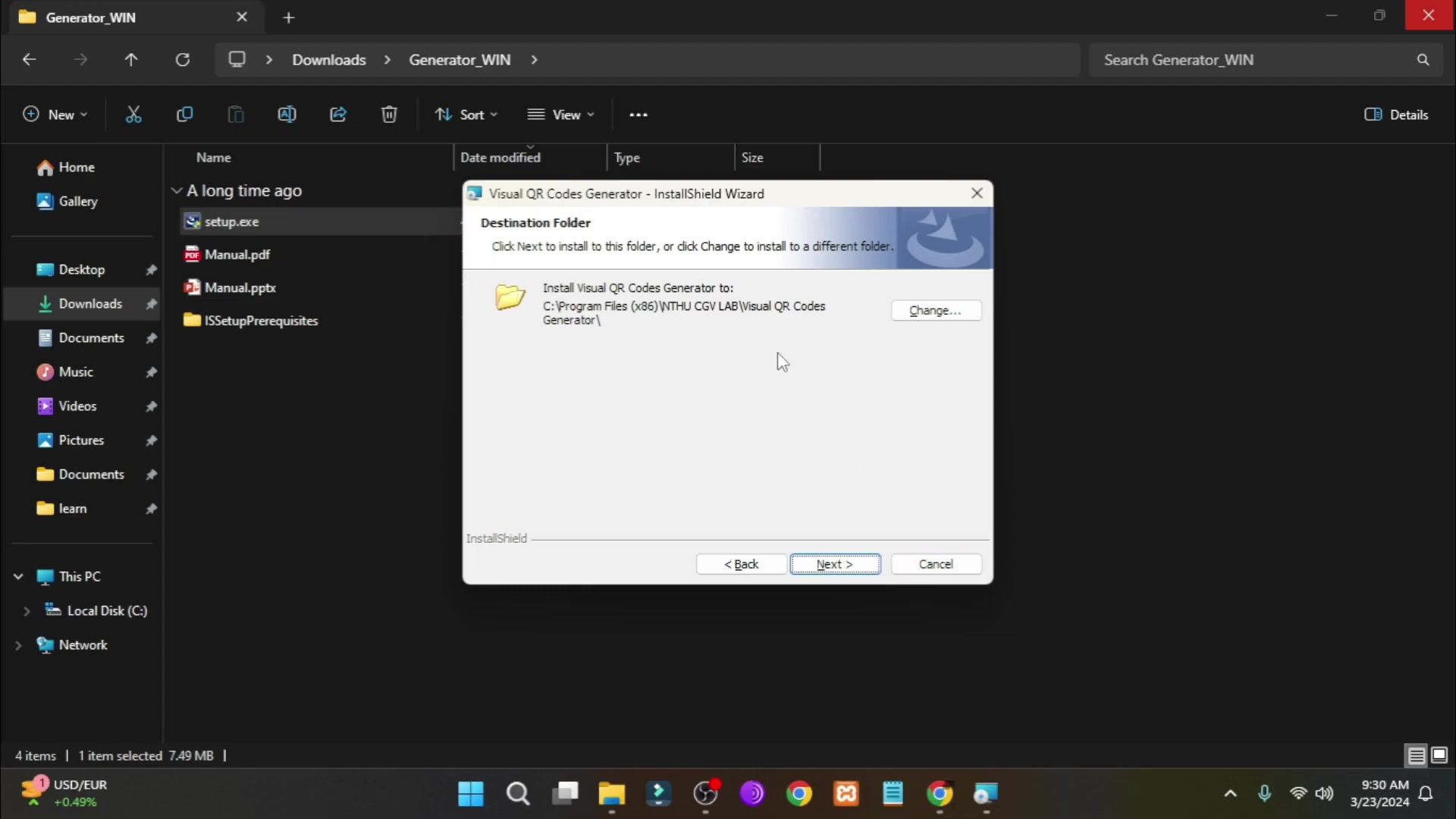
Unlike proprietary software that might require a subscription or specific hardware, Halftone QR Codes operates through a simple interface, making it accessible to anyone with a basic computer and an internet connection.
The tool is based on C++ programming intended for image transformation research, which makes it lightweight and efficient, capable of running smoothly on less powerful systems. The best part is that it is completely free, meaning you can experiment with creating beautiful visual QR codes without any financial constraints. This ease of access and affordability make Halftone QR Codes an ideal choice for educators, artists, and small businesses aiming to innovate their engagement strategies. It offers a perfect Blend of functionality and artistic creativity, all while removing the usual barriers of cost and complexity.
Halftone QR Code Generator is available on this website https://cgv.cs.nthu.edu.tw/projects/Recreational_Graphics/Halftone_QRCode/. You may also refer to the link in the video description.
Step-by-Step Tutorial: Crafting Your Own QR Code Art
Preparing Your Image
The foundation of an artistic QR code starts with the right image. While the process is adaptable to various visuals, adhering to specific guidelines ensures optimal results:
- Square Format: To maintain the QR code’s readability and aesthetic, begin with a square image. If your image isn’t square, crop it using a basic image editor.
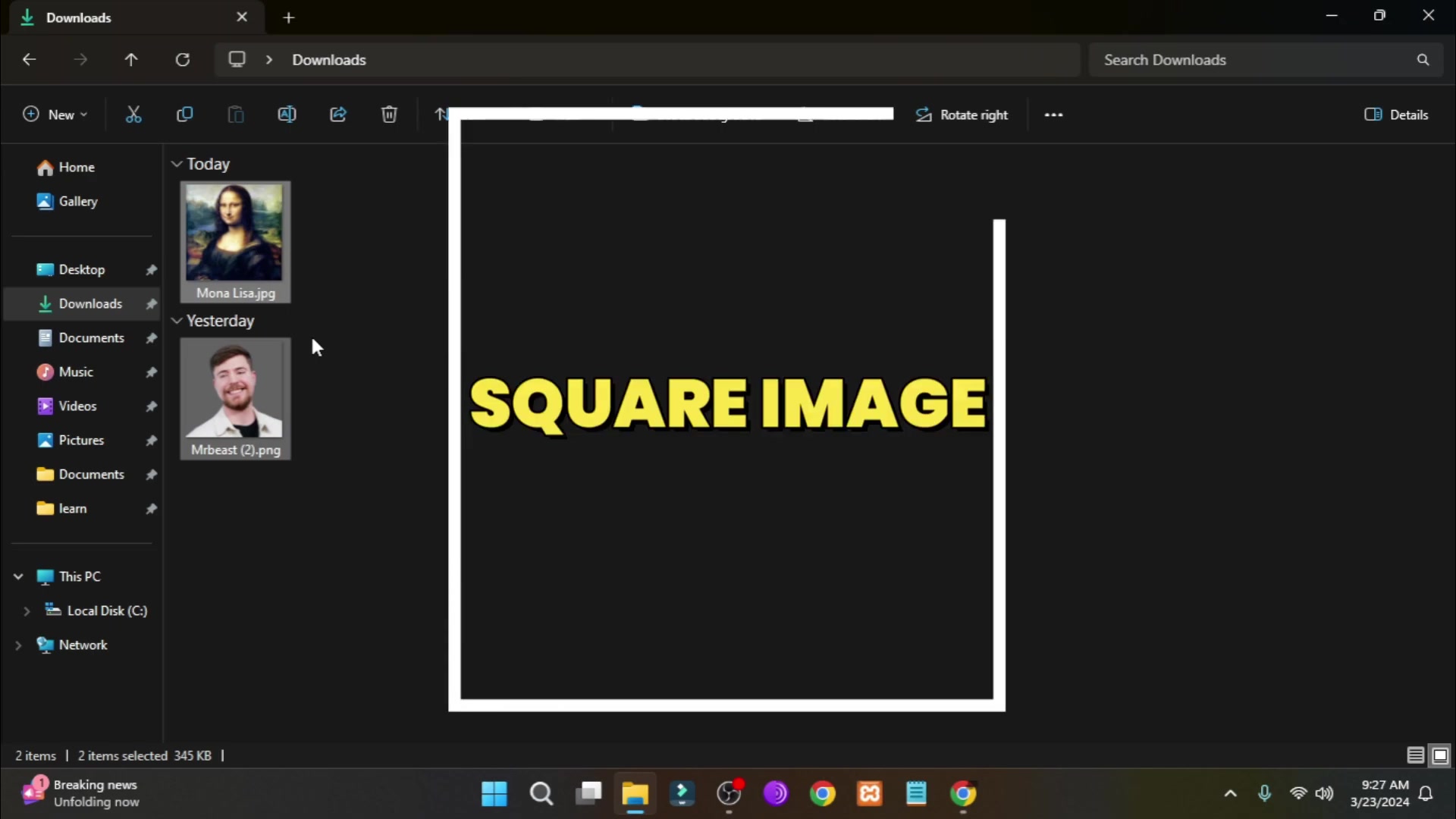
This ensures that the embedded artwork fits seamlessly within the QR code's matrix.
- Transparency for PNG: You may use
Remove.bgfor transparent image. To achieve better quality and allow for greater artistic freedom, your image should ideally be in PNG format with a transparent background. This technique lets the QR code’s structure interact more dynamically with the underlying artwork.
Downloading and Installing Halftone QR Codes
The next phase involves getting the right tool set up on your system:
- Access the Download Link: Locate the download link for the Halftone QR Codes generator, typically found at the bottom of the tool’s official webpage.
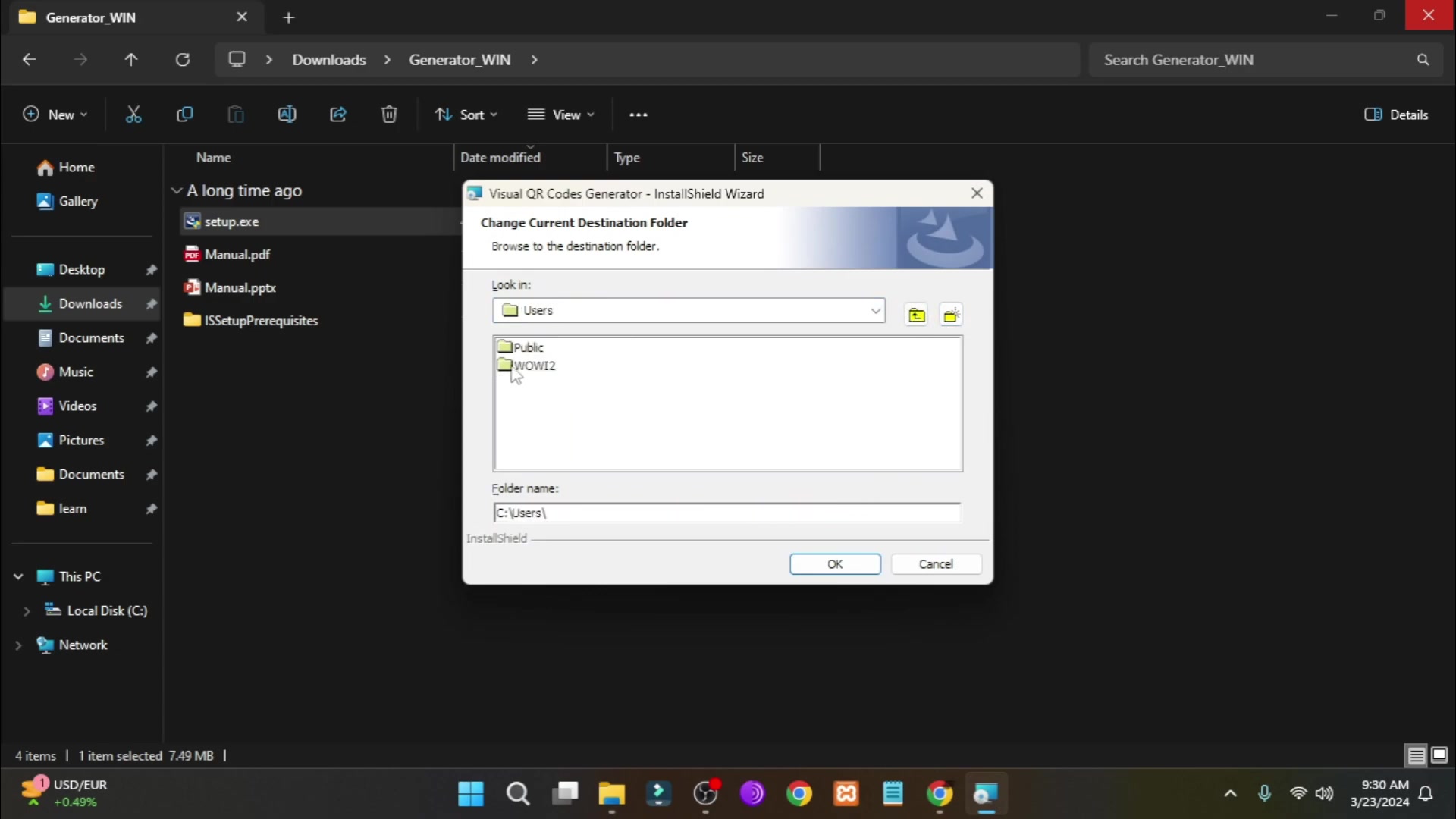
The download is straightforward and contains all the necessary files to install the application.
- Installation Process: After downloading, extract the contents of the ZIP file. Run the installer (setup.exe) and follow the on-screen prompts to install the generator on your computer. During installation, you might be prompted to choose a custom installation folder. Select one that’s easily accessible.
Generating Your Artistic QR Code
With the tool successfully installed, you’re ready to transform your image into a scannable masterpiece:
- Launch the Generator: Locate the shortcut on your desktop or in the installation folder and launch the Halftone QR Codes generator.
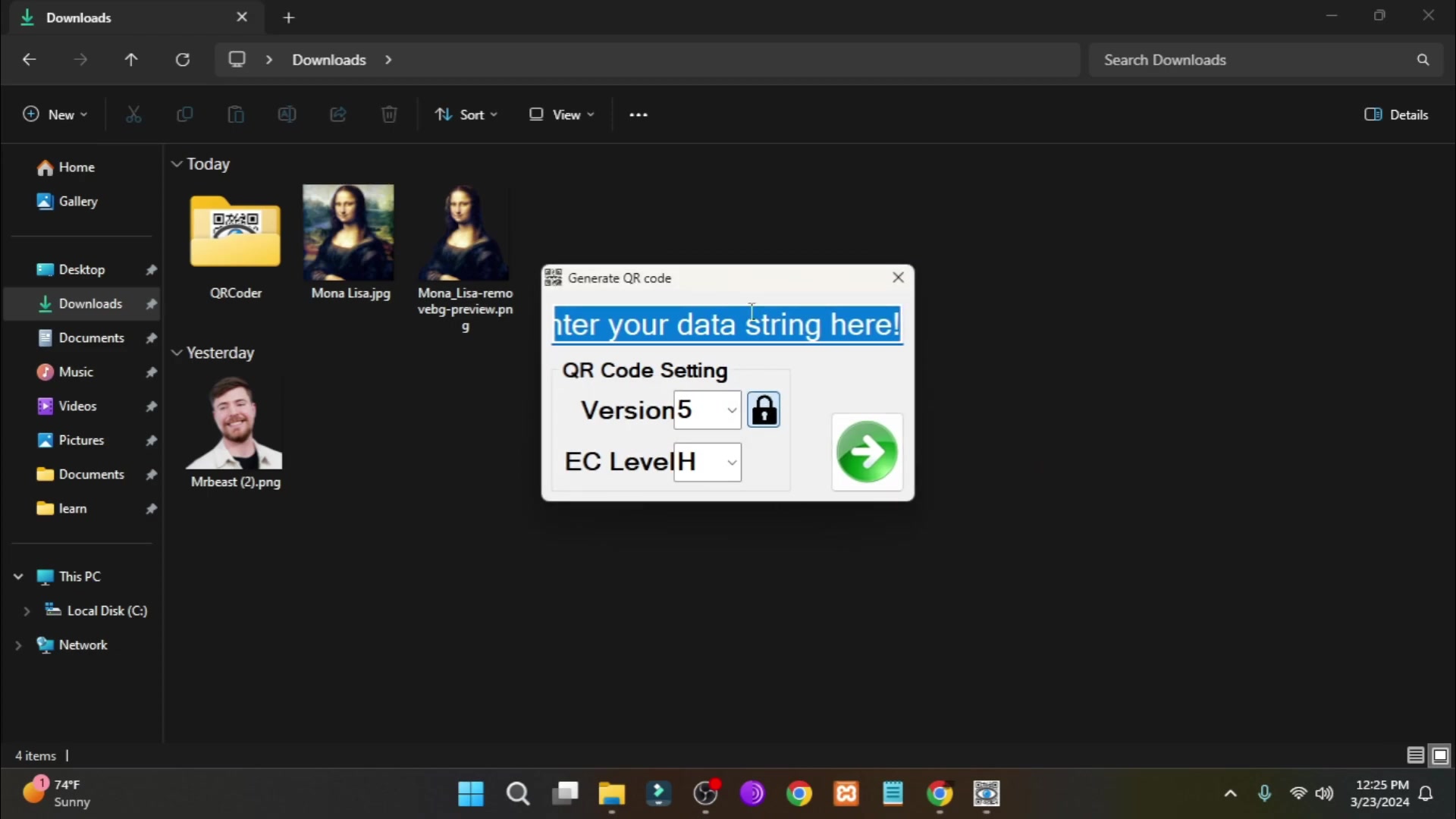
For smooth operation, run it as an administrator, ensuring it has all the necessary permissions.
- Import Your Image: Within the generator interface, select the option to import an image from your files. Remember to choose the correct file extension (usually PNG) to ensure your image is visible and can be selected.
- Enter QR Code Content: Decide what the QR code will link to – a website, a text message, or any other digital content. Enter this information into the provided field. This step defines the QR code’s function.
Fine-Tuning for Aesthetics and Functionality
The final step is to balance visual appeal with QR code functionality:
- Adjust the Version and Error Correction Levels: Experiment with the version settings to control the density and detail of the QR code.
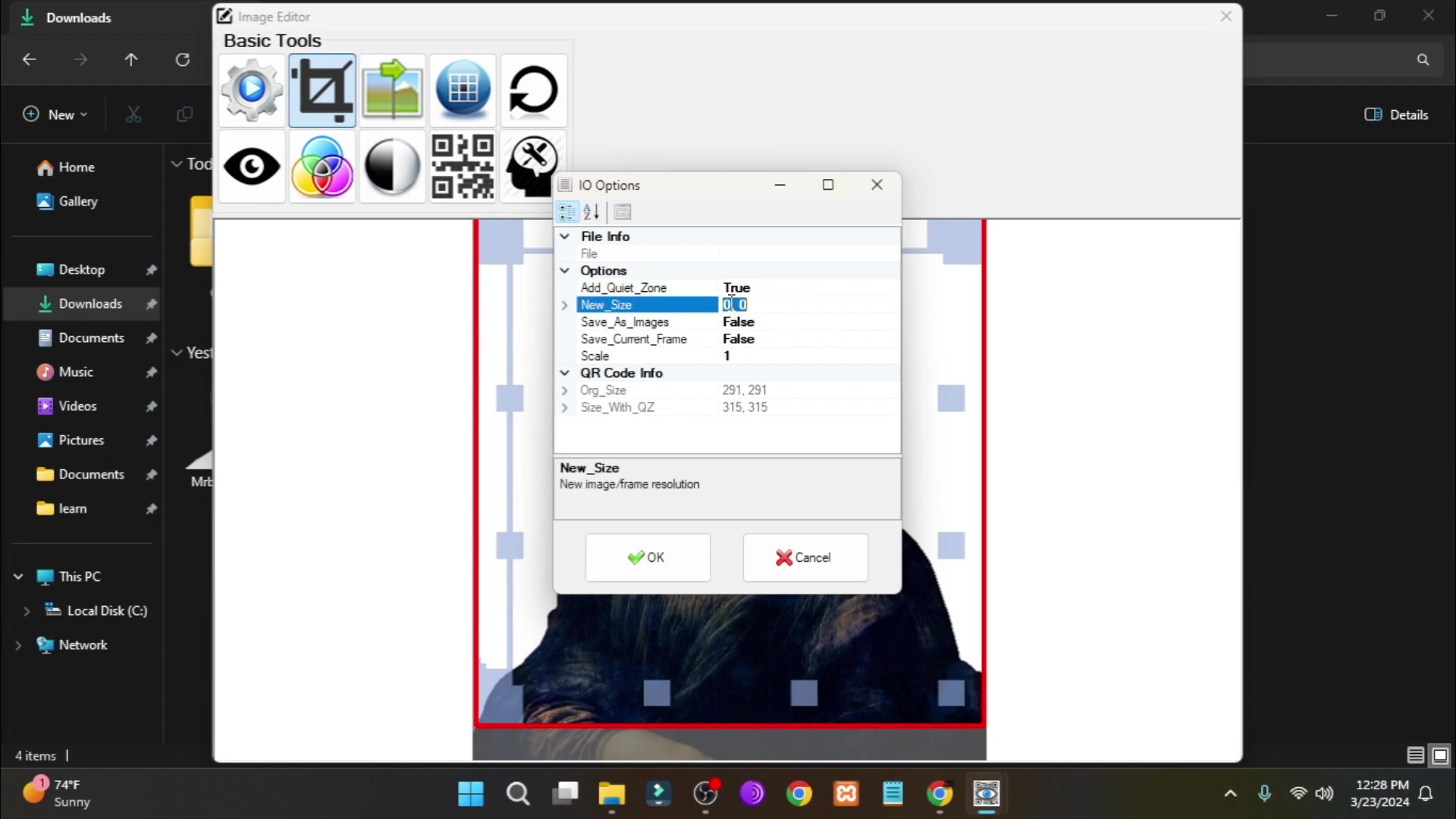
Lower versions are easier to scan but less detailed, while higher versions offer a closer resemblance to the original image but may be harder to scan, especially on small devices.
- Size Configuration: Set the image size according to your intended use. Larger sizes are suitable for banners and posters, while smaller settings work well for business cards or smaller displays. Keep the Scale appropriate so that the system will not ignore setting.
- Generate and Save: Once satisfied with the settings, generate the QR code and save it in your preferred format. Test the QR code with a scanner app on your smartphone to ensure it functions correctly. Consider if there is any need to touch-up, you may enhance image features or to add contrast to the original image






Most people like


































Report
Please select a reason for reporting
- 13 Reasons to Switch from Snapchat to Text Messaging
- 7 Powerful Speech to Text Apps to Boost Productivity
- 10 Best Speech to Text Tools for Effortless Transcription
- 13 Free Tools to Easily Transcribe Audio to Text
- 15 Surprising Ways Google's Speech-to-Text Boosts Productivity
- 7 Best Free Online Audio to Text Transcription Tools
- 9 Tips to Transcribe Speech to Text Faster and Better
- 13 Best Speech to Text Software for Windows 10 in 2023
- 7 Tips for Choosing the Best Transcriber for Audio to Text
- 11 Reasons Why Dragon Speech-to-Text Apps are Game-Changers
- 6 Secrets to Enhance Your Speech to Text Transcription
- 6 Brilliant Ways to Boost Productivity with Talk-to-Text on Your MacBook
- 6 Ways Transcription Software Converts Audio to Text
- 8 Tips to Transcribe Speech to Text Like a Pro
- 6 Reasons IBM Watson Speech to Text is a Game-Changer
- 14 Powerful Ways Talk-to-Text Improves Your Workflow
- 12 Top Windows Speech-to-Text Software for Efficient Transcription
- 12 Game-Changing Benefits of Apple's Speech to Text Technology
- 9 Powerful Use Cases for AWS Speech to Text Technology
- 10 Easy Steps to Transcribe YouTube Videos to Text
- transcription audio en texte
- online audio transcription
- free audio file transcription
- free ai audio transcription
- audio transcription service
- audio transcription online free
- audio transcription free online
- audio to transcription software
- audio and transcript
- ai audio transcription free
- voice recording to text converter
- translate voice recording to text
- record voice to text
- audio recording to text converter
- voice recording and transcription
- chatgpt voice to text
- gmail voice to text
- speech to text reader
- speech to text ai free
- speech to talk
- How SEO and Marketing Dashboards Empower Agencies to Drive Results
- How to Use AI Tools to Find Internal Linking Opportunities Across a Business Website
- Discover Your Perfect Haircut with AI Hairstyle Apps
- Free Reputation Calculator Tools: How They're Adapting to Score AI Visibility, Not Just Rankings
- Design Professional Flyers for Free on Your Phone
- Best Free Flyer Maker Apps for Android: Design Like a Pro
- How to Know If Your Business Is Ready for an AI Customer Service Agent
- Revolutionizing Storytelling: From Novels to Screenplays with AI
- Create Engaging Animated Explainer Videos with a Free AI Tool
- Stop Multi-Subscribing: Benchmark Top AI Visual Models in One Canvas
- 5 Data Problems That Stall AI Projects in Financial Compliance
- Master Storyboard Drawing: Expert Tips for Non-artists
- The Future of Smart Glasses: Explained & Assembling Guide
- DeepL Translator: The AI-Powered Translation Tool
- AI Video Upscaling: Top Tools Compared for Enhanced Quality
- Bridging the Gap: How One Indie Developer Solved the "Art Asset Nightmare" Using AI Style Transfer
- How I Direct Consistent AI Clips: A Hands-On Guide to Multi-Model Generation
- My Honest Review of VideoAI: The Ultimate Character Voice Generator I've Been Using Lately
- Why do so many AI tools underdeliver for online stores?
- My Brand New Logo: AI-Powered Logo Design for Startups

Copyright ©2026 toolify