































Table of Contents
- Key Points
- Unveiling DeepSeek R1
- Bolt.DIY: Your Free AI-Powered Development Platform
- How to Use DeepSeek R1 with Bolt.DIY
- DeepSeek R1 Pricing on Hyperbolic
- The advantages and disadvantages of Bolt.DIY
- Key Features of DeepSeek R1
- Use Cases for DeepSeek R1 and Bolt.DIY
- Frequently Asked Questions
- Related Questions



Unveiling DeepSeek R1
The Rise of Open Source AI
The AI landscape is witnessing a paradigm shift with the emergence of powerful open-source models.
DeepSeek R1 is the most powerful open-source model ever created. Its performance on benchmark tests is challenging proprietary giants, showcasing the potential of community-driven AI development. The accessibility and collaborative nature of open-source AI are accelerating innovation and democratizing access to advanced technology. This is the new frontier of AI, and DeepSeek R1 is leading the charge. This powerful language model is proving its worth with developers everywhere integrating it into their dev tools. The power of this is insane, its capabilities are extremely impressive, and its integration into platforms such as Bolt.DIY have given developers access to unparalleled capabilities.
DeepSeek R1 Performance Overview
DeepSeek R1's groundbreaking architecture allows it to excel in various language tasks. One of the primary reasons for DeepSeek R1's adoption is its capacity to operate at a performance level superior to its open-source alternatives. DeepSeek R1 consistently outperforms other popular AI language models, demonstrating its sophisticated design and efficiency. The community is excited about DeepSeek R1's potential for various applications, and benchmark tests demonstrate results that equal those of premium proprietary models.
Developers are actively working with the new model, pulling all-nighters to integrate it into their dev tools. Many are also discovering that many of those tools sit behind a paywall, which makes free options like Bolt.DIY and the hyperbolic R1 model extremely attractive.
Bolt.DIY: Your Free AI-Powered Development Platform
Introducing Bolt.DIY
Bolt.DIY aims to bridge the gap by providing a completely open-source development environment.

Unlike many paid tools, Bolt.DIY is community-driven, led by Cole Medin. Bolt.DIY allows users to Prompt, run, edit, and deploy full-stack applications on the web using the LLM of their choice. It aims to be a no-code solution.
Features and Capabilities
Bolt.DIY simplifies web development by providing AI-powered capabilities. Instead of writing any lines of code, prompts are used to create functional websites and interactive pages. Here's a breakdown of how Bolt.DIY empowers developers:
- AI-Powered Code Generation: Generate full-stack application code using simple prompts.
- Full-Stack Development: Create functional websites, interactive pages, and animations.
- Open Source and Free: Access all features without subscription fees or paywalls.
- Community-Driven: Benefit from continuous updates and improvements driven by a community of developers.
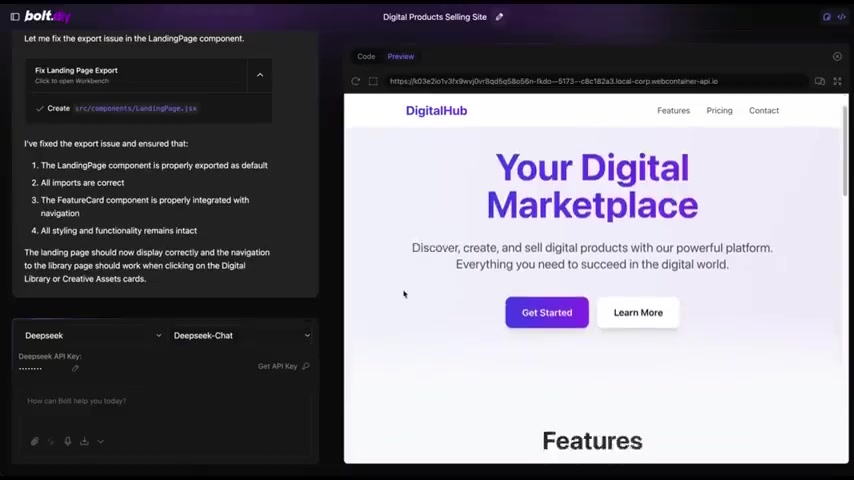
Continually developing with the aid of an amazing community, Bolt.DIY is free and open-source.
Bolt.DIY provides an accessible and powerful platform for AI-assisted web development.
Bolt.DIY Success Stories
Bolt.DIY has seen a userbase quickly develop that has used the platform for a variety of innovative AI-assisted web-development projects.

The capacity to generate animations, chatbots, and code entire pages are all a possibility that Bolt.DIY can provide. It's also been proven to assist in creating fully functional websites.
How to Use DeepSeek R1 with Bolt.DIY
Accessing DeepSeek R1
You will need to either install DeepSeek R1 locally with Ollama or get a free API key from Hyperbolic.
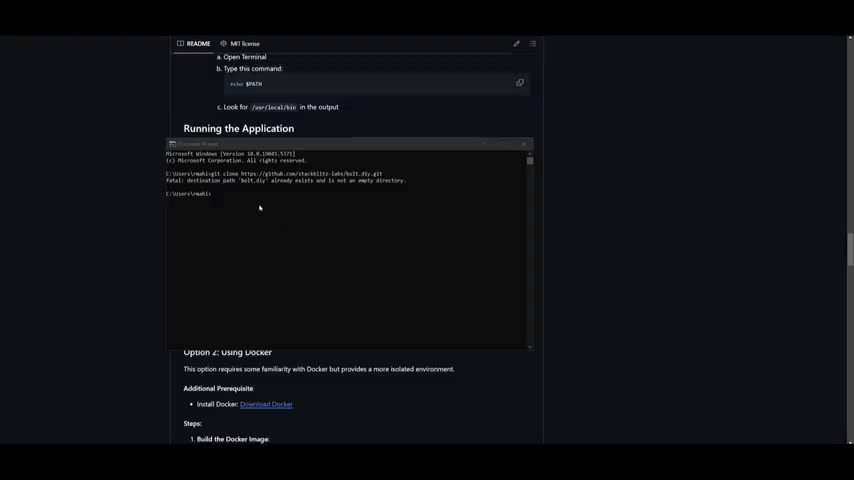
Here’s how to set up R1 on Bolt.DIY:
Step 1: Cloning the Bolt.DIY Repository
First, you will need to clone Bolt.DIY.
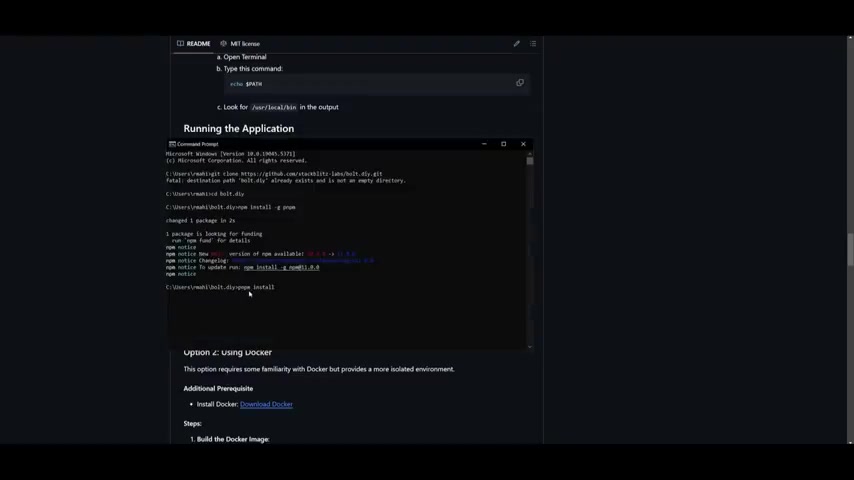
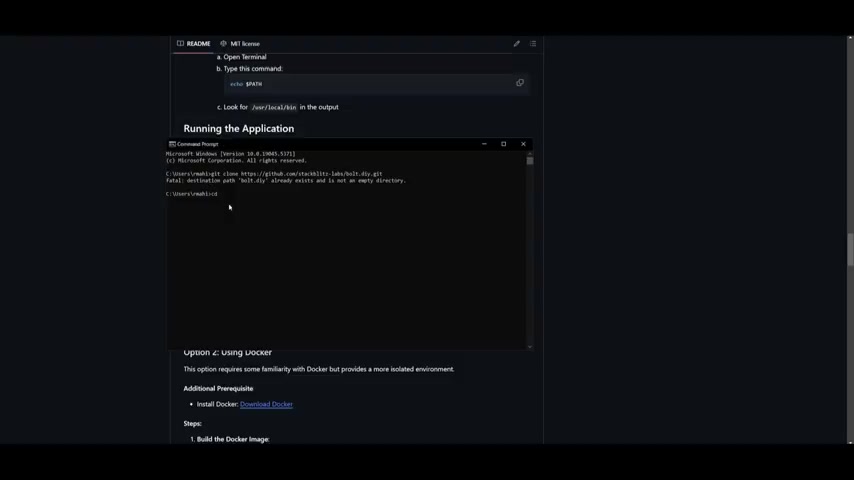
You will need Git to clone the repository locally. Open a command prompt or terminal and run the following command:
git clone [https://github.com/stackblitzlab/bolt.diy.git](https://github.com/stackblitzlab/bolt.diy.git)This command downloads the Bolt.DIY source code to your local machine.
Step 2: Navigating to the Bolt.DIY Directory
In the command prompt or terminal, navigate to the Bolt.DIY directory that you just cloned:
cd bolt.diyThis command changes the current directory to the Bolt.DIY project folder.
Step 3: Installing Dependencies
Bolt.DIY requires several dependencies to run correctly. Install them using the following command:
npm install -g pnpmAfterwards, run:
pnpm installStep 4: Starting the Application
To start the Bolt.DIY application, run:
pnpm run devStep 5: Accessing Bolt.DIY in Your Browser
Once the application is running, open your web browser and navigate to the address provided in the command prompt or terminal.
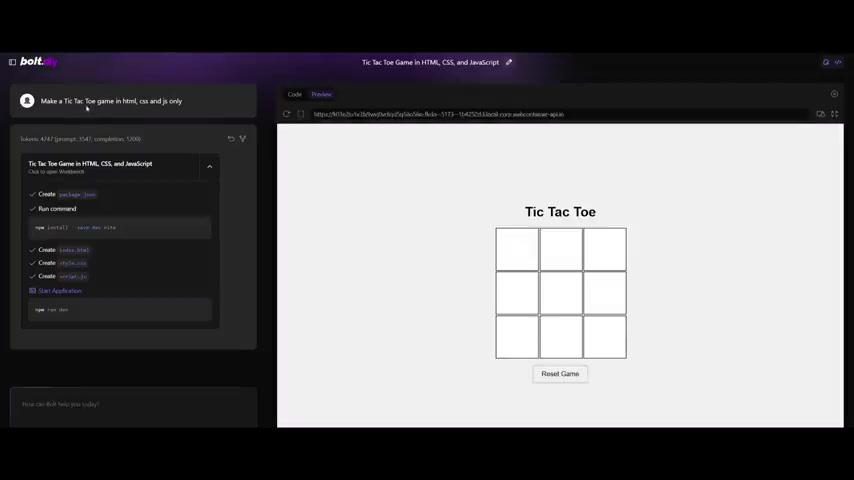
This will typically be localhost:5173. You should now see the Bolt.DIY interface.
Step 6: Configuring DeepSeek R1
To connect Bolt.DIY to DeepSeek R1, you can use a DeepSeek API key, a Hyperbolic API key, or use a local Ollama install.
Setting up your Deepseek R1 with Hyperbolic's API
You will need to obtain an API key from Hyperbolic.
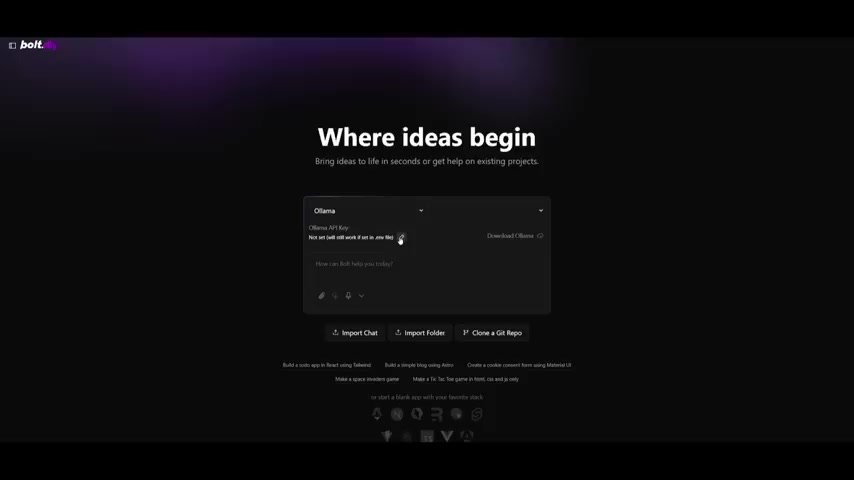
Open the main interface of Bolt.DIY, select DeepSeek R1 from the dropdown menu, click the pencil icon, and paste your API key. Hyperbolic provides free credit to test DeepSeek R1, allowing you to experiment without upfront costs.
Using Ollama's installation of Deepseek R1
You will need to download Ollama to access Deepseek R1 for your system, and download Deepseek R1 from the service. Go to the dropdown menu and find Ollama. Afterwards, follow their instructions to install Deepseek R1 from the Ollama service. The advantages to Ollama include increased speed, as well as access to many other smaller versions of the model. These can assist with a variety of more specific tasks. A high-end PC is needed to run the 7 billion parameter version.
Step 7: Building Your First Full-Stack Application
Now that you have connected Bolt.DIY to DeepSeek R1, you can start building your first full-stack application. Use simple prompts to describe your desired application, and let Bolt.DIY generate the code for you. You can then edit and deploy the application directly from the Bolt.DIY interface. Start generating and enjoy!
DeepSeek R1 Pricing on Hyperbolic
Understanding Hyperbolic's Token-Based Pricing
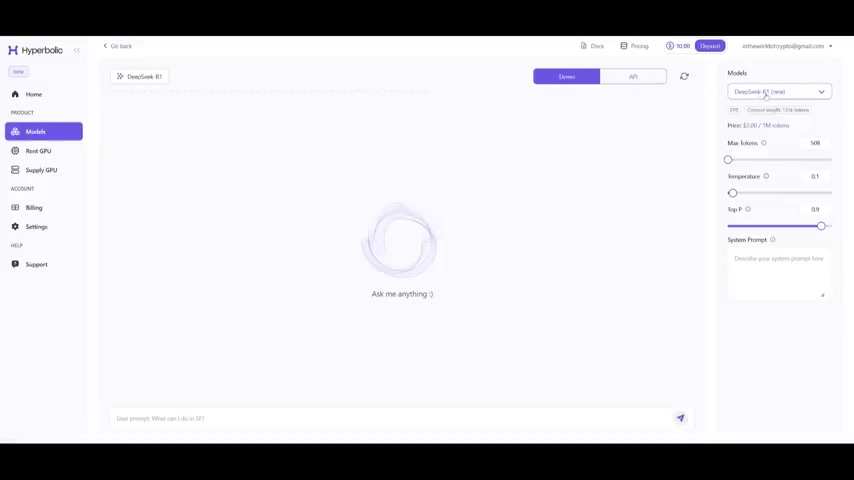
On Hyperbolic, DeepSeek R1 is priced at $2.00 per 1 million tokens. New users receive $10 in free credits, allowing for experimentation without initial costs. This token-based system allows users to pay only for the AI resources they consume.
This makes Bolt.DIY and Hyperbolic extremely attractive for developers.
Key Features of DeepSeek R1
Revolutionizing AI Development
DeepSeek R1 has various features that make it a Game changer in the AI landscape:
- Top-Tier Performance: Outperforms proprietary models in some benchmark tests.
- Free Access: Hyperbolic provides free API access to DeepSeek R1, lowering the barrier to entry.
- Full-Stack Generation: Generates front-end and back-end code, streamlining the development process.
- Ease of Use: Requires no coding knowledge, making it accessible to non-technical users.
The updates to platforms like Bolt.DIY consistently streamline and improve the software.





Most people like



































Report
Please select a reason for reporting
- 13 Reasons to Switch from Snapchat to Text Messaging
- 7 Powerful Speech to Text Apps to Boost Productivity
- 10 Best Speech to Text Tools for Effortless Transcription
- 13 Free Tools to Easily Transcribe Audio to Text
- 15 Surprising Ways Google's Speech-to-Text Boosts Productivity
- 7 Best Free Online Audio to Text Transcription Tools
- 9 Tips to Transcribe Speech to Text Faster and Better
- 13 Best Speech to Text Software for Windows 10 in 2023
- 7 Tips for Choosing the Best Transcriber for Audio to Text
- 11 Reasons Why Dragon Speech-to-Text Apps are Game-Changers
- 6 Secrets to Enhance Your Speech to Text Transcription
- 6 Brilliant Ways to Boost Productivity with Talk-to-Text on Your MacBook
- 6 Ways Transcription Software Converts Audio to Text
- 8 Tips to Transcribe Speech to Text Like a Pro
- 6 Reasons IBM Watson Speech to Text is a Game-Changer
- 14 Powerful Ways Talk-to-Text Improves Your Workflow
- 12 Top Windows Speech-to-Text Software for Efficient Transcription
- 12 Game-Changing Benefits of Apple's Speech to Text Technology
- 9 Powerful Use Cases for AWS Speech to Text Technology
- 10 Easy Steps to Transcribe YouTube Videos to Text
- transcription audio en texte
- online audio transcription
- free audio file transcription
- free ai audio transcription
- audio transcription service
- audio transcription online free
- audio transcription free online
- audio to transcription software
- audio and transcript
- ai audio transcription free
- voice recording to text converter
- translate voice recording to text
- record voice to text
- audio recording to text converter
- voice recording and transcription
- chatgpt voice to text
- gmail voice to text
- speech to text reader
- speech to text ai free
- speech to talk
- Meshy AI: How to Create 3D Models from Text and Images
- How SEO and Marketing Dashboards Empower Agencies to Drive Results
- How to Use AI Tools to Find Internal Linking Opportunities Across a Business Website
- Discover Your Perfect Haircut with AI Hairstyle Apps
- Free Reputation Calculator Tools: How They're Adapting to Score AI Visibility, Not Just Rankings
- Design Professional Flyers for Free on Your Phone
- Best Free Flyer Maker Apps for Android: Design Like a Pro
- How to Know If Your Business Is Ready for an AI Customer Service Agent
- Revolutionizing Storytelling: From Novels to Screenplays with AI
- Create Engaging Animated Explainer Videos with a Free AI Tool
- Automate Lead Generation: A Comprehensive Guide with AI Agents
- Revideo.io: The Future of Reverse Video Search Technology
- Revolutionize Learning: Discover Quizzes AI for Engaging Interactive Quizzes
- Revolutionizing Email Marketing Agency with AI
- Breaking the Character Drift Dilemma: A Practical Test of Smart Shot
- Meshy AI: How to Create 3D Models from Text and Images
- ASOMobile Helps Teams Benchmark App Store Screenshots Against Competitors
- How to Match LMS Software With Your Organization's Training Plan
- How to Convert BTC to HNT
- Unleashing the Power of AI: Cognizant's Roadmap for Transformation

Copyright ©2026 toolify