































Table of Contents
- Key Points
- Setting Up the Django Backend
- Integrating Google's Gemini AI
- Step-by-Step Guide: Building the Music Recommendation App
- Pricing for the Tech Stack
- Advantages and Disadvantages of Using Django, React, and Gemini AI
- Core Features of the Music Recommendation AI
- Use Cases for the Music Recommendation AI
- Frequently Asked Questions
- Related Questions


Setting Up the Django Backend
Understanding Django Models
Django models are Python classes that subclass django.db.models.Model. Each model represents a database table, and each attribute of the model represents a database column. Django provides a rich set of field types to define the data that can be stored in each column. In our Music recommendation project, we define three models: Theme, Recommendation, and Link.
- Theme: Represents the themes or moods associated with a song. The
Thememodel has two fields:name(CharField) anddescription(TextField). - Recommendation: Stores the music recommendations generated by the AI. The
Recommendationmodel includes fields likename,artist,album,themes(ManyToManyField),release_date, andalbum_art. - Link: Holds the URLs where the song can be listened to, such as Spotify, Apple Music, and YouTube. The
Linkmodel includes fields forrecommendation,youtube_link,spotify_link, andapple_music_link. These models will help to structure data and create an orgenized database for our project.
Creating API Endpoints with Django REST Framework
Django REST Framework (DRF) is a powerful and flexible toolkit for building Web APIs. DRF makes it easy to serialize data, handle authentication, and create browsable APIs.
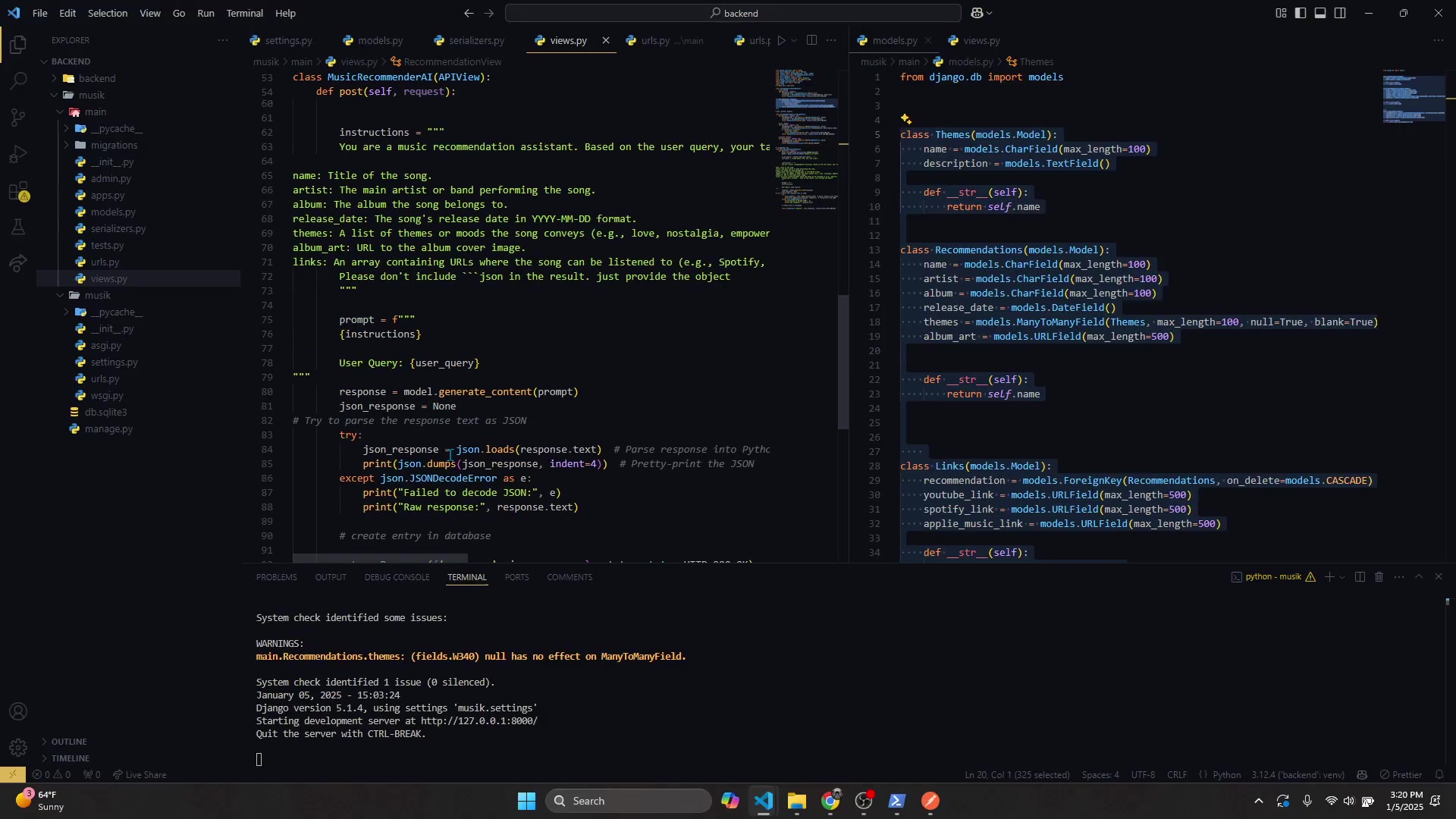
To create API endpoints for our music recommendation app, we'll use DRF's APIView class and define methods for handling HTTP requests.
Here's how we create the MusicRecommendationAIView:
- Import necessary modules and set up the API key for Google's Gemini AI.
- Define the
postmethod to handle incoming POST requests. This method retrieves the user query from the request data. - Use Google's Gemini AI to generate music recommendations based on the user query.
- Parse the JSON response from the AI and save the data to the database.
- Return a JSON response indicating the status of the request.
Integrating Google's Gemini AI
Configuring the Gemini AI API
Google's Gemini AI provides powerful capabilities for generating creative and informative text. In our music recommendation app, we use Gemini AI to suggest songs based on user queries.
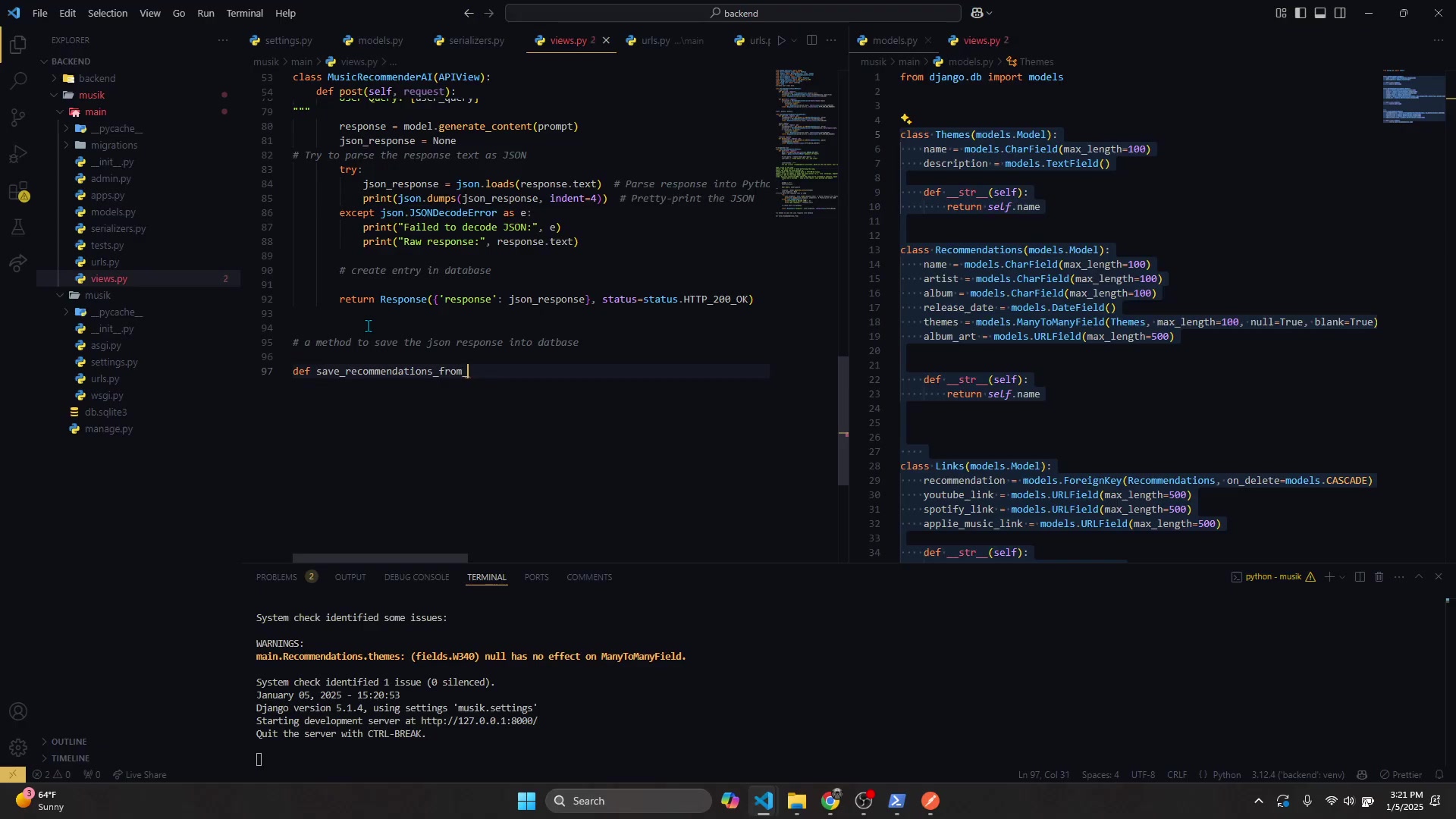
To integrate Gemini AI, you'll need to:
- Obtain an API key from Google AI Studio.
- Configure the Gemini AI model using the
genai.configuremethod. - Use the
genai.GenerativeModelto generate content based on a Prompt.
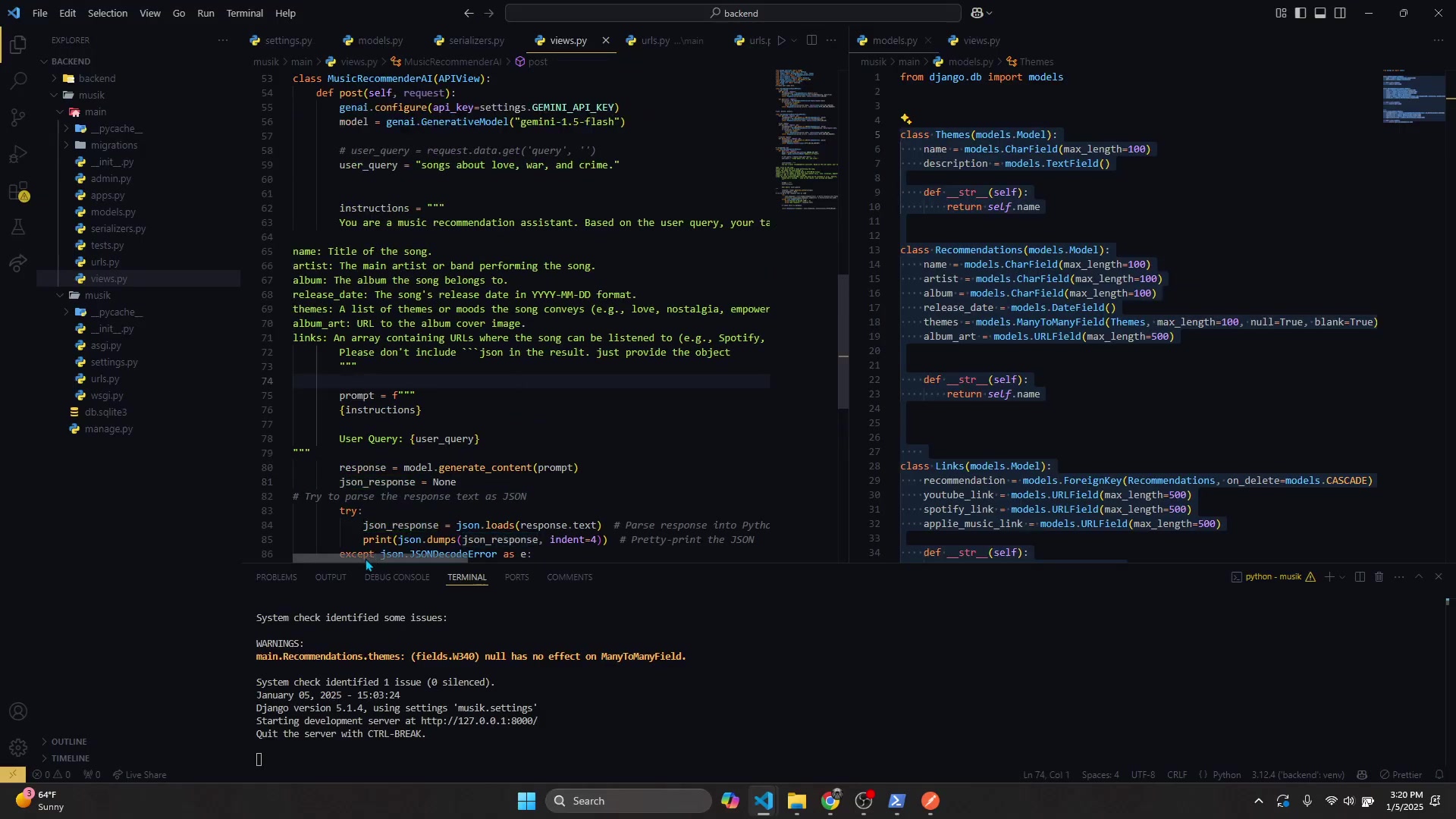
The prompt includes instructions for the AI to act as a music recommendation assistant, specify the desired format for the response (JSON), and list the attributes to include for each song (name, artist, album, themes, release date, album art, and links). Ensure that you provide clear and concise instructions to get the best results from the AI.
By using Gemini AI, our music recommendation app can dynamically generate personalized song suggestions, making the user experience more engaging and tailored to their preferences.
Crafting Effective Prompts for Music Recommendations
Crafting effective prompts is essential to getting high-quality music recommendations from Gemini AI. The prompt should clearly instruct the AI to act as a music recommendation assistant and specify the format for the response.
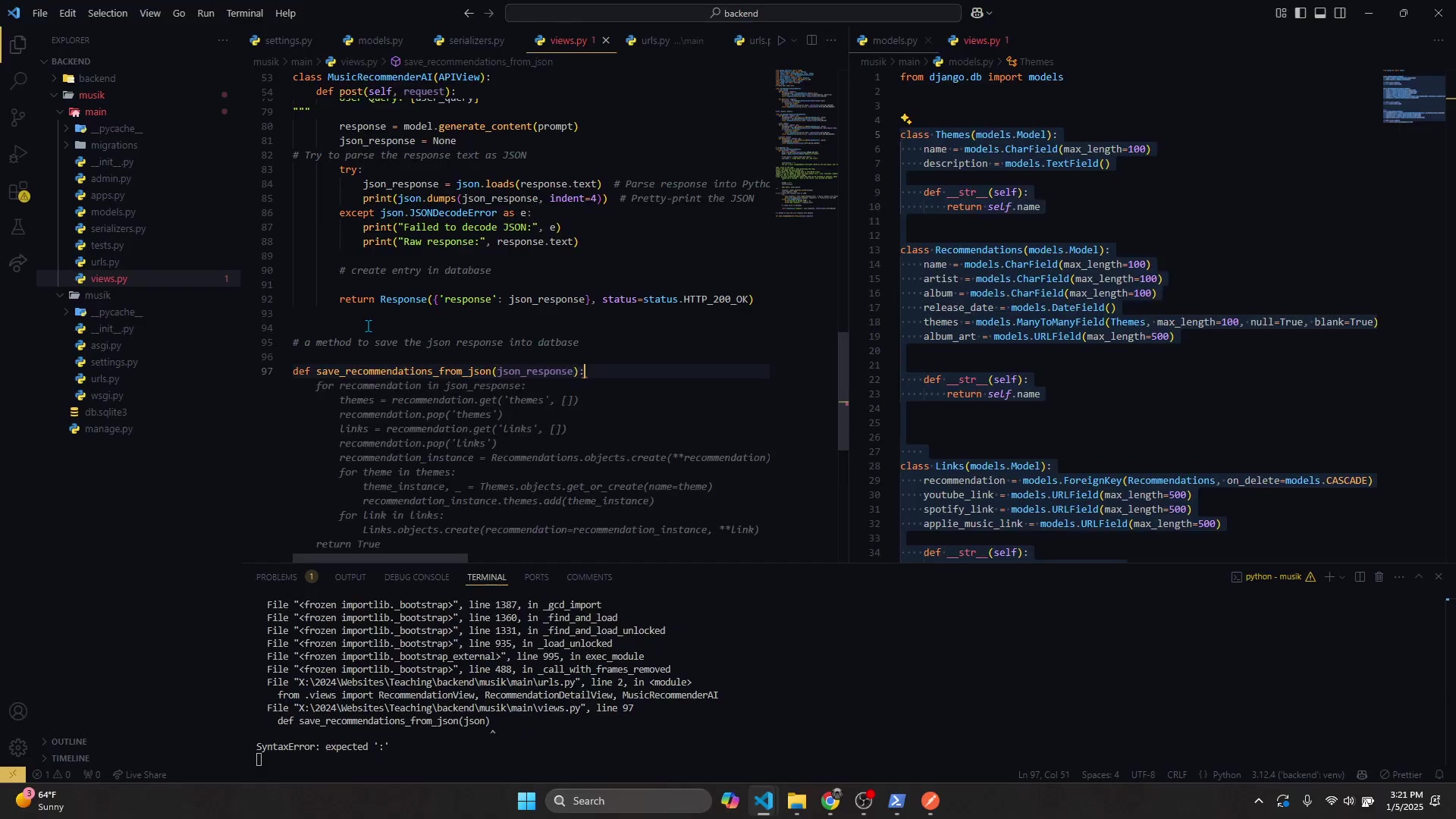
In our project, the prompt includes the following instructions:
- Act as a music recommendation assistant.
- Recommend five songs that fit the user's query.
- Provide the song's name, artist, album, themes, release date, album art, and links.
- Return the response in JSON format.
Here's an example of a well-crafted prompt:
Instructions: You are a music recommendation assistant. Based on the user query, your task is to recommend 5 songs that fit the query and performing the song.
name: Title of the song.
artist: The main artist or band performing the song.
album: The album the song belongs to.
release date: The song's release date in YYYY-MM-DD format.
themes: A list of themes or moods the song conveys (e.g., love, nostalgia, empowerment, sadness).
album_art: URL to the album cover image.
links: An array containing URLs where the song can be listened to (e.g., Spotify, Apple Music, YouTube).
Please don't include  json  in the result. Just provide the object.```
By providing clear and specific instructions, you can guide the AI to generate accurate and relevant music recommendations that enhance the user experience.
Step-by-Step Guide: Building the Music Recommendation App
Step 1: Setting Up the Django Project
First, create a new Django project and app. Navigate to your desired project directory and run the following commands:
django-admin startproject music_recommender
cd music_recommender
python manage.py startapp music
This will create a new Django project named music_recommender and an app named music.
Step 2: Defining the Models
In the music app, define the models in models.py to represent themes, recommendations, and links. Here's an example of how to define the models:
from django.db import models

class Theme(models.Model):
    name = models.CharField(max_length=100)
    description = models.TextField()

    def __str__(self):
        return self.name

class Recommendation(models.Model):
    name = models.CharField(max_length=100)
    artist = models.CharField(max_length=100)
    album = models.CharField(max_length=100)
    themes = models.ManyToManyField(Theme, null=True, blank=True)
    release_date = models.CharField(max_length=100)
    album_art = models.URLField(max_length=500)

    def __str__(self):
        return self.name

class Link(models.Model):
    recommendation = models.ForeignKey(Recommendation, on_delete=models.CASCADE)
    youtube_link = models.URLField(max_length=500)
    spotify_link = models.URLField(max_length=500)
    apple_music_link = models.URLField(max_length=500)

    def __str__(self):
        return self.recommendation.name
Remember to run migrations after defining the models to create the corresponding database tables.
Step 3: Creating API Views
Use Django REST Framework to create API views for handling requests and generating music recommendations.
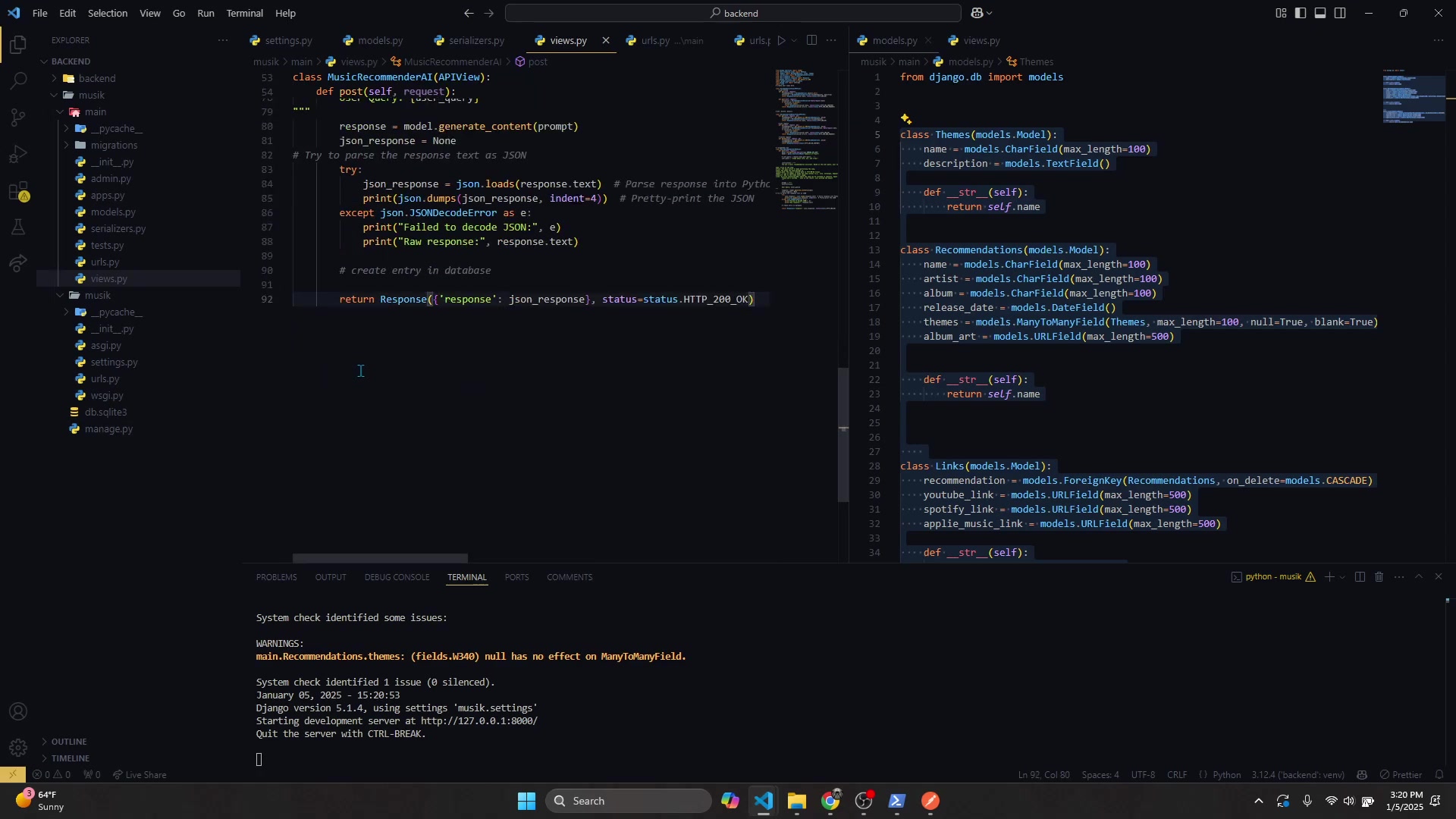
In views.py, define the MusicRecommendationAIView as follows:
import genai
from rest_framework.views import APIView
from rest_framework.response import Response
from .models import Theme, Recommendation, Link
import json
from rest_framework import status

genai.configure(api_key=settings.GEMINI_API_KEY)

class MusicRecommendationAIView(APIView):
    def post(self, request):
        user_query = request.data.get('query', '')
        prompt = f"""You are a music recommendation assistant. Based on the user query, your task is to recommend 5 songs that fit the query and performing the song.
name: Title of the song.
artist: The main artist or band performing the song.
album: The album the song belongs to.
release date: The song's release date in YYYY-MM-DD format.
themes: A list of themes or moods the song conveys (e.g., love, nostalgia, empowerment, sadness).
album_art: URL to the album cover image.
links: An array containing URLs where the song can be listened to (e.g., Spotify, Apple Music, YouTube).
Please don't include  json  in the result. Just provide the object."""

        model = genai.GenerativeModel('gemini-1.5-flash')
        response = model.generate_content(prompt)
        json_response = None

        try:
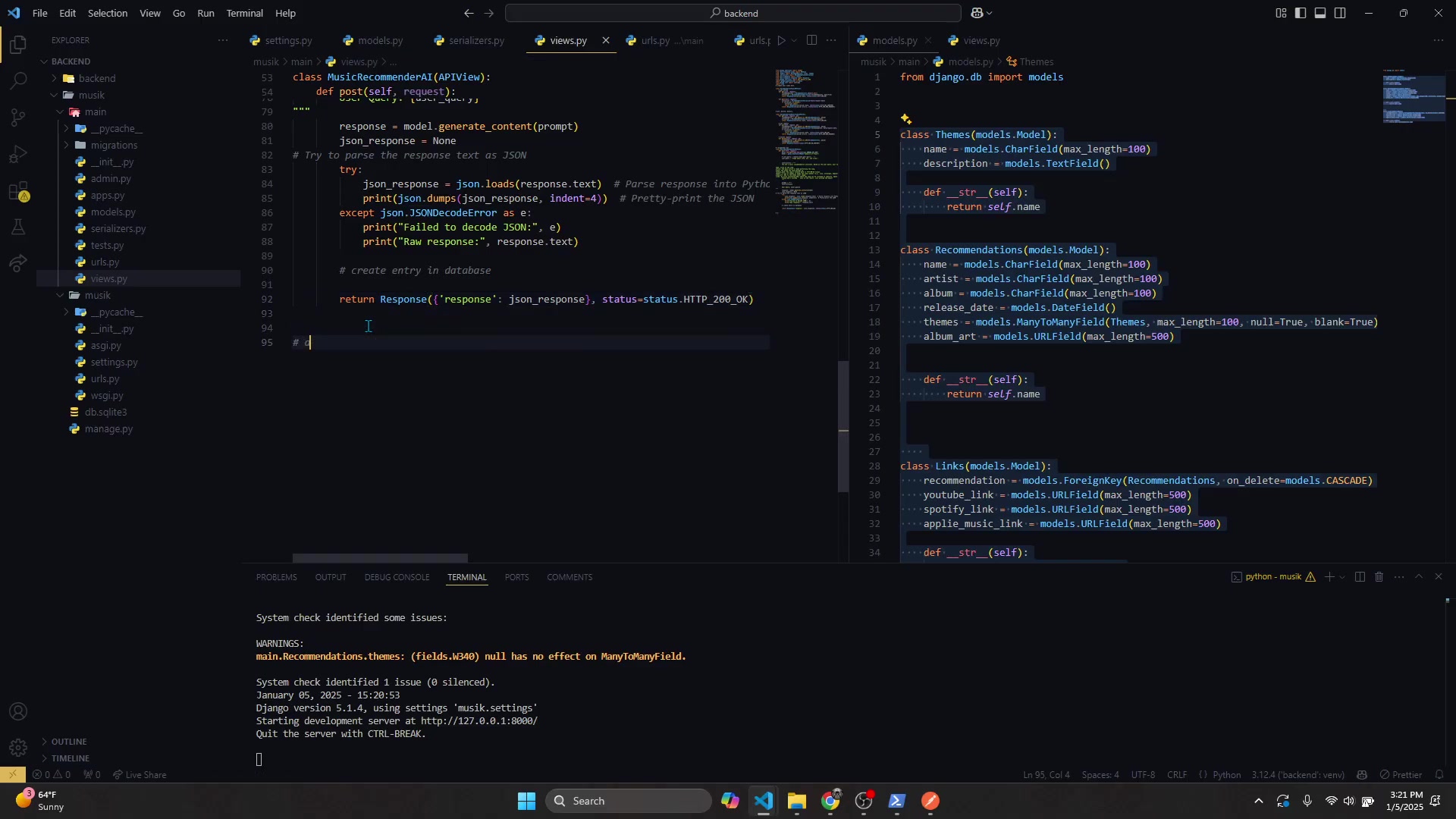
            json_response = json.loads(response.text)
        except json.JSONDecodeError as e:
            print(f"Failed to decode JSON: {e}")
            return Response({"error": "Failed to decode JSON"}, status=status.HTTP_400_BAD_REQUEST)

        def save_recommendations_from_json(json_response):
            recommendations = json_response.get('response', [])

            for rec in recommendations:
                theme_objects = []
                for theme in rec.get('themes'):
                    theme_obj, created = Theme.objects.get_or_create(name=theme)
                    theme_objects.append(theme_obj)

                recommendation = Recommendation.objects.create(
                    name=rec.get('name'),
                    artist=rec.get('artist'),
                    album=rec.get('album'),
                    release_date=rec.get('release_date'),
                    album_art=rec.get('album_art'),
                )

                recommendation.themes.set(theme_objects)

                Link.objects.create(
                    recommendation=recommendation,
                    youtube_link=rec.get('links')[0],
                    spotify_link=rec.get('links')[1],
                    apple_music_link=rec.get('links')[2]
                )

        save_recommendations_from_json(json_response)
return Response({"response": response.status}, status=status.HTTP_200_OK)Core Features of the Music Recommendation AI
Key Functionalities
Our music recommendation AI boasts several core features that make it a valuable tool for music enthusiasts.
These features include:
- AI-Powered Recommendations: Leverages Gemini AI to provide personalized music suggestions based on user queries.
- Database Storage: Utilizes Django models to store and manage music data, themes, and links.
- API Endpoints: Django REST Framework provides API endpoints for handling requests and responses.
- Frontend Interface: A React-based user interface for seamless interaction and data display.
- JSON Parsing: Efficiently parses JSON responses from the AI to extract and store relevant information.
These features combined deliver a robust and user-friendly music recommendation experience.
Use Cases for the Music Recommendation AI
Real-World Applications
The music recommendation AI can be applied in various scenarios to enhance user experience and engagement.
Here are a few key use cases:
- Music Streaming Platforms: Enhance personalized playlists and song suggestions.
- Social Media Apps: Recommend songs based on user posts and preferences.
- Event Planning: Suggest music for parties and gatherings based on event themes.
- Educational Purposes: Assist students in exploring different genres and artists.
- Fitness Apps: Create motivating workout playlists based on user preferences.
- Mood-Based Music: Suggest music to improve someone's mood.









Most people like


























Report
Please select a reason for reporting
- 13 Reasons to Switch from Snapchat to Text Messaging
- 7 Powerful Speech to Text Apps to Boost Productivity
- 10 Best Speech to Text Tools for Effortless Transcription
- 13 Free Tools to Easily Transcribe Audio to Text
- 15 Surprising Ways Google's Speech-to-Text Boosts Productivity
- 7 Best Free Online Audio to Text Transcription Tools
- 9 Tips to Transcribe Speech to Text Faster and Better
- 13 Best Speech to Text Software for Windows 10 in 2023
- 7 Tips for Choosing the Best Transcriber for Audio to Text
- 11 Reasons Why Dragon Speech-to-Text Apps are Game-Changers
- 6 Secrets to Enhance Your Speech to Text Transcription
- 6 Brilliant Ways to Boost Productivity with Talk-to-Text on Your MacBook
- 6 Ways Transcription Software Converts Audio to Text
- 8 Tips to Transcribe Speech to Text Like a Pro
- 6 Reasons IBM Watson Speech to Text is a Game-Changer
- 14 Powerful Ways Talk-to-Text Improves Your Workflow
- 12 Top Windows Speech-to-Text Software for Efficient Transcription
- 12 Game-Changing Benefits of Apple's Speech to Text Technology
- 9 Powerful Use Cases for AWS Speech to Text Technology
- 10 Easy Steps to Transcribe YouTube Videos to Text
- transcription audio en texte
- online audio transcription
- free audio file transcription
- free ai audio transcription
- audio transcription service
- audio transcription online free
- audio transcription free online
- audio to transcription software
- audio and transcript
- ai audio transcription free
- voice recording to text converter
- translate voice recording to text
- record voice to text
- audio recording to text converter
- voice recording and transcription
- chatgpt voice to text
- gmail voice to text
- speech to text reader
- speech to text ai free
- speech to talk
- Create Engaging Animated Explainer Videos with a Free AI Tool
- Stop Multi-Subscribing: Benchmark Top AI Visual Models in One Canvas
- Best Seedance 2.5 API Provider: Every Price on the Market, Checked at Source
- AI OnlyFans: How to Generate $30,000/Month (Legally)
- Transform Your Script into an Engaging Video with AI Video Maker!
- AI Marketing Automation: A Comprehensive Guide for Small Businesses
- Midjourney Alternative for Anime Art Creators: Why PixAI May Be Better for Character Workflows
- 10 Things Most People Get Wrong About AI Image Search
- AI Girlfriend Apps: Top Choices Redefining Relationships 2025
- How to Reduce Quoting Errors in Salesforce with AI-Assisted Quote Creation
- AI Resume Builders: EnhanceCV, ResumeNerd AI, & Teal Compared
- ResumeAI: Crafting ATS-Optimized Resumes with AI
- AI in Resume Writing: A New Era for Job Seekers
- AI Resume Tools: Streamline Your Job Search and Land Your Dream Role
- AI Resume Optimization: The Right Way to Land Interviews
- Crafting a Killer Resume with AI: A Step-by-Step Guide
- Crafting a Winning Resume: AI Tools and Expert Tips
- AI Job Search: Level Up Your Career with AI Automation
- Empower Your Career Journey: Dynamic Resumes with AI
- AI Resume Builder: Create Professional Resumes Effortlessly

Copyright ©2026 toolify