































Table of Contents
- Key Points
- Introduction to EchoMimic V2
- EchoMimic V2: A Step Towards Accessible Animation
- Step-by-Step Installation and Usage of EchoMimic V2
- Pricing
- Advantages and Disadvantages of Using EchoMimic V2
- Core Features in Detail
- Ideal Use Cases for EchoMimic V2
- Frequently Asked Questions About EchoMimic V2
- Related Questions



EchoMimic V2: A Step Towards Accessible Animation
Conclusion - Empowering Content Creation
In conclusion, EchoMimic V2 represents a significant step forward in accessible animation technology.
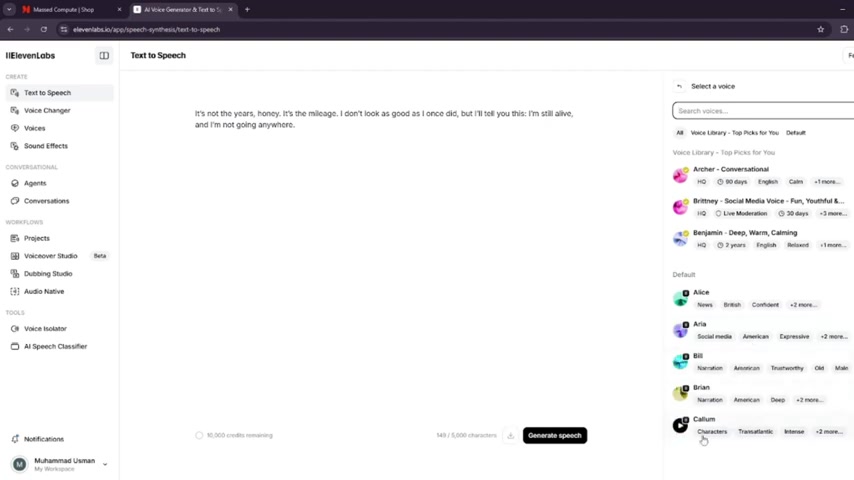
As an open-source tool, it democratizes the ability to create lifelike animated content, empowering individuals and organizations with limited resources. With its versatile applications spanning education, marketing, entertainment, and accessibility, EchoMimic V2 holds immense potential for transforming how content is created and consumed. By harnessing the power of AI and open-source collaboration, EchoMimic V2 offers a glimpse into the future of digital portrayal, where lifelike animations can be created with ease and affordability. As AI continues to evolve, tools like EchoMimic V2 will play a vital role in shaping the future of content creation, making it more accessible, engaging, and inclusive.
Step-by-Step Installation and Usage of EchoMimic V2
Preparing Your System Environment
Before installing EchoMimic V2, it's essential to ensure your system meets the necessary requirements.
This includes verifying that CUDA 11.7 or above is installed and checking your Python version. EchoMimic V2 also relies on key frameworks and libraries. Here's a breakdown:
- Verify CUDA Installation: Use the command
nvcc --versionin your terminal to check your CUDA version. If CUDA is not installed, refer to the CUDA installation guide for your Linux distribution. - Check Python Version: Ensure Python 3.10 (or a compatible version) is installed. You can verify this with
python3 --version. - Install Conda (if not installed): Conda is needed to help with the installation. Here's the documentation if you do not have Conda already installed: Miniconda installation guide for your OS.
Cloning the EchoMimic V2 Repository
The next step involves cloning the EchoMimic V2 repository from GitHub. Use the following command in your terminal:
git clone https://github.com/antgroup/echomimic_v2
cd echomimic_v2
Setting Up the Environment
There are two main options for setting up your environment: automatic and manual.
-
Option A: Automatic Setup:
Run the setup script:
sh linux_setup.sh -
Option B: Manual Setup:
-
Create a Conda environment:
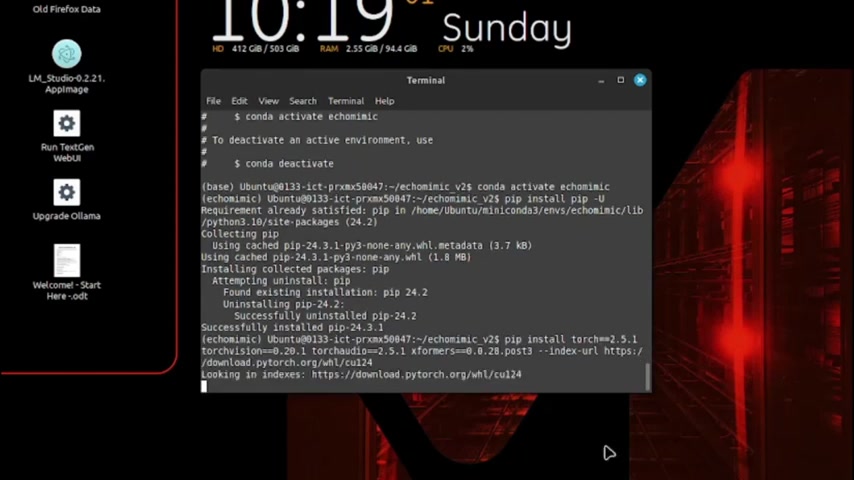
conda create -n echomimic python=3.10 conda activate echomimic -
Upgrade pip and install required packages:
pip install --upgrade pip pip install torch==2.5.1 torchvision==0.20.1 torchaudio==2.5.1 --index-url https://download.pytorch.org/whl/nightly/cpu pip install -r requirements.txt pip install --no-deps facet_pytorch==2.6.0 -
Install ffmpeg-static:
Download and decompress ffmpeg-static. Then, set the environment variable:
export FFMPEG_PATH=/path/to/ffmpeg-4.4-amd64-static -
Download Pretrained Weights:
git lfs install
git clone https://huggingface.co/BaDTeBest/EchoMimicV2_pretrained_weights
-
Run the Demo
After setting up your environment and downloading the necessary weights, you can run the demo using the following command:
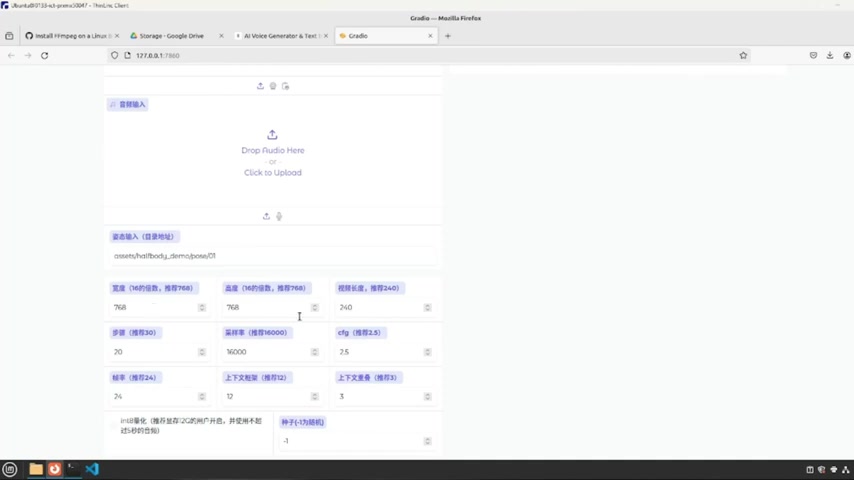
python app.pyThis command launches the EchoMimic V2 demo, allowing you to upload images and audio, adjust parameters, and generate animated videos
.
To address the Chinese language interface, use your browser's translation feature. For instance, in Firefox, you can right-click and select 'Translate Page' to switch to English. This ensures that the tool interface is more accessible and user-friendly. I recommend using Chrome so that you can Translate everything from chinese to english





Most people like


































Report
Please select a reason for reporting
- 13 Reasons to Switch from Snapchat to Text Messaging
- 7 Powerful Speech to Text Apps to Boost Productivity
- 10 Best Speech to Text Tools for Effortless Transcription
- 13 Free Tools to Easily Transcribe Audio to Text
- 15 Surprising Ways Google's Speech-to-Text Boosts Productivity
- 7 Best Free Online Audio to Text Transcription Tools
- 9 Tips to Transcribe Speech to Text Faster and Better
- 13 Best Speech to Text Software for Windows 10 in 2023
- 7 Tips for Choosing the Best Transcriber for Audio to Text
- 11 Reasons Why Dragon Speech-to-Text Apps are Game-Changers
- 6 Secrets to Enhance Your Speech to Text Transcription
- 6 Brilliant Ways to Boost Productivity with Talk-to-Text on Your MacBook
- 6 Ways Transcription Software Converts Audio to Text
- 8 Tips to Transcribe Speech to Text Like a Pro
- 6 Reasons IBM Watson Speech to Text is a Game-Changer
- 14 Powerful Ways Talk-to-Text Improves Your Workflow
- 12 Top Windows Speech-to-Text Software for Efficient Transcription
- 12 Game-Changing Benefits of Apple's Speech to Text Technology
- 9 Powerful Use Cases for AWS Speech to Text Technology
- 10 Easy Steps to Transcribe YouTube Videos to Text
- transcription audio en texte
- online audio transcription
- free audio file transcription
- free ai audio transcription
- audio transcription service
- audio transcription online free
- audio transcription free online
- audio to transcription software
- audio and transcript
- ai audio transcription free
- voice recording to text converter
- translate voice recording to text
- record voice to text
- audio recording to text converter
- voice recording and transcription
- chatgpt voice to text
- gmail voice to text
- speech to text reader
- speech to text ai free
- speech to talk
- Meshy AI: How to Create 3D Models from Text and Images
- How SEO and Marketing Dashboards Empower Agencies to Drive Results
- How to Use AI Tools to Find Internal Linking Opportunities Across a Business Website
- Discover Your Perfect Haircut with AI Hairstyle Apps
- Free Reputation Calculator Tools: How They're Adapting to Score AI Visibility, Not Just Rankings
- Design Professional Flyers for Free on Your Phone
- Best Free Flyer Maker Apps for Android: Design Like a Pro
- How to Know If Your Business Is Ready for an AI Customer Service Agent
- Revolutionizing Storytelling: From Novels to Screenplays with AI
- Create Engaging Animated Explainer Videos with a Free AI Tool
- Automate Lead Generation: A Comprehensive Guide with AI Agents
- Revideo.io: The Future of Reverse Video Search Technology
- Revolutionizing Email Marketing Agency with AI
- Breaking the Character Drift Dilemma: A Practical Test of Smart Shot
- Meshy AI: How to Create 3D Models from Text and Images
- ASOMobile Helps Teams Benchmark App Store Screenshots Against Competitors
- How to Match LMS Software With Your Organization's Training Plan
- How to Convert BTC to HNT
- Unleashing the Power of AI: Cognizant's Roadmap for Transformation
- Frame to Video Review: A Practical Look at Turning Two Still Frames Into Motion

Copyright ©2026 toolify