































Table of Contents
- Key Points
- Effortless AI Video Creation with MagicLight AI
- Crafting Captivating AI Video Content
- How to Use MagiclightAI?
- Magiclight AI Pricing
- Advantages and Disadvantages of MagicLight AI
- Frequently Asked Questions (FAQ)
- Related Questions About AI-Generated Content


Effortless AI Video Creation with MagicLight AI
The Power of One-Click Video Creation
The concept of creating professional-quality AI videos with a single click seems far-fetched, right? But it’s not with MagicLight AI. Traditional video creation involves multiple complex stages:

Prompt Engineering: Crafting effective prompts to guide AI image and video generation. Image Generation: Turning those prompts into visually compelling images. *Video Assembly: Stringing images together, adding voiceovers, Music, and editing to create a finished video. What if we told you, you can skip all these steps?. MagicLight AI is the solution. It is an innovative platform that automates the entire AI video creation process. It eliminates the steep learning curve and technical hurdles, allowing anyone, regardless of experience, to produce engaging video content. This streamlined process lets you focus on storytelling and content strategy, rather than being bogged down by technical complexities. The platform's AI handles everything, resulting in high-quality AI content in just a matter of minutes.
Monetization Opportunities with AI Videos
Creating AI videos opens up exciting avenues for monetization. One way to monetize is through YouTube.
Many channels using AI videos are already earning substantial income. Some channels are generating between ₹1-2 lakh monthly. These videos, often short and engaging, tap into a growing audience eager for fresh, AI-generated content. By focusing on storytelling, these channels create videos that capture viewers’ attention and garner significant engagement. Monetization isn't limited to YouTube alone. Consider other platforms like TikTok, Instagram Reels, and even online learning platforms. The demand for engaging video content is high, making AI video creation a sustainable way to generate revenue.
Crafting Captivating AI Video Content
The Power of Storytelling
At the heart of every successful video is a compelling story. It can be used for videos to sell yourself to potential customers. You need an AI to do this as well.
Start with a simple concept that sparks interest and then use ChatGPT to refine and expand your idea. ChatGPT is an AI-powered language model that assists you in crafting engaging narratives tailored to specific audiences and themes. You can use ChatGPT to develop your concepts, generate creative plotlines, and flesh out story elements. This tool helps you to define your story’s direction before you even touch the AI video creation platform. Use AI story to create great SEO content that will bring you traffic for years.
Detailed Steps to Creating a Professional AI Video with MagicLight AI
Here’s how to create captivating AI videos and then monetize them using the methods discussed:
Step 1: Generating Your Story Idea with ChatGPT
-
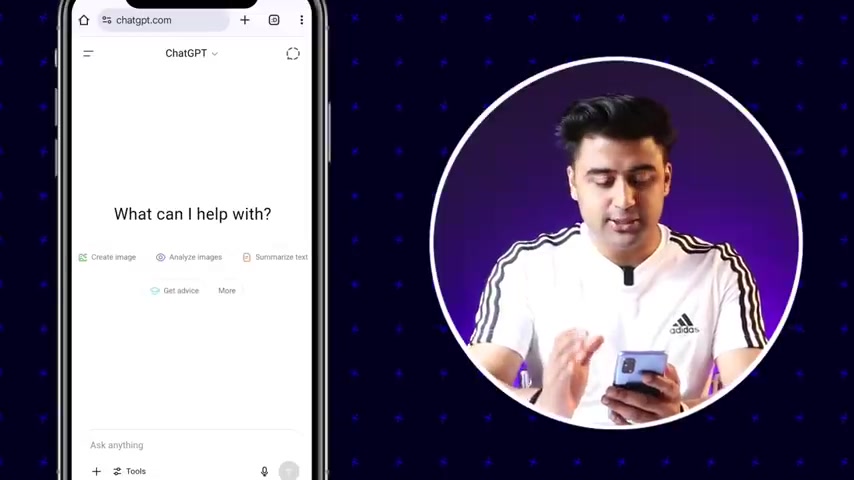
Open Chrome: Open Chrome or preferred browser.
-
Search ChatGPT: Open Google in Chrome and type ChatGPT into search bar.
-
Open the ChatGPT website: Find the page that says Introducing ChatGPT and open the link.
-
Log in: Log in with a Google account.
-
Generate idea: Type “Give me a story of a young girl who does well in school and has a great friend”
Step 2: Sign up for MagicLight AI.
- Find: Type MagicLight AI into Google or click the link in the description.
- Sign up: After arriving to the page sign up with your Google account, you’ll receive 300 credits.
Step 3: Put your information in MagicLight AI
- Click AI video: On the top left, find and click AI video.
- Choose Basic script: After arriving on the page find the “Basic Script” option and click it.
- Paste story: Next, paste the story from ChatGPT into the box.
- Aspect ratio: Choose the aspect ratio you’d prefer.
- Video Language: Pick the language you prefer the voice over and captions to be in.
- 3D Cartoon: After you select your video language select 3D cartoon for animation.
- Click Next: Find the next button on the bottom of the screen, click it.
- Confirm AI: If prompted click animate all.
- Generate: After that, click generate.
Here is a table with all the AI Tools for creating great videos:
| Feature | Description |
|---|---|
| ChatGPT | Generates scripts and storylines, providing creative content for videos. |
| MagicLight AI | Automates the transformation of text into high-quality, engaging videos with AI. |
| Video Editing | Tools to refine and enhance videos, including effects, transitions, and audio adjustments. |
| SEO Optimization | Strategies to improve video visibility, including keyword research, content optimization, and audience engagement. |
How to Use MagiclightAI?
How to Create AI Videos With MagicLight AI
To use Magiclight AI you must log in with a Google account.
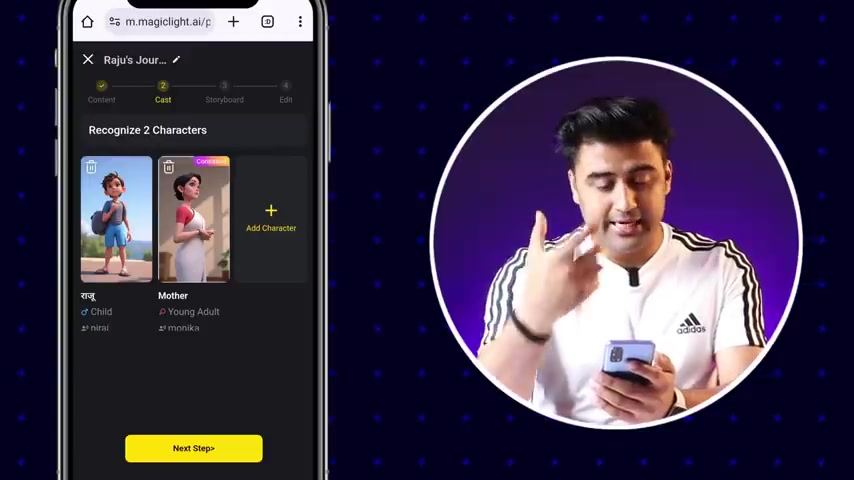
It will then Prompt you to make a AI video by making a page with different types of scripts, the basic script version is the free one. After the story you need to select you video language, the style of animation, and the aspect ratio of the video. AI will then select the different characters based on the content of the story selected and edit the video together. The next page will allow you to change any subtitles or voices, then the AI video will be ready for you to download!
Magiclight AI Pricing
Pricing for MagicLight AI
MagicLight AI’s offers 300 free credits for all its users upon signing up.
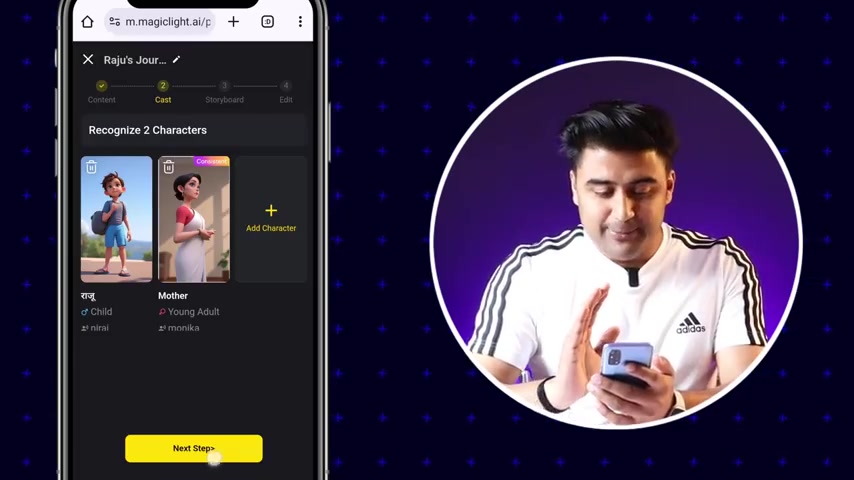
This means all users will be able to create AI videos using MagicLight AI without any upfront commitment. If you wish to unlock more storage or video time you can use one of MagicLights other plans:
- Standard Plan: The AI and video space is free and it contains 100 character prompts
- Plus Plan: It is 19.99 dollars a month. It has a Fast Track Generation and it can run videos for up to 15 minutes.
- Pro Plan: Costing 24 dollars a month, has the quickest video production times and it can make 30-minute videos.










Most people like



























Report
Please select a reason for reporting
- 13 Reasons to Switch from Snapchat to Text Messaging
- 7 Powerful Speech to Text Apps to Boost Productivity
- 10 Best Speech to Text Tools for Effortless Transcription
- 13 Free Tools to Easily Transcribe Audio to Text
- 15 Surprising Ways Google's Speech-to-Text Boosts Productivity
- 7 Best Free Online Audio to Text Transcription Tools
- 9 Tips to Transcribe Speech to Text Faster and Better
- 13 Best Speech to Text Software for Windows 10 in 2023
- 7 Tips for Choosing the Best Transcriber for Audio to Text
- 11 Reasons Why Dragon Speech-to-Text Apps are Game-Changers
- 6 Secrets to Enhance Your Speech to Text Transcription
- 6 Brilliant Ways to Boost Productivity with Talk-to-Text on Your MacBook
- 6 Ways Transcription Software Converts Audio to Text
- 8 Tips to Transcribe Speech to Text Like a Pro
- 6 Reasons IBM Watson Speech to Text is a Game-Changer
- 14 Powerful Ways Talk-to-Text Improves Your Workflow
- 12 Top Windows Speech-to-Text Software for Efficient Transcription
- 12 Game-Changing Benefits of Apple's Speech to Text Technology
- 9 Powerful Use Cases for AWS Speech to Text Technology
- 10 Easy Steps to Transcribe YouTube Videos to Text
- transcription audio en texte
- online audio transcription
- free audio file transcription
- free ai audio transcription
- audio transcription service
- audio transcription online free
- audio transcription free online
- audio to transcription software
- audio and transcript
- ai audio transcription free
- voice recording to text converter
- translate voice recording to text
- record voice to text
- audio recording to text converter
- voice recording and transcription
- chatgpt voice to text
- gmail voice to text
- speech to text reader
- speech to text ai free
- speech to talk
- Create Engaging Animated Explainer Videos with a Free AI Tool
- Stop Multi-Subscribing: Benchmark Top AI Visual Models in One Canvas
- Best Seedance 2.5 API Provider: Every Price on the Market, Checked at Source
- AI OnlyFans: How to Generate $30,000/Month (Legally)
- Transform Your Script into an Engaging Video with AI Video Maker!
- AI Marketing Automation: A Comprehensive Guide for Small Businesses
- Midjourney Alternative for Anime Art Creators: Why PixAI May Be Better for Character Workflows
- 10 Things Most People Get Wrong About AI Image Search
- AI Girlfriend Apps: Top Choices Redefining Relationships 2025
- How to Reduce Quoting Errors in Salesforce with AI-Assisted Quote Creation
- Why AI Language Tutors Underperform in Low-Resource Languages (And How to Work Around It)
- Top 5 AI Detector Tools: Ensuring Originality in Your Content
- How to Tell If an AI Study Tool Is Actually Helping You Learn (6 Checks for 2026)
- From Auto-Cuts to Generative Clips: Top 4 AI Video Editor Platforms Tested
- AI Resume Builders: EnhanceCV, ResumeNerd AI, & Teal Compared
- ResumeAI: Crafting ATS-Optimized Resumes with AI
- AI in Resume Writing: A New Era for Job Seekers
- AI Resume Tools: Streamline Your Job Search and Land Your Dream Role
- AI Resume Optimization: The Right Way to Land Interviews
- Crafting a Killer Resume with AI: A Step-by-Step Guide

Copyright ©2026 toolify