































Table of Contents
- Key Points
- Introduction to Ghostwriter.Express
- Diving Deeper: The Table of Contents Studio
- How to Use Ghostwriter.Express
- Ghostwriter.Express Pricing
- Benefits and Drawbacks
- Ghostwriter.Express Core Features
- Use Cases for Ghostwriter.Express
- Frequently Asked Questions
- Related Questions


Introduction to Ghostwriter.Express
What is Ghostwriter.Express?
Ghostwriter.Express is an AI-powered platform designed to assist authors in writing and publishing books more efficiently. It provides various tools and templates to streamline the book-writing process.
This platform aims to make book creation accessible and straightforward for everyone, regardless of their writing experience. It reduces the stress and time commitment traditionally associated with writing a book. By leveraging AI, Ghostwriter.Express assists with ideation, outlining, writing, and even marketing, ensuring that authors can focus on their core message and creativity.
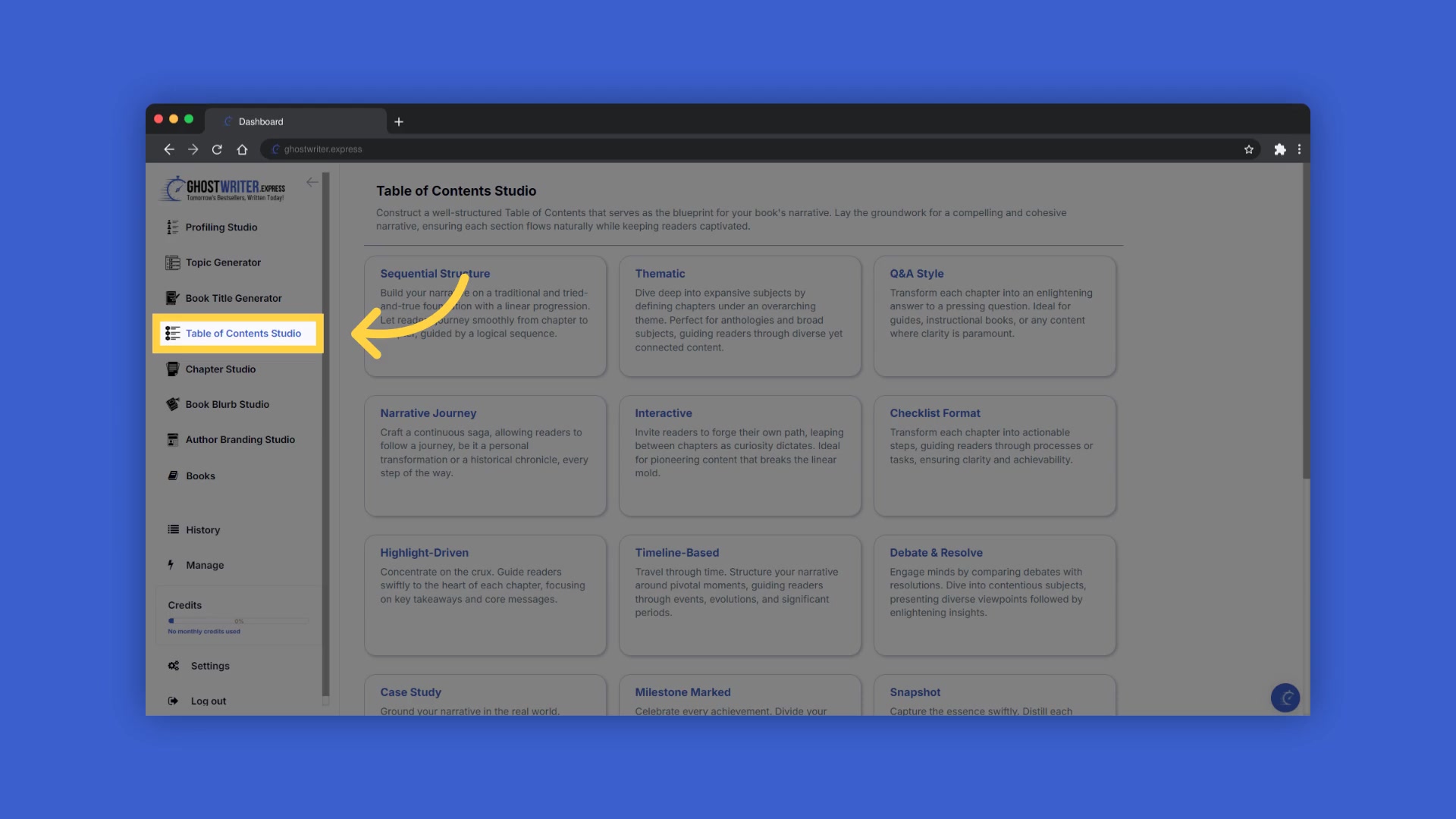
Key features include the Profiling Studio, which helps define the target audience, Topic Generator, Book Title Generator, Table of Contents Studio, Chapter Studio, and the Author Branding Studio. Together, these tools provide a comprehensive suite of resources for any author looking to bring their book to life quickly and effectively.
Ghostwriter.Express offers a seamless solution for aspiring authors. The Table of Contents Studio allows for structured planning of the book's narrative, leading to a compelling and Cohesive structure. Features like Sequential Structure, Thematic organization, Q&A style, and Narrative Journey ensure every author finds a method that best suits their creative process.
This is how Ghostwriter.Express can revolutionize your writing process and make your authorial dreams a reality!
Diving Deeper: The Table of Contents Studio
Crafting a Narrative Journey
The Table of Contents Studio is a pivotal component within Ghostwriter.Express, designed to help authors structure their books effectively.
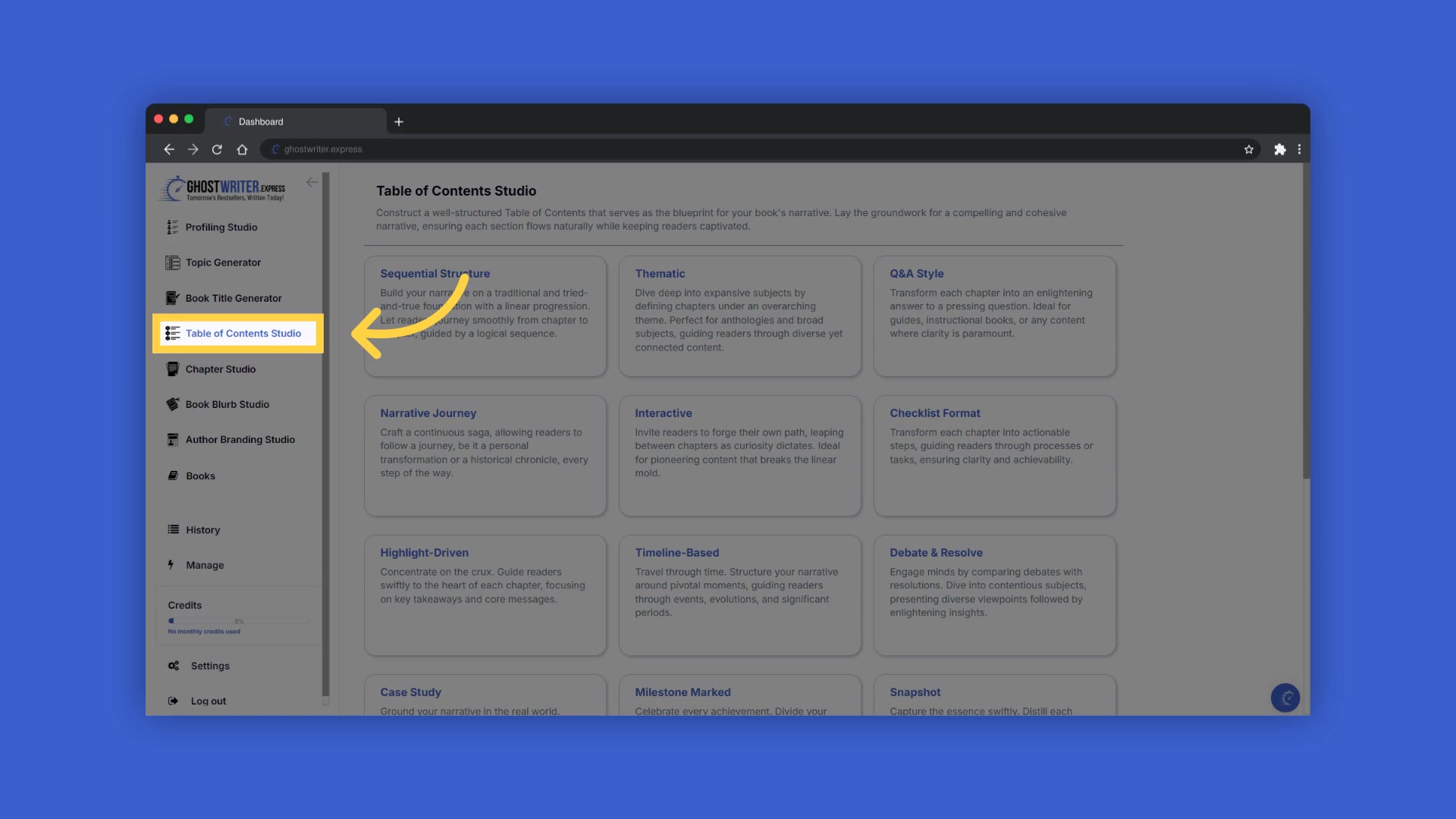
A well-structured table of contents serves as the blueprint for a book's narrative, ensuring each section flows naturally while keeping readers captivated. One of the key templates within this studio is the 'Narrative Journey,' which is particularly useful for crafting stories that take readers on a transformative experience.
The Narrative Journey template crafts a continuous saga, allowing readers to follow a journey, be it a personal transformation or a historical chronicle, every step of the way. Each chapter title is vivid and engaging, capturing the essence of pivotal moments or milestones in the journey toward the primary goal. Chapters flow seamlessly into the next, making readers eager to embark on the next phase of the journey. This table of contents is not just a list but a map of an enlightening journey, ensuring readers can't wait to start their expedition through the pages.
With Ghostwriter.Express, setting up your narrative journey is straightforward. Start by clicking on the template name to open the dropdown menu, allowing you to select and change between different templates within the Table of Contents Studio. If you need help at any time, you can watch the Tutorial for guidance. The platform also provides blue tooltips beside each field name, offering explanations and examples of the information needed. A popup will display with examples of the type of information required.
Once you've added information to a field, a folder will appear on the right, containing the history of the last ten entries in that field. Click on the history folder to easily reselect information you've already entered and add it to that field. Enter the required information to generate the table of contents. You can highlight and copy the book title and Subtitle from the book builder on the right to paste it into the required field on the left. Ensure you create the correct number of chapters, as you will be unable to add additional main chapters once your book is created.
To create a compelling table of contents using the Narrative Journey template, consider the following elements:
- The Inciting Incident: What event sets your protagonist on their path?
- Challenges and Obstacles: What trials do they face along the way?
- Allies and Mentors: Who supports them on their journey?
- The Climax: What is the ultimate test of their transformation?
- Resolution: How does the journey change them, and what have they learned?
You can change the information you provide and regenerate the content as many times as you need to craft the perfect table of contents for your book. With Ghostwriter.Express, you're not just creating a list of chapters; you're mapping out an adventure.
Adjusting Inputs for Customized Results
Ghostwriter.Express empowers you to tailor your book's content to Align precisely with your vision.
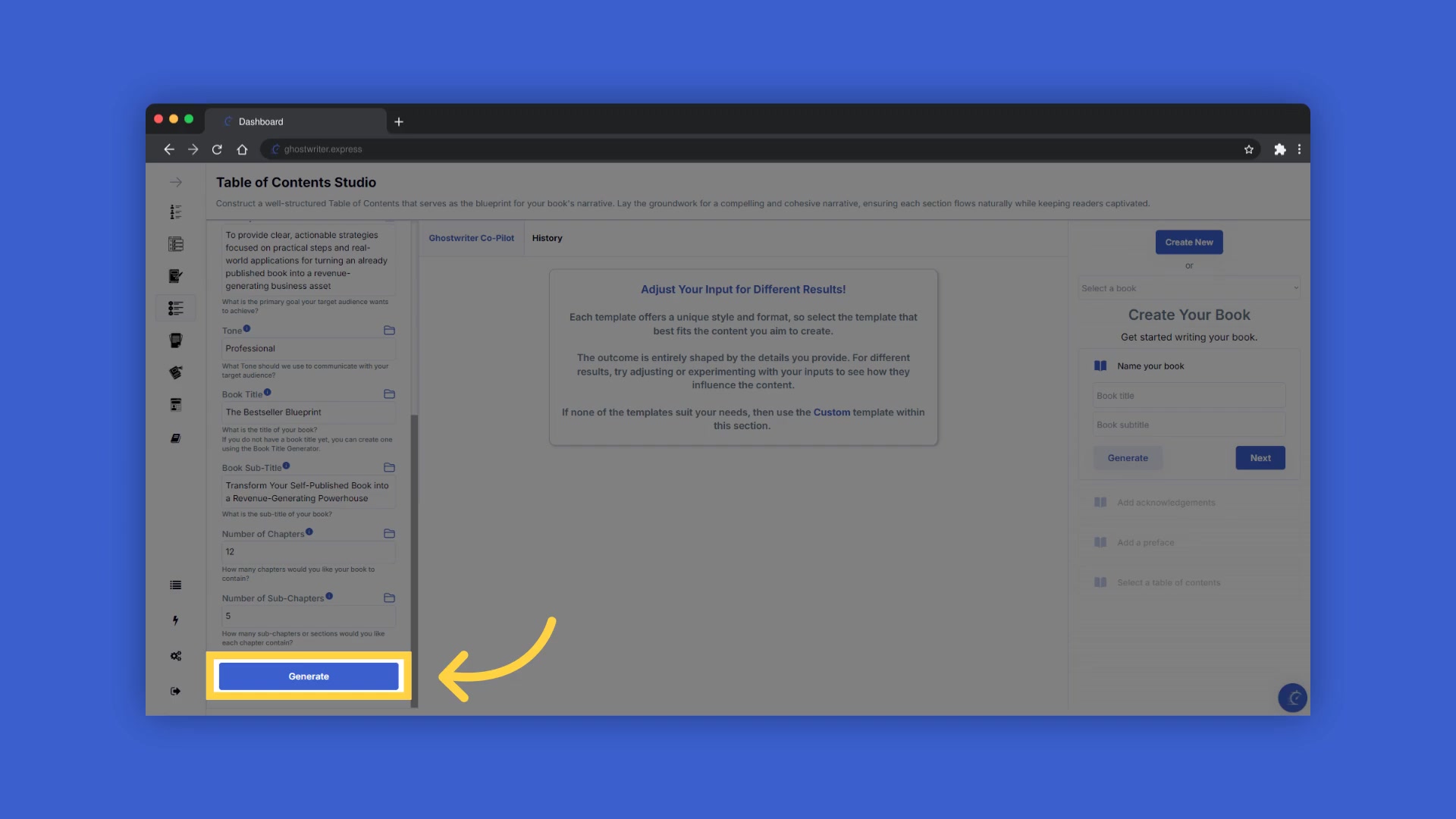
You can change key information like the Target Audience, Niche, Primary Goal, and Tone to generate completely different content.
Here’s a sample markdown table:
| Input | Description | Example |
|---|---|---|
| Target Audience | Who are you writing for? Be specific. | Entrepreneurs minded individuals with great business ideas. |
| Niche | What category does your book fall into? | Applications for running an already published book into a lead-generating business asset. |
| Primary Goal | What is the primary goal your target audience wants to achieve? | To provide clear, actionable strategies focused on practical steps and real-world applications. |
| Tone | How should we communicate with your target audience? Use one WORD only to avoid confusion and keep the same style. | Professional |
These inputs influence how the AI writes and structures your book, ensuring the final product aligns with your objectives. The History function stores all the content you generated. Select the history button to view or use any of the past content you've created with this template.
How to Use Ghostwriter.Express
Step-by-Step Guide to Table of Contents Studio
Let's walk through the process of generating a compelling table of contents for your book, step by step.
- Access the Table of Contents Studio
: Navigate to the Table of Contents Studio within the Ghostwriter.Express platform.
- Select a Template : Choose the 'Narrative Journey' template to craft a story-driven Outline. Other options include 'Sequential Structure' or 'Thematic' depending on your book's genre and style.
- Adjust Input Fields : Define your target audience, niche, primary goal, and tone. Use the blue tooltips for guidance on each field.
- Generate Your Outline : After filling in the necessary information, click 'Generate' to create the initial table of contents.
- Review and Refine : Examine the generated content and make any necessary adjustments. Remember, you can regenerate the content as many times as needed.
- Save and Integrate : Once you're satisfied, save the table of contents and integrate it into your book project. You can either generate a new table of contents or add one you have previously created.
- Proceed to Chapter Studio: Click next, The structure of your book is now being built, and you will be taken to the Chapter studio to craft chapters and subchapters.







Most people like





























Report
Please select a reason for reporting
- 13 Reasons to Switch from Snapchat to Text Messaging
- 7 Powerful Speech to Text Apps to Boost Productivity
- 10 Best Speech to Text Tools for Effortless Transcription
- 13 Free Tools to Easily Transcribe Audio to Text
- 15 Surprising Ways Google's Speech-to-Text Boosts Productivity
- 7 Best Free Online Audio to Text Transcription Tools
- 9 Tips to Transcribe Speech to Text Faster and Better
- 13 Best Speech to Text Software for Windows 10 in 2023
- 7 Tips for Choosing the Best Transcriber for Audio to Text
- 11 Reasons Why Dragon Speech-to-Text Apps are Game-Changers
- 6 Secrets to Enhance Your Speech to Text Transcription
- 6 Brilliant Ways to Boost Productivity with Talk-to-Text on Your MacBook
- 6 Ways Transcription Software Converts Audio to Text
- 8 Tips to Transcribe Speech to Text Like a Pro
- 6 Reasons IBM Watson Speech to Text is a Game-Changer
- 14 Powerful Ways Talk-to-Text Improves Your Workflow
- 12 Top Windows Speech-to-Text Software for Efficient Transcription
- 12 Game-Changing Benefits of Apple's Speech to Text Technology
- 9 Powerful Use Cases for AWS Speech to Text Technology
- 10 Easy Steps to Transcribe YouTube Videos to Text
- transcription audio en texte
- online audio transcription
- free audio file transcription
- free ai audio transcription
- audio transcription service
- audio transcription online free
- audio transcription free online
- audio to transcription software
- audio and transcript
- ai audio transcription free
- voice recording to text converter
- translate voice recording to text
- record voice to text
- audio recording to text converter
- voice recording and transcription
- chatgpt voice to text
- gmail voice to text
- speech to text reader
- speech to text ai free
- speech to talk
- Meshy AI: How to Create 3D Models from Text and Images
- How SEO and Marketing Dashboards Empower Agencies to Drive Results
- How to Use AI Tools to Find Internal Linking Opportunities Across a Business Website
- Discover Your Perfect Haircut with AI Hairstyle Apps
- Free Reputation Calculator Tools: How They're Adapting to Score AI Visibility, Not Just Rankings
- Design Professional Flyers for Free on Your Phone
- Best Free Flyer Maker Apps for Android: Design Like a Pro
- How to Know If Your Business Is Ready for an AI Customer Service Agent
- Revolutionizing Storytelling: From Novels to Screenplays with AI
- Create Engaging Animated Explainer Videos with a Free AI Tool
- Meshy AI: How to Create 3D Models from Text and Images
- ASOMobile Helps Teams Benchmark App Store Screenshots Against Competitors
- How to Match LMS Software With Your Organization's Training Plan
- Revolutionizing Email Marketing Agency with AI
- How to Convert BTC to HNT
- Unleashing the Power of AI: Cognizant's Roadmap for Transformation
- Frame to Video Review: A Practical Look at Turning Two Still Frames Into Motion
- NVIDIA NIM: Revolutionizing Supply Chain Data Analysis with AI
- Top AI Tools That Help Brands Stand Out Offline (Not Just Online)
- Top 5 Cold Email Software: Maximize Your Outreach in 2025

Copyright ©2026 toolify