






















Enhanced Image Caption Generation: A Comprehensive Guide

Updated on Sep 01,2025

Table of Contents

In today's visually driven world, images reign supreme. Whether it’s for social media, blogging, or e-commerce, compelling visuals are key to capturing attention. But a great image alone isn't always enough. The right caption can elevate your content, drive engagement, and significantly boost your SEO. This guide explores the exciting realm of AI-powered image caption generation and introduces an enhanced app designed to make the process seamless and effective. Discover how to use AI for captioning, translate into different languages, and ultimately, make your content shine.

Key Points

Discover an enhanced image caption generator app that leverages AI to create compelling captions automatically.

Learn how to translate captions into multiple languages, broadening your content's reach.

Understand the importance of SEO-friendly captions and how AI can help you optimize them.

Explore the app's features, including audio narration and text file download.

Find out how to easily upload and generate captions for various images.

The Power of AI Image Caption Generation

Why Image Captions Matter for SEO and Engagement

In the digital landscape, where attention spans are fleeting, a picture truly is worth a thousand words – especially when paired with the right Caption. Image captions are essential for several reasons, profoundly impacting both SEO and audience engagement.

First and foremost, image captions significantly boost SEO. Search engines like Google can't "see" images in the same way humans do. They rely on alt text, file names, and, crucially, captions to understand the content of an image. By crafting descriptive and keyword-rich captions, you provide search engines with valuable context, helping them index your images and rank your content higher in search results. This increased visibility translates to more organic traffic to your website or social media profiles.

Engaging your audience is another critical function of a well-written image caption. While the image initially captures attention, the caption provides further context, tells a story, or sparks a conversation. A captivating caption can:

  • Increase dwell time: Encouraging visitors to stay on your page longer.
  • Drive social shares: Making your content more likely to be shared across social media platforms.
  • Foster a sense of community: Inviting comments, questions, and discussions around your images.

Without a caption, an image risks being misinterpreted or simply overlooked. A strategically crafted caption transforms a passive viewing experience into an active engagement, enriching the user experience and driving meaningful results. In conclusion, mastering the art of image captioning is indispensable for anyone looking to maximize their online presence and connect with their audience on a deeper level.

Introducing the Enhanced Image Caption Generator App

Creating compelling and SEO-friendly image captions can be time-consuming, especially when dealing with a large volume of images. That's where AI-powered image caption generators come to the rescue. These tools leverage advanced artificial intelligence algorithms to automatically generate captions based on the content of your images.

The Enhanced Image Caption Generator App takes this concept to the next level, offering a range of features designed to streamline the captioning process and enhance your content. This app is your one-stop solution for creating, translating, and optimizing image captions for various platforms.

Whether you're a social media manager, blogger, e-commerce store owner, or anyone who relies on visual content, this app can save you valuable time and effort while ensuring your images are accompanied by engaging and effective captions. Get ready to unlock the power of AI and transform your images into powerful storytelling tools.

Tips for Crafting Effective Image Captions with AI

Beyond Automation: Elevating AI-Generated Captions

While AI-powered image caption generators are incredibly powerful, it's important to remember that they are tools to assist you, not replace your creativity and judgment. Here are some tips for crafting effective image captions that go beyond automation:

  • Add a Personal Touch: Customize the AI-generated captions to reflect your brand's voice and personality. Infuse your unique style to make the captions more relatable and authentic.
  • Incorporate Relevant Keywords: Review the generated captions and strategically incorporate relevant keywords to boost your SEO. Use keyword research tools to identify high-impact keywords for your niche.
  • Tell a Story: Use captions to tell a story, share an anecdote, or provide context that enhances the image. Engaging storytelling can captivate your audience and create a lasting impression.
  • Ask Questions: Encourage engagement by asking questions related to the image or caption. This prompts viewers to leave comments and participate in a conversation.
  • Use Hashtags Strategically: Incorporate relevant hashtags to expand your reach and connect with a wider audience on social media. Use a mix of popular and niche-specific hashtags.
  • Keep it Concise: While detail is valuable, prioritize clarity and brevity. Get your key message across quickly and effectively, particularly on platforms with character limits.
  • Proofread Carefully: Always proofread your captions before publishing them to ensure there are no grammatical errors or typos. A polished caption reflects professionalism and attention to detail.

By combining the power of AI with your creative insights, you can create image captions that are not only informative but also deeply engaging, memorable, and optimized for success.

Step-by-Step Guide: How to Use the Enhanced Image Caption Generator App

Step 1: Uploading Your Image

The first step is to upload the image you want to generate a caption for. The app supports various image formats, including JPEG, PNG, and more. Simply click on the "Drag and drop file here" area or use the "Browse files" button to select an image from your computer.
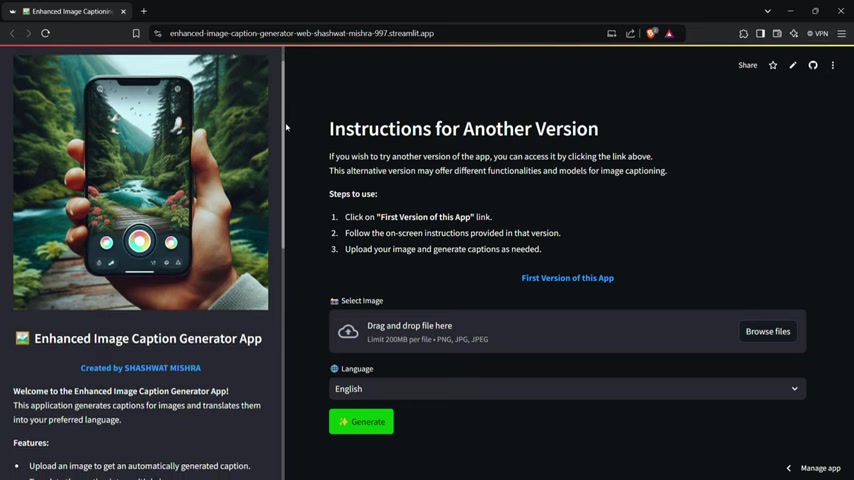
The app supports images up to 200MB in size.

Step 2: Selecting Your Language

Next, choose the language you want your caption to be generated in. The app supports a wide range of languages, including English, Spanish, French, German, Chinese, Japanese, Hindi and more.
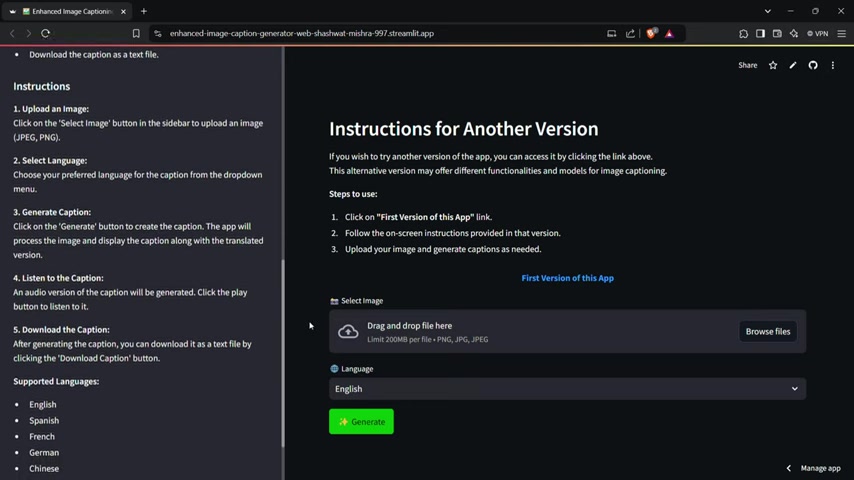
Select your desired language from the dropdown menu.

Step 3: Generating Your Caption

Once you've uploaded your image and selected your language, it's time to generate your caption. Click on the "Generate" button, and the app will work its magic, analyzing your image and creating a relevant caption.
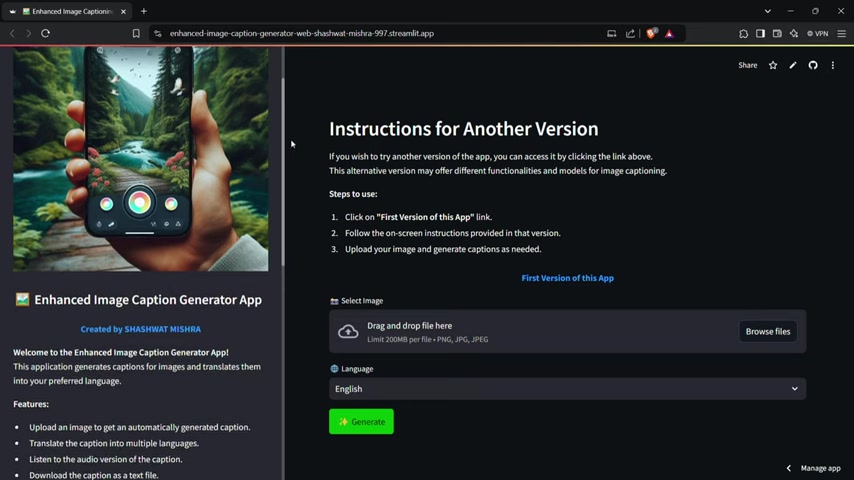
The caption will then be displayed in the "Generated Caption" section.

Step 4: Listening to the Audio Caption

To listen to the audio narration of your caption, simply click on the play button in the "Audio Caption" section. Adjust the volume and playback speed as needed. This feature is great for ensuring the caption sounds natural and engaging.

Step 5: Downloading Your Caption

Finally, download your caption as a text file by clicking on the "Download Caption" button. Save the file to your computer for easy access and integration into your content workflows.

Weighing the Options: Pros and Cons of Using an AI Image Caption Generator

👍 Pros

Time-Saving: Automatically generates captions, saving significant time and effort.

SEO Enhancement: Optimizes captions with relevant keywords, boosting search engine visibility.

Multi-Language Support: Translates captions into multiple languages, expanding audience reach.

Accessibility: Provides audio narration for visually impaired users.

Creativity Aid: Can spark ideas and inspiration for crafting compelling captions.

👎 Cons

May Lack Nuance: AI-generated captions can sometimes lack the creativity and emotional depth of human-written captions.

Requires Review and Editing: Captions often need to be reviewed and edited to ensure accuracy, relevance, and brand consistency.

Potential for Generic Captions: Some AI generators may produce generic captions that don't fully capture the essence of the image.

Dependence on Image Quality: The quality of the generated caption depends on the clarity and content of the uploaded image.

Exploring the Core Features of the Image Caption Generator App

Automatic Caption Generation

At the heart of the app lies its AI-powered caption generation engine. Simply upload an image, and the app will automatically analyze its content and generate a relevant and descriptive caption. This feature saves you countless hours of brainstorming and writing, allowing you to focus on other aspects of your content creation process. The AI is trained on vast datasets of images and text, enabling it to understand the nuances of visual content and generate captions that are both accurate and engaging.

Multi-Language Translation

In today's globalized world, reaching a diverse audience is crucial for success. The app's multi-language translation feature allows you to instantly Translate your captions into multiple languages, expanding your content's reach and engaging with international audiences. Break down language barriers and connect with people from all corners of the globe.

Audio Narration

Accessibility is paramount in modern content creation. The audio narration feature allows you to generate an audio version of your caption, making your content accessible to visually impaired users and those who prefer to consume information through audio. This feature broadens your audience and demonstrates your commitment to inclusivity.

Text File Download

For added convenience, the app allows you to download your generated captions as a text file. This feature is particularly useful for managing captions in bulk, integrating them into other workflows, or archiving them for future use. Keep your captions organized and readily accessible.

Unlocking the Potential: Use Cases for the Image Caption Generator App

Social Media Marketing

In the fast-paced world of social media, grabbing attention is paramount. Use the app to generate engaging captions for your Instagram, Facebook, Twitter, and other social media posts. Create captions that resonate with your audience, drive likes, shares, and comments, and boost your overall social media presence.

Blogging and Content Creation

Enhance your blog posts and articles with compelling image captions that provide context, tell stories, and engage your readers. Improve your SEO by incorporating relevant keywords into your captions, driving more organic traffic to your website.

E-commerce Product Listings

Make your product listings stand out with descriptive and persuasive image captions that highlight the key features and benefits of your products. Increase sales and conversions by providing customers with the information they need to make informed purchasing decisions.

Education and E-learning

Make educational content more accessible and engaging with audio-narrated image captions. Cater to diverse learning styles and ensure that all students can benefit from your visual materials.

Frequently Asked Questions (FAQ)

What image formats are supported by the app?
The Enhanced Image Caption Generator App supports common image formats such as JPEG, PNG, and WebP.
Is there a limit to the image file size?
Yes, the app supports images up to 200MB in size.
How accurate are the AI-generated captions?
The AI is trained on a vast dataset of images and text, resulting in highly accurate captions. However, it's always recommended to review and edit the captions for optimal results.
Can I use the app for commercial purposes?
Yes, you can use the Enhanced Image Caption Generator App for both personal and commercial purposes.
Is there a free trial available?
Please refer to the app's website or app store listing for information on free trial availability and pricing details.

Related Questions

What are the best practices for writing SEO-friendly image captions?
To write SEO-friendly image captions, focus on being descriptive, including relevant keywords, and keeping it concise. Use keywords naturally within the caption's context. Ensure the caption accurately represents the image content. For instance, instead of a generic caption like "Beautiful Sunset," opt for something more specific such as "Golden sunset over the Pacific Ocean, California." This specificity helps search engines index the image effectively, driving more organic traffic to your content. Always use relevant keywords, but ensure they blend naturally and do not detract from readability. Also, aim to incorporate long-tail keywords. Long-tail keywords are longer, more specific phrases that people are likely to use when they're closer to a point of purchase or looking for very specific information. For example, "best hiking boots for women with ankle support" is a long-tail keyword that can attract a highly targeted audience. Here's a structured approach to creating SEO-friendly captions: Keyword Research: Identify relevant keywords using tools like Google Keyword Planner, SEMrush, or Ahrefs. Descriptive Language: Use clear and descriptive language to explain what's in the image. Contextual Relevance: Ensure the caption relates directly to the image and the surrounding content. Natural Integration: Incorporate keywords naturally, avoiding keyword stuffing. Conciseness: Keep the caption brief and to the point. By following these best practices, you can create image captions that improve your SEO and enhance user engagement. Prioritize creating captions that are valuable, informative, and engaging for your audience.

Most people like












