































Table of Contents
- Key Points
- Unlocking AI Potential: Free AI Testing Tools
- Exploring Specific Free AI Testing Tools
- Getting Started with Testim's Free Trial
- Pricing of Testim
- Pros and Cons of Testim
- Core Features of Testim
- Use Cases for Testim
- FAQ
- Related Questions


Unlocking AI Potential: Free AI Testing Tools
The Growing Importance of AI in Software Testing
The integration of artificial intelligence (AI) into software testing is no longer a futuristic concept; it's a current reality. AI is revolutionizing how software is tested, offering unprecedented capabilities in automation, defect detection, and overall quality assurance. Testers are increasingly turning to AI-powered tools to streamline their workflows and enhance the accuracy of their results.
AI addresses several critical challenges in traditional software testing. For instance, manual testing is often time-consuming and prone to human error. AI can automate repetitive tasks, freeing up testers to focus on more complex and strategic testing activities. Furthermore, AI algorithms can analyze vast amounts of data to identify patterns and anomalies that might be missed by human testers, leading to earlier detection of critical bugs.
Another area where AI shines is in predictive testing. By analyzing historical data and current trends, AI can predict potential failure points in the software, allowing developers to proactively address these issues before they impact the end-user experience. This proactive approach not only reduces the risk of costly failures but also significantly improves the overall reliability and performance of the software.
Moreover, AI is enhancing the ability to test software across various platforms and devices. With the proliferation of mobile devices and diverse web browsers, ensuring compatibility can be a significant challenge. AI-driven testing tools can automatically adapt tests to different environments, ensuring consistent performance across all platforms. This capability is particularly valuable for companies looking to deliver a seamless user experience across a wide range of devices.
AI also plays a crucial role in improving the efficiency of regression testing. Whenever changes are made to the software code, regression tests are run to ensure that existing functionality remains intact. AI can intelligently select the most relevant regression tests to run based on the changes made, reducing the time and resources required for this critical process.
In essence, AI is enabling software testers to achieve more with less. By automating tasks, predicting failures, and enhancing compatibility testing, AI is transforming the software testing landscape, making it more efficient, accurate, and reliable. As AI technologies continue to evolve, their role in software testing will only become more prominent, driving further innovation and improvements in the quality of software products.
Why Look for Free AI Testing Tools?
While premium AI testing tools offer comprehensive features and advanced capabilities, the cost can be a significant barrier for many individuals and small to medium-sized businesses. Fortunately, numerous free AI testing tools provide substantial value, allowing testers to leverage AI without incurring hefty expenses.

The primary advantage of free AI testing tools is cost savings. These tools eliminate the need for expensive licenses or subscriptions, making AI-powered testing accessible to a broader audience. This is particularly beneficial for startups and smaller companies that may have limited budgets but still need to ensure the quality of their software products.
Another compelling reason to explore free AI testing tools is the opportunity for experimentation and learning. These tools provide a risk-free environment to test out AI-driven testing methodologies and understand how AI can be integrated into your existing workflows. This hands-on experience can be invaluable in determining whether investing in a premium AI testing solution is the right choice for your organization.
Free AI testing tools also serve as excellent educational resources. Many come with tutorials, documentation, and community support, making it easier to learn about AI testing concepts and best practices. This educational aspect is particularly beneficial for testers who are new to AI and want to develop their skills in this rapidly evolving field.
Moreover, free AI testing tools can be surprisingly powerful and effective for specific testing tasks. While they may not offer the same level of sophistication as their premium counterparts, they can still automate repetitive tasks, identify common defects, and improve overall testing efficiency. This makes them a valuable asset for testers looking to augment their capabilities without significant financial investment.
It's important to note that free AI testing tools often come with certain limitations, such as restrictions on the number of tests that can be run, limited access to advanced features, or the absence of dedicated support. However, these limitations are often outweighed by the cost savings and the opportunity to gain experience with AI-driven testing.
Exploring free AI testing tools is a smart and practical way to unlock the potential of AI in software testing without breaking the bank. These tools provide a cost-effective means to improve testing efficiency, enhance accuracy, and develop AI testing skills, making them an indispensable resource for testers of all levels.
Exploring Specific Free AI Testing Tools
Testim: AI-Powered Testing with a Free Community Plan
Testim is an AI-powered testing platform designed to make software testing faster and more reliable. While it offers premium plans with advanced features, Testim also provides a free community plan that allows users to experience the benefits of AI-driven testing without any cost.
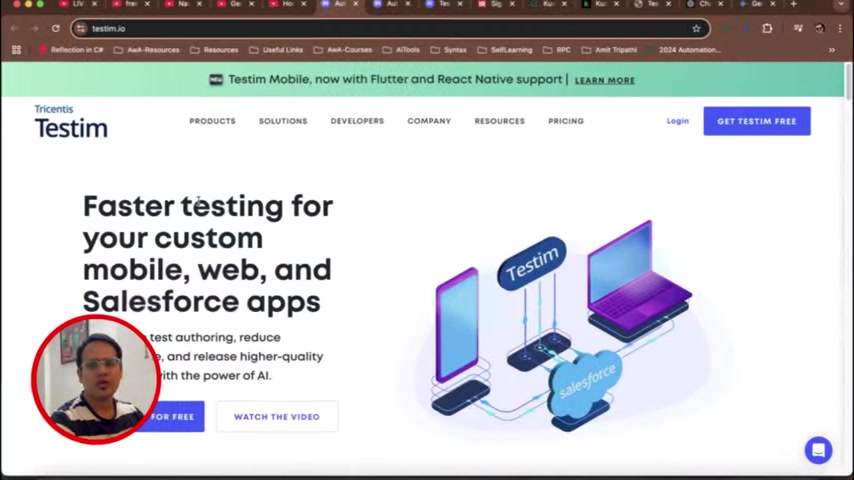
The Testim community plan includes a range of features suitable for web and mobile testing. It allows users to create and run automated tests using a visual editor, making it easy to build tests without writing code. The AI capabilities of Testim help to stabilize tests by automatically adapting to changes in the application's user interface, reducing the need for manual maintenance.
One of the key advantages of the Testim community plan is its support for collaborative testing. Users can share tests and results with their team members, facilitating better communication and faster resolution of issues. The platform also integrates with popular development tools, such as Jira and Slack, further streamlining the testing workflow.
To get started with Testim, users can sign up for a free account on the Testim website. The sign-up process requires a valid email address and the creation of a password. Once the account is created, users can start building their first automated tests using the visual editor. The platform provides a variety of tutorials and documentation to help users learn the basics of AI-driven testing.
It's important to note that the Testim community plan has certain limitations compared to the premium plans. These limitations include restrictions on the number of tests that can be run and limited access to advanced features. However, the community plan still provides a valuable opportunity to experience the benefits of AI-driven testing and determine whether Testim is the right solution for your organization.
Overall, Testim's free community plan is an excellent option for testers looking to explore AI-driven testing without any financial commitment. Its user-friendly interface, AI-powered test stabilization, and collaborative features make it a valuable asset for improving testing efficiency and ensuring the quality of software products.
Getting Started with Testim's Free Trial
Step-by-Step Guide to Utilizing Testim
To effectively use Testim, follow these detailed steps:
-
Visit the Testim Website: Navigate to Testim.io using your preferred web browser.
-
Explore Pricing Options:
Click on the 'Pricing' tab to review the different plans available, including the 'Community Free Plan'. This will give you an overview of the free features and any limitations.
-
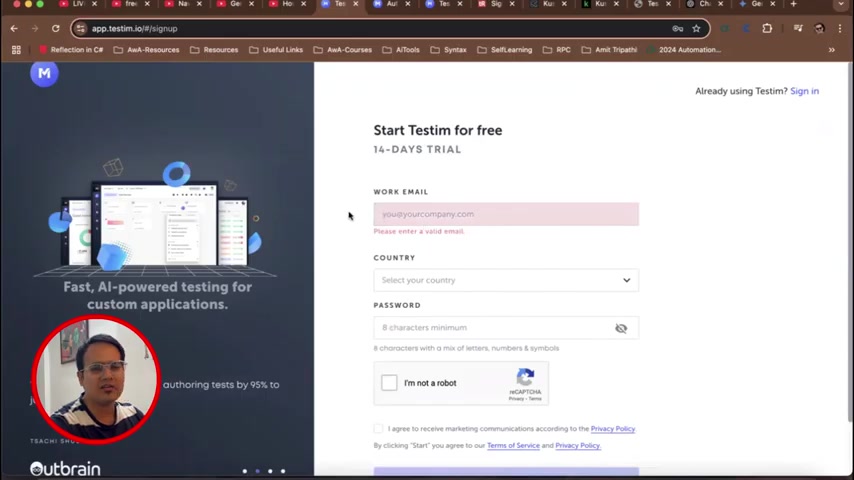
Start a Free Trial: Click on the 'Get Testim Free' button. This will redirect you to the sign-up page where you can start a 14-day trial.
-
Fill Out the Sign-Up Form: Enter your work email, select your country, and create a password. Note that you might need a valid company email to proceed with the trial.
-
Confirm Your Account: Check your email for a verification link from Testim and click on it to activate your account.
-
Start Building Tests: Once logged in, explore the dashboard and start creating your first automated test. Utilize the visual editor, which allows you to record user interactions and set validations without writing code.
-
Integrate with Your Workflow: Connect Testim with tools like Jira or Slack to streamline communication and issue tracking. This helps ensure that testing results are promptly shared and addressed.
By following these steps, you can effectively integrate Testim into your testing process and leverage its AI capabilities to improve software quality.









Most people like


























Report
Please select a reason for reporting
- 13 Reasons to Switch from Snapchat to Text Messaging
- 7 Powerful Speech to Text Apps to Boost Productivity
- 10 Best Speech to Text Tools for Effortless Transcription
- 13 Free Tools to Easily Transcribe Audio to Text
- 15 Surprising Ways Google's Speech-to-Text Boosts Productivity
- 7 Best Free Online Audio to Text Transcription Tools
- 9 Tips to Transcribe Speech to Text Faster and Better
- 13 Best Speech to Text Software for Windows 10 in 2023
- 7 Tips for Choosing the Best Transcriber for Audio to Text
- 11 Reasons Why Dragon Speech-to-Text Apps are Game-Changers
- 6 Secrets to Enhance Your Speech to Text Transcription
- 6 Brilliant Ways to Boost Productivity with Talk-to-Text on Your MacBook
- 6 Ways Transcription Software Converts Audio to Text
- 8 Tips to Transcribe Speech to Text Like a Pro
- 6 Reasons IBM Watson Speech to Text is a Game-Changer
- 14 Powerful Ways Talk-to-Text Improves Your Workflow
- 12 Top Windows Speech-to-Text Software for Efficient Transcription
- 12 Game-Changing Benefits of Apple's Speech to Text Technology
- 9 Powerful Use Cases for AWS Speech to Text Technology
- 10 Easy Steps to Transcribe YouTube Videos to Text
- transcription audio en texte
- online audio transcription
- free audio file transcription
- free ai audio transcription
- audio transcription service
- audio transcription online free
- audio transcription free online
- audio to transcription software
- audio and transcript
- ai audio transcription free
- voice recording to text converter
- translate voice recording to text
- record voice to text
- audio recording to text converter
- voice recording and transcription
- chatgpt voice to text
- gmail voice to text
- speech to text reader
- speech to text ai free
- speech to talk
- Create Engaging Animated Explainer Videos with a Free AI Tool
- Stop Multi-Subscribing: Benchmark Top AI Visual Models in One Canvas
- Best Seedance 2.5 API Provider: Every Price on the Market, Checked at Source
- AI OnlyFans: How to Generate $30,000/Month (Legally)
- Transform Your Script into an Engaging Video with AI Video Maker!
- AI Marketing Automation: A Comprehensive Guide for Small Businesses
- Midjourney Alternative for Anime Art Creators: Why PixAI May Be Better for Character Workflows
- 10 Things Most People Get Wrong About AI Image Search
- AI Girlfriend Apps: Top Choices Redefining Relationships 2025
- How to Reduce Quoting Errors in Salesforce with AI-Assisted Quote Creation
- AI Resume Builders: EnhanceCV, ResumeNerd AI, & Teal Compared
- ResumeAI: Crafting ATS-Optimized Resumes with AI
- AI in Resume Writing: A New Era for Job Seekers
- AI Resume Tools: Streamline Your Job Search and Land Your Dream Role
- AI Resume Optimization: The Right Way to Land Interviews
- Crafting a Killer Resume with AI: A Step-by-Step Guide
- Crafting a Winning Resume: AI Tools and Expert Tips
- AI Job Search: Level Up Your Career with AI Automation
- Empower Your Career Journey: Dynamic Resumes with AI
- AI Resume Builder: Create Professional Resumes Effortlessly

Copyright ©2026 toolify