































Table of Contents
- Key Points
- GitHub Copilot's Game-Changing Updates
- Deep Dive into GitHub Spark's Architecture
- How to Use GitHub Spark
- GitHub Copilot and Spark Pricing
- Pros and Cons: GitHub Copilot vs. GitHub Spark
- Core Features of GitHub Copilot and Spark
- Use Cases for GitHub Copilot and Spark
- Frequently Asked Questions
- Related Questions



GitHub Copilot's Game-Changing Updates
GitHub Universe: A Developer-Focused Event
The GitHub Universe conference

serves as a focal point for developers within the GitHub ecosystem. It's a global event where new tools and features are unveiled, setting the stage for the future of software development. This year's conference heavily emphasized AI-driven Developer Tools, signaling GitHub's commitment to integrating AI deeply into the coding process. The keynote speech and subsequent announcements have reverberated throughout the developer community, sparking conversations about the potential and implications of these advancements for AI generative coding.
The conference typically focuses on new AI-driven developer tools which are designed to help developers.
Multi-LLM Model Support: Developer's Choice
The first major announcement

is the introduction of multi-LLM model support within GitHub Copilot, a feature they're calling "Developer's Choice." This empowers developers to select the AI model that best suits their specific needs and preferences. Instead of being locked into a single model, users will have the freedom to choose from a range of LLMs, each offering unique strengths and capabilities. This shift towards choice and freedom is a significant departure from the previous model, where COPILOT relied on a single, pre-selected AI model. This is a huge win for developers, who now have the power to tailor their AI coding assistant to their specific project and workflow, increasing the power and flexibility in AI generative coding.
Initially, Copilot will support models from Anthropic (Claude), Google (Gemini), and OpenAI. This selection covers a wide range of AI capabilities, from complex coding tasks to massive context window understanding and reasoning capabilities. GitHub claims it to be the same exact flexibility as Cursor offers, in an attempt to challenge the existing players in AI generative coding. The company clearly recognizes the importance of flexibility and developer autonomy in AI-assisted coding.
| LLM Provider | Model(s) | Key Capabilities |
|---|---|---|
| Anthropic | Claude | Complex Coding Tasks |
| Gemini | Massive Context Window | |
| OpenAI | GPT-4o | Reasoning Capabilities |
GitHub Spark: App Creation for Everyone
The Second major announcement is the launch of GitHub Spark

, an AI Tool designed to democratize app creation. Spark aims to make app development accessible to individuals regardless of their coding expertise. This is achieved through a combination of natural language interaction and AI-powered code generation. Spark allows users to describe the app they want to build using plain English, and the AI will then generate the necessary code and even deploy the application. It's focused around app creation to everyone.
Spark consists of three key components:
- Natural Language-Based Editor: Where you initially create and refine Spark.
- Managed Runtime Environment: Hosts all the Sparks that you make.
- PWA-Enabled Dashboard: Manage and launch Sparks from anywhere.
The key thing about Spark: Sparks are focused micro-apps , meaning they are intended for simple, single-purpose applications. GitHub emphasizes that Sparks are not for complex apps .
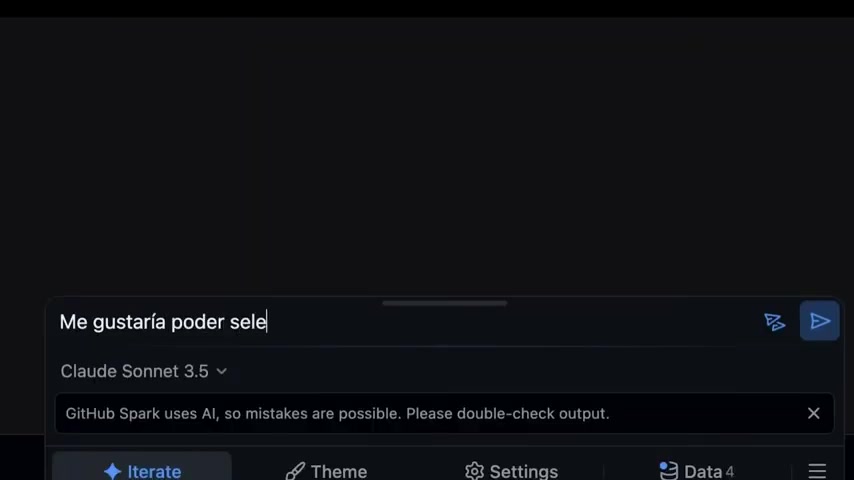
Spark emphasizes a create-and-share approach and is built with ease of use in mind. This focus is what sets it apart.
Deep Dive into GitHub Spark's Architecture
Natural Language to Code
At the heart of GitHub Spark lies its ability to Translate natural language descriptions into functional code. This process is facilitated by sophisticated natural language processing (NLP) algorithms that interpret user input and generate corresponding code snippets. The editor interface is designed to be intuitive and user-friendly, allowing individuals with limited coding knowledge to effectively communicate their app ideas to the AI. By writing some basic information about your desired function, you can see the code being automatically generated.

After generating a baseline app, you can also input more information, like, “Give the title a cool gradient and add a thicker border to the card.” The system makes it extremely easy to design, iterate, and come up with new ideas.
Micro-Apps and Instant Deployment
GitHub Spark excels in creating focused micro-apps. These are small, self-contained applications designed to perform a specific task. The emphasis on micro-apps allows Spark to streamline the development process and provide Instant automatic deployment

within the GitHub environment. This means that once the app is generated and refined, it can be immediately deployed and made accessible. GitHub Spark is built for focusing on a small niche. This is especially good for building and testing quick prototype apps to learn new things.
Three examples of micro-apps include:
- Allowance Tracker: An allowance tracker for kids, which can be shared in either read-only or read-write mode (for parents), and uses an LLM to generate a celebratory message when an earning goal is reached.
- Animated Vehicle World: An animated world of vehicles, as envisioned, and created by a six-year-old.
- Karaoke Night: An app for tracking a weekly karaoke night, along with the status of each invited guest.
Managed Runtime and PWA-Enabled Dashboard
To ensure seamless execution and accessibility, GitHub Spark includes a managed runtime environment. This environment provides the necessary infrastructure to host and run the generated micro-apps. Furthermore, Spark offers a PWA-enabled (Progressive Web App) dashboard, allowing users to manage and launch their micro-apps from anywhere with an internet connection. The dashboard provides a centralized location for organizing and accessing all of the user's Sparks. Sparks can then be shared on GitHub.





Most people like





































Report
Please select a reason for reporting
- 13 Reasons to Switch from Snapchat to Text Messaging
- 7 Powerful Speech to Text Apps to Boost Productivity
- 10 Best Speech to Text Tools for Effortless Transcription
- 13 Free Tools to Easily Transcribe Audio to Text
- 15 Surprising Ways Google's Speech-to-Text Boosts Productivity
- 7 Best Free Online Audio to Text Transcription Tools
- 9 Tips to Transcribe Speech to Text Faster and Better
- 13 Best Speech to Text Software for Windows 10 in 2023
- 7 Tips for Choosing the Best Transcriber for Audio to Text
- 11 Reasons Why Dragon Speech-to-Text Apps are Game-Changers
- 6 Secrets to Enhance Your Speech to Text Transcription
- 6 Brilliant Ways to Boost Productivity with Talk-to-Text on Your MacBook
- 6 Ways Transcription Software Converts Audio to Text
- 8 Tips to Transcribe Speech to Text Like a Pro
- 6 Reasons IBM Watson Speech to Text is a Game-Changer
- 14 Powerful Ways Talk-to-Text Improves Your Workflow
- 12 Top Windows Speech-to-Text Software for Efficient Transcription
- 12 Game-Changing Benefits of Apple's Speech to Text Technology
- 9 Powerful Use Cases for AWS Speech to Text Technology
- 10 Easy Steps to Transcribe YouTube Videos to Text
- transcription audio en texte
- online audio transcription
- free audio file transcription
- free ai audio transcription
- audio transcription service
- audio transcription online free
- audio transcription free online
- audio to transcription software
- audio and transcript
- ai audio transcription free
- voice recording to text converter
- translate voice recording to text
- record voice to text
- audio recording to text converter
- voice recording and transcription
- chatgpt voice to text
- gmail voice to text
- speech to text reader
- speech to text ai free
- speech to talk
- Meshy AI: How to Create 3D Models from Text and Images
- How SEO and Marketing Dashboards Empower Agencies to Drive Results
- How to Use AI Tools to Find Internal Linking Opportunities Across a Business Website
- Discover Your Perfect Haircut with AI Hairstyle Apps
- Free Reputation Calculator Tools: How They're Adapting to Score AI Visibility, Not Just Rankings
- Design Professional Flyers for Free on Your Phone
- Best Free Flyer Maker Apps for Android: Design Like a Pro
- How to Know If Your Business Is Ready for an AI Customer Service Agent
- Revolutionizing Storytelling: From Novels to Screenplays with AI
- Create Engaging Animated Explainer Videos with a Free AI Tool
- Automate Lead Generation: A Comprehensive Guide with AI Agents
- Revideo.io: The Future of Reverse Video Search Technology
- Revolutionizing Email Marketing Agency with AI
- Breaking the Character Drift Dilemma: A Practical Test of Smart Shot
- Meshy AI: How to Create 3D Models from Text and Images
- ASOMobile Helps Teams Benchmark App Store Screenshots Against Competitors
- How to Match LMS Software With Your Organization's Training Plan
- How to Convert BTC to HNT
- Unleashing the Power of AI: Cognizant's Roadmap for Transformation
- Frame to Video Review: A Practical Look at Turning Two Still Frames Into Motion

Copyright ©2026 toolify