































Table of Contents
- Key Points
- Exploring GitHub Marketplace for AI Models
- Step-by-Step Guide: Compare AI Models in GitHub
- Frequently Asked Questions
- Related Questions



Exploring GitHub Marketplace for AI Models
Navigating the GitHub Marketplace
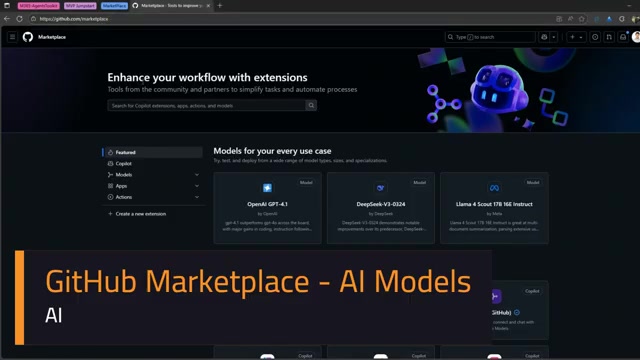
The GitHub Marketplace can be accessed by navigating to github.com/marketplace. This centralized location provides developers with access to tools and extensions designed to enhance their development workflow. The marketplace offers a variety of resources, including Copilot extensions, AI models, apps, and actions.
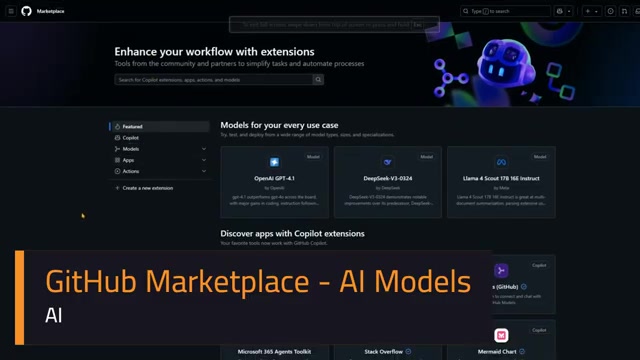
Developers can use this platform to discover new tools and integrate them into their projects.
Copilot Extensions: These extensions expand the capabilities of GitHub Copilot using third-party tools, services, and data. They enable developers to integrate external resources into their coding workflow, enhancing code completion, documentation, and overall assistance.
AI Models: GitHub offers a catalog of AI models, including those powered by AI Models. These models allow developers to test and deploy a wide range of models directly within their projects, streamlining the integration of AI functionality into their applications.
Apps and Actions: The marketplace also offers AI-assisted apps and actions that can be incorporated into development processes. These include tools for code review, documentation, and various other tasks, providing intelligent automation and assistance throughout the development lifecycle.
Copilot Extensions: Expanding Coding Capabilities
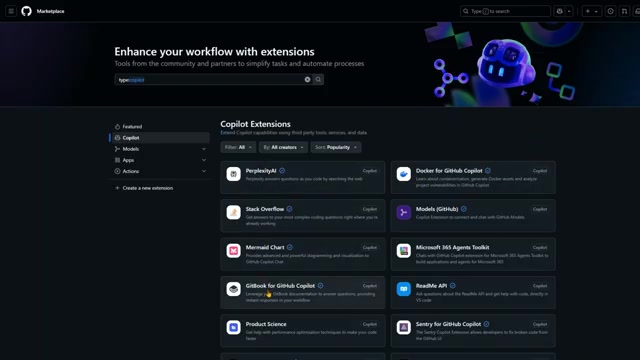
Copilot extensions are designed to extend the capabilities of GitHub Copilot, one of the most well known AI code generation tool. These extensions make it easier to extend code capabilities by integrating third-party tools, services, and data directly into the coding experience. Popular Copilot extensions include:
-
PerplexityAI: Answers coding questions by searching the web.
-
Stack Overflow: Provides solutions to complex coding questions.
-
Docker for GitHub Copilot: Automates Docker asset generation and analyzes project vulnerabilities.
-
GitBook for GitHub Copilot: Leverages GitBook documentation to answer questions.
-
ReadMe API: Asks questions about the ReadMe API and gets help with code directly in VS Code.
-
Octopus for GitHub Copilot: Automates cloud-hosted Octopus instances.
These Copilot extensions help you leverage all third party capabilities to simplify your workflow. By integrating these extensions, developers can streamline their coding process and leverage external resources to solve complex challenges more efficiently.
AI-Assisted Apps: Intelligent Tools for Developers
The GitHub Marketplace features a variety of AI-assisted apps that are designed to help you become a better developer. These apps integrate Artificial Intelligence to provide intelligent assistance with several tasks. AI assistance saves developer’s a lot of time and reduces effort in the overall application development cycle. Some prominent AI-assisted apps include:
- CodeRabbit: Enhances team collaboration with AI-driven contextual feedback.
- Gemini Code Assist: Boosts the power of Gemini to pull request processes.
- Chart.DB: Provides AI diagnostics with code to visualize and design SQL queries.
- Microsoft 365 Agents Toolkit: Uses GitHub Copilot extensions for Microsoft 365 to build applications and agents.
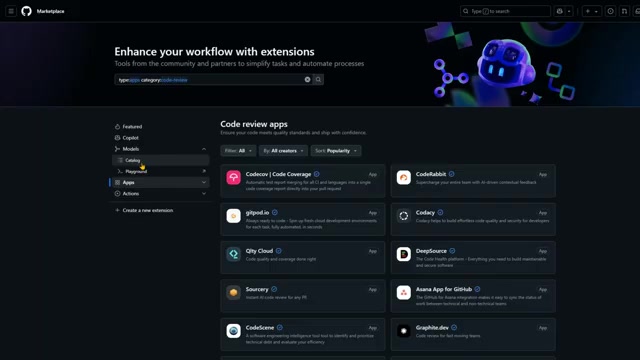
These apps demonstrate the power of AI in revolutionizing software development, offering intelligent solutions to streamline development and deliver high-quality applications.
Models Catalog: Testing AI Integration Affordably
The GitHub Marketplace provides access to a models catalog and playground, allowing developers to experiment with different AI and Large Language Models (LLMs) without incurring significant costs.
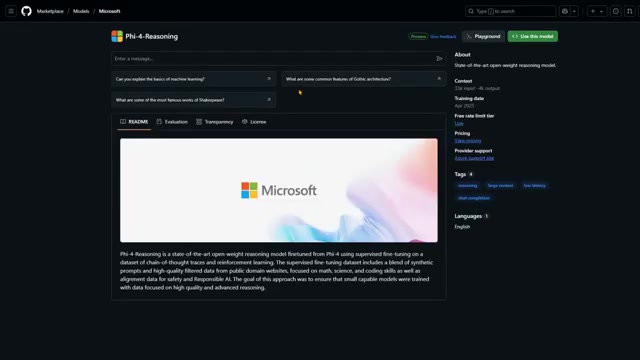
This setup enables developers to assess the suitability of various AI models for their specific projects and applications.
The GitHub Models Catalog: The catalog features a wide range of models available for integration. Here are few of the available models:
- DeepSeek
- Grok from XAI
- Microsoft Phi
- OpenAI
Model Playground: The model playground enables testing of different Artificial Intelligence tools. testing in the playground will allow you to get a hands on feel with each of these tools to find a tool suitable to your specific needs and requirements. With access to these free trials, AI has become much more accessible than it ever has.
Model Insights: A Deeper Dive
When selecting an AI model from the GitHub Marketplace, it is important to consider key factors such as training data, context, and licensing. Model cards are designed to help understand the model’s capabilities and limitations. Here is the information that can typically be found.
- Training Data: Information of what data was used to train the AI and the date when the training was done.
- Context: The context helps to understand the amount of inputs and outputs that were considered when training the data.
- Licensing: All models come with a license which you should be aware of. For example, you might see the Microsoft MIT license.
Let's take a moment to examine those variables and explore how these considerations factor into model selection.
Step-by-Step Guide: Compare AI Models in GitHub
Follow These Steps to Compare
Comparing the various models in the marketplace is actually relatively easy. By following the steps below, you will be able to find a tool that meets your requirements and is suitable for your use cases.
-
Navigate to GitHub Marketplace Models: Go to github.com/marketplace/models to access the Models section.
-
Select Two Models for Comparison:
- Click the comparison toggle
- Select the two models you wish to compare
Note that the training data may be different across these tools and you can use that information to find the right one for you.
-
Type Prompts: Type out your test Prompt and see the output you receive to make the right decision. Compare the various reasons given with your tests.
The above steps can be easily utilized to find the best fit for your requirements!








Most people like

































Report
Please select a reason for reporting
- 13 Reasons to Switch from Snapchat to Text Messaging
- 7 Powerful Speech to Text Apps to Boost Productivity
- 10 Best Speech to Text Tools for Effortless Transcription
- 13 Free Tools to Easily Transcribe Audio to Text
- 15 Surprising Ways Google's Speech-to-Text Boosts Productivity
- 7 Best Free Online Audio to Text Transcription Tools
- 9 Tips to Transcribe Speech to Text Faster and Better
- 13 Best Speech to Text Software for Windows 10 in 2023
- 7 Tips for Choosing the Best Transcriber for Audio to Text
- 11 Reasons Why Dragon Speech-to-Text Apps are Game-Changers
- 6 Secrets to Enhance Your Speech to Text Transcription
- 6 Brilliant Ways to Boost Productivity with Talk-to-Text on Your MacBook
- 6 Ways Transcription Software Converts Audio to Text
- 8 Tips to Transcribe Speech to Text Like a Pro
- 6 Reasons IBM Watson Speech to Text is a Game-Changer
- 14 Powerful Ways Talk-to-Text Improves Your Workflow
- 12 Top Windows Speech-to-Text Software for Efficient Transcription
- 12 Game-Changing Benefits of Apple's Speech to Text Technology
- 9 Powerful Use Cases for AWS Speech to Text Technology
- 10 Easy Steps to Transcribe YouTube Videos to Text
- transcription audio en texte
- online audio transcription
- free audio file transcription
- free ai audio transcription
- audio transcription service
- audio transcription online free
- audio transcription free online
- audio to transcription software
- audio and transcript
- ai audio transcription free
- voice recording to text converter
- translate voice recording to text
- record voice to text
- audio recording to text converter
- voice recording and transcription
- chatgpt voice to text
- gmail voice to text
- speech to text reader
- speech to text ai free
- speech to talk
- How SEO and Marketing Dashboards Empower Agencies to Drive Results
- How to Use AI Tools to Find Internal Linking Opportunities Across a Business Website
- Discover Your Perfect Haircut with AI Hairstyle Apps
- Free Reputation Calculator Tools: How They're Adapting to Score AI Visibility, Not Just Rankings
- Design Professional Flyers for Free on Your Phone
- Best Free Flyer Maker Apps for Android: Design Like a Pro
- How to Know If Your Business Is Ready for an AI Customer Service Agent
- Revolutionizing Storytelling: From Novels to Screenplays with AI
- Create Engaging Animated Explainer Videos with a Free AI Tool
- Stop Multi-Subscribing: Benchmark Top AI Visual Models in One Canvas
- AI & Elections: Defending Democracy Against Misinformation
- Navigating Political Discourse: AI, Deepfakes, and Reality Checks
- Detecting Political Bias in News Articles: A Powerful AI Algorithm
- AI Bias Unveiled: Political Leanings in ChatGPT & Beyond
- Revolutionize Learning: Discover Quizzes AI for Engaging Interactive Quizzes
- From AI-Generated to Audience-Ready: How Quillbot Humanize AI Is Changing the Content Editing Process
- Building an AI Writing Stack in 2026: LLMs, Detectors, and Humanizers
- 7 Top AI-Powered Database Assistant Platforms
- An Objective Look at Modern Web-Based Visual Modifications
- My Honest Experience with VideoAI: The Secret Weapon for Creators Who Need Character Voices

Copyright ©2026 toolify